Icons disappearing with error messages and being sent to Recycle Bin

I've tried both of those before. Documents and executables disappear. I have Explorer++ on the desktop. It's a standalone (no need to install) software, similar to Windows Explorer. I would click on the icon to open, it would disappear, error message, etc. But the program would open! And then when I clicked on any file or folder in Explorer++, the same problems would occur: vanishing icon, error messages (always the same one, multiplied at least a dozen times).

The other day I created another user account "Testaccount" and that's when I said the problem was "even worse" than the administrator account. When I clicked on an icon, it wouldn't disappear but I'd get this message: "FILE ACCESS DENIED. You'll need to provide administrative permission to delete this file." And that message would automatically duplicate itself many times. Needless to say, I wasn't trying to delete anything. And in that test account, the computer froze. I had to unplug it to turn it off.
So even shortcuts and programs on desktop (not explorer++) have the same problem?

just right-click (and not yet click something in rightclick menu) triggers the delete?
 

My Computer My Computer

At a glance

Microsoft Windows 7 Home Premium 64-bits 7601...Intel(R) Core(TM) i3 CPU M 370 @ 2.40GHz4,00 GBATI Mobility Radeon HD 5400 Series
Computer type
Laptop
Computer Manufacturer/Model Number
ACER ASPIRE 5742G
OS
Microsoft Windows 7 Home Premium 64-bits 7601 Multiprocessor Free Service Pack 1
CPU
Intel(R) Core(TM) i3 CPU M 370 @ 2.40GHz
Motherboard
Acer Aspire 5742G
Memory
4,00 GB
Graphics Card(s)
ATI Mobility Radeon HD 5400 Series
Sound Card
(1) AMD High Definition Audio Device (2) Realtek High Defi
Screen Resolution
1366 x 768 x 32 bits (4294967296 colors) @ 60 Hz
Hard Drives
WDC WD5000BEVT-22ZAT0
Right. The shortcuts (and documents/files/folders) get deleted. And right clicking causes the same effect. I click on Open in the context menu and the same problem happens. If I click on Properties in the context menu, I get this: "Problem with shortcut.... The name "" specified in the Target URL box is not valid. Make sure the name is correct."
 

My Computer My Computer

At a glance

Windows 7 64bit Home Premium
OS
Windows 7 64bit Home Premium
Right. The shortcuts (and documents/files/folders) get deleted. And right clicking causes the same effect. I click on Open in the context menu and the same problem happens. If I click on Properties in the context menu, I get this: "Problem with shortcut.... The name "" specified in the Target URL box is not valid. Make sure the name is correct."
Just rightclick on shortcut/file triggers the delete? Even if you DON'T select anything yet in context menu?

If so: that's why properties,open, rename etc fail.... because the file isn't there anymore
 

My Computer My Computer

At a glance

Microsoft Windows 7 Home Premium 64-bits 7601...Intel(R) Core(TM) i3 CPU M 370 @ 2.40GHz4,00 GBATI Mobility Radeon HD 5400 Series
Computer type
Laptop
Computer Manufacturer/Model Number
ACER ASPIRE 5742G
OS
Microsoft Windows 7 Home Premium 64-bits 7601 Multiprocessor Free Service Pack 1
CPU
Intel(R) Core(TM) i3 CPU M 370 @ 2.40GHz
Motherboard
Acer Aspire 5742G
Memory
4,00 GB
Graphics Card(s)
ATI Mobility Radeon HD 5400 Series
Sound Card
(1) AMD High Definition Audio Device (2) Realtek High Defi
Screen Resolution
1366 x 768 x 32 bits (4294967296 colors) @ 60 Hz
Hard Drives
WDC WD5000BEVT-22ZAT0
select a file/shortcut by LEFT-click (only once). Now it's selected and I assume the file/shortcut is still there (?). Now press ENTER-button. Does the file open?
or press ALT-ENTER when file/shortcut has been selected, this should open it's properties.

Open a "command prompt" and then:
start notepad
start excel
start winword

Do they start?
 

My Computer My Computer

At a glance

Microsoft Windows 7 Home Premium 64-bits 7601...Intel(R) Core(TM) i3 CPU M 370 @ 2.40GHz4,00 GBATI Mobility Radeon HD 5400 Series
Computer type
Laptop
Computer Manufacturer/Model Number
ACER ASPIRE 5742G
OS
Microsoft Windows 7 Home Premium 64-bits 7601 Multiprocessor Free Service Pack 1
CPU
Intel(R) Core(TM) i3 CPU M 370 @ 2.40GHz
Motherboard
Acer Aspire 5742G
Memory
4,00 GB
Graphics Card(s)
ATI Mobility Radeon HD 5400 Series
Sound Card
(1) AMD High Definition Audio Device (2) Realtek High Defi
Screen Resolution
1366 x 768 x 32 bits (4294967296 colors) @ 60 Hz
Hard Drives
WDC WD5000BEVT-22ZAT0
I've been using Stardock's free Object Dock (icons lined up on the bottom of the desktop) running at start-up. I installed this after I've been having the problem. If I click on an icon on Object Dock, Chrome for example, it opens the program up. No problem. An interesting thing happens though, when I go to open my web mail, all the auto-fill options show up but when I hover the mouse over them, they disappear as well.

But like I said, after about five minutes of the icons disappearing from the Desktop or Windows Explorer (as well as from Explorer++ and Free Commander), the problem stops and everything goes back to normal. So if I click on an icon at start-up, it disappears (gets sent to the Recycle Bin), and I get the "can't find" error message. A few minutes after that, I go into the Recycle Bin, restore the icon to the Desktop, and click on the restored icon, the program/file opens up without a problem or message.
 

My Computer My Computer

At a glance

Windows 7 64bit Home Premium
OS
Windows 7 64bit Home Premium
so just leftclick (to select it) triggers the event? Same with just rightclick? (only click once)
Just rightclick on free space of desktop and select new textdocument. Does that work?
 

My Computer My Computer

At a glance

Microsoft Windows 7 Home Premium 64-bits 7601...Intel(R) Core(TM) i3 CPU M 370 @ 2.40GHz4,00 GBATI Mobility Radeon HD 5400 Series
Computer type
Laptop
Computer Manufacturer/Model Number
ACER ASPIRE 5742G
OS
Microsoft Windows 7 Home Premium 64-bits 7601 Multiprocessor Free Service Pack 1
CPU
Intel(R) Core(TM) i3 CPU M 370 @ 2.40GHz
Motherboard
Acer Aspire 5742G
Memory
4,00 GB
Graphics Card(s)
ATI Mobility Radeon HD 5400 Series
Sound Card
(1) AMD High Definition Audio Device (2) Realtek High Defi
Screen Resolution
1366 x 768 x 32 bits (4294967296 colors) @ 60 Hz
Hard Drives
WDC WD5000BEVT-22ZAT0
One left click and the icon disappears. One right click and the context menu appears, the icon stays, but when I choose something from the context menu the problem happens. I'll try the right click on empty space in a bit and report back. Thanks.
 

My Computer My Computer

At a glance

Windows 7 64bit Home Premium
OS
Windows 7 64bit Home Premium
one left click standard selects the file? Or does open the file standard? So do you have to doubleclick in working situation, or just singleclick?
 

My Computer My Computer

At a glance

Microsoft Windows 7 Home Premium 64-bits 7601...Intel(R) Core(TM) i3 CPU M 370 @ 2.40GHz4,00 GBATI Mobility Radeon HD 5400 Series
Computer type
Laptop
Computer Manufacturer/Model Number
ACER ASPIRE 5742G
OS
Microsoft Windows 7 Home Premium 64-bits 7601 Multiprocessor Free Service Pack 1
CPU
Intel(R) Core(TM) i3 CPU M 370 @ 2.40GHz
Motherboard
Acer Aspire 5742G
Memory
4,00 GB
Graphics Card(s)
ATI Mobility Radeon HD 5400 Series
Sound Card
(1) AMD High Definition Audio Device (2) Realtek High Defi
Screen Resolution
1366 x 768 x 32 bits (4294967296 colors) @ 60 Hz
Hard Drives
WDC WD5000BEVT-22ZAT0
I forgot to mention. Double left click to open a file or program. But one left click on the icon causes the problem.
 

My Computer My Computer

At a glance

Windows 7 64bit Home Premium
OS
Windows 7 64bit Home Premium
I forgot to mention. Double left click to open a file or program.
so single leftclick should select file only? but now it moves file to recycle bin. It moves to recyclebin without a confirmation question? Normally you see confirmation question I suppose
 

My Computer My Computer

At a glance

Microsoft Windows 7 Home Premium 64-bits 7601...Intel(R) Core(TM) i3 CPU M 370 @ 2.40GHz4,00 GBATI Mobility Radeon HD 5400 Series
Computer type
Laptop
Computer Manufacturer/Model Number
ACER ASPIRE 5742G
OS
Microsoft Windows 7 Home Premium 64-bits 7601 Multiprocessor Free Service Pack 1
CPU
Intel(R) Core(TM) i3 CPU M 370 @ 2.40GHz
Motherboard
Acer Aspire 5742G
Memory
4,00 GB
Graphics Card(s)
ATI Mobility Radeon HD 5400 Series
Sound Card
(1) AMD High Definition Audio Device (2) Realtek High Defi
Screen Resolution
1366 x 768 x 32 bits (4294967296 colors) @ 60 Hz
Hard Drives
WDC WD5000BEVT-22ZAT0
I removed that option months ago (right click on Recycle Bin icon > Properties > Unchecked "Display delete confirmation dialog.")
 

My Computer My Computer

At a glance

Windows 7 64bit Home Premium
OS
Windows 7 64bit Home Premium
Drag your mouse around an icon on desktop. Is it now selected or deleted? If selected press F2. Can you give it another name nd does that work? If selected press ALT-ENTER, it should open the properties. Just ENTER (if selected) should open it.
 

My Computer My Computer

At a glance

Microsoft Windows 7 Home Premium 64-bits 7601...Intel(R) Core(TM) i3 CPU M 370 @ 2.40GHz4,00 GBATI Mobility Radeon HD 5400 Series
Computer type
Laptop
Computer Manufacturer/Model Number
ACER ASPIRE 5742G
OS
Microsoft Windows 7 Home Premium 64-bits 7601 Multiprocessor Free Service Pack 1
CPU
Intel(R) Core(TM) i3 CPU M 370 @ 2.40GHz
Motherboard
Acer Aspire 5742G
Memory
4,00 GB
Graphics Card(s)
ATI Mobility Radeon HD 5400 Series
Sound Card
(1) AMD High Definition Audio Device (2) Realtek High Defi
Screen Resolution
1366 x 768 x 32 bits (4294967296 colors) @ 60 Hz
Hard Drives
WDC WD5000BEVT-22ZAT0
I removed that option months ago (right click on Recycle Bin icon > Properties > Unchecked "Display delete confirmation dialog.")
put it back to test. Does it display confirmation dialog when opening shortcut?
Put it back afterwards if you wish
 

My Computer My Computer

At a glance

Microsoft Windows 7 Home Premium 64-bits 7601...Intel(R) Core(TM) i3 CPU M 370 @ 2.40GHz4,00 GBATI Mobility Radeon HD 5400 Series
Computer type
Laptop
Computer Manufacturer/Model Number
ACER ASPIRE 5742G
OS
Microsoft Windows 7 Home Premium 64-bits 7601 Multiprocessor Free Service Pack 1
CPU
Intel(R) Core(TM) i3 CPU M 370 @ 2.40GHz
Motherboard
Acer Aspire 5742G
Memory
4,00 GB
Graphics Card(s)
ATI Mobility Radeon HD 5400 Series
Sound Card
(1) AMD High Definition Audio Device (2) Realtek High Defi
Screen Resolution
1366 x 768 x 32 bits (4294967296 colors) @ 60 Hz
Hard Drives
WDC WD5000BEVT-22ZAT0
So:
single click deletes file (should only select it)
doubleclick delete file (should do the default action, which is OPEN)
rightclick works but after selecting any option (all options?) the file is deleted

All options seam the work, but the file has already been deleted ... hence the error message.

Is this the situation?
 

My Computer My Computer

At a glance

Microsoft Windows 7 Home Premium 64-bits 7601...Intel(R) Core(TM) i3 CPU M 370 @ 2.40GHz4,00 GBATI Mobility Radeon HD 5400 Series
Computer type
Laptop
Computer Manufacturer/Model Number
ACER ASPIRE 5742G
OS
Microsoft Windows 7 Home Premium 64-bits 7601 Multiprocessor Free Service Pack 1
CPU
Intel(R) Core(TM) i3 CPU M 370 @ 2.40GHz
Motherboard
Acer Aspire 5742G
Memory
4,00 GB
Graphics Card(s)
ATI Mobility Radeon HD 5400 Series
Sound Card
(1) AMD High Definition Audio Device (2) Realtek High Defi
Screen Resolution
1366 x 768 x 32 bits (4294967296 colors) @ 60 Hz
Hard Drives
WDC WD5000BEVT-22ZAT0
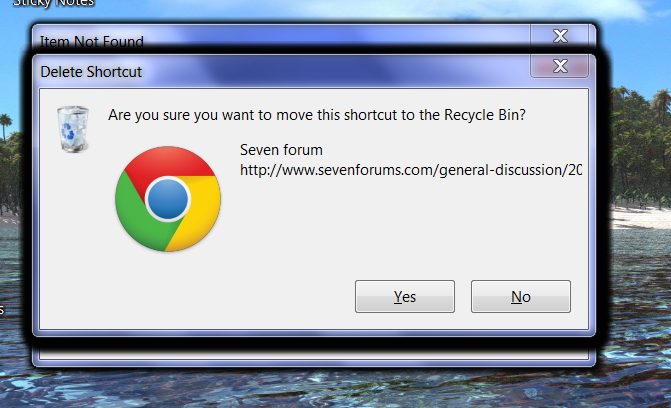
Yes, that's about right. I turned the delete confirmation dialog back on and the message popped up many, many times, along with the original error message. I tried your suggestion of dragging the mouse over to an icon and had the same problem. Here's a screenshot:

KLh1I.png
 

My Computer My Computer

At a glance

Windows 7 64bit Home Premium
OS
Windows 7 64bit Home Premium
Yes, that's about right. I turned the delete confirmation dialog back on and the message popped up many, many times, along with the original error message. I tried your suggestion of dragging the mouse over to an icon and had the same problem. Here's a screenshot:


KLh1I.png
So just select a file either by dragging the mouse around it or click on it ... deletes the file. Also after rightclick and then select any option ... deletes the file as well.

Can you start regedit or is that impossible due to the problem you have? Maybe you can put it on then stardock bar where explorer++ also is. Start regedit when having problems and browse to

[HKEY_CURRENT_USER\Software\Microsoft\Windows NT\CurrentVersion\Winlogon]
Is there a subkey "shell"? and what is its value?
 

My Computer My Computer

At a glance

Microsoft Windows 7 Home Premium 64-bits 7601...Intel(R) Core(TM) i3 CPU M 370 @ 2.40GHz4,00 GBATI Mobility Radeon HD 5400 Series
Computer type
Laptop
Computer Manufacturer/Model Number
ACER ASPIRE 5742G
OS
Microsoft Windows 7 Home Premium 64-bits 7601 Multiprocessor Free Service Pack 1
CPU
Intel(R) Core(TM) i3 CPU M 370 @ 2.40GHz
Motherboard
Acer Aspire 5742G
Memory
4,00 GB
Graphics Card(s)
ATI Mobility Radeon HD 5400 Series
Sound Card
(1) AMD High Definition Audio Device (2) Realtek High Defi
Screen Resolution
1366 x 768 x 32 bits (4294967296 colors) @ 60 Hz
Hard Drives
WDC WD5000BEVT-22ZAT0
also regkey HKEY_LOCAL_MACHINE\SOFTWARE\Microsoft\Windows NT\CurrentVersion\Winlogon
is there a subkey "shell" and what's its value?
 

My Computer My Computer

At a glance

Microsoft Windows 7 Home Premium 64-bits 7601...Intel(R) Core(TM) i3 CPU M 370 @ 2.40GHz4,00 GBATI Mobility Radeon HD 5400 Series
Computer type
Laptop
Computer Manufacturer/Model Number
ACER ASPIRE 5742G
OS
Microsoft Windows 7 Home Premium 64-bits 7601 Multiprocessor Free Service Pack 1
CPU
Intel(R) Core(TM) i3 CPU M 370 @ 2.40GHz
Motherboard
Acer Aspire 5742G
Memory
4,00 GB
Graphics Card(s)
ATI Mobility Radeon HD 5400 Series
Sound Card
(1) AMD High Definition Audio Device (2) Realtek High Defi
Screen Resolution
1366 x 768 x 32 bits (4294967296 colors) @ 60 Hz
Hard Drives
WDC WD5000BEVT-22ZAT0
Does this also happen in safe mode?
 

My Computer My Computer

At a glance

XP / Win7 x64 ProIntel Quad-Core Q9450 @ 3.2GHz2x2GB GSkill DDR2NVIDIA GeForce 8600 GTS (EVGA)
OS
XP / Win7 x64 Pro
CPU
Intel Quad-Core Q9450 @ 3.2GHz
Motherboard
Asus P5-E
Memory
2x2GB GSkill DDR2
Graphics Card(s)
NVIDIA GeForce 8600 GTS (EVGA)
Monitor(s) Displays
Dell 2408WFP
Screen Resolution
1920x1200

My Computer My Computer

At a glance

Microsoft Windows 7 Home Premium 64-bits 7601...Intel(R) Core(TM) i3 CPU M 370 @ 2.40GHz4,00 GBATI Mobility Radeon HD 5400 Series
Computer type
Laptop
Computer Manufacturer/Model Number
ACER ASPIRE 5742G
OS
Microsoft Windows 7 Home Premium 64-bits 7601 Multiprocessor Free Service Pack 1
CPU
Intel(R) Core(TM) i3 CPU M 370 @ 2.40GHz
Motherboard
Acer Aspire 5742G
Memory
4,00 GB
Graphics Card(s)
ATI Mobility Radeon HD 5400 Series
Sound Card
(1) AMD High Definition Audio Device (2) Realtek High Defi
Screen Resolution
1366 x 768 x 32 bits (4294967296 colors) @ 60 Hz
Hard Drives
WDC WD5000BEVT-22ZAT0
Yes, the icons/folders/programs disappear when clicked on in a Clean Boot and in Safe Mode.

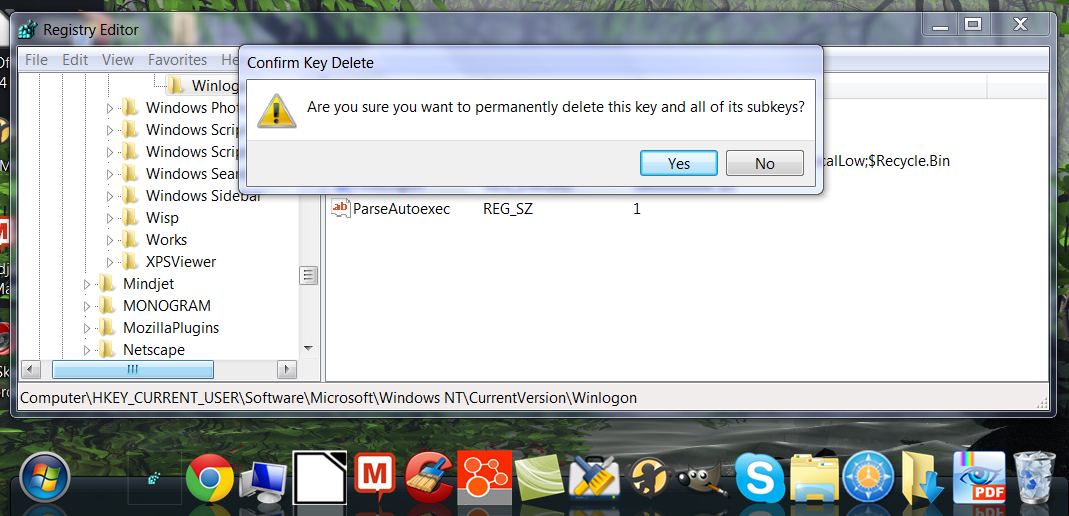
Okay, I tried the suggestion Kaktussoft suggested checking out the registry keys. I can access Regedit from Stardock, but when I click on a key, I got this message:

"Are you sure you want to permanently delete this key and all of its subkeys?"

Here's another screenshot:

5Eb3o.png

I did check Regedit when the computer was running normally. There weren't any subkeys named "shell" in HKEY_CURRENT_USER\Software\Microsoft\Windows NT\CurrentVersion\Winlogon or in HKEY_LOCAL_MACHINE\SOFTWARE\Microsoft\Windows NT\CurrentVersion\Winlogon
 

My Computer My Computer

At a glance

Windows 7 64bit Home Premium
OS
Windows 7 64bit Home Premium
Back
Top