Solved Icon's have become 'corrupt' / 'broken'

xSaxby

New member
Local time
9:43 PM
Messages
16
Location
London, England.
I literally just restarted my laptop, and now my icons are looking like this. Although it's only for certain ones, the official windows icons are fine.

Could anybody help me, Thanks.


gbVsA.png
 

My Computer My Computer

Computer Manufacturer/Model Number
Sony Vaio
OS
Windows 7 Home Premium x64
CPU
intel Core i5
Memory
3GB RAM
Graphics Card(s)
ATI RADEON
not sure how to fix all of them at once but you might be able to fix them one by one.

right click on a icon and choose "properties". then on the shortcut tab choose "change Icon" there might be another icon pic in there to choose from.

or under the "previous version" tab there might be the old icon there to replace it with.
 

My Computer My Computer

OS
windows 7 ultimate 64 bit
CPU
amd athlon 64 X2 5000+
Motherboard
asus A8M2N-LA
Memory
4 gigs pc2 5300
Graphics Card(s)
Nvidia GeForce 8600 GTS
Sound Card
Realtek alc888 high def 8 channel
Monitor(s) Displays
17"samsung syncMaster and 32" LCD panasonic viera tv
Hard Drives
300 gb Hitachi sata 7200rpm
1T seagate Barracuda sata 7200rpm
150 gb WD PATA
250gb WD my passport USB 2.0
PSU
Antec
Other Info
Altec lansing ATP3 3 pc speaker system(these things rock!)
Hello Saxby, and welcome to Seven Forums.

Sorry, but the suggestion posted above is not going to help with this at all.

This is a issue with the shortcut arrow overlay icon, and not the icon for the shortcut itself. You could easily restore the shortcut arrow icon for all shortcuts by using the free program in OPTION ONE in the tutorial below.

http://www.sevenforums.com/tutorials/3606-shortcut-arrow-change-remove-restore.html

Hope this helps,
Shawn
 

My Computer My Computer

Computer type
PC/Desktop
Computer Manufacturer/Model Number
Self built custom
OS
64-bit Windows 11 Pro for Workstations
CPU
Intel i7-8700K OC'd to 5 GHz
Motherboard
ASUS ROG Maximus XI Formula Z390
Memory
64 GB (4x16GB) G.SKILL TridentZ RGB DDR4 3600 MHz
Graphics Card(s)
ASUS ROG-STRIX-GTX1080TI-O11G-GAMING
Sound Card
Integrated
Monitor(s) Displays
2 x Samsung Odyssey G7 27"
Screen Resolution
2560x1440
Hard Drives
1TB Samsung 990 PRO M.2,
4TB Samsung 990 PRO PRO M.2,
TerraMaster F8 SSD Plus NAS
PSU
Seasonic Prime Titanium 850W
Case
Thermaltake Core P3
Cooling
Corsair Hydro H115i
Keyboard
Logitech wireless K800
Mouse
Logitech MX Master 4
Internet Speed
2 Gb/s Download and 100 Mb/s Upload
Antivirus
Malwarebyte Anti-Malware Premium
Browser
Google Chrome
Other Info
Logitech Z625 speaker system,
Logitech BRIO 4K Pro webcam,
HP Color LaserJet Pro MFP M477fdn,
APC SMART-UPS RT 1000 XL - SURT1000XLI,
Galaxy S23 Plus phone
Hello Saxby, and welcome to Seven Forums.

Sorry, but the suggestion posted above is not going to help with this at all.

This is a issue with the shortcut arrow overlay icon, and not the icon for the shortcut itself. You could easily restore the shortcut arrow icon for all shortcuts by using the free program in OPTION ONE in the tutorial below.

http://www.sevenforums.com/tutorials/3606-shortcut-arrow-change-remove-restore.html

Hope this helps,
Shawn

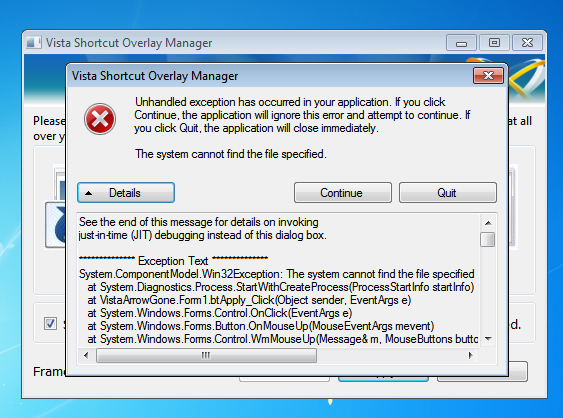
Thanks for your help Shawn, But I'm afraid this is coming up, after ticking 'No Arrow' & 'Select here to remove...'

DmEQu.png


Thanks, xSaxby.
 

My Computer My Computer

Computer Manufacturer/Model Number
Sony Vaio
OS
Windows 7 Home Premium x64
CPU
intel Core i5
Memory
3GB RAM
Graphics Card(s)
ATI RADEON

My Computer My Computer

Computer Manufacturer/Model Number
Myself
OS
Windows 7 Ultimate 64Bit
CPU
C2D E8200
Motherboard
XFX 750i
Memory
8GB PNY PC2-6400
Graphics Card(s)
BFG 9600GT x 2
Sound Card
Stock XFX Optical
Monitor(s) Displays
Gateway 22" HD Display
Hard Drives
C: 1 TB G: 500 GB H: 500 GB
PSU
Ultra LSP 550 Pro Lifetime Series
Case
Xion2
Cooling
ThermalTake
Hello Zomby,

Sorry, but no it will not work for this since that would only affect the icon for the shortcut itself (icon behind small arrow) and not the arrow overlay icon. :(
 

My Computer My Computer

Computer type
PC/Desktop
Computer Manufacturer/Model Number
Self built custom
OS
64-bit Windows 11 Pro for Workstations
CPU
Intel i7-8700K OC'd to 5 GHz
Motherboard
ASUS ROG Maximus XI Formula Z390
Memory
64 GB (4x16GB) G.SKILL TridentZ RGB DDR4 3600 MHz
Graphics Card(s)
ASUS ROG-STRIX-GTX1080TI-O11G-GAMING
Sound Card
Integrated
Monitor(s) Displays
2 x Samsung Odyssey G7 27"
Screen Resolution
2560x1440
Hard Drives
1TB Samsung 990 PRO M.2,
4TB Samsung 990 PRO PRO M.2,
TerraMaster F8 SSD Plus NAS
PSU
Seasonic Prime Titanium 850W
Case
Thermaltake Core P3
Cooling
Corsair Hydro H115i
Keyboard
Logitech wireless K800
Mouse
Logitech MX Master 4
Internet Speed
2 Gb/s Download and 100 Mb/s Upload
Antivirus
Malwarebyte Anti-Malware Premium
Browser
Google Chrome
Other Info
Logitech Z625 speaker system,
Logitech BRIO 4K Pro webcam,
HP Color LaserJet Pro MFP M477fdn,
APC SMART-UPS RT 1000 XL - SURT1000XLI,
Galaxy S23 Plus phone
Hello Saxby, and welcome to Seven Forums.

Sorry, but the suggestion posted above is not going to help with this at all.

This is a issue with the shortcut arrow overlay icon, and not the icon for the shortcut itself. You could easily restore the shortcut arrow icon for all shortcuts by using the free program in OPTION ONE in the tutorial below.

http://www.sevenforums.com/tutorials/3606-shortcut-arrow-change-remove-restore.html

Hope this helps,
Shawn

Thanks for your help Shawn, But I'm afraid this is coming up, after ticking 'No Arrow' & 'Select here to remove...'

DmEQu.png


Thanks, xSaxby.

Did you download and install the 64-bit version of this program, and have UAC turned on to get a UAC prompt to approve running this program as administrator?

If you did, then try downloading and merging the lnk (LNK) option in the tutorial below to restore the defaults registry entries for shortcuts.

http://www.sevenforums.com/tutorials/19449-default-file-type-associations-restore.html
 

My Computer My Computer

Computer type
PC/Desktop
Computer Manufacturer/Model Number
Self built custom
OS
64-bit Windows 11 Pro for Workstations
CPU
Intel i7-8700K OC'd to 5 GHz
Motherboard
ASUS ROG Maximus XI Formula Z390
Memory
64 GB (4x16GB) G.SKILL TridentZ RGB DDR4 3600 MHz
Graphics Card(s)
ASUS ROG-STRIX-GTX1080TI-O11G-GAMING
Sound Card
Integrated
Monitor(s) Displays
2 x Samsung Odyssey G7 27"
Screen Resolution
2560x1440
Hard Drives
1TB Samsung 990 PRO M.2,
4TB Samsung 990 PRO PRO M.2,
TerraMaster F8 SSD Plus NAS
PSU
Seasonic Prime Titanium 850W
Case
Thermaltake Core P3
Cooling
Corsair Hydro H115i
Keyboard
Logitech wireless K800
Mouse
Logitech MX Master 4
Internet Speed
2 Gb/s Download and 100 Mb/s Upload
Antivirus
Malwarebyte Anti-Malware Premium
Browser
Google Chrome
Other Info
Logitech Z625 speaker system,
Logitech BRIO 4K Pro webcam,
HP Color LaserJet Pro MFP M477fdn,
APC SMART-UPS RT 1000 XL - SURT1000XLI,
Galaxy S23 Plus phone
Yes, I've installed the x64, and I ran it as administrator.. :huh:
 

My Computer My Computer

Computer Manufacturer/Model Number
Sony Vaio
OS
Windows 7 Home Premium x64
CPU
intel Core i5
Memory
3GB RAM
Graphics Card(s)
ATI RADEON

My Computer My Computer

Computer type
PC/Desktop
Computer Manufacturer/Model Number
Self built custom
OS
64-bit Windows 11 Pro for Workstations
CPU
Intel i7-8700K OC'd to 5 GHz
Motherboard
ASUS ROG Maximus XI Formula Z390
Memory
64 GB (4x16GB) G.SKILL TridentZ RGB DDR4 3600 MHz
Graphics Card(s)
ASUS ROG-STRIX-GTX1080TI-O11G-GAMING
Sound Card
Integrated
Monitor(s) Displays
2 x Samsung Odyssey G7 27"
Screen Resolution
2560x1440
Hard Drives
1TB Samsung 990 PRO M.2,
4TB Samsung 990 PRO PRO M.2,
TerraMaster F8 SSD Plus NAS
PSU
Seasonic Prime Titanium 850W
Case
Thermaltake Core P3
Cooling
Corsair Hydro H115i
Keyboard
Logitech wireless K800
Mouse
Logitech MX Master 4
Internet Speed
2 Gb/s Download and 100 Mb/s Upload
Antivirus
Malwarebyte Anti-Malware Premium
Browser
Google Chrome
Other Info
Logitech Z625 speaker system,
Logitech BRIO 4K Pro webcam,
HP Color LaserJet Pro MFP M477fdn,
APC SMART-UPS RT 1000 XL - SURT1000XLI,
Galaxy S23 Plus phone

My Computer My Computer

Computer type
PC/Desktop
Computer Manufacturer/Model Number
Home Built Desktop By DataTech
OS
Windows 7 Ultimate X64 SP1
CPU
Intel i5-2550K, Differing ~4.4-4.8GHz No built in GPU
Motherboard
ASUS P8Z68-V PRO/GEN3
Memory
16GB G.Skill Sniper 1866MHz @ 2133MHz 2x8GB
Graphics Card(s)
ASUS GTX650TIB-DC2OC-2GD5, (650TI Boost)
Sound Card
Onboard Realtek 5-1
Monitor(s) Displays
Samsung P2570HD
Screen Resolution
1920x1080
Hard Drives
Samsung 840 Pro 256GB SSD for OS, 500GB Seagate Constellation (Enterprise drive) for Data
PSU
Corsair HX650W
Case
Inwin Dragon Rider
Cooling
Hyper 212 EVO w/two Noctua fans, push-pull, @1300 RPM
Keyboard
E-Z Eyes, bright yellow keys with large characters
Mouse
steelseries SENSEI Laser Pro Gaming
Internet Speed
48-51Mbs Mbs down, 11 Mbs up Xfinity Cable
Antivirus
Norton Internet Security 2013
Browser
IE 10, Opera, Pale Moon if needed
Other Info
4 case fans, LG BluRay-RE, ASUS DVD-RW, Mr. Fusion power supply, 1.21 gigawatts.
Try downloading and merging the lnk (LNK) option in the tutorial below to restore the defaults registry entries for shortcuts.

Default File Type Associations - Restore

Thankyou very much, that worked.

plIPa.png


finally, i've found a forum that actually helps me to sort out the problems I have, and which is very detailed! - Thankyou again, xSaxby. :geek:
 

My Computer My Computer

Computer Manufacturer/Model Number
Sony Vaio
OS
Windows 7 Home Premium x64
CPU
intel Core i5
Memory
3GB RAM
Graphics Card(s)
ATI RADEON
You're most welcome xSaxby. I'm happy to hear that got it sorted for you. :)
 

My Computer My Computer

Computer type
PC/Desktop
Computer Manufacturer/Model Number
Self built custom
OS
64-bit Windows 11 Pro for Workstations
CPU
Intel i7-8700K OC'd to 5 GHz
Motherboard
ASUS ROG Maximus XI Formula Z390
Memory
64 GB (4x16GB) G.SKILL TridentZ RGB DDR4 3600 MHz
Graphics Card(s)
ASUS ROG-STRIX-GTX1080TI-O11G-GAMING
Sound Card
Integrated
Monitor(s) Displays
2 x Samsung Odyssey G7 27"
Screen Resolution
2560x1440
Hard Drives
1TB Samsung 990 PRO M.2,
4TB Samsung 990 PRO PRO M.2,
TerraMaster F8 SSD Plus NAS
PSU
Seasonic Prime Titanium 850W
Case
Thermaltake Core P3
Cooling
Corsair Hydro H115i
Keyboard
Logitech wireless K800
Mouse
Logitech MX Master 4
Internet Speed
2 Gb/s Download and 100 Mb/s Upload
Antivirus
Malwarebyte Anti-Malware Premium
Browser
Google Chrome
Other Info
Logitech Z625 speaker system,
Logitech BRIO 4K Pro webcam,
HP Color LaserJet Pro MFP M477fdn,
APC SMART-UPS RT 1000 XL - SURT1000XLI,
Galaxy S23 Plus phone
Back
Top