

- Local time
- 6:17 PM
- Messages
- 334
I am going to try to explain this as well as I can.
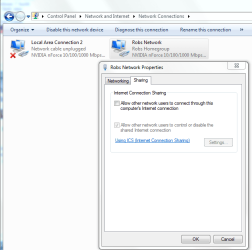
My router died and I needed to have 2 computers online. So my option was to use ICS to connect the second computer to the internet through my main pc.
Here is the setup I am using.
PC1: Main On-Board Gigabit Lan and a PCI NIC (Win7)
PC2 On-Board Lan (WinXP)
I run ethernet from PC2 over to the on-board lan on PC1 and then run ethernet from the PCI NIC on PC1 to the cable modem. I enable ICS on the PCI NIC on PC1 and everything is working fine.
Now here is where I have the issue. I decided that I would change the connections. Here is how I configured that:
I run ethernet from PC2 on-board to the PCI NIC on PC1 I then run ethernet from the on-board lan on PC1 to the cable modem.
Now PC2 cannot establish an internet connection. I am running into an invalid IP issue. Now this is what I think is happening or at least what seems to be happening. Win7 is treating the connection between the 2 computers as a separate connection all together. Basically even though I have told it to share the internet connection it is not. Instead it wants to identify the connection to PC2 as a connection to the internet. Like a second broadband connection that cannot obtain an IP because it is actually hitting PC2 instead of the internet and a provider that would lease it an IP.
The second PC cannot obtain an IP either because it hits PC1 and the connection does not get passed through to the internet.
I can see packet flow going back and fourth between PC2 and PC1 if I try to access a web page from PC2 however PC never finds the page because the connection stops at PC1.
Does this make any sense to anyone?
I need some help with this because I cannot afford to go pick up a router for a few more months and I need the second machine to be online. Reversing the connections back to how they were is not an option either.
I need some instructions on starting over fresh like setting everything back to default and then moving forward from there.
My router died and I needed to have 2 computers online. So my option was to use ICS to connect the second computer to the internet through my main pc.
Here is the setup I am using.
PC1: Main On-Board Gigabit Lan and a PCI NIC (Win7)
PC2 On-Board Lan (WinXP)
I run ethernet from PC2 over to the on-board lan on PC1 and then run ethernet from the PCI NIC on PC1 to the cable modem. I enable ICS on the PCI NIC on PC1 and everything is working fine.
Now here is where I have the issue. I decided that I would change the connections. Here is how I configured that:
I run ethernet from PC2 on-board to the PCI NIC on PC1 I then run ethernet from the on-board lan on PC1 to the cable modem.
Now PC2 cannot establish an internet connection. I am running into an invalid IP issue. Now this is what I think is happening or at least what seems to be happening. Win7 is treating the connection between the 2 computers as a separate connection all together. Basically even though I have told it to share the internet connection it is not. Instead it wants to identify the connection to PC2 as a connection to the internet. Like a second broadband connection that cannot obtain an IP because it is actually hitting PC2 instead of the internet and a provider that would lease it an IP.
The second PC cannot obtain an IP either because it hits PC1 and the connection does not get passed through to the internet.
I can see packet flow going back and fourth between PC2 and PC1 if I try to access a web page from PC2 however PC never finds the page because the connection stops at PC1.
Does this make any sense to anyone?
I need some help with this because I cannot afford to go pick up a router for a few more months and I need the second machine to be online. Reversing the connections back to how they were is not an option either.
I need some instructions on starting over fresh like setting everything back to default and then moving forward from there.
My Computer
- Computer Manufacturer/Model Number
- Custom
- OS
- Win7 64bit Ultimate
- CPU
- AMD Phenom II X6 1100T Black Edition Thuban 3.3GHz, 3.7GHz
- Motherboard
- Gigabyte GA-890FXA-UD5
- Memory
- CORSAIR DOMINATOR GT 8GB (2 x 4GB) 1866 DDR3
- Graphics Card(s)
- XFX HD-697A-CNDC Radeon HD6970 2GB 256-bit
- Sound Card
- Creative SoundBlaster X-Fi Platinum Fatal1ty Edition
- Monitor(s) Displays
- Dual 25 Inch Hanns-G HZ251
- Screen Resolution
- 1920x1080 X 2
- PSU
- Corsair 850W Single Rail
- Case
- Thermaltake V9 BlacX w/ Dual HDD Docking Station
- Cooling
- Air lots and lots of air and copper...
- Keyboard
- Kensington (Low-Profile)
- Mouse
- Creative Fatal1ty
- Internet Speed
- 15Gbit (15 Down 5 Up)
- Other Info
- XIGMATEK HDT-S1284F 120mm HYPRO Bearing CPU Cooler, LG Blu-Ray Burner.



 Took me a few reads, but I think I get it... although a diagram often helps w/ these complex networking configs. Also, I think we should encourage another bridging vs. ICS experiment! If Corpsecrank is up for it...


