ICS Issues

Corpsecrank

NSFW
Pro User
Local time
4:12 PM
Messages
334
I am going to try to explain this as well as I can.

My router died and I needed to have 2 computers online. So my option was to use ICS to connect the second computer to the internet through my main pc.

Here is the setup I am using.

PC1: Main On-Board Gigabit Lan and a PCI NIC (Win7)
PC2 On-Board Lan (WinXP)

I run ethernet from PC2 over to the on-board lan on PC1 and then run ethernet from the PCI NIC on PC1 to the cable modem. I enable ICS on the PCI NIC on PC1 and everything is working fine.

Now here is where I have the issue. I decided that I would change the connections. Here is how I configured that:

I run ethernet from PC2 on-board to the PCI NIC on PC1 I then run ethernet from the on-board lan on PC1 to the cable modem.

Now PC2 cannot establish an internet connection. I am running into an invalid IP issue. Now this is what I think is happening or at least what seems to be happening. Win7 is treating the connection between the 2 computers as a separate connection all together. Basically even though I have told it to share the internet connection it is not. Instead it wants to identify the connection to PC2 as a connection to the internet. Like a second broadband connection that cannot obtain an IP because it is actually hitting PC2 instead of the internet and a provider that would lease it an IP.

The second PC cannot obtain an IP either because it hits PC1 and the connection does not get passed through to the internet.

I can see packet flow going back and fourth between PC2 and PC1 if I try to access a web page from PC2 however PC never finds the page because the connection stops at PC1.

Does this make any sense to anyone?

I need some help with this because I cannot afford to go pick up a router for a few more months and I need the second machine to be online. Reversing the connections back to how they were is not an option either.

I need some instructions on starting over fresh like setting everything back to default and then moving forward from there.
 

My Computer

Computer Manufacturer/Model Number
Custom
OS
Win7 64bit Ultimate
CPU
AMD Phenom II X6 1100T Black Edition Thuban 3.3GHz, 3.7GHz
Motherboard
Gigabyte GA-890FXA-UD5
Memory
CORSAIR DOMINATOR GT 8GB (2 x 4GB) 1866 DDR3
Graphics Card(s)
XFX HD-697A-CNDC Radeon HD6970 2GB 256-bit
Sound Card
Creative SoundBlaster X-Fi Platinum Fatal1ty Edition
Monitor(s) Displays
Dual 25 Inch Hanns-G HZ251
Screen Resolution
1920x1080 X 2
PSU
Corsair 850W Single Rail
Case
Thermaltake V9 BlacX w/ Dual HDD Docking Station
Cooling
Air lots and lots of air and copper...
Keyboard
Kensington (Low-Profile)
Mouse
Creative Fatal1ty
Internet Speed
15Gbit (15 Down 5 Up)
Other Info
XIGMATEK HDT-S1284F 120mm HYPRO Bearing CPU Cooler, LG Blu-Ray Burner.
Hi Corpsecrank,

I know I'm getting to this rather late, so I hope you've managed to clear up the situation since. If not, I wanted to take a shot in the dark- instead of ICS, have you tried bridging your two Local Area Connections?

Cheers,

Walker
Windows Outreach Team
 

My Computer

Computer Manufacturer/Model Number
HP Pavilion dm3 (netbook) *** 27" iMac (Dual-Boot)
OS
Windows 7 Home Premium (64-bit) *** Windows XP SP3 (32-bit), OSX 10.6
CPU
AMD Athlon Neo X2 1.6GHz *** Intel Core i7 Quad Core 2.8GHz
Memory
4.00 GB *** 4.00 GB
Graphics Card(s)
ATI Radeon HD 3200, 384MB *** ATI Radeon HD 4850, 1GB
Sound Card
ATI High Definition Audio *** ATI High Definition Audio
Monitor(s) Displays
LG Flatron W2053TX
Screen Resolution
1600 x 900 (monitor), 1266 x 768 (laptop) *** 2560 x 1440
Hard Drives
300 GB SATA (internal), 500 GB HP SimpleSave (external) *** 1 TB SATA (internal), 160 GB LaCie (external)
Mouse
Logitech Cordless Optical Mouse for Notebooks
Internet Speed
Broadband
You can try these command lines in the command prompt and see if it fixes anything for you.

ipconfig - Windows Command Line Utility

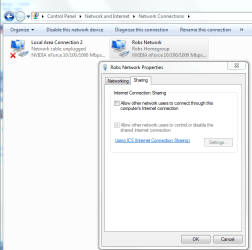
I'm sure you knew about this setting also in the picture below.
 

Attachments

  • Enable ICS.PNG
    Enable ICS.PNG
    67 KB · Views: 42

My Computer

Computer type
PC/Desktop
Computer Manufacturer/Model Number
Home built
OS
Windows 7 Ult, Windows 8.1 Pro,
CPU
Q9650-4.275GHz, E8600 4.5GHz, E6750-3.8GHz
Motherboard
Evga 780i FTW
Memory
G.Skill PC2 9600 1200Mhz 5 5 5 15 2T
Graphics Card(s)
GTX480
Sound Card
Asus Xonar D2
Monitor(s) Displays
HannsG
Screen Resolution
1680X1050
Hard Drives
GSkill Phoenix Pro 120GB SSD
PSU
ThermalTake Toughpower 1000Watt modular
Case
ThermalTake XaserV
Cooling
Xigmatek S1283
Keyboard
Logitech G15
Mouse
Logitech G9
Internet Speed
T1
I see that you switched the ports being used on PC1 for internet and ICS.

Your original config had the PCI NIC is the Internet (router) and the Onboard NIC is ICS to PC2.

In the new config you swapped ports. Now the Onboard NIC is Internet (Modem) and the PCI NIC is ICS to PC2.

See the difference?

If you do that you have to tell ICS which port is being shared since you changed it.
 

My Computer

Computer Manufacturer/Model Number
Dell C521
OS
W7 Ultimate 64bit W7 Premium 64bit W7 Premium 32bit WXP Home 32bit
CPU
Athlon 64X2 5000+
Motherboard
Dell
Memory
4GB
Graphics Card(s)
ATI X1300
Sound Card
On Board
Monitor(s) Displays
Dell 19" Flat
Screen Resolution
1280x1024
Hard Drives
500GB Western Digital Caviar Green
Mouse
Microsoft Wireless Intellimouse Explorer 2.0
Internet Speed
SBC DSL - 6Mbps
I see that you switched the ports being used on PC1 for internet and ICS.

Your original config had the PCI NIC is the Internet (router) and the Onboard NIC is ICS to PC2.

In the new config you swapped ports. Now the Onboard NIC is Internet (Modem) and the PCI NIC is ICS to PC2.

See the difference?

If you do that you have to tell ICS which port is being shared since you changed it.
Corpsecrank did a pretty solid job of describing the setup, didn't he? :) Took me a few reads, but I think I get it... although a diagram often helps w/ these complex networking configs. Also, I think we should encourage another bridging vs. ICS experiment! If Corpsecrank is up for it...

Walker
Windows Outreach Team
 

My Computer

Computer Manufacturer/Model Number
HP Pavilion dm3 (netbook) *** 27" iMac (Dual-Boot)
OS
Windows 7 Home Premium (64-bit) *** Windows XP SP3 (32-bit), OSX 10.6
CPU
AMD Athlon Neo X2 1.6GHz *** Intel Core i7 Quad Core 2.8GHz
Memory
4.00 GB *** 4.00 GB
Graphics Card(s)
ATI Radeon HD 3200, 384MB *** ATI Radeon HD 4850, 1GB
Sound Card
ATI High Definition Audio *** ATI High Definition Audio
Monitor(s) Displays
LG Flatron W2053TX
Screen Resolution
1600 x 900 (monitor), 1266 x 768 (laptop) *** 2560 x 1440
Hard Drives
300 GB SATA (internal), 500 GB HP SimpleSave (external) *** 1 TB SATA (internal), 160 GB LaCie (external)
Mouse
Logitech Cordless Optical Mouse for Notebooks
Internet Speed
Broadband
Yeah,

I drew a diagram based on his description. I like pictures...:p
 

My Computer

Computer Manufacturer/Model Number
Dell C521
OS
W7 Ultimate 64bit W7 Premium 64bit W7 Premium 32bit WXP Home 32bit
CPU
Athlon 64X2 5000+
Motherboard
Dell
Memory
4GB
Graphics Card(s)
ATI X1300
Sound Card
On Board
Monitor(s) Displays
Dell 19" Flat
Screen Resolution
1280x1024
Hard Drives
500GB Western Digital Caviar Green
Mouse
Microsoft Wireless Intellimouse Explorer 2.0
Internet Speed
SBC DSL - 6Mbps
Did briding the connections work?

Btw, aren't these the same?

"I run ethernet from PC2 over to the on-board lan on PC1 and then run ethernet from the PCI NIC on PC1 to the cable modem. I enable ICS on the PCI NIC on PC1 and everything is working fine."

"I run ethernet from PC2 on-board to the PCI NIC on PC1 I then run ethernet from the on-board lan on PC1 to the cable modem."
 

My Computer

Computer Manufacturer/Model Number
Lenovo ThinkPad T60
OS
Windows 7 Ultimate 64Bit
CPU
GenuineIntel Intel(R) Core(TM) DuoCore T2400 @ 1.83GHz
Motherboard
Intel(R) 82801G (ICH7 Family)
Memory
2.00 GB
Graphics Card(s)
Mobile Intel(R) 945 Express Chipset
Sound Card
SoundMAX Integrated Digital HD Audio
Monitor(s) Displays
ThinkPad Display
Screen Resolution
1400x1050
Hard Drives
100Gb SATA
Keyboard
Standard Keyboard
Mouse
HID-compliant Mouse
Internet Speed
Cable Broadband - 54Mbps
Other Info
Intel(R) PRO/1000 PL Network Connection
11a/b/g Wireless LAN Mini PCI Express Adapter
Did briding the connections work?

Btw, aren't these the same?

"I run ethernet from PC2 over to the on-board lan on PC1 and then run ethernet from the PCI NIC on PC1 to the cable modem. I enable ICS on the PCI NIC on PC1 and everything is working fine."

"I run ethernet from PC2 on-board to the PCI NIC on PC1 I then run ethernet from the on-board lan on PC1 to the cable modem."

Nope: Look closely. His PC1 has two NIC's: OnBoard and PCI. Draw it out and you'll see what I mean.
 

My Computer

Computer Manufacturer/Model Number
Dell C521
OS
W7 Ultimate 64bit W7 Premium 64bit W7 Premium 32bit WXP Home 32bit
CPU
Athlon 64X2 5000+
Motherboard
Dell
Memory
4GB
Graphics Card(s)
ATI X1300
Sound Card
On Board
Monitor(s) Displays
Dell 19" Flat
Screen Resolution
1280x1024
Hard Drives
500GB Western Digital Caviar Green
Mouse
Microsoft Wireless Intellimouse Explorer 2.0
Internet Speed
SBC DSL - 6Mbps
doh, i knew i can't type, now i can't read too. :o
 

My Computer

Computer Manufacturer/Model Number
Lenovo ThinkPad T60
OS
Windows 7 Ultimate 64Bit
CPU
GenuineIntel Intel(R) Core(TM) DuoCore T2400 @ 1.83GHz
Motherboard
Intel(R) 82801G (ICH7 Family)
Memory
2.00 GB
Graphics Card(s)
Mobile Intel(R) 945 Express Chipset
Sound Card
SoundMAX Integrated Digital HD Audio
Monitor(s) Displays
ThinkPad Display
Screen Resolution
1400x1050
Hard Drives
100Gb SATA
Keyboard
Standard Keyboard
Mouse
HID-compliant Mouse
Internet Speed
Cable Broadband - 54Mbps
Other Info
Intel(R) PRO/1000 PL Network Connection
11a/b/g Wireless LAN Mini PCI Express Adapter

My Computer

Computer Manufacturer/Model Number
Dell C521
OS
W7 Ultimate 64bit W7 Premium 64bit W7 Premium 32bit WXP Home 32bit
CPU
Athlon 64X2 5000+
Motherboard
Dell
Memory
4GB
Graphics Card(s)
ATI X1300
Sound Card
On Board
Monitor(s) Displays
Dell 19" Flat
Screen Resolution
1280x1024
Hard Drives
500GB Western Digital Caviar Green
Mouse
Microsoft Wireless Intellimouse Explorer 2.0
Internet Speed
SBC DSL - 6Mbps
Ahhh simple answer....

Me help!


Do like I say....and everything will work itself out.

What i need you to do is flush out your Static IPs.
on all of your connections.


GATEWAY COMPUTER (ONE WITH TWO NICS - BRINGING THE INTERNET CONNECTION IN)

1st NIC CARD: Keep the IPs Dynamic so that it can gather the IP from the cable modem.
then you are going to enable ICS, make sure in the ICS settings you choose the other NIC, make sure the other NIC is enabled so it can detect it.

2nd NIC CARD: When you check it out it will put the IP in as: 192.168.0.1
If i am not mistaken , that is all that it should be in there.


THE OTHER COMPUTER: ( YOU WANT INTERNET)
Force this IP Configuration into your NIC card under the IPv4.

IP: 192.168.0.2
SUBNET MASK: 255.255.255.0
GATEWAY: 192.168.0.1

DNS:
DNS 2:

YOU WILL PULL THESE DNS SERVER NUMBERS BY GOING ON THE COMPUTER WITH THE INTERNET AND RUNNING THE "CMD" COMMAND ON THAT COMPUTER

THEN YOU WILL TYPE: ipconfig / all

when you do that, find the NIC card that is grabbing your internet and there shoudl be your DNS numbers, that is what your going to enter into the 2nd computer to grab the internet....

if you have any question.. please don't hesitate to ask...

I have no job, no girlfriend.. and a brain full of answers.....
 

My Computer

Computer Manufacturer/Model Number
HP Pavilion Elite HPE-410f
OS
Windows 7 Ultimate x64
CPU
AMD Phenom x6 1045t
Motherboard
N/A
Memory
8 GB
Graphics Card(s)
ATI Radeon HD 5570
Sound Card
Realtek Highdefinition Audio / 5.1 Dolby Setup
Monitor(s) Displays
HP w2207h Widescreen
Screen Resolution
1680*1050
Hard Drives
1 TB (fixed), 320 Portable maxtor, Server Hard drives
PSU
350 Watt
Case
HP CASE
Cooling
Bass
Keyboard
Logitech MX 5500
Mouse
Logitech MX 5500
Internet Speed
ROAD RUNNER 16MB D/512 U
His original configuration worked according to his first post. He had ICS working.

The easiest solution is to put it back that way and configure the PCI NIC on PC1 to connect to his cable modem. He may need to configure PPPoE though depending on the requirements of his ISP and the cable modem.
 

My Computer

Computer Manufacturer/Model Number
Dell C521
OS
W7 Ultimate 64bit W7 Premium 64bit W7 Premium 32bit WXP Home 32bit
CPU
Athlon 64X2 5000+
Motherboard
Dell
Memory
4GB
Graphics Card(s)
ATI X1300
Sound Card
On Board
Monitor(s) Displays
Dell 19" Flat
Screen Resolution
1280x1024
Hard Drives
500GB Western Digital Caviar Green
Mouse
Microsoft Wireless Intellimouse Explorer 2.0
Internet Speed
SBC DSL - 6Mbps
yeah your right it did work.... i thought it said cable... and not the DSL dial up....but who knows...

i have a queation... i know you coudl have done it with a third party software but if you iniitiate a PPOe will it automatically dial on the remote computer from the host?


my biggest grip is that when you tell someone something they want to argue with you and ask why... just do it and ask why later....

not this thread.... but you know...
 

My Computer

Computer Manufacturer/Model Number
HP Pavilion Elite HPE-410f
OS
Windows 7 Ultimate x64
CPU
AMD Phenom x6 1045t
Motherboard
N/A
Memory
8 GB
Graphics Card(s)
ATI Radeon HD 5570
Sound Card
Realtek Highdefinition Audio / 5.1 Dolby Setup
Monitor(s) Displays
HP w2207h Widescreen
Screen Resolution
1680*1050
Hard Drives
1 TB (fixed), 320 Portable maxtor, Server Hard drives
PSU
350 Watt
Case
HP CASE
Cooling
Bass
Keyboard
Logitech MX 5500
Mouse
Logitech MX 5500
Internet Speed
ROAD RUNNER 16MB D/512 U
ICS would normally trigger a dial up for modem connections automatically if it sees traffic that needs to go to the internet.

For PPPoE, I don't see why it wouldn't be different. You can share a PPPoE connection so I would think it'd be triggered the same as a dial up connection.
 

My Computer

Computer Manufacturer/Model Number
Dell C521
OS
W7 Ultimate 64bit W7 Premium 64bit W7 Premium 32bit WXP Home 32bit
CPU
Athlon 64X2 5000+
Motherboard
Dell
Memory
4GB
Graphics Card(s)
ATI X1300
Sound Card
On Board
Monitor(s) Displays
Dell 19" Flat
Screen Resolution
1280x1024
Hard Drives
500GB Western Digital Caviar Green
Mouse
Microsoft Wireless Intellimouse Explorer 2.0
Internet Speed
SBC DSL - 6Mbps
Back
Top