Hi ...
For years I used Publisher 2002 when I was on XP but in January this year, I progressed (?) to W7 and that gave me a headache with using Pub 02 because every time I had to add or change text or whatever in a text box, the act of highlighting the text highlighted everything in black making the job impossible. In the end, frustration took over and I pretty much stopped using the programme.
Then I discovered that Pub 02 is not compatible with W7 so in the end, I bought Office 2013 which contains Publisher. The settings system has been completely changed which has upset more than 1 or 2 people if the many articles on the web are anything to go by and it is this that may have also caused me problems.
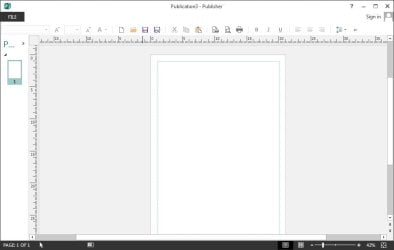
I don't know how or why but the menu bar across the top of the window (FILE, HOME, INSERT, PAGE DESIGN etc.) has vanished and I have no idea as to get it back. Doesn't appear to be any link in the ribbon (which is far too complicated anyway) so I'm a bit lost. There must be a way of doing it ... perhaps in the registry?
So far, I've uninstalled the programme twice as well as every reference to it in the registry then re-installed ... still no menu bar!
The attached screen shot shows the very blank space above the quick access toolbar.
Sorry to bore you with the above bit of history but I'd be very grateful for any help or ideas that will solve this problem.
Thanks in advance ... Michael.
For years I used Publisher 2002 when I was on XP but in January this year, I progressed (?) to W7 and that gave me a headache with using Pub 02 because every time I had to add or change text or whatever in a text box, the act of highlighting the text highlighted everything in black making the job impossible. In the end, frustration took over and I pretty much stopped using the programme.
Then I discovered that Pub 02 is not compatible with W7 so in the end, I bought Office 2013 which contains Publisher. The settings system has been completely changed which has upset more than 1 or 2 people if the many articles on the web are anything to go by and it is this that may have also caused me problems.
I don't know how or why but the menu bar across the top of the window (FILE, HOME, INSERT, PAGE DESIGN etc.) has vanished and I have no idea as to get it back. Doesn't appear to be any link in the ribbon (which is far too complicated anyway) so I'm a bit lost. There must be a way of doing it ... perhaps in the registry?
So far, I've uninstalled the programme twice as well as every reference to it in the registry then re-installed ... still no menu bar!
The attached screen shot shows the very blank space above the quick access toolbar.
Sorry to bore you with the above bit of history but I'd be very grateful for any help or ideas that will solve this problem.
Thanks in advance ... Michael.
Attachments
My Computer
At a glance
W7Pro-64bitINTEL G4400 SKYLAKE 3.3GHZ 3MBCACHE LGA11512 X 8.00Gb DDR4 DIMMNVIDIA GeForce GT430
- Computer type
- PC/Desktop
- Computer Manufacturer/Model Number
- Custom build based on Asus
- OS
- W7Pro-64bit
- CPU
- INTEL G4400 SKYLAKE 3.3GHZ 3MBCACHE LGA1151
- Motherboard
- ASUS H110M-PLUS INTEL SKT1151 (25-03-2017)
- Memory
- 2 X 8.00Gb DDR4 DIMM
- Graphics Card(s)
- NVIDIA GeForce GT430
- Sound Card
- Included on-board MB
- Monitor(s) Displays
- HP 1530
- Screen Resolution
- 1024 x 768
- Hard Drives
- C: 120Gb SANDISK SATA3 SSD+
D: 160Gb SAMSUNG SATA
E: 500Gb WESTEN DIGITAL SATA
- PSU
- 500w
- Case
- ATX Micro Tower
- Cooling
- 2 fans (incl 1 in PSU)
- Keyboard
- Logitech K120
- Mouse
- Logitech B100
- Internet Speed
- D/L 38.5Mb // U/L 8.3
- Browser
- Pale Moon 28.16
- Other Info
- LAN ... Realtek 811H Gigabit LAN Controller