Solved I'd like to get back my menu bar in Publisher 2013

mipak

New member
Member
Local time
12:33 AM
Messages
61
Location
The Outer Hebrides
Hi ...

For years I used Publisher 2002 when I was on XP but in January this year, I progressed (?) to W7 and that gave me a headache with using Pub 02 because every time I had to add or change text or whatever in a text box, the act of highlighting the text highlighted everything in black making the job impossible. In the end, frustration took over and I pretty much stopped using the programme.

Then I discovered that Pub 02 is not compatible with W7 so in the end, I bought Office 2013 which contains Publisher. The settings system has been completely changed which has upset more than 1 or 2 people if the many articles on the web are anything to go by and it is this that may have also caused me problems.

I don't know how or why but the menu bar across the top of the window (FILE, HOME, INSERT, PAGE DESIGN etc.) has vanished and I have no idea as to get it back. Doesn't appear to be any link in the ribbon (which is far too complicated anyway) so I'm a bit lost. There must be a way of doing it ... perhaps in the registry?

So far, I've uninstalled the programme twice as well as every reference to it in the registry then re-installed ... still no menu bar!

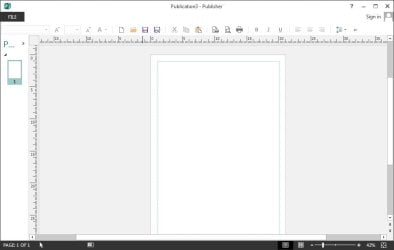
The attached screen shot shows the very blank space above the quick access toolbar.

Sorry to bore you with the above bit of history but I'd be very grateful for any help or ideas that will solve this problem.

Thanks in advance ... Michael.
 

Attachments
  • pub 13.jpg
    pub 13.jpg
    29.3 KB · Views: 2

My Computer My Computer

At a glance

W7Pro-64bitINTEL G4400 SKYLAKE 3.3GHZ 3MBCACHE LGA11512 X 8.00Gb DDR4 DIMMNVIDIA GeForce GT430
Computer type
PC/Desktop
Computer Manufacturer/Model Number
Custom build based on Asus
OS
W7Pro-64bit
CPU
INTEL G4400 SKYLAKE 3.3GHZ 3MBCACHE LGA1151
Motherboard
ASUS H110M-PLUS INTEL SKT1151 (25-03-2017)
Memory
2 X 8.00Gb DDR4 DIMM
Graphics Card(s)
NVIDIA GeForce GT430
Sound Card
Included on-board MB
Monitor(s) Displays
HP 1530
Screen Resolution
1024 x 768
Hard Drives
C: 120Gb SANDISK SATA3 SSD+
D: 160Gb SAMSUNG SATA
E: 500Gb WESTEN DIGITAL SATA
PSU
500w
Case
ATX Micro Tower
Cooling
2 fans (incl 1 in PSU)
Keyboard
Logitech K120
Mouse
Logitech B100
Internet Speed
D/L 38.5Mb // U/L 8.3
Browser
Pale Moon 28.16
Other Info
LAN ... Realtek 811H Gigabit LAN Controller
That looks weird, here's Publisher 2013 in my computer:
2014-11-04_17h15_16.png
If you press ALT key do you get the keyboard shortcut indicators?
2014-11-04_17h16_48.png
If yes, what happens if you press for example W for View?
 

My Computer My Computer

At a glance

Windows 10 Pro x64 EN-GB1.6 GHz Intel Core i7-720QM Processor6 GBATI Mobility Radeon HD 5850 Graphics
Computer type
Laptop
Computer Manufacturer/Model Number
HP ENVY 17-1150eg
OS
Windows 10 Pro x64 EN-GB
CPU
1.6 GHz Intel Core i7-720QM Processor
Memory
6 GB
Graphics Card(s)
ATI Mobility Radeon HD 5850 Graphics
Sound Card
Beats sound system with integrated subwoofer
Monitor(s) Displays
17" laptop display, 22" LED and 32" Full HD TV through HDMI
Screen Resolution
1600*900 (1), 1920*1080 (2&3)
Hard Drives
Internal: 2 x 500 GB SATA Hard Disk Drive 7200 rpm
External: 2TB for backups, 3TB USB3 network drive for media
Cooling
As Envy runs a bit warm, I have it on a Cooler Master pad
Keyboard
Logitech diNovo Media Desktop Laser (bluetooth)
Mouse
Logitech Performance Mouse MX
Internet Speed
50/10 Mbps VDSL
Antivirus
Windows Defender 4.3.9431.0
Browser
Maxthon 3.5.2., IE11
hi ... and thanks ...
you're right ... very weird ... and frustrating too!!

my publisher looked the same before i lost the menu bar. i don't use the ribbon ... takes too long to find stuff.

each time i press ALT, a white number on a darker background, nothing else, appears over each of the icons in the toolbar but nothing else happens. they disappear if i click anywhere else on the page.

pressing W doesn't do anything other that producing a small window saying "You can only type into a text box, table and certain shapes. For more information, press E1" and that's it. no other change.

michael.
 

My Computer My Computer

At a glance

W7Pro-64bitINTEL G4400 SKYLAKE 3.3GHZ 3MBCACHE LGA11512 X 8.00Gb DDR4 DIMMNVIDIA GeForce GT430
Computer type
PC/Desktop
Computer Manufacturer/Model Number
Custom build based on Asus
OS
W7Pro-64bit
CPU
INTEL G4400 SKYLAKE 3.3GHZ 3MBCACHE LGA1151
Motherboard
ASUS H110M-PLUS INTEL SKT1151 (25-03-2017)
Memory
2 X 8.00Gb DDR4 DIMM
Graphics Card(s)
NVIDIA GeForce GT430
Sound Card
Included on-board MB
Monitor(s) Displays
HP 1530
Screen Resolution
1024 x 768
Hard Drives
C: 120Gb SANDISK SATA3 SSD+
D: 160Gb SAMSUNG SATA
E: 500Gb WESTEN DIGITAL SATA
PSU
500w
Case
ATX Micro Tower
Cooling
2 fans (incl 1 in PSU)
Keyboard
Logitech K120
Mouse
Logitech B100
Internet Speed
D/L 38.5Mb // U/L 8.3
Browser
Pale Moon 28.16
Other Info
LAN ... Realtek 811H Gigabit LAN Controller

You installed using a valid, official install media?
 

My Computer My Computer

At a glance

Windows 10 Pro x64 EN-GB1.6 GHz Intel Core i7-720QM Processor6 GBATI Mobility Radeon HD 5850 Graphics
Computer type
Laptop
Computer Manufacturer/Model Number
HP ENVY 17-1150eg
OS
Windows 10 Pro x64 EN-GB
CPU
1.6 GHz Intel Core i7-720QM Processor
Memory
6 GB
Graphics Card(s)
ATI Mobility Radeon HD 5850 Graphics
Sound Card
Beats sound system with integrated subwoofer
Monitor(s) Displays
17" laptop display, 22" LED and 32" Full HD TV through HDMI
Screen Resolution
1600*900 (1), 1920*1080 (2&3)
Hard Drives
Internal: 2 x 500 GB SATA Hard Disk Drive 7200 rpm
External: 2TB for backups, 3TB USB3 network drive for media
Cooling
As Envy runs a bit warm, I have it on a Cooler Master pad
Keyboard
Logitech diNovo Media Desktop Laser (bluetooth)
Mouse
Logitech Performance Mouse MX
Internet Speed
50/10 Mbps VDSL
Antivirus
Windows Defender 4.3.9431.0
Browser
Maxthon 3.5.2., IE11
yes ... definitely
 

My Computer My Computer

At a glance

W7Pro-64bitINTEL G4400 SKYLAKE 3.3GHZ 3MBCACHE LGA11512 X 8.00Gb DDR4 DIMMNVIDIA GeForce GT430
Computer type
PC/Desktop
Computer Manufacturer/Model Number
Custom build based on Asus
OS
W7Pro-64bit
CPU
INTEL G4400 SKYLAKE 3.3GHZ 3MBCACHE LGA1151
Motherboard
ASUS H110M-PLUS INTEL SKT1151 (25-03-2017)
Memory
2 X 8.00Gb DDR4 DIMM
Graphics Card(s)
NVIDIA GeForce GT430
Sound Card
Included on-board MB
Monitor(s) Displays
HP 1530
Screen Resolution
1024 x 768
Hard Drives
C: 120Gb SANDISK SATA3 SSD+
D: 160Gb SAMSUNG SATA
E: 500Gb WESTEN DIGITAL SATA
PSU
500w
Case
ATX Micro Tower
Cooling
2 fans (incl 1 in PSU)
Keyboard
Logitech K120
Mouse
Logitech B100
Internet Speed
D/L 38.5Mb // U/L 8.3
Browser
Pale Moon 28.16
Other Info
LAN ... Realtek 811H Gigabit LAN Controller
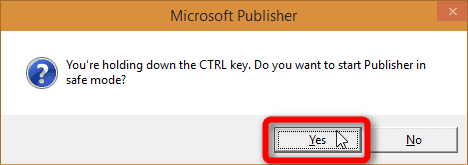
Have you tried to start Publisher in Safe Mode yet? To start any Office app in Safe Mode, press and hold down the CTRL key then double click an Office app icon or shortcut. Keep the CTRL key down until you get an dialog asking if you want to start in Safe Mode. Release the CTRL key and click Yes.

2014-11-04_19h42_50.png

Do you get the menus now?
 

My Computer My Computer

At a glance

Windows 10 Pro x64 EN-GB1.6 GHz Intel Core i7-720QM Processor6 GBATI Mobility Radeon HD 5850 Graphics
Computer type
Laptop
Computer Manufacturer/Model Number
HP ENVY 17-1150eg
OS
Windows 10 Pro x64 EN-GB
CPU
1.6 GHz Intel Core i7-720QM Processor
Memory
6 GB
Graphics Card(s)
ATI Mobility Radeon HD 5850 Graphics
Sound Card
Beats sound system with integrated subwoofer
Monitor(s) Displays
17" laptop display, 22" LED and 32" Full HD TV through HDMI
Screen Resolution
1600*900 (1), 1920*1080 (2&3)
Hard Drives
Internal: 2 x 500 GB SATA Hard Disk Drive 7200 rpm
External: 2TB for backups, 3TB USB3 network drive for media
Cooling
As Envy runs a bit warm, I have it on a Cooler Master pad
Keyboard
Logitech diNovo Media Desktop Laser (bluetooth)
Mouse
Logitech Performance Mouse MX
Internet Speed
50/10 Mbps VDSL
Antivirus
Windows Defender 4.3.9431.0
Browser
Maxthon 3.5.2., IE11
Perhaps this will help you.
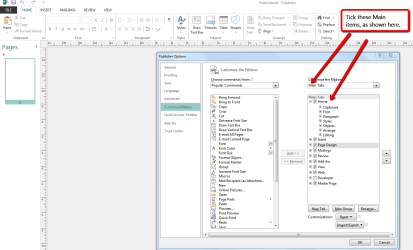
With Publisher opened, select File then Options & then Customise Ribbon & follow the screen shot. If you tick those items it should bring back your lost items.

Publisher_Option_settings..png
 

My Computer My Computer

At a glance

Windows 7 Home Premium 64 bit sp1Intel i5 3570 3.4Ghz Ivy Bridge SKT 1155 quad...G-Skill Rip Jaws 16Gb (8x2) DDR3 -1600 PC3 12...Gigabyte NVIDIA GT610 1Gb DDR3 810/1200 PCI-E...
Computer type
PC/Desktop
Computer Manufacturer/Model Number
Self built using existing case
OS
Windows 7 Home Premium 64 bit sp1
CPU
Intel i5 3570 3.4Ghz Ivy Bridge SKT 1155 quad core
Motherboard
Gigabyte Z77-HD3 SKT 1155 2xSata 3, 4x USB 3.0
Memory
G-Skill Rip Jaws 16Gb (8x2) DDR3 -1600 PC3 12800 CL 10 red
Graphics Card(s)
Gigabyte NVIDIA GT610 1Gb DDR3 810/1200 PCI-E 2.0 Silent
Sound Card
NVIDIA High Definition & Realtech High Definition Audio
Monitor(s) Displays
2 x Philips 226V4L 16:9 aspect ratio
Screen Resolution
1920 x 1080 HD
Hard Drives
Samsung 840 Pro 256gb SSD, SATA 3.
Hitachi Touro Portable 1tb, USB 3.0 HDD used for image b/ups.
PSU
Corsair VS450
Case
Codeng
Cooling
PSU fan & CPU fan
Keyboard
Logitech
Mouse
Logitech Wireless trackball M570
Internet Speed
Wireless 3G. 3mg down & 550kb up.
Antivirus
Bitdefender Internet Security 2020
Browser
Opera (Current Version) & Firefox
Other Info
MS Office 2013 Pro. Davis weather station software. MGE Nova 600 avr UPS.
To Ranger 4 ...

Thank you for your suggestion ... it worked a treat so now I have a smile on my face again. :D
I was concentrating solely on the Quick Access Toolbar which I prefer but I think if I hadn't kept the ribbon closed off, I might have figured it out myself although on the other hand, I might not have done!!
Anyway, the problem is solved so thank you once again.
 

My Computer My Computer

At a glance

W7Pro-64bitINTEL G4400 SKYLAKE 3.3GHZ 3MBCACHE LGA11512 X 8.00Gb DDR4 DIMMNVIDIA GeForce GT430
Computer type
PC/Desktop
Computer Manufacturer/Model Number
Custom build based on Asus
OS
W7Pro-64bit
CPU
INTEL G4400 SKYLAKE 3.3GHZ 3MBCACHE LGA1151
Motherboard
ASUS H110M-PLUS INTEL SKT1151 (25-03-2017)
Memory
2 X 8.00Gb DDR4 DIMM
Graphics Card(s)
NVIDIA GeForce GT430
Sound Card
Included on-board MB
Monitor(s) Displays
HP 1530
Screen Resolution
1024 x 768
Hard Drives
C: 120Gb SANDISK SATA3 SSD+
D: 160Gb SAMSUNG SATA
E: 500Gb WESTEN DIGITAL SATA
PSU
500w
Case
ATX Micro Tower
Cooling
2 fans (incl 1 in PSU)
Keyboard
Logitech K120
Mouse
Logitech B100
Internet Speed
D/L 38.5Mb // U/L 8.3
Browser
Pale Moon 28.16
Other Info
LAN ... Realtek 811H Gigabit LAN Controller
Glad to have been able to help & that you are all up & running again.
 

My Computer My Computer

At a glance

Windows 7 Home Premium 64 bit sp1Intel i5 3570 3.4Ghz Ivy Bridge SKT 1155 quad...G-Skill Rip Jaws 16Gb (8x2) DDR3 -1600 PC3 12...Gigabyte NVIDIA GT610 1Gb DDR3 810/1200 PCI-E...
Computer type
PC/Desktop
Computer Manufacturer/Model Number
Self built using existing case
OS
Windows 7 Home Premium 64 bit sp1
CPU
Intel i5 3570 3.4Ghz Ivy Bridge SKT 1155 quad core
Motherboard
Gigabyte Z77-HD3 SKT 1155 2xSata 3, 4x USB 3.0
Memory
G-Skill Rip Jaws 16Gb (8x2) DDR3 -1600 PC3 12800 CL 10 red
Graphics Card(s)
Gigabyte NVIDIA GT610 1Gb DDR3 810/1200 PCI-E 2.0 Silent
Sound Card
NVIDIA High Definition & Realtech High Definition Audio
Monitor(s) Displays
2 x Philips 226V4L 16:9 aspect ratio
Screen Resolution
1920 x 1080 HD
Hard Drives
Samsung 840 Pro 256gb SSD, SATA 3.
Hitachi Touro Portable 1tb, USB 3.0 HDD used for image b/ups.
PSU
Corsair VS450
Case
Codeng
Cooling
PSU fan & CPU fan
Keyboard
Logitech
Mouse
Logitech Wireless trackball M570
Internet Speed
Wireless 3G. 3mg down & 550kb up.
Antivirus
Bitdefender Internet Security 2020
Browser
Opera (Current Version) & Firefox
Other Info
MS Office 2013 Pro. Davis weather station software. MGE Nova 600 avr UPS.
Back
Top