IDE hard drive not recognized

Haha I wouldn't say that I'm "happy" as I still haven't converted it to Basic (haven't had time yet). It was "offline", as Whest said, but would only allow me to convert it to Dynamic drive. I assume it was already in Basic but was not showing or allowed me to do anything. Now that I converted it into Dynamic, I am able to see the HDD as it was: a file dump. I'm able to access things and do things with it. Looks good so far but yes, I'll try to convert it to Basic once I get time. And I'm not sure what this SATA/PATA is about (unless PATA = IDE?)
 

My Computer

OS
Windows 7 Pro 64-bit
CPU
Intel Core 2 Duo E7300
Motherboard
Gigabyte GA-EP45-DS3L
Memory
Corsair TWINX 4096MB (2 x 2GB)
Graphics Card(s)
Asus (ATI) Radeon 4670 HD
Hard Drives
Seagate 500GB SATA
WD 250GB IDE
Case
Antec Sonata II
Yes Pata = IDE
 

My Computer

OS
XP, Vista, W7 64bit Home Premium
CPU
Intel Core Duo 6850 3.0 ghz @ 3.7 ghz
Motherboard
Asus P5E
Memory
4GB Corsair DDR 2 PC-6400
Graphics Card(s)
Ati 4870 1ghz
Sound Card
Supreme FX 11
Monitor(s) Displays
View Sonic VX1962wm
Screen Resolution
1680 X1050
Hard Drives
3 Seagate Sata Drives 160gb 250gb 500gb
PSU
Thermaltake 600 watt
Case
NZXT Alpha
Cooling
3X120cm Fans
Keyboard
Microsoft Digital Media Pro Keyboard
Mouse
Microsoft Wheel Mouse Optical
Internet Speed
1.5Mb to 8Mb/384k

My Computer

Computer Manufacturer/Model Number
Homebrew PC - "Alpha_Dawg"
OS
Windows 7 Ultimate 64 bit Steve Ballmer Signature Edition
CPU
Intel Core 2 Quad - Q9550 - 2.83GHz stock - OC'd to 3.6GHz
Motherboard
Gigabyte EP45-UD3P
Memory
4GB DDR2 800MHz (PC6400) OCZ Reaper
Graphics Card(s)
Nvidia GE Force 8800 GTS
Sound Card
Asus Xonar DX
Monitor(s) Displays
Samsung SyncMaster 2333HD
Screen Resolution
1920 x 1080
Hard Drives
WD Caviar Black 750GB - 7200RPM - 32MB cache
WD Caviar Green 1.5TB - 5400RPM - 64MB cache
WD Caviar Green 2.0TB - 5400RPM - 64MB cache
PSU
PC Power & Cooling Silencer 750
Case
Gigabyte 3D Aurora
Cooling
Case is Air - 5ea. 120mm fans (mix of Arctic and Xigmatec)
Keyboard
MS Natural Wireless KB
Mouse
MS Wireless Mouse
Internet Speed
50 mbps down/5 mbps up
Other Info
AVerMedia - AVerTVHD G2 Dual Tuner Card
mayt be foramt it and then use wild guess helped me
using other computer save ur data and format
 

My Computer

Computer Manufacturer/Model Number
custom
OS
win 7
CPU
d930 3ghz
Motherboard
102ggc2
Memory
1.5 gb ddr2 667
Graphics Card(s)
8600gts(physx)4870 xfx1gb
Monitor(s) Displays
samsung 2232 bw x2
Screen Resolution
1440x900
Hard Drives
seagate 80gb
wd 500gb caviar green
PSU
800 modular corsair
Case
cm storm
Cooling
stock
Keyboard
x-7
Mouse
cm sentinel
Internet Speed
1mb
I found it in help what happened but it only explains it in brief - it automatically converts it to a dynamic drive - so your ok to go - I think its do with the original setup with the hard drive - so you can rest easy :) .
 

My Computer

OS
XP, Vista, W7 64bit Home Premium
CPU
Intel Core Duo 6850 3.0 ghz @ 3.7 ghz
Motherboard
Asus P5E
Memory
4GB Corsair DDR 2 PC-6400
Graphics Card(s)
Ati 4870 1ghz
Sound Card
Supreme FX 11
Monitor(s) Displays
View Sonic VX1962wm
Screen Resolution
1680 X1050
Hard Drives
3 Seagate Sata Drives 160gb 250gb 500gb
PSU
Thermaltake 600 watt
Case
NZXT Alpha
Cooling
3X120cm Fans
Keyboard
Microsoft Digital Media Pro Keyboard
Mouse
Microsoft Wheel Mouse Optical
Internet Speed
1.5Mb to 8Mb/384k
I found it in help what happened but it only explains it in brief - it automatically converts it to a dynamic drive - so your ok to go - I think its do with the original setup with the hard drive - so you can rest easy :) .

You mean, what I did was "automatic"? Actually, I still don't get it, haha. So it's okay to not switch it to Basic?
 

My Computer

OS
Windows 7 Pro 64-bit
CPU
Intel Core 2 Duo E7300
Motherboard
Gigabyte GA-EP45-DS3L
Memory
Corsair TWINX 4096MB (2 x 2GB)
Graphics Card(s)
Asus (ATI) Radeon 4670 HD
Hard Drives
Seagate 500GB SATA
WD 250GB IDE
Case
Antec Sonata II
I think so, but if you want to find out you could try to, as long as the options not greyed out you can for sure.
I just found out the solution i think as to why this happened - your disk was a dynamic disk originally :

A dynamic disk may become Missing when it is corrupted, powered down, or disconnected.
A dynamic disk may become Offline if it is corrupted or intermittently unavailable. A dynamic disk may also become Offline if you attempt to import a foreign (dynamic) disk and the import fails. An error icon appears on the Offline disk. Only dynamic disks display the Missing or Offline status.
Only dynamic disks can be reactivated.
Backup Operator or Administrator is the minimum membership required to perform these steps.
Reactivating a missing or offline dynamic disk
Using the Windows interface :
To reactivate a dynamic disk by using the Windows interface
In Disk Management, right-click the disk marked Missing or Offline.
Click Reactivate Disk. The disk should be marked Online after the disk is reactivated
:):):):)
 

My Computer

OS
XP, Vista, W7 64bit Home Premium
CPU
Intel Core Duo 6850 3.0 ghz @ 3.7 ghz
Motherboard
Asus P5E
Memory
4GB Corsair DDR 2 PC-6400
Graphics Card(s)
Ati 4870 1ghz
Sound Card
Supreme FX 11
Monitor(s) Displays
View Sonic VX1962wm
Screen Resolution
1680 X1050
Hard Drives
3 Seagate Sata Drives 160gb 250gb 500gb
PSU
Thermaltake 600 watt
Case
NZXT Alpha
Cooling
3X120cm Fans
Keyboard
Microsoft Digital Media Pro Keyboard
Mouse
Microsoft Wheel Mouse Optical
Internet Speed
1.5Mb to 8Mb/384k
Interesting. That does make sense (in how I "reactivated it") but curious as to why my drive was originally a dynamic (if it's sole purpose is a file dump). Thanks!
 

My Computer

OS
Windows 7 Pro 64-bit
CPU
Intel Core 2 Duo E7300
Motherboard
Gigabyte GA-EP45-DS3L
Memory
Corsair TWINX 4096MB (2 x 2GB)
Graphics Card(s)
Asus (ATI) Radeon 4670 HD
Hard Drives
Seagate 500GB SATA
WD 250GB IDE
Case
Antec Sonata II
I am having the same issues with my IDE drive in combo with 2 SATA-3g drives. The IDE drive, which is 300GB and was fully functional in my old system, now doesn't work under Windows 7.

However, in my computer, the drive DOES show up, as drive G, labeled Local Disk. When I right-click it, as file system it is blank, and there are no details for the drive. But in the post screen while booting, it lists all the harddrives and their formatting, and it lists this drive as formatted FAT32.

In my BIOS I do have a SATA/RAID/AHCI and I just leave it as SATA (or it may be AUTO). But to enable both IDE and SATA would I need to enable AHCI? It appears we are both having the same problem, but on different drives, so the answer should solve it for both of us, although he can't see his drive in My Computer... I can. Although it doesn't appear to have any formatting in the properties option.
 

My Computer

Computer Manufacturer/Model Number
Custom built ASUS-based mid-tower
OS
Windows7 on desktop & Vista on laptop
CPU
AMD Athlon II X2 240
Motherboard
ASUS M3A78-EM
Memory
4 GB Corsair DDR2 1066MHz (2x2096MB)
Graphics Card(s)
ATI Radeon HD 3200 GPU (integrated graphics)
Sound Card
Realtek ALC1200 HD Audio 8-Channel CODEC (integrated sound)
Monitor(s) Displays
20" HANNspree flatscreen HMDI HF207 & DYNEX HDTV
Screen Resolution
HDMI 1600x900 (recommended setting, so I leave it)
Hard Drives
Seagate 500GB LP SATA HD/5900/16MB/SATA-3G,
Seagate 250GB SATA HD/7200/16MB/SATA-3G,
Samsung 300GB HD300LD PATA,
WD My Book Essentials 1TB USB 2.0 external
PSU
450W
Case
Power Up! ATX mid-tower
Cooling
120mm Side Case Cooling Fan, CPU Fan
Keyboard
Omnitech rubber flexible ultrathin USB/PS/2 adapter USB
Mouse
Wacom Bamboo Fun small Pen Mouse Tablet
Internet Speed
Cable
Other Info
Laptop computer: COMPAQ Presario C762NR Notebook PC w/Intel Pentium dual-CPU T2370 @ 1.73 GHz, 15.4" BrightView running Vista Home Premium SP2 32-BIT, 3 GB RAM, with external Western Digital 1tb My Book Essentials USB Hard drive.
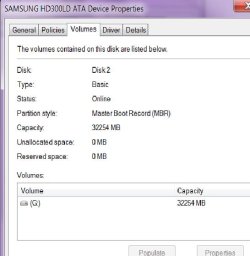
SO What does THIS mean?

Here is what I did:
I went into COMPUTER and there were all the drives. The IDE drive is G: Local Drive. If I click on it, it asks if I want to format it. Well, if I right click it, it brings up properties, and click that.
Then I went to the Hardware tab, and selected the drive from the list. Then I clicked Properties.
Then under the Volume tab, it shows nothing, so I click POPULATE.
It brings up another window for the drive, where I click Volume tab and it's also blank so I press POPULATE again and I get results:
 

Attachments

  • examplecomputer.jpg
    examplecomputer.jpg
    28.1 KB · Views: 21

My Computer

Computer Manufacturer/Model Number
Custom built ASUS-based mid-tower
OS
Windows7 on desktop & Vista on laptop
CPU
AMD Athlon II X2 240
Motherboard
ASUS M3A78-EM
Memory
4 GB Corsair DDR2 1066MHz (2x2096MB)
Graphics Card(s)
ATI Radeon HD 3200 GPU (integrated graphics)
Sound Card
Realtek ALC1200 HD Audio 8-Channel CODEC (integrated sound)
Monitor(s) Displays
20" HANNspree flatscreen HMDI HF207 & DYNEX HDTV
Screen Resolution
HDMI 1600x900 (recommended setting, so I leave it)
Hard Drives
Seagate 500GB LP SATA HD/5900/16MB/SATA-3G,
Seagate 250GB SATA HD/7200/16MB/SATA-3G,
Samsung 300GB HD300LD PATA,
WD My Book Essentials 1TB USB 2.0 external
PSU
450W
Case
Power Up! ATX mid-tower
Cooling
120mm Side Case Cooling Fan, CPU Fan
Keyboard
Omnitech rubber flexible ultrathin USB/PS/2 adapter USB
Mouse
Wacom Bamboo Fun small Pen Mouse Tablet
Internet Speed
Cable
Other Info
Laptop computer: COMPAQ Presario C762NR Notebook PC w/Intel Pentium dual-CPU T2370 @ 1.73 GHz, 15.4" BrightView running Vista Home Premium SP2 32-BIT, 3 GB RAM, with external Western Digital 1tb My Book Essentials USB Hard drive.
ide not recognized

hi, i have the same problem, i have 3 hdd, 2 sata and 1 ide! on win xp all hdd run fine.
but on win 7 the ide hdd does not show up in my computer
 

My Computer

Computer Manufacturer/Model Number
*****
OS
win 7 ultimate
CPU
prescott 3.8
Motherboard
MSI PM8M-V
Memory
2gb ddr
Graphics Card(s)
geforce 7300gt 512mb
Sound Card
creative sound blaster audigy 2
Monitor(s) Displays
19"" viewsonic
Hard Drives
250gb sata hitachi
160 sata hitachi
160 ide samsung
Back
Top