Actually, your system specs should be in your system specs on your sevenforums profile.
Please update so I won't "scold" you - I was about to admonish you, but decided to back up the thread and saw that you answered my first request, not by updating your profile, by pointing me to post #1. People just aren't going to read every post just to find your system information.
And the two softpaqs from HP are different:
sp59882 is what I asked about
sp56953 is what you told me you were trying.
Let's try it this way:
Please post the following system information: Speccy snapshot
How to publish a Speccy snapshot:
Click on the Speccy file menu and select Publish Snapshot. This method removes sensitive information and provides you with a link to the report.
Copy the link returned from Publish Snapshot and paste it in a post on this thread so members have more information to better assist you.

Speccy snapshot of my machine: http://speccy.piriform.com/results/CHlegp43qppad1Ua8dOLDAj
Thanks
Please update so I won't "scold" you
- I was about to admonish you, but decided to back up the thread and saw that you answered my first request, not by updating your profile, by pointing me to post #1. People just aren't going to read every post just to find your system information.And the two softpaqs from HP are different:
sp59882 is what I asked about
sp56953 is what you told me you were trying.
I don't know which model HP laptop you have - please update your system specs.
Is this the version you installed?
ftp://ftp.hp.com/pub/softpaq/sp59501-60000/sp59882.htmlmy system specs should be at the very beginning of my this thread.
and i think that is what i am installing.
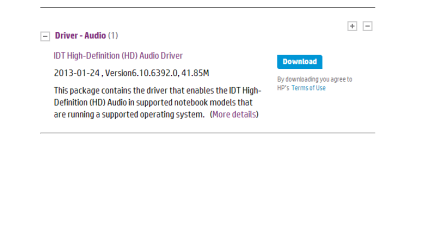
and this is the release details of the driver that i am installing. this is according to the HP website.
Released:2013-01-24
File name: sp56953.exe [1/1, 41.85M]
Version6.10.6392.0
Compatibility: Microsoft Windows 7 (64-bit)
Please post the following system information: Speccy snapshot
How to publish a Speccy snapshot:
Click on the Speccy file menu and select Publish Snapshot. This method removes sensitive information and provides you with a link to the report.
Copy the link returned from Publish Snapshot and paste it in a post on this thread so members have more information to better assist you.
Speccy snapshot of my machine: http://speccy.piriform.com/results/CHlegp43qppad1Ua8dOLDAj
Thanks
My Computer
- Computer type
- Laptop
- Computer Manufacturer/Model Number
- HP Pavilion dv6-6c10us
- OS
- x64 (6.3.9600) Win8.1 Pro & soon dual boot x64 (6.1.7601) Win7_SP1 HomePrem
- CPU
- AMD A6-3420M APU with Radeon(tm) HD Graphics
- Motherboard
- Hewlett-Packard 1805
- Memory
- 6.00 GB
- Graphics Card(s)
- AMD Radeon(TM) HD 6520G
- Sound Card
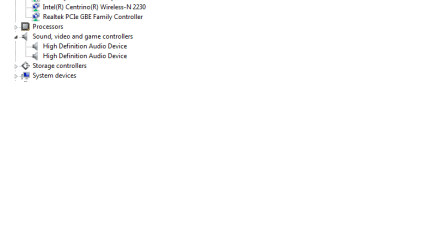
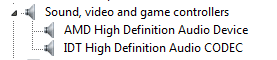
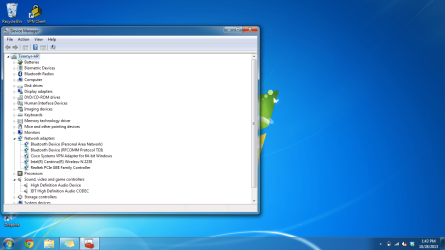
- (1) AMD High Definition Audio Device (2) IDT High Definiti
- Monitor(s) Displays
- HP W2072a 20" LCD (1600 x 900) @ 60 Hz
- Screen Resolution
- 1366 x 768 x 32 bits (4294967296 colors) @ 60 Hz
- Hard Drives
- ST640LM0 00 HM641JI SATA Disk Device
- Keyboard
- Logitech k520 wireless KB
- Mouse
- Logitech m320 wireless mouse (bundled with KB)
- Internet Speed
- 15/5 | 54 MB Wireless 'n'
- Antivirus
- Realtime: Defender or Avast | On-demand: Malwarebytes, ESET
- Browser
- IE 11 on Win8, IE 10 on win 7
- Other Info
- Media: [Gimp, Audacity, VLC] || Comm: [WEmail 2012, Skype] || Productivity: [OpenOffice,| Textpad] || Utils: [Sysinternals, cCleaner, Speccy, Defraggler]