IE 10 crashes

rozniak

New member
Local time
3:23 PM
Messages
16
I am a reasonably sophisticated user. I have IE 10 on my laptop (win 7 home prem) and IE 9 on my desktop (win 7 enterprise). Both are running Trend software although different versions. I have disabled tabs on both computers.

My problem....both IEs crash unpredictably, and when they do (IE has stopped responding) they close all windows. And I lose work.

I have searched for solutions, and most sites say the same thing

reset your browser (I am tired of this)

manage your addons (I have very few active ones)

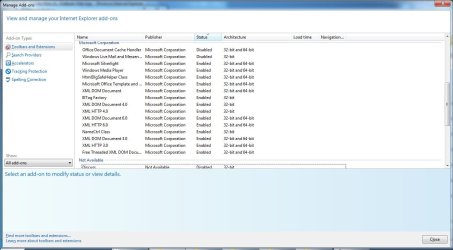
sadly, the addons cannot be copied and pasted
and knocking them off has not seemed to make a difference

very few sites suggest looking at the event viewer, but here is the latest
- <Event xmlns="http://schemas.microsoft.com/win/2004/08/events/event">
- <System>
<Provider Name="Application Error" />

<EventID Qualifiers="0">1000</EventID>

<Level>2</Level>

<Task>100</Task>

<Keywords>0x80000000000000</Keywords>

<TimeCreated SystemTime="2014-03-03T01:21:16.000000000Z" />

<EventRecordID>49880</EventRecordID>

<Channel>Application</Channel>

<Computer>Tosh14</Computer>

<Security />

</System>


- <EventData>
<Data>IEXPLORE.EXE</Data>

<Data>10.0.9200.16798</Data>

<Data>52ec7da1</Data>

<Data>MSHTML.dll</Data>

<Data>10.0.9200.16798</Data>

<Data>52ec9129</Data>

<Data>c0000005</Data>

<Data>001ab80a</Data>

<Data>1f64</Data>

<Data>01cf362b91313fb4</Data>

<Data>C:\Program Files (x86)\Internet Explorer\IEXPLORE.EXE</Data>

<Data>C:\windows\system32\MSHTML.dll</Data>

<Data>1d76988b-a272-11e3-b9b1-e8e0b7f5565e</Data>

</EventData>


</Event>

using the Microsoft event online help yields nothing


I certainly cannot figure this out. Chrome doesn't seem to have the problem.

So it seems to me that MS has a real issue here with general compatibility. But in the meantime, is there anything that I can to to debug this without resetting my IE every day?
 

My Computer

OS
win 7 64 bit home premium

My Computer

Computer type
PC/Desktop
Computer Manufacturer/Model Number
Custom assembled by me :}
OS
Win-7-Pro64bit 7-H-Prem-64bit
CPU
i7-5930K 2nd i9-9940x both water blocked VRM's too
Motherboard
ASUS SABERTOOTH X99 2nd ASUS x299 Apex
Memory
Trident-z 3200C14 2nd Trident-z 3600C16
Graphics Card(s)
EVGA 1080ti ftw3 2nd Titan Xp both water blocked
Sound Card
Built-in Realtek
Monitor(s) Displays
1-AOC G2460PG 24"G-Sync 144Hz/ 2nd 1-ASUS VG248QE 24" 144Hz
Screen Resolution
1920 x 1080 144Hz
Hard Drives
2-Samsung M.2 Evo & Evo Plus
2-Samsung 850 EVO 500GB SSD's/ 3-2.5 W.D. Black 1tb-&3-1tb/3-3.5 WD Black 1tb hdd's
PSU
EVGA SuperNOVA 1000-P2 2nd 1200-P2
Case
2-Corsair Obsidian Series 450D Black ATX Mid Tower
Cooling
Custom water loops
Keyboard
Logitech G710+/ 2nd Logitech G910
Mouse
2-RedDragon M901 Perdition 16400 dpi Gaming mouse = wired
Internet Speed
Comcast Ping 19ms 89.31mbps download speed 6.12mbps upload
Antivirus
Malwarebytes Pro/ Superantispyware Pro
Browser
FireFox & Pale moon
Other Info
2nd ASUS X299 Apex/Intel i9-9940x with Custom water loop/7H-Prem-x64/Corsair 450D case/Ram Trident-z 3600C16 4x8gb / Samsung970Evo plus 500gb SSD/Dual ssd EZ swap evo/PSU EVGA SuperNova 1200w-P2 80+Platinum/GPU Titan Xp /8-ML-140 on push-pull on 2-280GTX rads
Thanks for the note

I also have a win xp computer. Also Trend (the pattern here is my work requires me to use Trend to permit VPN access). IE 8. NEVER happens.

There are some other funky behaviors.

I was going to add that it NEVER happens on laptop when opening the first IE browser, but it did right after I posted the last message.

and

Sometimes, but not every time, when I change IE pages URLs, I get a new IE window that closes the window where I clicked. Again, never happens on the XP computer and IE 8. Really odd.
 

My Computer

OS
win 7 64 bit home premium
Hi thanks for the additional information,
Lets go back to the reset process,
What do you do first thing after resetting ?
Do you re-activate any toolbars/ browser add-ons...
Please post a screen shot of the Show all add-ons pages so we can see them,
There's a link to show you how if you need to refer to it,
ie9 and above added many new security features which often clash with third party av's especially the two mentioned prior,
It also added Gpu rendering to the mix,
Internet options/ Advanced/ Uncheck the top box to use software rendering,
Cheers.
 

My Computer

Computer type
PC/Desktop
Computer Manufacturer/Model Number
Custom assembled by me :}
OS
Win-7-Pro64bit 7-H-Prem-64bit
CPU
i7-5930K 2nd i9-9940x both water blocked VRM's too
Motherboard
ASUS SABERTOOTH X99 2nd ASUS x299 Apex
Memory
Trident-z 3200C14 2nd Trident-z 3600C16
Graphics Card(s)
EVGA 1080ti ftw3 2nd Titan Xp both water blocked
Sound Card
Built-in Realtek
Monitor(s) Displays
1-AOC G2460PG 24"G-Sync 144Hz/ 2nd 1-ASUS VG248QE 24" 144Hz
Screen Resolution
1920 x 1080 144Hz
Hard Drives
2-Samsung M.2 Evo & Evo Plus
2-Samsung 850 EVO 500GB SSD's/ 3-2.5 W.D. Black 1tb-&3-1tb/3-3.5 WD Black 1tb hdd's
PSU
EVGA SuperNOVA 1000-P2 2nd 1200-P2
Case
2-Corsair Obsidian Series 450D Black ATX Mid Tower
Cooling
Custom water loops
Keyboard
Logitech G710+/ 2nd Logitech G910
Mouse
2-RedDragon M901 Perdition 16400 dpi Gaming mouse = wired
Internet Speed
Comcast Ping 19ms 89.31mbps download speed 6.12mbps upload
Antivirus
Malwarebytes Pro/ Superantispyware Pro
Browser
FireFox & Pale moon
Other Info
2nd ASUS X299 Apex/Intel i9-9940x with Custom water loop/7H-Prem-x64/Corsair 450D case/Ram Trident-z 3600C16 4x8gb / Samsung970Evo plus 500gb SSD/Dual ssd EZ swap evo/PSU EVGA SuperNova 1200w-P2 80+Platinum/GPU Titan Xp /8-ML-140 on push-pull on 2-280GTX rads
I haven't reset for a while. I hate that process, since it resets lots of advanced things and then stuff from work doesn't work.

I am running 64 bit OS.

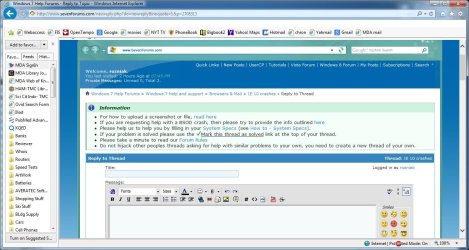
Here is something interesting. I opened this as the 3rd IE window. Things looked ok. Clicked on my google bookmark, and the menu bar disappears. See screen shot 1.

right click on top of IE, uncheck, then recheck menu bar, and its back.


screen shots 2-4 have the addons. it is embarrassing to see all of these. the problem existed prior to adblock and google talk. I cannot check office computer tonight, and, well, the IT boys came and got it before I went out of the country two weeks ago since it -well- died. on the morning when I was leaving, we had a phase go down on one of our segmented power distribution panels. my office is right next door to the "substation." the mobo got trashed. supposedly, I get my computer back tomoro with the same harddrive.
 

Attachments

  • Sshot1.jpg
    Sshot1.jpg
    126.3 KB · Views: 0
  • sshot2.jpg
    sshot2.jpg
    81.8 KB · Views: 1
  • sshot3.jpg
    sshot3.jpg
    88.4 KB · Views: 1
  • sshot4.jpg
    sshot4.jpg
    83 KB · Views: 1

My Computer

OS
win 7 64 bit home premium
PS

That bizarre behavior....where a click on a bookmark opens a new IE browser and closes the old one.....


that happens only on the FIRST URL change after opening a new IE window. Never on any subsequent click or new URL entry.

Lots of odd MS behaviors here to which I had really not paid attention.
 

My Computer

OS
win 7 64 bit home premium
Thanks again,
I would Uninstall All of the BHO's via disable then uninstall a program,
Anything that is Not available/ Verified same thing as above, except for the obvious Microsoft ones OneNote...
IE TagFactory seems interesting so do the Classic ie settings and toolbar ?
Reset using this process,
Reset process first opening Internet explorer
Confirm which add-ons are enabled via Show all-add-ons after,
Cheers.
You might want to use this and post the scan results before resetting,
Review Jacee’s instructions to run Adwcleaner here on post#7,
Ignore the title of the thread,
http://www.sevenforums.com/system-security/316404-instant-savings-app.html
Or download it from bleepingcomputer.com
Screen shot of the download button to use for Adwcleaner
http://www.bleepingcomputer.com/download/adwcleaner/
 

My Computer

Computer type
PC/Desktop
Computer Manufacturer/Model Number
Custom assembled by me :}
OS
Win-7-Pro64bit 7-H-Prem-64bit
CPU
i7-5930K 2nd i9-9940x both water blocked VRM's too
Motherboard
ASUS SABERTOOTH X99 2nd ASUS x299 Apex
Memory
Trident-z 3200C14 2nd Trident-z 3600C16
Graphics Card(s)
EVGA 1080ti ftw3 2nd Titan Xp both water blocked
Sound Card
Built-in Realtek
Monitor(s) Displays
1-AOC G2460PG 24"G-Sync 144Hz/ 2nd 1-ASUS VG248QE 24" 144Hz
Screen Resolution
1920 x 1080 144Hz
Hard Drives
2-Samsung M.2 Evo & Evo Plus
2-Samsung 850 EVO 500GB SSD's/ 3-2.5 W.D. Black 1tb-&3-1tb/3-3.5 WD Black 1tb hdd's
PSU
EVGA SuperNOVA 1000-P2 2nd 1200-P2
Case
2-Corsair Obsidian Series 450D Black ATX Mid Tower
Cooling
Custom water loops
Keyboard
Logitech G710+/ 2nd Logitech G910
Mouse
2-RedDragon M901 Perdition 16400 dpi Gaming mouse = wired
Internet Speed
Comcast Ping 19ms 89.31mbps download speed 6.12mbps upload
Antivirus
Malwarebytes Pro/ Superantispyware Pro
Browser
FireFox & Pale moon
Other Info
2nd ASUS X299 Apex/Intel i9-9940x with Custom water loop/7H-Prem-x64/Corsair 450D case/Ram Trident-z 3600C16 4x8gb / Samsung970Evo plus 500gb SSD/Dual ssd EZ swap evo/PSU EVGA SuperNova 1200w-P2 80+Platinum/GPU Titan Xp /8-ML-140 on push-pull on 2-280GTX rads
Ran the AdwCleaner program
here is the log

# AdwCleaner v3.020 - Report created 03/03/2014 at 12:47:20
# Updated 27/02/2014 by Xplode
# Operating System : Windows 7 Home Premium Service Pack 1 (64 bits)
# Username : TestUser - TOSH14
# Running from : C:\Downloads\Computer Utils\AdwCleaner.exe
# Option : Scan
***** [ Services ] *****

***** [ Files / Folders ] *****
Folder Found C:\Program Files (x86)\Toolbar Cleaner
Folder Found C:\Users\Administrator\AppData\Local\Temp\boost_interprocess
Folder Found C:\Users\TestUser\AppData\Roaming\Microsoft\Windows\Start Menu\Programs\Toolbar Cleaner
***** [ Shortcuts ] *****

***** [ Registry ] *****
Key Found : HKCU\Software\Microsoft\Windows\CurrentVersion\Ext\Settings\{AE805869-2E5C-4ED4-8F7B-F1F7851A4497}
Key Found : HKCU\Software\Microsoft\Windows\CurrentVersion\Ext\Stats\{AE805869-2E5C-4ED4-8F7B-F1F7851A4497}
Key Found : HKLM\Software\caphyon
Key Found : HKLM\SOFTWARE\Classes\AppID\{0A18A436-2A7A-49F3-A488-30538A2F6323}
Key Found : HKLM\SOFTWARE\Classes\CLSID\{007EFBDF-8A5D-4930-97CC-A4B437CBA777}
Key Found : HKLM\SOFTWARE\Classes\CLSID\{AE805869-2E5C-4ED4-8F7B-F1F7851A4497}
Key Found : HKLM\SOFTWARE\Classes\Interface\{79FB5FC8-44B9-4AF5-BADD-CCE547F953E5}
Key Found : HKLM\Software\Freeze.com
Key Found : HKLM\SOFTWARE\Google\Chrome\Extensions\heoldelcflnigdllmlopiefhkkobendj
Key Found : HKLM\SOFTWARE\Microsoft\Tracing\apnstub_RASAPI32
Key Found : HKLM\SOFTWARE\Microsoft\Tracing\apnstub_RASMANCS
Key Found : HKLM\SOFTWARE\Microsoft\Windows\CurrentVersion\Explorer\Browser Helper Objects\{AE805869-2E5C-4ED4-8F7B-F1F7851A4497}
Key Found : HKLM\SOFTWARE\Microsoft\Windows\CurrentVersion\Uninstall\Toolbar Cleaner
Key Found : HKLM\Software\PIP
Key Found : HKLM\Software\Toolbar Cleaner
Key Found : [x64] HKLM\SOFTWARE\Classes\CLSID\{AE805869-2E5C-4ED4-8F7B-F1F7851A4497}
Key Found : [x64] HKLM\SOFTWARE\Microsoft\Windows\CurrentVersion\Explorer\Browser Helper Objects\{AE805869-2E5C-4ED4-8F7B-F1F7851A4497}
***** [ Browsers ] *****
-\\ Internet Explorer v10.0.9200.16798

-\\ Google Chrome v33.0.1750.117
[ File : C:\Users\marozner\AppData\Local\Google\Chrome\User Data\Default\preferences ]

[ File : C:\Users\TestUser\AppData\Local\Google\Chrome\User Data\Default\preferences ]

*************************
AdwCleaner[R0].txt - [2287 octets] - [03/03/2014 12:47:20]
########## EOF - C:\AdwCleaner\AdwCleaner[R0].txt - [2347 octets] ##########
 

My Computer

OS
win 7 64 bit home premium

My Computer

Computer type
PC/Desktop
Computer Manufacturer/Model Number
Custom assembled by me :}
OS
Win-7-Pro64bit 7-H-Prem-64bit
CPU
i7-5930K 2nd i9-9940x both water blocked VRM's too
Motherboard
ASUS SABERTOOTH X99 2nd ASUS x299 Apex
Memory
Trident-z 3200C14 2nd Trident-z 3600C16
Graphics Card(s)
EVGA 1080ti ftw3 2nd Titan Xp both water blocked
Sound Card
Built-in Realtek
Monitor(s) Displays
1-AOC G2460PG 24"G-Sync 144Hz/ 2nd 1-ASUS VG248QE 24" 144Hz
Screen Resolution
1920 x 1080 144Hz
Hard Drives
2-Samsung M.2 Evo & Evo Plus
2-Samsung 850 EVO 500GB SSD's/ 3-2.5 W.D. Black 1tb-&3-1tb/3-3.5 WD Black 1tb hdd's
PSU
EVGA SuperNOVA 1000-P2 2nd 1200-P2
Case
2-Corsair Obsidian Series 450D Black ATX Mid Tower
Cooling
Custom water loops
Keyboard
Logitech G710+/ 2nd Logitech G910
Mouse
2-RedDragon M901 Perdition 16400 dpi Gaming mouse = wired
Internet Speed
Comcast Ping 19ms 89.31mbps download speed 6.12mbps upload
Antivirus
Malwarebytes Pro/ Superantispyware Pro
Browser
FireFox & Pale moon
Other Info
2nd ASUS X299 Apex/Intel i9-9940x with Custom water loop/7H-Prem-x64/Corsair 450D case/Ram Trident-z 3600C16 4x8gb / Samsung970Evo plus 500gb SSD/Dual ssd EZ swap evo/PSU EVGA SuperNova 1200w-P2 80+Platinum/GPU Titan Xp /8-ML-140 on push-pull on 2-280GTX rads
Back
Top