Solved IE 11 back button after Google search

Petiepete

New member
Local time
1:25 AM
Messages
4
I'm on Win 7 Professional 64-bit, running IE 11. When I do a Google search and click on a result, IE won't take me back to the original Google results screen but stays on the page of the result I clicked. I realize I can "open in new tile" but don't necessarily want to do that. In previous versions of IE, there'd be a drop down or somesuch that would show you the last pages the current tile was at. Now the drop down shows sites I've visited recently, but not specific pages and in no particular order. My guess is that the search result I clicked on does multiple redirects - I do click the back button several times in quick succession, no difference though.

Any idea how to get the "back button" to return me to the previous thread?
 

My Computer My Computer

OS
Windows 7 Ultimate x32
Hello and welcome to the seven forum.

Have you tried to reset IE from your tools menu.
 

My Computer My Computer

Computer type
PC/Desktop
Computer Manufacturer/Model Number
Lenovo
OS
Windows 7 Home Premium 64-Bit SP1
CPU
Intel Core i7 2600
Motherboard
Lenovo
Memory
8.00 GB Dual-Channel DDR3
Graphics Card(s)
1024MB GeForce GT 420
Sound Card
Intergrated Realtex ALC888S
Monitor(s) Displays
LG W40 series Widescreen
Screen Resolution
1920 by 1080 widescreen
Hard Drives
932GB Hitachi HDS TB
External drive 640 GB also
PSU
300W
Case
Tower
Cooling
yes came installed
Keyboard
Lenovo
Mouse
Laser wirless 5000
Antivirus
MBAM / Superantispyware pro paid for.
Browser
Google /
Other Info
PLDS DVD-RW DH16ABSH
I don't see "reset" in the Tools menu. And what would it reset? Why would a reset fix not being able to go back to the previously rendered page I was at? Thx.
 

My Computer My Computer

OS
Windows 7 Ultimate x32
Ok, solved. If I right click on the back button in IE the list of previous pages I was at in that particular IE tab shows up.
 
Last edited:

My Computer My Computer

OS
Windows 7 Ultimate x32
Hi and welcome to SevenForums,
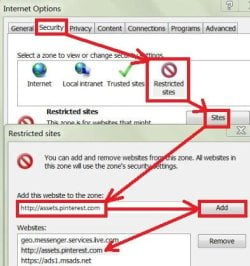
If you see the problematic link listed add that url to your restricted sites zone in ie11 and it shouldn't block access to going backwards anymore,
At any point click on the Gear symbol on the top right and click on Internet options,
Or you can use Alt+TO to get there,
Security section/ Restricted sites icon and click on the Sites button,
Add the problematic listing in the box and click on Add and apply and okay.
Cheers.
restricted sites-2.JPG
 

My Computer My Computer

Computer type
PC/Desktop
Computer Manufacturer/Model Number
Custom assembled by me :}
OS
Win-7-Pro64bit 7-H-Prem-64bit
CPU
i7-5930K 2nd i9-9940x both water blocked VRM's too
Motherboard
ASUS SABERTOOTH X99 2nd ASUS x299 Apex
Memory
Trident-z 3200C14 2nd Trident-z 3600C16
Graphics Card(s)
EVGA 1080ti ftw3 2nd Titan Xp both water blocked
Sound Card
Built-in Realtek
Monitor(s) Displays
1-AOC G2460PG 24"G-Sync 144Hz/ 2nd 1-ASUS VG248QE 24" 144Hz
Screen Resolution
1920 x 1080 144Hz
Hard Drives
2-Samsung M.2 Evo & Evo Plus
2-Samsung 850 EVO 500GB SSD's/ 3-2.5 W.D. Black 1tb-&3-1tb/3-3.5 WD Black 1tb hdd's
PSU
EVGA SuperNOVA 1000-P2 2nd 1200-P2
Case
2-Corsair Obsidian Series 450D Black ATX Mid Tower
Cooling
Custom water loops
Keyboard
Logitech G710+/ 2nd Logitech G910
Mouse
2-RedDragon M901 Perdition 16400 dpi Gaming mouse = wired
Internet Speed
Comcast Ping 19ms 89.31mbps download speed 6.12mbps upload
Antivirus
Malwarebytes Pro/ Superantispyware Pro
Browser
FireFox & Pale moon
Other Info
2nd ASUS X299 Apex/Intel i9-9940x with Custom water loop/7H-Prem-x64/Corsair 450D case/Ram Trident-z 3600C16 4x8gb / Samsung970Evo plus 500gb SSD/Dual ssd EZ swap evo/PSU EVGA SuperNova 1200w-P2 80+Platinum/GPU Titan Xp /8-ML-140 on push-pull on 2-280GTX rads
Unfortunately, that isn't the issue, it happens for any Google search, so you can't add every site to that. The solution I note above is exactly what I needed, right click the back button and the list of previous pages that were opened in that IE tab are listed, in the order they were accessed.
 

My Computer My Computer

OS
Windows 7 Ultimate x32
I haven't seen any issues searching on google lately could you post a screen shot of the listings to see what is showing up doing a search ?
 

My Computer My Computer

Computer type
PC/Desktop
Computer Manufacturer/Model Number
Custom assembled by me :}
OS
Win-7-Pro64bit 7-H-Prem-64bit
CPU
i7-5930K 2nd i9-9940x both water blocked VRM's too
Motherboard
ASUS SABERTOOTH X99 2nd ASUS x299 Apex
Memory
Trident-z 3200C14 2nd Trident-z 3600C16
Graphics Card(s)
EVGA 1080ti ftw3 2nd Titan Xp both water blocked
Sound Card
Built-in Realtek
Monitor(s) Displays
1-AOC G2460PG 24"G-Sync 144Hz/ 2nd 1-ASUS VG248QE 24" 144Hz
Screen Resolution
1920 x 1080 144Hz
Hard Drives
2-Samsung M.2 Evo & Evo Plus
2-Samsung 850 EVO 500GB SSD's/ 3-2.5 W.D. Black 1tb-&3-1tb/3-3.5 WD Black 1tb hdd's
PSU
EVGA SuperNOVA 1000-P2 2nd 1200-P2
Case
2-Corsair Obsidian Series 450D Black ATX Mid Tower
Cooling
Custom water loops
Keyboard
Logitech G710+/ 2nd Logitech G910
Mouse
2-RedDragon M901 Perdition 16400 dpi Gaming mouse = wired
Internet Speed
Comcast Ping 19ms 89.31mbps download speed 6.12mbps upload
Antivirus
Malwarebytes Pro/ Superantispyware Pro
Browser
FireFox & Pale moon
Other Info
2nd ASUS X299 Apex/Intel i9-9940x with Custom water loop/7H-Prem-x64/Corsair 450D case/Ram Trident-z 3600C16 4x8gb / Samsung970Evo plus 500gb SSD/Dual ssd EZ swap evo/PSU EVGA SuperNova 1200w-P2 80+Platinum/GPU Titan Xp /8-ML-140 on push-pull on 2-280GTX rads
Sometimes the back button doesn't show previous pages on IE11. You will notice an arrow pointing down next to the forward button. Click it and that will list the previous pages visited.
 

My Computer My Computer

Computer type
Laptop
Computer Manufacturer/Model Number
Samsung won't charge Now Dell Inspiron 17 3793
OS
Windows 7 Professional 32bit SP1, Windows 10 Home 64-bit at the moment
CPU
Intel Pentium B970 @ 2.30GHz, DELL DELL Intel 3793 Core i5 1
Motherboard
DELL 0C9WH2
Memory
8GB
Graphics Card(s)
NVIDIA GeForce MX230 (Dell)
Sound Card
Realtek High Definition Audio
Monitor(s) Displays
17.3" HD+ LED Display
Screen Resolution
1920x1040
Hard Drives
99GB (RAID SHIT SSD), Seagate 1TB SATA III DATA

Seagate ST1000LM048-2E7172 (SATA III)
Mouse
USB remote
Antivirus
Avast Free Antivirus 20.10.2442
Browser
Internet Explorer 11, FireFox
Other Info
DELL shit Its the worst laptop design ever made the laptop battery is inbuilt who the hell makes a laptop battery inbuilt DELL shit does, can't wait until the 1TB HDD is replaced and RAID shit is removed
Hi Petiepete, I do this sometimes.

1. Open IE
2. Click the tool button.
3. Click Internet Options.
4. Click the advanced button
5. You will see the reset button...

I'm glad you have fixed your problem...
 

My Computer My Computer

Computer type
PC/Desktop
Computer Manufacturer/Model Number
Lenovo
OS
Windows 7 Home Premium 64-Bit SP1
CPU
Intel Core i7 2600
Motherboard
Lenovo
Memory
8.00 GB Dual-Channel DDR3
Graphics Card(s)
1024MB GeForce GT 420
Sound Card
Intergrated Realtex ALC888S
Monitor(s) Displays
LG W40 series Widescreen
Screen Resolution
1920 by 1080 widescreen
Hard Drives
932GB Hitachi HDS TB
External drive 640 GB also
PSU
300W
Case
Tower
Cooling
yes came installed
Keyboard
Lenovo
Mouse
Laser wirless 5000
Antivirus
MBAM / Superantispyware pro paid for.
Browser
Google /
Other Info
PLDS DVD-RW DH16ABSH
Back
Top