IE 11 displays "Get to Google faster. Update"... WHEN instant DISABLED

gabriolinari

New member
Member
VIP
Local time
10:09 PM
Messages
144
IE 11 displays "Get to Google faster. Update"... WHEN instant DISABLED

hi guys, posted this somewhere else already but wanted to hear your opinion here as well, here's all the steps:

What steps will reproduce the problem?

1. Use IE11 - IE 10
2. Disable Instant
3. Search anything on google.com, co.uk, .it etc and then hit F5

What is the expected output? What do you see instead?

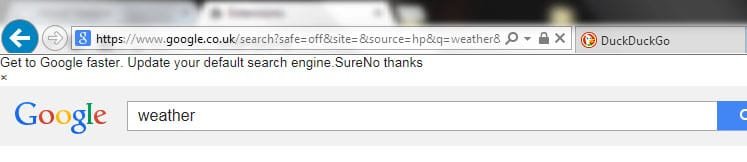
Normal loading page, instead I see at the top

"Get to Google faster. Update your default search engine.
Sure

No thanks" for a split second


What version of the product are you using? On what operating system?
IE 11, Win 7 64x


What is the url of the corresponding thread at Google Groups?
https://productforums.google.com/forum/#!category-topic/websearch/6kOZZwZA2dY

the title has a small typo, it should be "WHEN instant disabled", I provided some caps there.

What is your support ticket from Google support?
n/a

Please provide any additional information below.

I just tested something else, I tried to change User Agent String in IE11's developer tools to mimic as Chrome or Firefox, and it works fine!
some bug with IE's user agent and Google I guess.

any IE (10,9 etc) instead does the error.
 

Attachments

  • strangeIE11.jpg
    strangeIE11.jpg
    15 KB · Views: 1

My Computer My Computer

At a glance

Windows 7 Ultimate x64
Computer type
PC/Desktop
OS
Windows 7 Ultimate x64

My Computer My Computer

At a glance

W7 Pro SP1 64biti78GBIntel HD Graphics
Computer type
Laptop
Computer Manufacturer/Model Number
Employer provided Dell Latitude
OS
W7 Pro SP1 64bit
CPU
i7
Memory
8GB
Graphics Card(s)
Intel HD Graphics
Hard Drives
crappy SSD
Antivirus
Employer mandated Symantec Endpoint Protection
Browser
Pale Moon 64bit, IE11 64bit & Chrome 64bit
hi

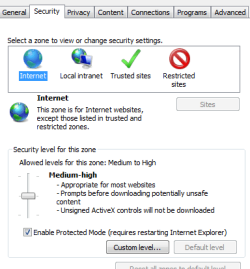
I just checked, I don't have this option that I show, which is the one you refer to I believe..check screencap - and protected mode is enabled from the Security page too.

I am on a different PC right now, same os win 7 and IE11, same thing happens. Weird.
 

Attachments

  • 64.png
    64.png
    10.7 KB · Views: 38
  • screen2.png
    screen2.png
    11.7 KB · Views: 37

My Computer My Computer

At a glance

Windows 7 Ultimate x64
Computer type
PC/Desktop
OS
Windows 7 Ultimate x64
Hi,
I'm assuming when you say disable "instant" your referring to Google instant search results in Google search settings ?
Cure might be to Sign out of Google :/

The popup is pretty normal it used to say upgrade your browser to chrome .....

So why do you not like instant search results it's default ?
 

My Computer My Computer

At a glance

Win-7-Pro64bit 7-H-Prem-64biti7-5930K 2nd i9-9940x both water blocked VRM'...Trident-z 3200C14 2nd Trident-z 3600C16EVGA 1080ti ftw3 2nd Titan Xp both water blocked
Computer type
PC/Desktop
Computer Manufacturer/Model Number
Custom assembled by me :}
OS
Win-7-Pro64bit 7-H-Prem-64bit
CPU
i7-5930K 2nd i9-9940x both water blocked VRM's too
Motherboard
ASUS SABERTOOTH X99 2nd ASUS x299 Apex
Memory
Trident-z 3200C14 2nd Trident-z 3600C16
Graphics Card(s)
EVGA 1080ti ftw3 2nd Titan Xp both water blocked
Sound Card
Built-in Realtek
Monitor(s) Displays
1-AOC G2460PG 24"G-Sync 144Hz/ 2nd 1-ASUS VG248QE 24" 144Hz
Screen Resolution
1920 x 1080 144Hz
Hard Drives
2-Samsung M.2 Evo & Evo Plus
2-Samsung 850 EVO 500GB SSD's/ 3-2.5 W.D. Black 1tb-&3-1tb/3-3.5 WD Black 1tb hdd's
PSU
EVGA SuperNOVA 1000-P2 2nd 1200-P2
Case
2-Corsair Obsidian Series 450D Black ATX Mid Tower
Cooling
Custom water loops
Keyboard
Logitech G710+/ 2nd Logitech G910
Mouse
2-RedDragon M901 Perdition 16400 dpi Gaming mouse = wired
Internet Speed
Comcast Ping 19ms 89.31mbps download speed 6.12mbps upload
Antivirus
Malwarebytes Pro/ Superantispyware Pro
Browser
FireFox & Pale moon
Other Info
2nd ASUS X299 Apex/Intel i9-9940x with Custom water loop/7H-Prem-x64/Corsair 450D case/Ram Trident-z 3600C16 4x8gb / Samsung970Evo plus 500gb SSD/Dual ssd EZ swap evo/PSU EVGA SuperNova 1200w-P2 80+Platinum/GPU Titan Xp /8-ML-140 on push-pull on 2-280GTX rads
Hi,
I'm assuming when you say disable "instant" your referring to Google instant search results in Google search settings ?

The popup is pretty normal it used to say upgrade your browser to chrome .....

Cure might be to Sign out of Google :/

>> tried that already, not working.

So why do you not like instant search results it's default ?

>> I just don't like it to pre-load stuff, but after the first time, you say "NO" (and it saves the cookie), then it stays somewhere in the code when you search anything or refresh. oh well I use DDG but still, seems to be a bug.

On Firefox works OK, same on Chrome, obviously.
 

My Computer My Computer

At a glance

Windows 7 Ultimate x64
Computer type
PC/Desktop
OS
Windows 7 Ultimate x64
Hi,
As far as I've noticed it's just an annoying drop down message that's been there since Chrome was released :D
It's just changed instead of update your browser to Chrome it wants you to download google search or google toolbar :/

Unless your signed in the settings change amounts to nothing because I doubt the setting will stick ;)
 

My Computer My Computer

At a glance

Win-7-Pro64bit 7-H-Prem-64biti7-5930K 2nd i9-9940x both water blocked VRM'...Trident-z 3200C14 2nd Trident-z 3600C16EVGA 1080ti ftw3 2nd Titan Xp both water blocked
Computer type
PC/Desktop
Computer Manufacturer/Model Number
Custom assembled by me :}
OS
Win-7-Pro64bit 7-H-Prem-64bit
CPU
i7-5930K 2nd i9-9940x both water blocked VRM's too
Motherboard
ASUS SABERTOOTH X99 2nd ASUS x299 Apex
Memory
Trident-z 3200C14 2nd Trident-z 3600C16
Graphics Card(s)
EVGA 1080ti ftw3 2nd Titan Xp both water blocked
Sound Card
Built-in Realtek
Monitor(s) Displays
1-AOC G2460PG 24"G-Sync 144Hz/ 2nd 1-ASUS VG248QE 24" 144Hz
Screen Resolution
1920 x 1080 144Hz
Hard Drives
2-Samsung M.2 Evo & Evo Plus
2-Samsung 850 EVO 500GB SSD's/ 3-2.5 W.D. Black 1tb-&3-1tb/3-3.5 WD Black 1tb hdd's
PSU
EVGA SuperNOVA 1000-P2 2nd 1200-P2
Case
2-Corsair Obsidian Series 450D Black ATX Mid Tower
Cooling
Custom water loops
Keyboard
Logitech G710+/ 2nd Logitech G910
Mouse
2-RedDragon M901 Perdition 16400 dpi Gaming mouse = wired
Internet Speed
Comcast Ping 19ms 89.31mbps download speed 6.12mbps upload
Antivirus
Malwarebytes Pro/ Superantispyware Pro
Browser
FireFox & Pale moon
Other Info
2nd ASUS X299 Apex/Intel i9-9940x with Custom water loop/7H-Prem-x64/Corsair 450D case/Ram Trident-z 3600C16 4x8gb / Samsung970Evo plus 500gb SSD/Dual ssd EZ swap evo/PSU EVGA SuperNova 1200w-P2 80+Platinum/GPU Titan Xp /8-ML-140 on push-pull on 2-280GTX rads
hi

I just checked, I don't have this option that I show, which is the one you refer to I believe..check screencap - and protected mode is enabled from the Security page too.

I am on a different PC right now, same os win 7 and IE11, same thing happens. Weird.
The screenshot that shows an options named:
"Enable 64-bit processes for Enhanced Protected Mode" is probably from an W8 or W10 OS.

IE10/IE11 on W7-32bit will not have the option named:
"Enable Enhanced Protection Mode"
IE10/IE11 on W7-64bit should have that "E.P.M." option.


Like you mentioned, Google is depending upon the user agent string (at least in part) to decide when to show that info. The fact that it flashes by is clearly a mistake on Google's part. Google probably never meant for the info to show at all to IE10/IE11 users. Google might get around to fixing the issue. Or... maybe not.
 

My Computer My Computer

At a glance

W7 Pro SP1 64biti78GBIntel HD Graphics
Computer type
Laptop
Computer Manufacturer/Model Number
Employer provided Dell Latitude
OS
W7 Pro SP1 64bit
CPU
i7
Memory
8GB
Graphics Card(s)
Intel HD Graphics
Hard Drives
crappy SSD
Antivirus
Employer mandated Symantec Endpoint Protection
Browser
Pale Moon 64bit, IE11 64bit & Chrome 64bit
Hi,
As far as I've noticed it's just an annoying drop down message that's been there since Chrome was released :D
It's just changed instead of update your browser to Chrome it wants you to download google search or google toolbar :/

Unless your signed in the settings change amounts to nothing because I doubt the setting will stick ;)

it's actually there, doesn't matter whether or not I am signed in. Only happens when INSTANT is disabled, as I said earlier and when user agent is IE11,10,9 etc
 

My Computer My Computer

At a glance

Windows 7 Ultimate x64
Computer type
PC/Desktop
OS
Windows 7 Ultimate x64
hi

I just checked, I don't have this option that I show, which is the one you refer to I believe..check screencap - and protected mode is enabled from the Security page too.

I am on a different PC right now, same os win 7 and IE11, same thing happens. Weird.
The screenshot that shows an options named:
"Enable 64-bit processes for Enhanced Protected Mode" is probably from an W8 or W10 OS.

IE10/IE11 on W7-32bit will not have the option named:
"Enable Enhanced Protection Mode"
IE10/IE11 on W7-64bit should have that "E.P.M." option.


Like you mentioned, Google is depending upon the user agent string (at least in part) to decide when to show that info. The fact that it flashes by is clearly a mistake on Google's part. Google probably never meant for the info to show at all to IE10/IE11 users. Google might get around to fixing the issue. Or... maybe not.

thanks - I tried it...didn't work... oh well, moving on, at least is not just me!
 

Attachments

  • enhanced.png
    enhanced.png
    808 bytes · Views: 35

My Computer My Computer

At a glance

Windows 7 Ultimate x64
Computer type
PC/Desktop
OS
Windows 7 Ultimate x64
For what it is worth, I see the info when Google's instant search feature is on or off.
 

My Computer My Computer

At a glance

W7 Pro SP1 64biti78GBIntel HD Graphics
Computer type
Laptop
Computer Manufacturer/Model Number
Employer provided Dell Latitude
OS
W7 Pro SP1 64bit
CPU
i7
Memory
8GB
Graphics Card(s)
Intel HD Graphics
Hard Drives
crappy SSD
Antivirus
Employer mandated Symantec Endpoint Protection
Browser
Pale Moon 64bit, IE11 64bit & Chrome 64bit
hi guys,

I still see "Get to google faster" etc etc... anyone else still with this issue on IE11?
 

My Computer My Computer

At a glance

Windows 7 Ultimate x64
Computer type
PC/Desktop
OS
Windows 7 Ultimate x64
I just checked (not logged into Google).

I don't see the annoyance any more (I forgot about it, actually)

Try clearing your browser cache and another other browser caches (web slices, saved sites).

Interent Explorer - options, general tab - delete button.
Make the selection, but be aware of cookies keeping your login information and also the password cache - those you might NOT want to clear.

IT seems as though google got the word and stopped the practice.
 

My Computer My Computer

At a glance

x64 (6.3.9600) Win8.1 Pro & soon dual boot x6...AMD A6-3420M APU with Radeon(tm) HD Graphics6.00 GBAMD Radeon(TM) HD 6520G
Computer type
Laptop
Computer Manufacturer/Model Number
HP Pavilion dv6-6c10us
OS
x64 (6.3.9600) Win8.1 Pro & soon dual boot x64 (6.1.7601) Win7_SP1 HomePrem
CPU
AMD A6-3420M APU with Radeon(tm) HD Graphics
Motherboard
Hewlett-Packard 1805
Memory
6.00 GB
Graphics Card(s)
AMD Radeon(TM) HD 6520G
Sound Card
(1) AMD High Definition Audio Device (2) IDT High Definiti
Monitor(s) Displays
HP W2072a 20" LCD (1600 x 900) @ 60 Hz
Screen Resolution
1366 x 768 x 32 bits (4294967296 colors) @ 60 Hz
Hard Drives
ST640LM0 00 HM641JI SATA Disk Device
Keyboard
Logitech k520 wireless KB
Mouse
Logitech m320 wireless mouse (bundled with KB)
Internet Speed
15/5 | 54 MB Wireless 'n'
Antivirus
Realtime: Defender or Avast | On-demand: Malwarebytes, ESET
Browser
IE 11 on Win8, IE 10 on win 7
Other Info
Media: [Gimp, Audacity, VLC] || Comm: [WEmail 2012, Skype] || Productivity: [OpenOffice,| Textpad] || Utils: [Sysinternals, cCleaner, Speccy, Defraggler]
I just checked (not logged into Google).

I don't see the annoyance any more (I forgot about it, actually)

Try clearing your browser cache and another other browser caches (web slices, saved sites).

Interent Explorer - options, general tab - delete button.
Make the selection, but be aware of cookies keeping your login information and also the password cache - those you might NOT want to clear.

IT seems as though google got the word and stopped the practice.

i still get the message regardless, i always get as attached on home PC and at work also the blue one...IF INSTANT is disabled.
 

Attachments

  • cap.jpg
    cap.jpg
    28.5 KB · Views: 0

My Computer My Computer

At a glance

Windows 7 Ultimate x64
Computer type
PC/Desktop
OS
Windows 7 Ultimate x64
Could you grab the URL form your address bar and post it here?

I'll go to the same site and see what it shows on my IE.

What is DuckDuckGo?

Have you tried clicking the X to dismiss it instead of answering sure or no thanks
Those look odd as well (sure | No thanks), when I did see the bar, they were well spaced and I think they were blue links.
The bar itself might have been yellow..I don't recall though.


Sanity check - you are running IE, yes.
That's all I run so if it's FF or Opera, or Chrome ... I'm not the best qualified or equipped to help.
 

My Computer My Computer

At a glance

x64 (6.3.9600) Win8.1 Pro & soon dual boot x6...AMD A6-3420M APU with Radeon(tm) HD Graphics6.00 GBAMD Radeon(TM) HD 6520G
Computer type
Laptop
Computer Manufacturer/Model Number
HP Pavilion dv6-6c10us
OS
x64 (6.3.9600) Win8.1 Pro & soon dual boot x64 (6.1.7601) Win7_SP1 HomePrem
CPU
AMD A6-3420M APU with Radeon(tm) HD Graphics
Motherboard
Hewlett-Packard 1805
Memory
6.00 GB
Graphics Card(s)
AMD Radeon(TM) HD 6520G
Sound Card
(1) AMD High Definition Audio Device (2) IDT High Definiti
Monitor(s) Displays
HP W2072a 20" LCD (1600 x 900) @ 60 Hz
Screen Resolution
1366 x 768 x 32 bits (4294967296 colors) @ 60 Hz
Hard Drives
ST640LM0 00 HM641JI SATA Disk Device
Keyboard
Logitech k520 wireless KB
Mouse
Logitech m320 wireless mouse (bundled with KB)
Internet Speed
15/5 | 54 MB Wireless 'n'
Antivirus
Realtime: Defender or Avast | On-demand: Malwarebytes, ESET
Browser
IE 11 on Win8, IE 10 on win 7
Other Info
Media: [Gimp, Audacity, VLC] || Comm: [WEmail 2012, Skype] || Productivity: [OpenOffice,| Textpad] || Utils: [Sysinternals, cCleaner, Speccy, Defraggler]
Could you grab the URL form your address bar and post it here?

I'll go to the same site and see what it shows on my IE.

What is DuckDuckGo?

Have you tried clicking the X to dismiss it instead of answering sure or no thanks
Those look odd as well (sure | No thanks), when I did see the bar, they were well spaced and I think they were blue links.
The bar itself might have been yellow..I don't recall though.


Sanity check - you are running IE, yes.
That's all I run so if it's FF or Opera, or Chrome ... I'm not the best qualified or equipped to help.

there you go

https://www.google.co.uk/search?saf...msedr...0...1c.1.60.hp..3.9.677.0.0cJVn9ysIDA

Duck duck go? it's my fav search engine.... more private than Google. which I still use for work...

of course I have tried dismissing the X and I keep getting it.

to be honest it's even more weird.

at home, I still get what I have attached here BUT not the one with the blue background. at work I get them both instead.
 

My Computer My Computer

At a glance

Windows 7 Ultimate x64
Computer type
PC/Desktop
OS
Windows 7 Ultimate x64

My Computer My Computer

At a glance

Windows 7 Ultimate x64
Computer type
PC/Desktop
OS
Windows 7 Ultimate x64
btw don't watch it via dropbox facility, looks upside down for some reason, just download it locally and play it with MPC classic or media player, should look OK.
 

My Computer My Computer

At a glance

Windows 7 Ultimate x64
Computer type
PC/Desktop
OS
Windows 7 Ultimate x64
Hi,
We already know what you see there no need for a video,
It's a google thing pushing google search nothing special about it annoying yes but anything we can do about it no
I would suggest contacting google but all they will say if anything at all will be to use another search if you don't want to see the message
Bing search page will have a similar message I believe :)
And also DuckyDuckyGo ;)
Cheers.
 

My Computer My Computer

At a glance

Win-7-Pro64bit 7-H-Prem-64biti7-5930K 2nd i9-9940x both water blocked VRM'...Trident-z 3200C14 2nd Trident-z 3600C16EVGA 1080ti ftw3 2nd Titan Xp both water blocked
Computer type
PC/Desktop
Computer Manufacturer/Model Number
Custom assembled by me :}
OS
Win-7-Pro64bit 7-H-Prem-64bit
CPU
i7-5930K 2nd i9-9940x both water blocked VRM's too
Motherboard
ASUS SABERTOOTH X99 2nd ASUS x299 Apex
Memory
Trident-z 3200C14 2nd Trident-z 3600C16
Graphics Card(s)
EVGA 1080ti ftw3 2nd Titan Xp both water blocked
Sound Card
Built-in Realtek
Monitor(s) Displays
1-AOC G2460PG 24"G-Sync 144Hz/ 2nd 1-ASUS VG248QE 24" 144Hz
Screen Resolution
1920 x 1080 144Hz
Hard Drives
2-Samsung M.2 Evo & Evo Plus
2-Samsung 850 EVO 500GB SSD's/ 3-2.5 W.D. Black 1tb-&3-1tb/3-3.5 WD Black 1tb hdd's
PSU
EVGA SuperNOVA 1000-P2 2nd 1200-P2
Case
2-Corsair Obsidian Series 450D Black ATX Mid Tower
Cooling
Custom water loops
Keyboard
Logitech G710+/ 2nd Logitech G910
Mouse
2-RedDragon M901 Perdition 16400 dpi Gaming mouse = wired
Internet Speed
Comcast Ping 19ms 89.31mbps download speed 6.12mbps upload
Antivirus
Malwarebytes Pro/ Superantispyware Pro
Browser
FireFox & Pale moon
Other Info
2nd ASUS X299 Apex/Intel i9-9940x with Custom water loop/7H-Prem-x64/Corsair 450D case/Ram Trident-z 3600C16 4x8gb / Samsung970Evo plus 500gb SSD/Dual ssd EZ swap evo/PSU EVGA SuperNova 1200w-P2 80+Platinum/GPU Titan Xp /8-ML-140 on push-pull on 2-280GTX rads
Thanks,

I used the link provided but did not get the bar you see. I thought there might have been something in the URL, but alas there wasn't.

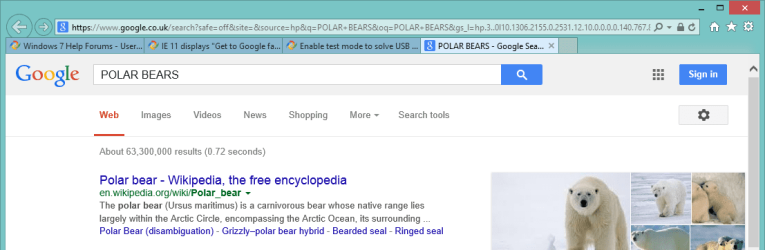
GabGooBarNo.png

I was not logged into Google, but you mentioned it didn't matter if you were logged in or not.

For the record, I don't allow any browser to store much (no web slices, only a few cookies, etc) and I delete history on exit.
You could try renaming the IE cache and let it build a new one, but back up your data first.

I'm not sure how that would affect other things (password cache, cookie cache) - they're all related and one might be connected in a way I'm not certain.

Use caution or skip the suggestion.

The other thing is DuckDuckGo might be caching things for you. That will be your task to investigate - I'm DuckDuckGo illiterate.

edit: the dropbox link just keeps spinning - could be my slow connection. Don't worry about trying to get it somewhere else. I think I understand the issue. The F5 (refresh) comment - why is that pertinent? I know - it's in the video ... but some people won't download stuff from personal online storage as a precaution (you don't know me, and I don't know you) - at any rate, it's best to try and explain here so more members will provide suggestions.

A simple screen shot posted in your thread will solicit better feedback to you
See: http://www.sevenforums.com/tutorials/9733-screenshots-files-upload-post-seven-forums.html
 

My Computer My Computer

At a glance

x64 (6.3.9600) Win8.1 Pro & soon dual boot x6...AMD A6-3420M APU with Radeon(tm) HD Graphics6.00 GBAMD Radeon(TM) HD 6520G
Computer type
Laptop
Computer Manufacturer/Model Number
HP Pavilion dv6-6c10us
OS
x64 (6.3.9600) Win8.1 Pro & soon dual boot x64 (6.1.7601) Win7_SP1 HomePrem
CPU
AMD A6-3420M APU with Radeon(tm) HD Graphics
Motherboard
Hewlett-Packard 1805
Memory
6.00 GB
Graphics Card(s)
AMD Radeon(TM) HD 6520G
Sound Card
(1) AMD High Definition Audio Device (2) IDT High Definiti
Monitor(s) Displays
HP W2072a 20" LCD (1600 x 900) @ 60 Hz
Screen Resolution
1366 x 768 x 32 bits (4294967296 colors) @ 60 Hz
Hard Drives
ST640LM0 00 HM641JI SATA Disk Device
Keyboard
Logitech k520 wireless KB
Mouse
Logitech m320 wireless mouse (bundled with KB)
Internet Speed
15/5 | 54 MB Wireless 'n'
Antivirus
Realtime: Defender or Avast | On-demand: Malwarebytes, ESET
Browser
IE 11 on Win8, IE 10 on win 7
Other Info
Media: [Gimp, Audacity, VLC] || Comm: [WEmail 2012, Skype] || Productivity: [OpenOffice,| Textpad] || Utils: [Sysinternals, cCleaner, Speccy, Defraggler]
Back
Top