- Local time
- 11:07 PM
- Messages
- 144
IE 11 displays "Get to Google faster. Update"... WHEN instant DISABLED
hi guys, posted this somewhere else already but wanted to hear your opinion here as well, here's all the steps:
What steps will reproduce the problem?
1. Use IE11 - IE 10
2. Disable Instant
3. Search anything on google.com, co.uk, .it etc and then hit F5
What is the expected output? What do you see instead?
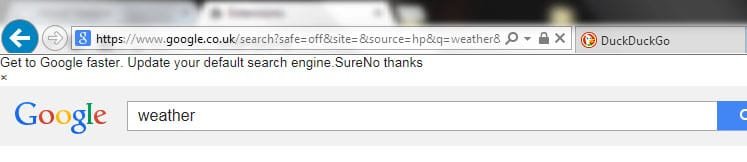
Normal loading page, instead I see at the top
"Get to Google faster. Update your default search engine.
Sure
No thanks" for a split second
What version of the product are you using? On what operating system?
IE 11, Win 7 64x
What is the url of the corresponding thread at Google Groups?
https://productforums.google.com/forum/#!category-topic/websearch/6kOZZwZA2dY
the title has a small typo, it should be "WHEN instant disabled", I provided some caps there.
What is your support ticket from Google support?
n/a
Please provide any additional information below.
I just tested something else, I tried to change User Agent String in IE11's developer tools to mimic as Chrome or Firefox, and it works fine!
some bug with IE's user agent and Google I guess.
any IE (10,9 etc) instead does the error.
hi guys, posted this somewhere else already but wanted to hear your opinion here as well, here's all the steps:
What steps will reproduce the problem?
1. Use IE11 - IE 10
2. Disable Instant
3. Search anything on google.com, co.uk, .it etc and then hit F5
What is the expected output? What do you see instead?
Normal loading page, instead I see at the top
"Get to Google faster. Update your default search engine.
Sure
No thanks" for a split second
What version of the product are you using? On what operating system?
IE 11, Win 7 64x
What is the url of the corresponding thread at Google Groups?
https://productforums.google.com/forum/#!category-topic/websearch/6kOZZwZA2dY
the title has a small typo, it should be "WHEN instant disabled", I provided some caps there.
What is your support ticket from Google support?
n/a
Please provide any additional information below.
I just tested something else, I tried to change User Agent String in IE11's developer tools to mimic as Chrome or Firefox, and it works fine!
some bug with IE's user agent and Google I guess.
any IE (10,9 etc) instead does the error.
Attachments

My Computer
At a glance
Windows 7 Ultimate x64
- Computer type
- PC/Desktop
- OS
- Windows 7 Ultimate x64