IE-11 Favorites Bar-Reappearing Shortcuts

jmruperto

New member
Local time
6:08 PM
Messages
3
Location
St. Pete
Recently I noticed that my IE-11 favorites bar stretched across the entire width of my Explorer window, indicating many shortcuts included in the Favorite Bar. Typically I have 2 or 3 of my most frequently used websites in the favorites bar. For no known reason (that I can figure out), the favorites bar has become populated with dozens of shortcuts that I didn't assign to the favorites bar.

I have tried numerous way (many of which were suggested on this forum) to remove the unwanted shortcuts. Shortly after being deleted the reappear in the Favorites Bar folder.

Help would be appreciated.
 

My Computer My Computer

At a glance

Windows 7 Home Premium SP-1 64-BitIntel Core 2 Duo CPU T5750 2 GHz4 GBNVIDIA GeForce 8400M GS
Computer type
PC/Desktop
Computer Manufacturer/Model Number
HP-dv97000t
OS
Windows 7 Home Premium SP-1 64-Bit
CPU
Intel Core 2 Duo CPU T5750 2 GHz
Memory
4 GB
Graphics Card(s)
NVIDIA GeForce 8400M GS
Sound Card
Realtek High Def Audio
Monitor(s) Displays
Generic PnP
Hard Drives
WDC WD5000BPKT-75PK4T0 ATA
WDC WD2500BEVS-60UST0 ATA
Antivirus
Windows Security Essentials
Browser
I.E. 11
HelloItsMeAgain thanks for the reply. I did try to reset I.E. settings including the Delete Personal Settings (nuclear Option). This did not solve the problem.
 

My Computer My Computer

At a glance

Windows 7 Home Premium SP-1 64-BitIntel Core 2 Duo CPU T5750 2 GHz4 GBNVIDIA GeForce 8400M GS
Computer type
PC/Desktop
Computer Manufacturer/Model Number
HP-dv97000t
OS
Windows 7 Home Premium SP-1 64-Bit
CPU
Intel Core 2 Duo CPU T5750 2 GHz
Memory
4 GB
Graphics Card(s)
NVIDIA GeForce 8400M GS
Sound Card
Realtek High Def Audio
Monitor(s) Displays
Generic PnP
Hard Drives
WDC WD5000BPKT-75PK4T0 ATA
WDC WD2500BEVS-60UST0 ATA
Antivirus
Windows Security Essentials
Browser
I.E. 11
Hi and welcome to SevenForums,
What type of sites are being populated in the favorite bar ?

Have you reviewed you uninstall a program list for odd or new entries
Also have you reviewed you manage add-ons toolbars and extensions section to see what is listed there ?
In ie11 just use Gear symbol on the top right and Manage add-ons
On the left side column on the Show listing just make sure it says Show All add-ons
Then Toolbars...
Post screen shots of both if not too much trouble

Refer to the links above my signature on hot to take and upload screen shots here.
 

My Computer My Computer

At a glance

Win-7-Pro64bit 7-H-Prem-64biti7-5930K 2nd i9-9940x both water blocked VRM'...Trident-z 3200C14 2nd Trident-z 3600C16EVGA 1080ti ftw3 2nd Titan Xp both water blocked
Computer type
PC/Desktop
Computer Manufacturer/Model Number
Custom assembled by me :}
OS
Win-7-Pro64bit 7-H-Prem-64bit
CPU
i7-5930K 2nd i9-9940x both water blocked VRM's too
Motherboard
ASUS SABERTOOTH X99 2nd ASUS x299 Apex
Memory
Trident-z 3200C14 2nd Trident-z 3600C16
Graphics Card(s)
EVGA 1080ti ftw3 2nd Titan Xp both water blocked
Sound Card
Built-in Realtek
Monitor(s) Displays
1-AOC G2460PG 24"G-Sync 144Hz/ 2nd 1-ASUS VG248QE 24" 144Hz
Screen Resolution
1920 x 1080 144Hz
Hard Drives
2-Samsung M.2 Evo & Evo Plus
2-Samsung 850 EVO 500GB SSD's/ 3-2.5 W.D. Black 1tb-&3-1tb/3-3.5 WD Black 1tb hdd's
PSU
EVGA SuperNOVA 1000-P2 2nd 1200-P2
Case
2-Corsair Obsidian Series 450D Black ATX Mid Tower
Cooling
Custom water loops
Keyboard
Logitech G710+/ 2nd Logitech G910
Mouse
2-RedDragon M901 Perdition 16400 dpi Gaming mouse = wired
Internet Speed
Comcast Ping 19ms 89.31mbps download speed 6.12mbps upload
Antivirus
Malwarebytes Pro/ Superantispyware Pro
Browser
FireFox & Pale moon
Other Info
2nd ASUS X299 Apex/Intel i9-9940x with Custom water loop/7H-Prem-x64/Corsair 450D case/Ram Trident-z 3600C16 4x8gb / Samsung970Evo plus 500gb SSD/Dual ssd EZ swap evo/PSU EVGA SuperNova 1200w-P2 80+Platinum/GPU Titan Xp /8-ML-140 on push-pull on 2-280GTX rads
TrashZone, thanks for the reply and I apologize for takingso long to reply. I was actually 80% of the way through a reply to you, whenI.E. crashed midway through my 7th image upload. Anyway here we goagain:

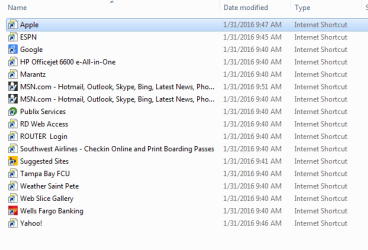
The attached image ‘Shortcuts’shows what is in the Favorites Bar folder. All of these shortcuts are actually elsewherein my Favorites folder (or subfolders thereof). There were actually many moreunwanted shortcuts that somehow auto-populated the Favorites Bar, but I manageddelete most of them. Those shown in the image reappear within seconds of beingdeleted.

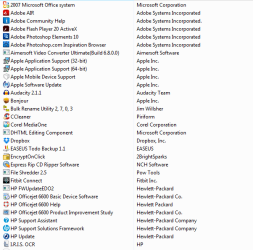
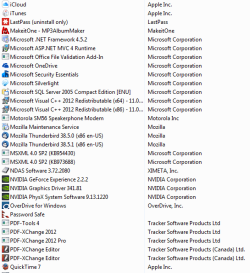
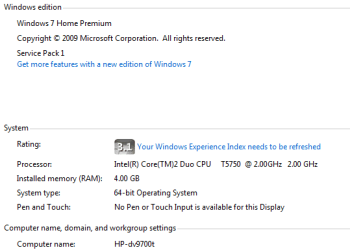
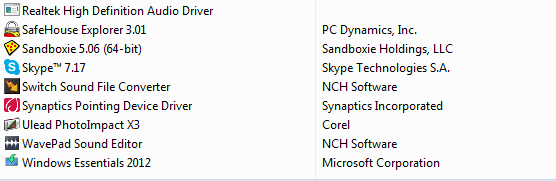
On your advice I did review all installed programs and didnot see anything unusual. Please see ‘InstalledSoftware 1, 2 and 3’ for a list of programs. What do you think? Irecently (last September) replaced my Vista OS with Win7 OS and replaced the harddrive. I did a clean install and removed all unwanted software. The ‘System’ image provides details of the system.

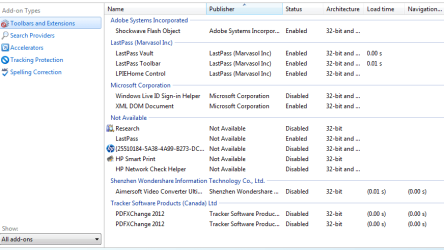
On your advice I did review the I.E. add-ons, again I don’tsee anything unusual. I have attached ‘Toolbars andExtensions’ and ‘Accelerators’ for yourreview.

Again any help would be appreciated.
 

Attachments

  • Shortcuts.PNG
    Shortcuts.PNG
    10 KB · Views: 5
  • Installed Software 1.PNG
    Installed Software 1.PNG
    18 KB · Views: 5
  • Installed Software 2.PNG
    Installed Software 2.PNG
    15.7 KB · Views: 5
  • System.PNG
    System.PNG
    7.5 KB · Views: 5
  • Toolbars and Extensions.PNG
    Toolbars and Extensions.PNG
    18.1 KB · Views: 0
  • Accelerators.PNG
    Accelerators.PNG
    7.8 KB · Views: 0
  • Installed Software3.PNG
    Installed Software3.PNG
    6.4 KB · Views: 5

My Computer My Computer

At a glance

Windows 7 Home Premium SP-1 64-BitIntel Core 2 Duo CPU T5750 2 GHz4 GBNVIDIA GeForce 8400M GS
Computer type
PC/Desktop
Computer Manufacturer/Model Number
HP-dv97000t
OS
Windows 7 Home Premium SP-1 64-Bit
CPU
Intel Core 2 Duo CPU T5750 2 GHz
Memory
4 GB
Graphics Card(s)
NVIDIA GeForce 8400M GS
Sound Card
Realtek High Def Audio
Monitor(s) Displays
Generic PnP
Hard Drives
WDC WD5000BPKT-75PK4T0 ATA
WDC WD2500BEVS-60UST0 ATA
Antivirus
Windows Security Essentials
Browser
I.E. 11
Hi
The only one that might sync from something is Onedrive you might remove it :/

FitBit is a weird one if you don't remember installing it you might remove it too

One click encrypt :/
Safe house explorer :/
Password safe along with Lastpass aren't those redundant to have both ?

Bonjour should be removed :/
You have 3 separate Cloud services = icloud/ Onedrive/ Dropbox :shock:

Personally I would use Adwcleaner asap
Review Jacee’s instructions to run Adwcleaner here post #7,
Ignore the title of the thread,
http://www.sevenforums.com/system-security/316404-instant-savings-app.html
On the BleepingComputer site use the button that looks like this,
adwcleaner-button.JPG

You can use these free tools to see if they find anything,
Manually Update them before running full scans,
Try not to use your computer while the scans are running, (one at a time of course).
See this tutorial on how to download and run Malwarebytes,
http://www.sevenforums.com/tutorials/338716-malwarebytes-anti-malware-free.html

Also use the Custom scan option not the Threat scan to scan the C drive and any other connected drives
Malwarebytes | Free Anti-Malware Detection & Removal Software
SAS is safe to remove anything it finds ;)
SUPERAntiSpyware | Remove Malware | Remove Spyware - AntiMalware, AntiSpyware, AntiAdware!
 

My Computer My Computer

At a glance

Win-7-Pro64bit 7-H-Prem-64biti7-5930K 2nd i9-9940x both water blocked VRM'...Trident-z 3200C14 2nd Trident-z 3600C16EVGA 1080ti ftw3 2nd Titan Xp both water blocked
Computer type
PC/Desktop
Computer Manufacturer/Model Number
Custom assembled by me :}
OS
Win-7-Pro64bit 7-H-Prem-64bit
CPU
i7-5930K 2nd i9-9940x both water blocked VRM's too
Motherboard
ASUS SABERTOOTH X99 2nd ASUS x299 Apex
Memory
Trident-z 3200C14 2nd Trident-z 3600C16
Graphics Card(s)
EVGA 1080ti ftw3 2nd Titan Xp both water blocked
Sound Card
Built-in Realtek
Monitor(s) Displays
1-AOC G2460PG 24"G-Sync 144Hz/ 2nd 1-ASUS VG248QE 24" 144Hz
Screen Resolution
1920 x 1080 144Hz
Hard Drives
2-Samsung M.2 Evo & Evo Plus
2-Samsung 850 EVO 500GB SSD's/ 3-2.5 W.D. Black 1tb-&3-1tb/3-3.5 WD Black 1tb hdd's
PSU
EVGA SuperNOVA 1000-P2 2nd 1200-P2
Case
2-Corsair Obsidian Series 450D Black ATX Mid Tower
Cooling
Custom water loops
Keyboard
Logitech G710+/ 2nd Logitech G910
Mouse
2-RedDragon M901 Perdition 16400 dpi Gaming mouse = wired
Internet Speed
Comcast Ping 19ms 89.31mbps download speed 6.12mbps upload
Antivirus
Malwarebytes Pro/ Superantispyware Pro
Browser
FireFox & Pale moon
Other Info
2nd ASUS X299 Apex/Intel i9-9940x with Custom water loop/7H-Prem-x64/Corsair 450D case/Ram Trident-z 3600C16 4x8gb / Samsung970Evo plus 500gb SSD/Dual ssd EZ swap evo/PSU EVGA SuperNova 1200w-P2 80+Platinum/GPU Titan Xp /8-ML-140 on push-pull on 2-280GTX rads
Back
Top