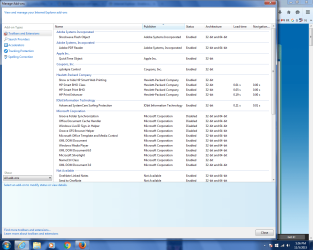
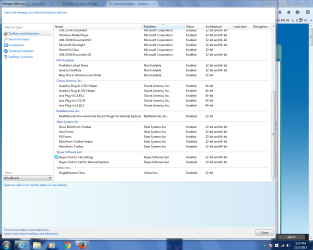
I am having an issue with Internet Explorer 11. I noticed a few weeks ago that when I use IE 11 that I keep having to click on the window to keep it active, even if I have no other windows open. If I open IE 11 window and start typing a login somewhere I get 4 or 5 characters typed in then window goes inactive and I have to click back in the text box to finish typing my login. If I am browsing I sometimes have to click back on the window somewhere to continue scrolling on a page.
This is getting annoying so I would like to find out a fix if possible. I do have Firefox and Chrome that DO NOT have the same problem. I use different browsers for different tasks and would like to resolve this if anyone can help.
Thanks so much.
My Computer
Computer type
PC/Desktop
Computer Manufacturer/Model Number
Dell
OS
Microsoft Windows 7 Home Premium 64-bit 7601 Multiprocessor Free Service Pack 1
CPU
Intel(R) Core(TM) i7-2600 CPU @ 3.40GHz
Motherboard
Dell Inc. 0Y2MRG
Memory
8 GB
Graphics Card(s)
NVIDIA GeForce GT 545
Sound Card
(1) Realtek High Definition Audio (2) Intel(R) Display Aud
Screen Resolution
1280 x 1024 x 32 bits (4294967296 colors) @ 75 Hz
Hard Drives
(1) WDC WD5000AAKX-753CA1 (2) Generic- Compact Flash USB Device (3) Generic- MS/MS-Pro USB Device (4) Generic- SD/MMC USB Device (5) Generic- SM/xD-Picture USB Device
2nd ASUS X299 Apex/Intel i9-9940x with Custom water loop/7H-Prem-x64/Corsair 450D case/Ram Trident-z 3600C16 4x8gb / Samsung970Evo plus 500gb SSD/Dual ssd EZ swap evo/PSU EVGA SuperNova 1200w-P2 80+Platinum/GPU Titan Xp /8-ML-140 on push-pull on 2-280GTX rads
Thanks
Yep you're stacked up :/
Anything with BHO disable
Oracle Java well that also should all be disabled
All Not available listings should also be disabled and even Silverlight.
Definitely Coupons Inc disable.
After that restart your computer and see what's up.
My Computer
Computer type
PC/Desktop
Computer Manufacturer/Model Number
Custom assembled by me :}
OS
Win-7-Pro64bit 7-H-Prem-64bit
CPU
i7-5930K 2nd i9-9940x both water blocked VRM's too
2nd ASUS X299 Apex/Intel i9-9940x with Custom water loop/7H-Prem-x64/Corsair 450D case/Ram Trident-z 3600C16 4x8gb / Samsung970Evo plus 500gb SSD/Dual ssd EZ swap evo/PSU EVGA SuperNova 1200w-P2 80+Platinum/GPU Titan Xp /8-ML-140 on push-pull on 2-280GTX rads
It looks like one or all of those things were causing my problem. After doing those things and disabling the roboform toolbar I do not have the issue. Thank you for your help!
My Computer
Computer type
PC/Desktop
Computer Manufacturer/Model Number
Dell
OS
Microsoft Windows 7 Home Premium 64-bit 7601 Multiprocessor Free Service Pack 1
CPU
Intel(R) Core(TM) i7-2600 CPU @ 3.40GHz
Motherboard
Dell Inc. 0Y2MRG
Memory
8 GB
Graphics Card(s)
NVIDIA GeForce GT 545
Sound Card
(1) Realtek High Definition Audio (2) Intel(R) Display Aud
Screen Resolution
1280 x 1024 x 32 bits (4294967296 colors) @ 75 Hz
Hard Drives
(1) WDC WD5000AAKX-753CA1 (2) Generic- Compact Flash USB Device (3) Generic- MS/MS-Pro USB Device (4) Generic- SD/MMC USB Device (5) Generic- SM/xD-Picture USB Device
2nd ASUS X299 Apex/Intel i9-9940x with Custom water loop/7H-Prem-x64/Corsair 450D case/Ram Trident-z 3600C16 4x8gb / Samsung970Evo plus 500gb SSD/Dual ssd EZ swap evo/PSU EVGA SuperNova 1200w-P2 80+Platinum/GPU Titan Xp /8-ML-140 on push-pull on 2-280GTX rads