Solved Having a issue with (OPEN WITH) option

ohsocute69

New member
Member
Local time
12:58 AM
Messages
69
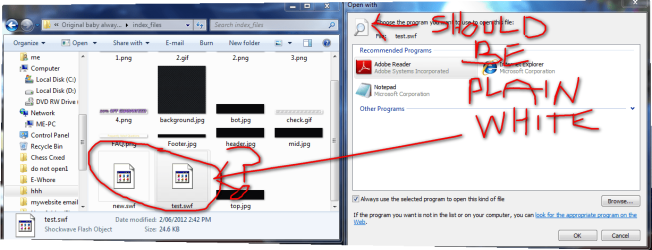
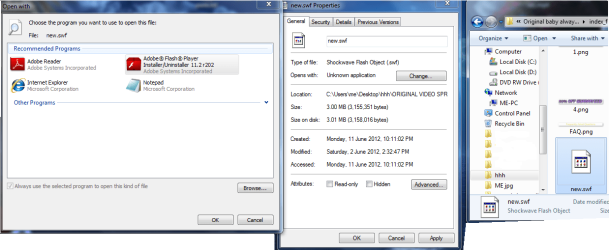
Well i dont remeber right clicking my .swf file to have it to open with another file as you can see in the picture note pad ..etc...

How do i revert this back so the .swf file is just plain white file ??

instead of the icon it has now ?

i hope it makes sense to you .. :p
 

Attachments

  • 2012-06-17_103726.png
    2012-06-17_103726.png
    84 KB · Views: 22
Last edited:

My Computer My Computer

OS
32
Basically you want .swf files to not have a default associated program, if I understand you correctly.

I don't know the steps, but there should be something on associating file formats / extensions in the Tutorials forum. Try having a look there.
 

My Computer My Computer

Computer Manufacturer/Model Number
Self-built rig
OS
Win7 Pro x64
CPU
Koa i5-2550K
Memory
8 GB
Graphics Card(s)
Sapphire ATI 6870 1GB GDDR5
Sound Card
RealTek HD Audio / ATI HDMI Audio
Monitor(s) Displays
Samsung HDTV Monitor T23A350
Screen Resolution
1920 x 1080
Hard Drives
- SSD (C:)
- HDD (D:)
- BD-ROM (E:)
Keyboard
Logitech G110
Internet Speed
Unifi home (5mbps)
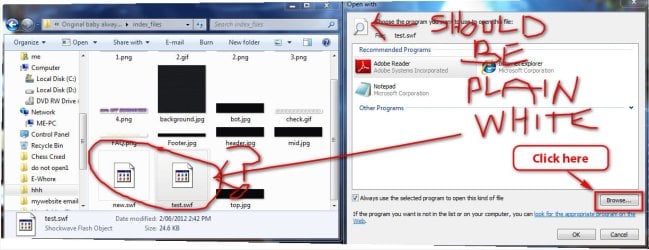
Using your uploaded snip .... Click on the browse button ....
2012-06-20_104635.jpg

Browse to : C:\Windows\System32\Macromed\Flash\FlashUtil_______ _Plugin (The name may vary), but I mean this one ...
2012-06-20_105103.jpg

Set it, and see if it is back to normal.
 

My Computer My Computer

Computer type
PC/Desktop
Computer Manufacturer/Model Number
Self Assembled
OS
Microsoft Windows 10 Pro Insider Preview 64-bit
CPU
Intel(R) Core(TM) i3-4130 CPU @ 3.40GHz
Motherboard
Gigabyte Technology Co., Ltd. B85M-D3H
Memory
Corsair Vengence 4GB x2 (8.00GB Dual-Channel DDR3 @ 798MHz)
Graphics Card(s)
2047MB GeForce GTS 450 (ZOTAC International)
Sound Card
Onboard (Realtek High Definition Audio)
Monitor(s) Displays
LG Flatron E2040T
Screen Resolution
1600x900
Hard Drives
Western Digital 1 TB
Seagate 500 GB
PSU
Corsair VS550
Case
Cooler Master K380
Cooling
Cooler Master Seidon 120V Plus
Keyboard
Logitech MK260r
Mouse
Logitech MK260r
Internet Speed
PMPL Broadband
Antivirus
Windows Defender + MBAM
Browser
Firefox
Other Info
Dell Studio 15" Laptop
Using your uploaded snip .... Click on the browse button ....
View attachment 217306

Browse to : C:\Windows\System32\Macromed\Flash\FlashUtil_______ _Plugin (The name may vary), but I mean this one ...
View attachment 217307

Set it, and see if it is back to normal.
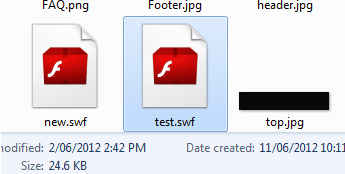
ok tried that but now shows like this ...
i am stumped on this lol
(please ignore the little black strip in picture and the word header..
 

Attachments

  • 2012-06-21_210405.png
    2012-06-21_210405.png
    5.2 KB · Views: 1

My Computer My Computer

OS
32
Does they open normally, you just want to change the icon ?

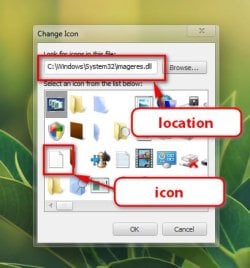
Right click on any swf file, > properties> change icon > Browse > to C:\ Windows\ System32\imageres.dll , and set the third one in the first column.

2012-06-21_165530.jpg

I guess this is the one you want.
 

My Computer My Computer

Computer type
PC/Desktop
Computer Manufacturer/Model Number
Self Assembled
OS
Microsoft Windows 10 Pro Insider Preview 64-bit
CPU
Intel(R) Core(TM) i3-4130 CPU @ 3.40GHz
Motherboard
Gigabyte Technology Co., Ltd. B85M-D3H
Memory
Corsair Vengence 4GB x2 (8.00GB Dual-Channel DDR3 @ 798MHz)
Graphics Card(s)
2047MB GeForce GTS 450 (ZOTAC International)
Sound Card
Onboard (Realtek High Definition Audio)
Monitor(s) Displays
LG Flatron E2040T
Screen Resolution
1600x900
Hard Drives
Western Digital 1 TB
Seagate 500 GB
PSU
Corsair VS550
Case
Cooler Master K380
Cooling
Cooler Master Seidon 120V Plus
Keyboard
Logitech MK260r
Mouse
Logitech MK260r
Internet Speed
PMPL Broadband
Antivirus
Windows Defender + MBAM
Browser
Firefox
Other Info
Dell Studio 15" Laptop
Hello ohsocute69,

By default, .swf (Shockwave Flash Object) files are not associated to be opened with any program which is why you would have the blank white page icon indicating so. If you like you can use the tutorial below to unassociate .swf files to restore it and the icon back to default. :)

http://www.sevenforums.com/tutorials/178296-file-extension-type-unassociate.html

Hope this helps,
Shawn
 

My Computer My Computer

Computer type
PC/Desktop
Computer Manufacturer/Model Number
Self built custom
OS
64-bit Windows 11 Pro for Workstations
CPU
Intel i7-8700K OC'd to 5 GHz
Motherboard
ASUS ROG Maximus XI Formula Z390
Memory
64 GB (4x16GB) G.SKILL TridentZ RGB DDR4 3600 MHz
Graphics Card(s)
ASUS ROG-STRIX-GTX1080TI-O11G-GAMING
Sound Card
Integrated
Monitor(s) Displays
2 x Samsung Odyssey G7 27"
Screen Resolution
2560x1440
Hard Drives
1TB Samsung 990 PRO M.2,
4TB Samsung 990 PRO PRO M.2,
TerraMaster F8 SSD Plus NAS
PSU
Seasonic Prime Titanium 850W
Case
Thermaltake Core P3
Cooling
Corsair Hydro H115i
Keyboard
Logitech wireless K800
Mouse
Logitech MX Master 4
Internet Speed
2 Gb/s Download and 100 Mb/s Upload
Antivirus
Malwarebyte Anti-Malware Premium
Browser
Google Chrome
Other Info
Logitech Z625 speaker system,
Logitech BRIO 4K Pro webcam,
HP Color LaserJet Pro MFP M477fdn,
APC SMART-UPS RT 1000 XL - SURT1000XLI,
Galaxy S23 Plus phone
Hello ohsocute69,

By default, .swf (Shockwave Flash Object) files are not associated to be opened with any program which is why you would have the blank white page icon indicating so. If you like you can use the tutorial below to unassociate .swf files to restore it and the icon back to default. :)

http://www.sevenforums.com/tutorials/178296-file-extension-type-unassociate.html

Hope this helps,
Shawn
Shawn yes what i want is it not to be asscociated with any other program ...
at the moment it has options to open with internet explorer , notepad, and a few others , i am wanting it to go back to normal , just plain (white) swf file but at the moment its not ., it has that above picture and also ..

i just used that exe file you mentioned and deleted the .swf now it looks like this .
i took screen shot of the complete thing,,, as you can see the associated programs im trying to remove and make this file juts normal again .
 

Attachments

  • 2012-06-22_191432.png
    2012-06-22_191432.png
    54.1 KB · Views: 6

My Computer My Computer

OS
32
If you like, download the REG file I attached below to your desktop, double click on the .reg file to merge it, then approve the merge (run, yes, yes, ok). That should restore it for you. :)
 

Attachments

My Computer My Computer

Computer type
PC/Desktop
Computer Manufacturer/Model Number
Self built custom
OS
64-bit Windows 11 Pro for Workstations
CPU
Intel i7-8700K OC'd to 5 GHz
Motherboard
ASUS ROG Maximus XI Formula Z390
Memory
64 GB (4x16GB) G.SKILL TridentZ RGB DDR4 3600 MHz
Graphics Card(s)
ASUS ROG-STRIX-GTX1080TI-O11G-GAMING
Sound Card
Integrated
Monitor(s) Displays
2 x Samsung Odyssey G7 27"
Screen Resolution
2560x1440
Hard Drives
1TB Samsung 990 PRO M.2,
4TB Samsung 990 PRO PRO M.2,
TerraMaster F8 SSD Plus NAS
PSU
Seasonic Prime Titanium 850W
Case
Thermaltake Core P3
Cooling
Corsair Hydro H115i
Keyboard
Logitech wireless K800
Mouse
Logitech MX Master 4
Internet Speed
2 Gb/s Download and 100 Mb/s Upload
Antivirus
Malwarebyte Anti-Malware Premium
Browser
Google Chrome
Other Info
Logitech Z625 speaker system,
Logitech BRIO 4K Pro webcam,
HP Color LaserJet Pro MFP M477fdn,
APC SMART-UPS RT 1000 XL - SURT1000XLI,
Galaxy S23 Plus phone
If you like, download the REG file I attached below to your desktop, double click on the .reg file to merge it, then approve the merge (run, yes, yes, ok). That should restore it for you. :)
Thanks so much fixed my issue ! :) ........so happy now.:D:D:party:
 

My Computer My Computer

OS
32
You're most welcome. I'm happy to hear that it's fixed now. :)
 

My Computer My Computer

Computer type
PC/Desktop
Computer Manufacturer/Model Number
Self built custom
OS
64-bit Windows 11 Pro for Workstations
CPU
Intel i7-8700K OC'd to 5 GHz
Motherboard
ASUS ROG Maximus XI Formula Z390
Memory
64 GB (4x16GB) G.SKILL TridentZ RGB DDR4 3600 MHz
Graphics Card(s)
ASUS ROG-STRIX-GTX1080TI-O11G-GAMING
Sound Card
Integrated
Monitor(s) Displays
2 x Samsung Odyssey G7 27"
Screen Resolution
2560x1440
Hard Drives
1TB Samsung 990 PRO M.2,
4TB Samsung 990 PRO PRO M.2,
TerraMaster F8 SSD Plus NAS
PSU
Seasonic Prime Titanium 850W
Case
Thermaltake Core P3
Cooling
Corsair Hydro H115i
Keyboard
Logitech wireless K800
Mouse
Logitech MX Master 4
Internet Speed
2 Gb/s Download and 100 Mb/s Upload
Antivirus
Malwarebyte Anti-Malware Premium
Browser
Google Chrome
Other Info
Logitech Z625 speaker system,
Logitech BRIO 4K Pro webcam,
HP Color LaserJet Pro MFP M477fdn,
APC SMART-UPS RT 1000 XL - SURT1000XLI,
Galaxy S23 Plus phone
Back
Top