Solved IE 11 installed but NOT able to open it

christurner57

New member
Local time
11:50 PM
Messages
14
Location
Granite Belt
  1. IE 9 shipped with the unit & it worked fine. I use Firefox so removed the friendly blue e ages ago:devil:
  2. I do a small amount of B2G at the end of each financial quarter & the Aussie Tax people are not big on support for other than IE, so I'd run IE9 from the start menu Run - fine.
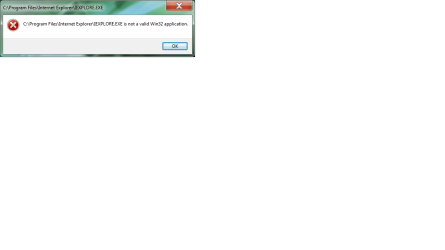
  3. A few days ago, I tried to open IE the usual way & it came up with the enclosed screenshot, don't know why the 32-bit reference I am on 64.
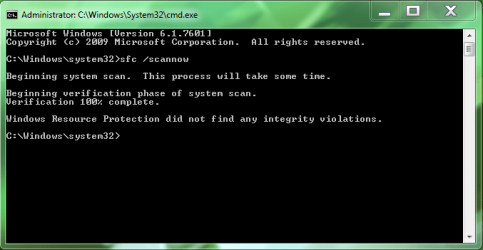
  4. I ran sfc /scannow from DOS as Admin, the CBS log told me that iexplore.exe and vbscript.dll were corrupt, as were their counterparts in the store directory. I don't believe that I received an installation disk from Acer, so no help there.:confused:. (CBS Log available)
  5. Meanwhile, I had read that IE11 was now available for Windows 7 64-bit, so I thought I'd try to install it. I downloaded it, and tried install, but was blocked with a message that setup could not complete because there was a newer version of IE on the computer.:(
  6. I got around this by uninstalling a couple of Windows Update KBs &c, that referred to IE 11 &c, got the installation completed yesterday, but guess what?

  • No blue e with a gold ring circling (icon), neither before nor after required restart.
  • running iexplore from Start repeats the error message screenshotted I was getting with IE9
  • double clicking the exxie file from Windows Explorer in the Program Files (x86) results in a brief blue circle (formerly the hourglass) but no apparent result, but invoking Task Manager says IE is running???:shock:
Meanwhile, IE 11 (nor any other IE version) does not appear in Control Panels Programs & Features to uninstall, nor in Revo Uninstaller:zip:


Any bright ideas (and I am sure they all are!) would be gratefully and greatly appreciated.
 

Attachments
  • Iexplore Drama.png
    Iexplore Drama.png
    11.4 KB · Views: 4

My Computer My Computer

At a glance

Windows 7 Home Premium 64bit2.80 gigahertz Intel Core i7-2600S8 GBNVIDIA GeForce GT 420 [Display adapter]
Computer type
PC/Desktop
Computer Manufacturer/Model Number
Acer Aspire Z5761
OS
Windows 7 Home Premium 64bit
CPU
2.80 gigahertz Intel Core i7-2600S
Motherboard
Acer Aspire Z5761
Memory
8 GB
Graphics Card(s)
NVIDIA GeForce GT 420 [Display adapter]
Hard Drives
WDC WD20EARS-22MVWB0 [Hard drive] (2000.40 GB) partitioned into two (2) drives of one TB each
Antivirus
Ashampoo AntiVirus 2014 v1.0.8
Browser
Mozilla Firefox v27.0.1

My Computer My Computer

At a glance

Win-7-Pro64bit 7-H-Prem-64biti7-5930K 2nd i9-9940x both water blocked VRM'...Trident-z 3200C14 2nd Trident-z 3600C16EVGA 1080ti ftw3 2nd Titan Xp both water blocked
Computer type
PC/Desktop
Computer Manufacturer/Model Number
Custom assembled by me :}
OS
Win-7-Pro64bit 7-H-Prem-64bit
CPU
i7-5930K 2nd i9-9940x both water blocked VRM's too
Motherboard
ASUS SABERTOOTH X99 2nd ASUS x299 Apex
Memory
Trident-z 3200C14 2nd Trident-z 3600C16
Graphics Card(s)
EVGA 1080ti ftw3 2nd Titan Xp both water blocked
Sound Card
Built-in Realtek
Monitor(s) Displays
1-AOC G2460PG 24"G-Sync 144Hz/ 2nd 1-ASUS VG248QE 24" 144Hz
Screen Resolution
1920 x 1080 144Hz
Hard Drives
2-Samsung M.2 Evo & Evo Plus
2-Samsung 850 EVO 500GB SSD's/ 3-2.5 W.D. Black 1tb-&3-1tb/3-3.5 WD Black 1tb hdd's
PSU
EVGA SuperNOVA 1000-P2 2nd 1200-P2
Case
2-Corsair Obsidian Series 450D Black ATX Mid Tower
Cooling
Custom water loops
Keyboard
Logitech G710+/ 2nd Logitech G910
Mouse
2-RedDragon M901 Perdition 16400 dpi Gaming mouse = wired
Internet Speed
Comcast Ping 19ms 89.31mbps download speed 6.12mbps upload
Antivirus
Malwarebytes Pro/ Superantispyware Pro
Browser
FireFox & Pale moon
Other Info
2nd ASUS X299 Apex/Intel i9-9940x with Custom water loop/7H-Prem-x64/Corsair 450D case/Ram Trident-z 3600C16 4x8gb / Samsung970Evo plus 500gb SSD/Dual ssd EZ swap evo/PSU EVGA SuperNova 1200w-P2 80+Platinum/GPU Titan Xp /8-ML-140 on push-pull on 2-280GTX rads
Hello Chris,

What are you running for an Antivirus?

Have you scanned for Malware?

Run a Disk Check

John
 

My Computers My Computers

  • At a glance

    Win7, Win10, Win11
    Computer type
    PC/Desktop
    Computer Manufacturer/Model Number
    HP Pavilion 6751c
    OS
    Win7, Win10, Win11
    Internet Speed
    100 Mbps
    Antivirus
    Norton 360
    Browser
    IE 11
  • At a glance

    Win7, Win10, Win11
    Computer type
    PC/Desktop
    System Manufacturer/Model Number
    HP ENVY 750-514 & Dell XPS 8960
    OS
    Win7, Win10, Win11
    Antivirus
    Norton 360
ThrashZone & John - tks for your help & your patience for my reply (remember I am standing on my head at the bottom of the world here). Followed John first then TZ-
John

  1. Ashampoo AntiVirus 2014 edition, seems quite good so far.
  2. Have Malwarebytes Anti-Malware, ran it again after reading your post, only problem flagged was one perhaps with FreeMake Video Converter I put on a couple of days ago, but that was after the probs with IE commenced, so I will attend to it as a separate issue
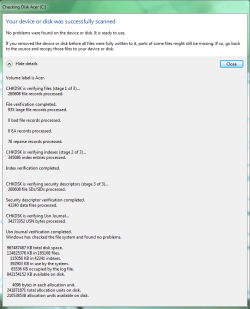
  3. Ran a disk check which found problems with orphaned files, ran it again with /f from startup and problems were resolved. Hard drive healthy
TZ -

  1. Ran your command, but it only came up with the IE not a valid Win32 application window again
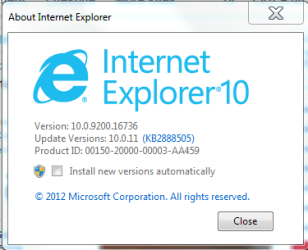
  2. Followed the tutorial you linked me to to uninstall IE11, and it appears to have worked perfectly (Option 1), thanks to Shawn. Got back IE 10 (not 9 as I thought), seems to work fine
I will Mark Solved very shortly but have 2 quick questions, one of them perhaps off-thread:

  1. Do you think I should try to install IE11 again (ie what's better over IE 10)
  2. If I have any probs that require me to restore to factory settings, is it sufficient to backup c:\windows\SoftwareDistribution\Download in order to replace all the KB files &c? I can replace everything else easily enough
Thanks very much for your help, & patience with a newbie. Attached are snipped shots that give me happy thoughts (Happy, Happy, Happy ...trailing off)Capture 2 - check disk option f checked chkdsk run from startup.PNG

Capture 3 - AOK by sfc.PNG

Capture 4 - IE10 back AOK.PNG
 

My Computer My Computer

At a glance

Windows 7 Home Premium 64bit2.80 gigahertz Intel Core i7-2600S8 GBNVIDIA GeForce GT 420 [Display adapter]
Computer type
PC/Desktop
Computer Manufacturer/Model Number
Acer Aspire Z5761
OS
Windows 7 Home Premium 64bit
CPU
2.80 gigahertz Intel Core i7-2600S
Motherboard
Acer Aspire Z5761
Memory
8 GB
Graphics Card(s)
NVIDIA GeForce GT 420 [Display adapter]
Hard Drives
WDC WD20EARS-22MVWB0 [Hard drive] (2000.40 GB) partitioned into two (2) drives of one TB each
Antivirus
Ashampoo AntiVirus 2014 v1.0.8
Browser
Mozilla Firefox v27.0.1
Hi thanks for the update,
Shampoo might be flagging or blocking internet explorer because of this not to be released until 3/11/14,
So I might just hang loose until the new versions are released,
http://www.sevenforums.com/security-news/324356-microsoft-security-bulletin-advance-notification-march-11th-2014-a.html
I personally prefer ie10 over ie11 and it's more secure than ie9,
This is a 64 bit bit Run command but you have to make sure the " on the front of the string is copied as well or it's likely to fail, "C:\Program Files\Internet Explorer\iexplore.exe" -extoff
This one should of worked too, iexplore.exe -extoff
But you have to make sure there's a space between e and - in the string,
I'll leave the check disk evaluation to someone else able to read it,
If Malwarebytes found something please see this and post it's scan results,
Review Jacee’s instructions to run Adwcleaner here on post#7,
Ignore the title of the thread,
http://www.sevenforums.com/system-security/316404-instant-savings-app.html
Or download it from bleepingcomputer.com
Screen shot of the download button to use for Adwcleaner
http://www.bleepingcomputer.com/download/adwcleaner/
Cheers.
 

My Computer My Computer

At a glance

Win-7-Pro64bit 7-H-Prem-64biti7-5930K 2nd i9-9940x both water blocked VRM'...Trident-z 3200C14 2nd Trident-z 3600C16EVGA 1080ti ftw3 2nd Titan Xp both water blocked
Computer type
PC/Desktop
Computer Manufacturer/Model Number
Custom assembled by me :}
OS
Win-7-Pro64bit 7-H-Prem-64bit
CPU
i7-5930K 2nd i9-9940x both water blocked VRM's too
Motherboard
ASUS SABERTOOTH X99 2nd ASUS x299 Apex
Memory
Trident-z 3200C14 2nd Trident-z 3600C16
Graphics Card(s)
EVGA 1080ti ftw3 2nd Titan Xp both water blocked
Sound Card
Built-in Realtek
Monitor(s) Displays
1-AOC G2460PG 24"G-Sync 144Hz/ 2nd 1-ASUS VG248QE 24" 144Hz
Screen Resolution
1920 x 1080 144Hz
Hard Drives
2-Samsung M.2 Evo & Evo Plus
2-Samsung 850 EVO 500GB SSD's/ 3-2.5 W.D. Black 1tb-&3-1tb/3-3.5 WD Black 1tb hdd's
PSU
EVGA SuperNOVA 1000-P2 2nd 1200-P2
Case
2-Corsair Obsidian Series 450D Black ATX Mid Tower
Cooling
Custom water loops
Keyboard
Logitech G710+/ 2nd Logitech G910
Mouse
2-RedDragon M901 Perdition 16400 dpi Gaming mouse = wired
Internet Speed
Comcast Ping 19ms 89.31mbps download speed 6.12mbps upload
Antivirus
Malwarebytes Pro/ Superantispyware Pro
Browser
FireFox & Pale moon
Other Info
2nd ASUS X299 Apex/Intel i9-9940x with Custom water loop/7H-Prem-x64/Corsair 450D case/Ram Trident-z 3600C16 4x8gb / Samsung970Evo plus 500gb SSD/Dual ssd EZ swap evo/PSU EVGA SuperNova 1200w-P2 80+Platinum/GPU Titan Xp /8-ML-140 on push-pull on 2-280GTX rads
TZ - Ashampoo A-V was only installed 1st March, post-dating probs with IE so it won't be the cause.

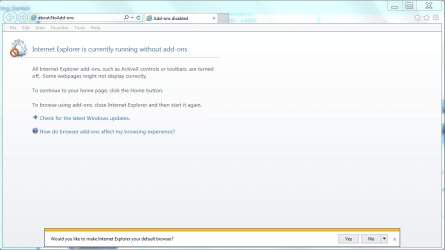
As mentioned "Ran your command, but it only came up with the IE not a valid Win32 application window again" was the case previously, now, it comes up with the attached screenshot from Snipping Tool.

Also enclosed is Malwarebytes log. I have adwcleaner on another of my computers, running XP Media Center Edition, so I'll run it on this one or download a Win 7 version if needed, I found it quite good.

Thanks for the tips of IE 10 over 11, I might stick with IE10 for a while - "If it ain't broke, don't fix it!"

Cheers

CT
encCapture 5 using -extoff.PNG

View attachment MBAM-log-2014-03-07 (10-58-40).txt
 

My Computer My Computer

At a glance

Windows 7 Home Premium 64bit2.80 gigahertz Intel Core i7-2600S8 GBNVIDIA GeForce GT 420 [Display adapter]
Computer type
PC/Desktop
Computer Manufacturer/Model Number
Acer Aspire Z5761
OS
Windows 7 Home Premium 64bit
CPU
2.80 gigahertz Intel Core i7-2600S
Motherboard
Acer Aspire Z5761
Memory
8 GB
Graphics Card(s)
NVIDIA GeForce GT 420 [Display adapter]
Hard Drives
WDC WD20EARS-22MVWB0 [Hard drive] (2000.40 GB) partitioned into two (2) drives of one TB each
Antivirus
Ashampoo AntiVirus 2014 v1.0.8
Browser
Mozilla Firefox v27.0.1
Okay that is the window that's supposed to open Nice to see it finally did :D

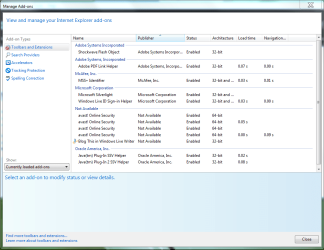
If you get a chance post some screen shots of your Show all add-ons pages especially the Toolbars and extensions pages,
You can click the Winkey and type in the search box Manage addons and click on manage browser add-ons,
On the bottom left you'll see Show click on it and show all add-ons will appear,
Shockwave-disable.JPG

Lets see what's listed,
Cheers.
Owe p.s. yes if it's not broken :D
 

My Computer My Computer

At a glance

Win-7-Pro64bit 7-H-Prem-64biti7-5930K 2nd i9-9940x both water blocked VRM'...Trident-z 3200C14 2nd Trident-z 3600C16EVGA 1080ti ftw3 2nd Titan Xp both water blocked
Computer type
PC/Desktop
Computer Manufacturer/Model Number
Custom assembled by me :}
OS
Win-7-Pro64bit 7-H-Prem-64bit
CPU
i7-5930K 2nd i9-9940x both water blocked VRM's too
Motherboard
ASUS SABERTOOTH X99 2nd ASUS x299 Apex
Memory
Trident-z 3200C14 2nd Trident-z 3600C16
Graphics Card(s)
EVGA 1080ti ftw3 2nd Titan Xp both water blocked
Sound Card
Built-in Realtek
Monitor(s) Displays
1-AOC G2460PG 24"G-Sync 144Hz/ 2nd 1-ASUS VG248QE 24" 144Hz
Screen Resolution
1920 x 1080 144Hz
Hard Drives
2-Samsung M.2 Evo & Evo Plus
2-Samsung 850 EVO 500GB SSD's/ 3-2.5 W.D. Black 1tb-&3-1tb/3-3.5 WD Black 1tb hdd's
PSU
EVGA SuperNOVA 1000-P2 2nd 1200-P2
Case
2-Corsair Obsidian Series 450D Black ATX Mid Tower
Cooling
Custom water loops
Keyboard
Logitech G710+/ 2nd Logitech G910
Mouse
2-RedDragon M901 Perdition 16400 dpi Gaming mouse = wired
Internet Speed
Comcast Ping 19ms 89.31mbps download speed 6.12mbps upload
Antivirus
Malwarebytes Pro/ Superantispyware Pro
Browser
FireFox & Pale moon
Other Info
2nd ASUS X299 Apex/Intel i9-9940x with Custom water loop/7H-Prem-x64/Corsair 450D case/Ram Trident-z 3600C16 4x8gb / Samsung970Evo plus 500gb SSD/Dual ssd EZ swap evo/PSU EVGA SuperNova 1200w-P2 80+Platinum/GPU Titan Xp /8-ML-140 on push-pull on 2-280GTX rads
Good Morning (Saturday, where I live), it's 7:45am here & I'm about to get my 2nd coffee for the day. So you're 16 hours behind us.

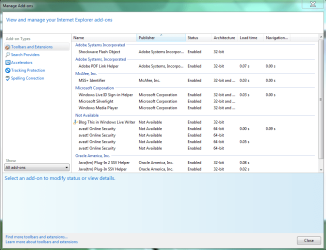
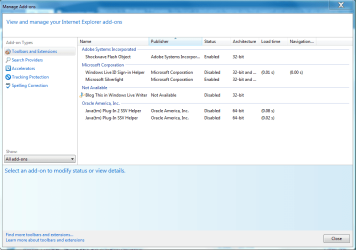
Attached is the screenshot, current addons is the same as show all details, reference to Avast was when I was using it before Ashampoo I guess. Enjoy
 

Attachments

  • Capture 6 - IE10 Addons.PNG
    Capture 6 - IE10 Addons.PNG
    41.1 KB · Views: 0

My Computer My Computer

At a glance

Windows 7 Home Premium 64bit2.80 gigahertz Intel Core i7-2600S8 GBNVIDIA GeForce GT 420 [Display adapter]
Computer type
PC/Desktop
Computer Manufacturer/Model Number
Acer Aspire Z5761
OS
Windows 7 Home Premium 64bit
CPU
2.80 gigahertz Intel Core i7-2600S
Motherboard
Acer Aspire Z5761
Memory
8 GB
Graphics Card(s)
NVIDIA GeForce GT 420 [Display adapter]
Hard Drives
WDC WD20EARS-22MVWB0 [Hard drive] (2000.40 GB) partitioned into two (2) drives of one TB each
Antivirus
Ashampoo AntiVirus 2014 v1.0.8
Browser
Mozilla Firefox v27.0.1
Hi,
Your set on Currently Loaded add-ons Not Show All Add-ons like my screen shot,
You have quite a few Avast security add-ons enabled = Please Disable them,
Also how exactly did you Uninstall Avast ?
Did you use this uninstaller tool if not please do,
avast! Uninstall Utility | Download aswClear for avast! Removal

Java is also taking a bit long to activate 0.08 which there's 2-32 bit listings ?
http://www.java.com/en/download/faq/remove_olderversions.xml
http://www.java.com/en/download/help/uninstall_java.xml
Interesting reads,
http://securitygarden.blogspot.com/2013/01/java-zero-day-again-time-to.html
http://blogs.technet.com/b/mmpc/archive/2013/04/16/how-to-protect-your-computer-against-dangerous-java-applets.aspx

You also have a Mcafee add-on enabled how exactly was it Uninstalled Please Disable it and use this Uninstaller,
How to uninstall or reinstall supported McAfee products using the Consumer Products Removal tool (MCPR)

Adobe pdf link helper is also taking a bit long to activate Please disable it and uninstall Adobe reader XI I guess is what you have installed,
You'll find it in Uninstall a program which you can type that in the start menu search box.
 
Last edited:

My Computer My Computer

At a glance

Win-7-Pro64bit 7-H-Prem-64biti7-5930K 2nd i9-9940x both water blocked VRM'...Trident-z 3200C14 2nd Trident-z 3600C16EVGA 1080ti ftw3 2nd Titan Xp both water blocked
Computer type
PC/Desktop
Computer Manufacturer/Model Number
Custom assembled by me :}
OS
Win-7-Pro64bit 7-H-Prem-64bit
CPU
i7-5930K 2nd i9-9940x both water blocked VRM's too
Motherboard
ASUS SABERTOOTH X99 2nd ASUS x299 Apex
Memory
Trident-z 3200C14 2nd Trident-z 3600C16
Graphics Card(s)
EVGA 1080ti ftw3 2nd Titan Xp both water blocked
Sound Card
Built-in Realtek
Monitor(s) Displays
1-AOC G2460PG 24"G-Sync 144Hz/ 2nd 1-ASUS VG248QE 24" 144Hz
Screen Resolution
1920 x 1080 144Hz
Hard Drives
2-Samsung M.2 Evo & Evo Plus
2-Samsung 850 EVO 500GB SSD's/ 3-2.5 W.D. Black 1tb-&3-1tb/3-3.5 WD Black 1tb hdd's
PSU
EVGA SuperNOVA 1000-P2 2nd 1200-P2
Case
2-Corsair Obsidian Series 450D Black ATX Mid Tower
Cooling
Custom water loops
Keyboard
Logitech G710+/ 2nd Logitech G910
Mouse
2-RedDragon M901 Perdition 16400 dpi Gaming mouse = wired
Internet Speed
Comcast Ping 19ms 89.31mbps download speed 6.12mbps upload
Antivirus
Malwarebytes Pro/ Superantispyware Pro
Browser
FireFox & Pale moon
Other Info
2nd ASUS X299 Apex/Intel i9-9940x with Custom water loop/7H-Prem-x64/Corsair 450D case/Ram Trident-z 3600C16 4x8gb / Samsung970Evo plus 500gb SSD/Dual ssd EZ swap evo/PSU EVGA SuperNova 1200w-P2 80+Platinum/GPU Titan Xp /8-ML-140 on push-pull on 2-280GTX rads
IE 11 installed but not able to open it

ThrashZone - see below
[FONT=Arial, sans-serif]
[/FONT]
[FONT=Arial, sans-serif]Your set on Currently Loaded add-ons Not Show All Add-ons like my screen shot[/FONT]


[FONT=Arial, sans-serif]As mentioned, my Currently Loaded is identical with All Add-ons (attached), because I have made little use of IE[/FONT]
[FONT=Arial, sans-serif]
You have quite a few Avast security add-ons enabled = Please Disable them - Done
[/FONT]

[FONT=Arial, sans-serif]Also how exactly did you Uninstall Avast ?
Did you use this uninstaller tool if not please do,
avast! Uninstall Utility | Download aswClear for avast! Removal
[/FONT]

[FONT=Arial, sans-serif]I did, a week ago or more. It can only be run once, as the first thing it asks for is the directory in which Avast is stored, and that is now gone. These add-on references must have been placed in IE 10 when Avast was installed, but missed in the uninstal when neither IE 10 nor 11 was fully functional. They were effectively invisible or inaccessible to the tool.[/FONT]
[FONT=Arial, sans-serif]
Java is also taking a bit long to activate 0.08 which there's 2-32 bit listings ?
[/FONT][FONT=Arial, sans-serif]http://www.java.com/en/download/faq/remove_olderversions.xml[/FONT][FONT=Arial, sans-serif]
[/FONT][FONT=Arial, sans-serif]http://www.java.com/en/download/help/uninstall_java.xml[/FONT][FONT=Arial, sans-serif]
[/FONT][FONT=Arial, sans-serif]Interesting reads,[/FONT][FONT=Arial, sans-serif]
[/FONT][FONT=Arial, sans-serif]http://securitygarden.blogspot.com/2013/01/java-zero-day-again-time-to.html[/FONT][FONT=Arial, sans-serif]
[/FONT][FONT=Arial, sans-serif]http://blogs.technet.com/b/mmpc/archive/2013/04/16/how-to-protect-your-computer-against-dangerous-java-applets.aspx[/FONT][FONT=Arial, sans-serif]

[/FONT][FONT=Arial, sans-serif]I will attend to the Java later today/tomorrow & report back. Tks for the interesting reads.[/FONT]


[FONT=Arial, sans-serif]You also have a Mcafee add-on enabled how exactly was it Uninstalled Please Disable it and use this Uninstaller, How to uninstall or reinstall supported McAfee products using the Consumer Products Removal tool (MCPR)
[/FONT]

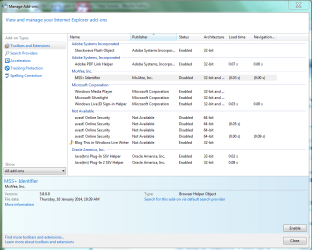
[FONT=Arial, sans-serif]McAfee Security Scan Plus shipped with the unit. I have had no use for it, but it pops up with a warning when my A-V and/or Firewall is temporarily disabled whilst installing a sensitive app. I have disabled the add-on, see attached. Is there a reason to remove it? If so, I will do so and report back.[/FONT]
[FONT=Arial, sans-serif]
Adobe pdf link helper is also taking a bit long to activate Please disable it and uninstall Adobe reader XI I guess is what you have installed, You'll find it in Uninstall a program which you can type that in the start menu search box.[/FONT]


[FONT=Arial, sans-serif]Adobe 9, not XI, currently. If I uninstal it should I then install XI?[/FONT]


[FONT=Arial, sans-serif]Cheers for now.[/FONT]
 

Attachments

  • Capture 7 - All IE Addons.PNG
    Capture 7 - All IE Addons.PNG
    40.6 KB · Views: 0
  • Capture 8 - Manage Addons some Disabled.PNG
    Capture 8 - Manage Addons some Disabled.PNG
    46.6 KB · Views: 0

My Computer My Computer

At a glance

Windows 7 Home Premium 64bit2.80 gigahertz Intel Core i7-2600S8 GBNVIDIA GeForce GT 420 [Display adapter]
Computer type
PC/Desktop
Computer Manufacturer/Model Number
Acer Aspire Z5761
OS
Windows 7 Home Premium 64bit
CPU
2.80 gigahertz Intel Core i7-2600S
Motherboard
Acer Aspire Z5761
Memory
8 GB
Graphics Card(s)
NVIDIA GeForce GT 420 [Display adapter]
Hard Drives
WDC WD20EARS-22MVWB0 [Hard drive] (2000.40 GB) partitioned into two (2) drives of one TB each
Antivirus
Ashampoo AntiVirus 2014 v1.0.8
Browser
Mozilla Firefox v27.0.1
Reset should get rid of the pesky Avast add-ons if the process here does go as it states report where it fails,
Use the start menu search method,
Reset process first opening Internet explorer
At worst you may have to re-install Avast and make sure the add-ons are disabled before uninstalling it as the uninstaller suggests,
Mcafee usually blocks silently so yes getting rid of it is highly recommended,
Yes after Uninstall adobe 9 if all you need is a reader XI gets that done so install it,
I asked for help with the odd Avast and Mcafee entries,
Hang loose until help gets here,
But you can reset and report back with what add-ons are left,
Cheers.

P.S.
What utility did you use to uninstall Avast or look for entries of it ?
 
Last edited:

My Computer My Computer

At a glance

Win-7-Pro64bit 7-H-Prem-64biti7-5930K 2nd i9-9940x both water blocked VRM'...Trident-z 3200C14 2nd Trident-z 3600C16EVGA 1080ti ftw3 2nd Titan Xp both water blocked
Computer type
PC/Desktop
Computer Manufacturer/Model Number
Custom assembled by me :}
OS
Win-7-Pro64bit 7-H-Prem-64bit
CPU
i7-5930K 2nd i9-9940x both water blocked VRM's too
Motherboard
ASUS SABERTOOTH X99 2nd ASUS x299 Apex
Memory
Trident-z 3200C14 2nd Trident-z 3600C16
Graphics Card(s)
EVGA 1080ti ftw3 2nd Titan Xp both water blocked
Sound Card
Built-in Realtek
Monitor(s) Displays
1-AOC G2460PG 24"G-Sync 144Hz/ 2nd 1-ASUS VG248QE 24" 144Hz
Screen Resolution
1920 x 1080 144Hz
Hard Drives
2-Samsung M.2 Evo & Evo Plus
2-Samsung 850 EVO 500GB SSD's/ 3-2.5 W.D. Black 1tb-&3-1tb/3-3.5 WD Black 1tb hdd's
PSU
EVGA SuperNOVA 1000-P2 2nd 1200-P2
Case
2-Corsair Obsidian Series 450D Black ATX Mid Tower
Cooling
Custom water loops
Keyboard
Logitech G710+/ 2nd Logitech G910
Mouse
2-RedDragon M901 Perdition 16400 dpi Gaming mouse = wired
Internet Speed
Comcast Ping 19ms 89.31mbps download speed 6.12mbps upload
Antivirus
Malwarebytes Pro/ Superantispyware Pro
Browser
FireFox & Pale moon
Other Info
2nd ASUS X299 Apex/Intel i9-9940x with Custom water loop/7H-Prem-x64/Corsair 450D case/Ram Trident-z 3600C16 4x8gb / Samsung970Evo plus 500gb SSD/Dual ssd EZ swap evo/PSU EVGA SuperNova 1200w-P2 80+Platinum/GPU Titan Xp /8-ML-140 on push-pull on 2-280GTX rads
Hi, further to the above:

  1. Uninstalled Java, reinstalled (still v7 Upd 51) 64-bit versions now appear in IE, times still the same, only the order (1 & 2) is reversed
  2. Read your Reads, thanks. I use Open Office v4.0.1, and have also downloaded Libre Office to compare. Been using OO for over 10 years now, and like it. Both require Java for their Base DB, and a few other things.
Later
PS I have Firefox set up to ask to use Java
 

My Computer My Computer

At a glance

Windows 7 Home Premium 64bit2.80 gigahertz Intel Core i7-2600S8 GBNVIDIA GeForce GT 420 [Display adapter]
Computer type
PC/Desktop
Computer Manufacturer/Model Number
Acer Aspire Z5761
OS
Windows 7 Home Premium 64bit
CPU
2.80 gigahertz Intel Core i7-2600S
Motherboard
Acer Aspire Z5761
Memory
8 GB
Graphics Card(s)
NVIDIA GeForce GT 420 [Display adapter]
Hard Drives
WDC WD20EARS-22MVWB0 [Hard drive] (2000.40 GB) partitioned into two (2) drives of one TB each
Antivirus
Ashampoo AntiVirus 2014 v1.0.8
Browser
Mozilla Firefox v27.0.1
[FONT=Arial, sans-serif]Reset should get rid of the pesky Avast add-ons if the process here does go as it states report where it fails,
Use the start menu search method,
Reset process first opening Internet explorer
[/FONT]

[FONT=Arial, sans-serif]Done, as you said. Didn't get rid of them, see below.[/FONT]


[FONT=Arial, sans-serif]At worst you may have to re-install Avast and make sure the add-ons are disabled before uninstalling it as the uninstaller suggests,[/FONT]


[FONT=Arial, sans-serif]No thanks – I am perfectly happy with Ashampoo AntiVirus currently. With the Avast!, I initially installed the Free version v 2014.9.0.2008 on 28th November 2013. It was updated automatically (not sure of date) to 2014.9.0.2011, the 4th February 2014, it updated to 2014.9.0.2013.[/FONT]


[FONT=Arial, sans-serif]Not sure when my IE probs started, but it was certainly around 4th February I started to notice glitches. Other sources on the Net appear to have people experiencing problems with the combo of Avast & IE v's 8 though 11, XP to Wndows 8, with the Avast versions 2014.9.0.2008 through 2014.9.0.2011 and maybe more I haven't found. Therefore I won't try to reinvent the wheel, and stick with what I have.[/FONT]


[FONT=Arial, sans-serif]After all, Firefox is my default browser of choice.[/FONT]
[FONT=Arial, sans-serif]
Mcafee usually blocks silently so yes getting rid of it is highly recommended,[/FONT]


[FONT=Arial, sans-serif]Done[/FONT]
[FONT=Arial, sans-serif]
Yes after Uninstall adobe 9 if all you need is a reader XI gets that done so install it,[/FONT]


[FONT=Arial, sans-serif]Done, but with an accidental outcome vis-a-vis add-ons installed. I had re-invoked Avast Clear tool to my desktop, switched to Safe Mode and ran as Admin, after making IE 10 my default. Cleaned out an empty directory "Avast Software" in C:\Programs, but didn't work on the IE add-ons. Enabled the Add-ons & tried again – no joy. Problem appears to be the "Not Available" status, hence you might suggest reinstalling Avast, but I won't, as per above.[/FONT]


[FONT=Arial, sans-serif]I used Uninstall Programs to remove Adobe Reader 9, then out of habit used Firefox to download & install Adobe Reader XI v11.0.06. Of course, it installed a Plug-In in Firefox, but nada in IE. Not so smart as they think they are. Not worried.[/FONT]
[FONT=Arial, sans-serif]
I asked for help with the odd Avast and Mcafee entries,
Hang loose until help gets here,[/FONT]


[FONT=Arial, sans-serif]Thanks – if the cavalry have any bright ideas about the disabled Avast add-ons, I'd welcome them. Other than that, should I "Mark Solved", now?[/FONT]
[FONT=Arial, sans-serif]
But you can reset and report back with what add-ons are left,[/FONT]


[FONT=Arial, sans-serif]Done[/FONT]


[FONT=Arial, sans-serif]Cheers[/FONT]
[FONT=Arial, sans-serif]enc[/FONT]
 

Attachments

  • Capture 12 - Avast Uninstall.PNG
    Capture 12 - Avast Uninstall.PNG
    7 KB · Views: 21
  • Capture 13 - Adobe Plugin.PNG
    Capture 13 - Adobe Plugin.PNG
    281.9 KB · Views: 1
  • Capture 14 - IE 10 Now.PNG
    Capture 14 - IE 10 Now.PNG
    31.9 KB · Views: 1

My Computer My Computer

At a glance

Windows 7 Home Premium 64bit2.80 gigahertz Intel Core i7-2600S8 GBNVIDIA GeForce GT 420 [Display adapter]
Computer type
PC/Desktop
Computer Manufacturer/Model Number
Acer Aspire Z5761
OS
Windows 7 Home Premium 64bit
CPU
2.80 gigahertz Intel Core i7-2600S
Motherboard
Acer Aspire Z5761
Memory
8 GB
Graphics Card(s)
NVIDIA GeForce GT 420 [Display adapter]
Hard Drives
WDC WD20EARS-22MVWB0 [Hard drive] (2000.40 GB) partitioned into two (2) drives of one TB each
Antivirus
Ashampoo AntiVirus 2014 v1.0.8
Browser
Mozilla Firefox v27.0.1
Once the Avast IE add-ons are removed, you can go back to your preferred antivirus app.

ThrashZone and I have been discussing (via PMs) things for you to try. The suggestion to temporarily install Avast again is just to get rid of the IE add-ons:

Uninstall current antivirus app
restart computer
install Avast
restart computer
uninstall Avast*
restart computer

*please use normal uninstall method - not the removal tool


IF the Avast add-ons are still in IE, then please install/use Microsoft Security Essentials while we troubleshoot the IE issue.

IF the Avast IE add-ons have been removed, then you can go back to your preferred antivirus app.
 

My Computer My Computer

At a glance

W7 Pro SP1 64biti78GBIntel HD Graphics
Computer type
Laptop
Computer Manufacturer/Model Number
Employer provided Dell Latitude
OS
W7 Pro SP1 64bit
CPU
i7
Memory
8GB
Graphics Card(s)
Intel HD Graphics
Hard Drives
crappy SSD
Antivirus
Employer mandated Symantec Endpoint Protection
Browser
Pale Moon 64bit, IE11 64bit & Chrome 64bit
So, enter the cavalry. Hello. Just a quick reply, as the box says. I am going to be pretty busy between now and the weekend, so will give your suggestions a try then. Meanwhile, try these out for size:

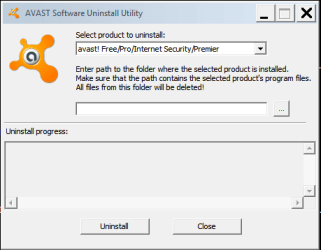
  1. I have used Avast Clear a second time. In order to do so, I created an empty folder in C:\Programs called Avast Software (as previously existed), copied Avast Clear to the desktop, restarted to Safe Mode, ran as Admin, &c
  2. It removed the dud folder, as expected, no joys on the Avast add-ons, but I noticed in the process that I may have made an error first time I invoked it. As enclosed shows, there are three (3) options, default is Avast! Windows Home Server Edition. I may have applied that the first time, rather than the Free option.
  3. I also noticed after the first use of it, that there were still quite a number of Registry entries to Avast left (using Regedit) in Registry. If I backed up Registry, then deleted all references to Avast, that might solve the problem OR
  4. I could add an add-on, any add-on, then search for a reference in Registry to determine where it is held, then specifically target where Avast's might be held. Easier than monkeying with the A-Vs?
  5. Is there actually a problem with leaving the orphaned Avast add-ons in IE? They are Not Available, and disabled. Or is some malware likely to make use of them? I have Malwarebytes Anti-Malware, and a few other tools.
Cheers until the weekend

CT
enc
 

My Computer My Computer

At a glance

Windows 7 Home Premium 64bit2.80 gigahertz Intel Core i7-2600S8 GBNVIDIA GeForce GT 420 [Display adapter]
Computer type
PC/Desktop
Computer Manufacturer/Model Number
Acer Aspire Z5761
OS
Windows 7 Home Premium 64bit
CPU
2.80 gigahertz Intel Core i7-2600S
Motherboard
Acer Aspire Z5761
Memory
8 GB
Graphics Card(s)
NVIDIA GeForce GT 420 [Display adapter]
Hard Drives
WDC WD20EARS-22MVWB0 [Hard drive] (2000.40 GB) partitioned into two (2) drives of one TB each
Antivirus
Ashampoo AntiVirus 2014 v1.0.8
Browser
Mozilla Firefox v27.0.1
OOPS - error on an RTF file, will save as Word
 

My Computer My Computer

At a glance

Windows 7 Home Premium 64bit2.80 gigahertz Intel Core i7-2600S8 GBNVIDIA GeForce GT 420 [Display adapter]
Computer type
PC/Desktop
Computer Manufacturer/Model Number
Acer Aspire Z5761
OS
Windows 7 Home Premium 64bit
CPU
2.80 gigahertz Intel Core i7-2600S
Motherboard
Acer Aspire Z5761
Memory
8 GB
Graphics Card(s)
NVIDIA GeForce GT 420 [Display adapter]
Hard Drives
WDC WD20EARS-22MVWB0 [Hard drive] (2000.40 GB) partitioned into two (2) drives of one TB each
Antivirus
Ashampoo AntiVirus 2014 v1.0.8
Browser
Mozilla Firefox v27.0.1

My Computer My Computer

At a glance

Windows 7 Home Premium 64bit2.80 gigahertz Intel Core i7-2600S8 GBNVIDIA GeForce GT 420 [Display adapter]
Computer type
PC/Desktop
Computer Manufacturer/Model Number
Acer Aspire Z5761
OS
Windows 7 Home Premium 64bit
CPU
2.80 gigahertz Intel Core i7-2600S
Motherboard
Acer Aspire Z5761
Memory
8 GB
Graphics Card(s)
NVIDIA GeForce GT 420 [Display adapter]
Hard Drives
WDC WD20EARS-22MVWB0 [Hard drive] (2000.40 GB) partitioned into two (2) drives of one TB each
Antivirus
Ashampoo AntiVirus 2014 v1.0.8
Browser
Mozilla Firefox v27.0.1
Last edited:

My Computer My Computer

At a glance

Win-7-Pro64bit 7-H-Prem-64biti7-5930K 2nd i9-9940x both water blocked VRM'...Trident-z 3200C14 2nd Trident-z 3600C16EVGA 1080ti ftw3 2nd Titan Xp both water blocked
Computer type
PC/Desktop
Computer Manufacturer/Model Number
Custom assembled by me :}
OS
Win-7-Pro64bit 7-H-Prem-64bit
CPU
i7-5930K 2nd i9-9940x both water blocked VRM's too
Motherboard
ASUS SABERTOOTH X99 2nd ASUS x299 Apex
Memory
Trident-z 3200C14 2nd Trident-z 3600C16
Graphics Card(s)
EVGA 1080ti ftw3 2nd Titan Xp both water blocked
Sound Card
Built-in Realtek
Monitor(s) Displays
1-AOC G2460PG 24"G-Sync 144Hz/ 2nd 1-ASUS VG248QE 24" 144Hz
Screen Resolution
1920 x 1080 144Hz
Hard Drives
2-Samsung M.2 Evo & Evo Plus
2-Samsung 850 EVO 500GB SSD's/ 3-2.5 W.D. Black 1tb-&3-1tb/3-3.5 WD Black 1tb hdd's
PSU
EVGA SuperNOVA 1000-P2 2nd 1200-P2
Case
2-Corsair Obsidian Series 450D Black ATX Mid Tower
Cooling
Custom water loops
Keyboard
Logitech G710+/ 2nd Logitech G910
Mouse
2-RedDragon M901 Perdition 16400 dpi Gaming mouse = wired
Internet Speed
Comcast Ping 19ms 89.31mbps download speed 6.12mbps upload
Antivirus
Malwarebytes Pro/ Superantispyware Pro
Browser
FireFox & Pale moon
Other Info
2nd ASUS X299 Apex/Intel i9-9940x with Custom water loop/7H-Prem-x64/Corsair 450D case/Ram Trident-z 3600C16 4x8gb / Samsung970Evo plus 500gb SSD/Dual ssd EZ swap evo/PSU EVGA SuperNova 1200w-P2 80+Platinum/GPU Titan Xp /8-ML-140 on push-pull on 2-280GTX rads
[FONT=Arial, sans-serif]Regret the delay, busy this weekend, as mentioned.[/FONT]


[FONT=Arial, sans-serif]"Not sure what this is supposed to show here ? "[/FONT]


[FONT=Arial, sans-serif](My) Thread #15 Item 2. refers. I believe it likely I boo-boo'ed when first using Avast Clear utility tool. GIGO – Garbage In, Garbage Out, and the tool was not intuitive enough to remove all traces.[/FONT]


[FONT=Arial, sans-serif]Did you redownload avast ?[/FONT]


[FONT=Arial, sans-serif]No. As mentioned, too much of a pain to uninstall my Ashampoo A-V, reinstall Avast, then uninstall it after problems (POSSIBLY) solved, then reinstall Ashampoo, all for a Browser I seldom use (other than if there was Malware afoot!). Instead I did some lateral thinking. See below.[/FONT]


[FONT=Arial, sans-serif]"The only other option I see besides re-downloading avast and then reviewing the Manage add-ons Show All add-ons to see if they can be Disabled then,..."[/FONT]


[FONT=Arial, sans-serif]No, see Lateral Thinking, below, and my Thread #15.[/FONT]


[FONT=Arial, sans-serif]"Is to reset ie which I've already posted the reset link,
[/FONT][FONT=Arial, sans-serif]Reset process first opening Internet explorer[/FONT][FONT=Arial, sans-serif]http://www.sevenforums.com/tutorials/1222-internet-explorer-reset.html[/FONT][FONT=Arial, sans-serif]
After your sure the add-ons are disabled, Uninstall avast."
[/FONT]


[FONT=Arial, sans-serif]Nope, done twice (Reset), no effect, other than to have to re-option displaying the Menu bar, &c. And having to choose Recommended Security & Compatibility Settings when prompted, &c. See enclosed. BTW, I answered, in (my) Thread #13 that I had tried Reset, to no avail.[/FONT]


[FONT=Arial, sans-serif]LATERAL THINKING[/FONT]


[FONT=Arial, sans-serif]My Thread #15, Items 3. And 4. referred to using Regedit to troubleshoot the probs.[/FONT]


[FONT=Arial, sans-serif]I had also mentioned in my Thread #13,[/FONT]


[FONT=Arial, sans-serif]No thanks – I am perfectly happy with Ashampoo AntiVirus currently.[/FONT]


[FONT=Arial, sans-serif]I have used Ashampoo since 2002, with their [/FONT]Ashampoo® UnInstaller Suite
Version v1.32, 2002/09/03


[FONT=Arial, sans-serif]I get free software with them now, because of a rewards system, and I had downloaded the latest Uninstaller 5 in early February but not installed it yet. As with motor vehicle accessories, what used to be an optional extra, at a cost, is now standard, and so with Ashampoo's Uninstaller. It now comes with a set of tools, including Registry ones, Orphaned this & that.[/FONT]


[FONT=Arial, sans-serif]I backed up my Registry this morning, with a view to tackling the problem with Regedit, but on reviewing our Post threads, thought of the Ashampoo option. I installed UI5, hit the Tools section, found one I wanted, and the rest is history, as they say.[/FONT]


[FONT=Arial, sans-serif]The enclosed show the outcome, and a couple of warm boots and a cold one indicate that all is well.[/FONT]


[FONT=Arial, sans-serif]Cheers[/FONT]
[FONT=Arial, sans-serif]enc[/FONT]


[FONT=Arial, sans-serif]PS Should I Mark Solved now? Have a good weekend, I will.[/FONT]
 

Attachments

  • Capture 20 - All Add-ons after Reset IE.PNG
    Capture 20 - All Add-ons after Reset IE.PNG
    36.4 KB · Views: 0
  • Capture 23 - Security Settings IE after Reset.PNG
    Capture 23 - Security Settings IE after Reset.PNG
    22.6 KB · Views: 10
  • Capture 24 - Avast References gone.PNG
    Capture 24 - Avast References gone.PNG
    32.7 KB · Views: 0

My Computer My Computer

At a glance

Windows 7 Home Premium 64bit2.80 gigahertz Intel Core i7-2600S8 GBNVIDIA GeForce GT 420 [Display adapter]
Computer type
PC/Desktop
Computer Manufacturer/Model Number
Acer Aspire Z5761
OS
Windows 7 Home Premium 64bit
CPU
2.80 gigahertz Intel Core i7-2600S
Motherboard
Acer Aspire Z5761
Memory
8 GB
Graphics Card(s)
NVIDIA GeForce GT 420 [Display adapter]
Hard Drives
WDC WD20EARS-22MVWB0 [Hard drive] (2000.40 GB) partitioned into two (2) drives of one TB each
Antivirus
Ashampoo AntiVirus 2014 v1.0.8
Browser
Mozilla Firefox v27.0.1
It is probably okay to keep those Avast add-ons attached to IE. Disabling them should prevent IE from caring about them.

I'm not a big fan of 3rd party uninstallers; they are mostly snake oil. The remnants that they find/clean are (for the most part) harmless. And sometime, they rip out too much. But, to each his own.

I'll let ThrashZone comment on marking this as solved :-)
 

My Computer My Computer

At a glance

W7 Pro SP1 64biti78GBIntel HD Graphics
Computer type
Laptop
Computer Manufacturer/Model Number
Employer provided Dell Latitude
OS
W7 Pro SP1 64bit
CPU
i7
Memory
8GB
Graphics Card(s)
Intel HD Graphics
Hard Drives
crappy SSD
Antivirus
Employer mandated Symantec Endpoint Protection
Browser
Pale Moon 64bit, IE11 64bit & Chrome 64bit
Back
Top