
Solved IE 11 installed but NOT able to open it

Hi,
Well you've gotten rid of the Mcafee and finally Avast add-ons :thumbsup:
Not exactly sure why Blog this in windows live writer is Unavailable ?
But I would give reset one more attempt to see if it disappears as well,
Both Java'a are 64 bit seems good enough,

I would refer to your Extensions in Firefox and see what is listed there/ resetting Firefox would get the unavailable ones in it's Plug-ins to disappear,

Otherwise how is Internet explorer operating now ?
If your not using Java = Disable those add-ons one is still showing 0.08 to activate which would trigger a Speed up browsing popup to disable add-ons,
Cheers.
 

My Computer My Computer

At a glance

Win-7-Pro64bit 7-H-Prem-64biti7-5930K 2nd i9-9940x both water blocked VRM'...Trident-z 3200C14 2nd Trident-z 3600C16EVGA 1080ti ftw3 2nd Titan Xp both water blocked
Computer type
PC/Desktop
Computer Manufacturer/Model Number
Custom assembled by me :}
OS
Win-7-Pro64bit 7-H-Prem-64bit
CPU
i7-5930K 2nd i9-9940x both water blocked VRM's too
Motherboard
ASUS SABERTOOTH X99 2nd ASUS x299 Apex
Memory
Trident-z 3200C14 2nd Trident-z 3600C16
Graphics Card(s)
EVGA 1080ti ftw3 2nd Titan Xp both water blocked
Sound Card
Built-in Realtek
Monitor(s) Displays
1-AOC G2460PG 24"G-Sync 144Hz/ 2nd 1-ASUS VG248QE 24" 144Hz
Screen Resolution
1920 x 1080 144Hz
Hard Drives
2-Samsung M.2 Evo & Evo Plus
2-Samsung 850 EVO 500GB SSD's/ 3-2.5 W.D. Black 1tb-&3-1tb/3-3.5 WD Black 1tb hdd's
PSU
EVGA SuperNOVA 1000-P2 2nd 1200-P2
Case
2-Corsair Obsidian Series 450D Black ATX Mid Tower
Cooling
Custom water loops
Keyboard
Logitech G710+/ 2nd Logitech G910
Mouse
2-RedDragon M901 Perdition 16400 dpi Gaming mouse = wired
Internet Speed
Comcast Ping 19ms 89.31mbps download speed 6.12mbps upload
Antivirus
Malwarebytes Pro/ Superantispyware Pro
Browser
FireFox & Pale moon
Other Info
2nd ASUS X299 Apex/Intel i9-9940x with Custom water loop/7H-Prem-x64/Corsair 450D case/Ram Trident-z 3600C16 4x8gb / Samsung970Evo plus 500gb SSD/Dual ssd EZ swap evo/PSU EVGA SuperNova 1200w-P2 80+Platinum/GPU Titan Xp /8-ML-140 on push-pull on 2-280GTX rads
It is probably okay to keep those Avast add-ons attached to IE. Disabling them should prevent IE from caring about them.

I'm not a big fan of 3rd party uninstallers; they are mostly snake oil. The remnants that they find/clean are (for the most part) harmless. And sometime, they rip out too much. But, to each his own.

I'll let ThrashZone comment on marking this as solved :-)
I should clarify my post above.

It is possible to remove a program from the list of installed Programs and Features without uninstalling the app. The app will run just fine without being in that list. It is also possible to remove add-ons from the list of Toolbars and Extensions without removing the files or the registry entries that attempt to load the files.

I've not studied Uninstaller 5 to know how well it cleans things up, but some of these reviews are unkind. Let's hope that UI5 did more than just hide the problem.

Hopefully, the disabled status that was in place before running UI5 means that nothing will attempt to load the add-ons (if they are indeed still around).
 

My Computer My Computer

At a glance

W7 Pro SP1 64biti78GBIntel HD Graphics
Computer type
Laptop
Computer Manufacturer/Model Number
Employer provided Dell Latitude
OS
W7 Pro SP1 64bit
CPU
i7
Memory
8GB
Graphics Card(s)
Intel HD Graphics
Hard Drives
crappy SSD
Antivirus
Employer mandated Symantec Endpoint Protection
Browser
Pale Moon 64bit, IE11 64bit & Chrome 64bit
Tks UsernameIssues, but you missed the point, the order in which the screenshots were attached may have confused you.

The first one of all add-ons was the outcome of an IE Reset, nil effect on the Avast. The second was following running the snake oil product, which focused its attention on Registry, as I had speculated. It worked, and the add-ons are no more.

I wonder if Ashampoo will grow back hair over my bald spot?

Thanks for your help.
 

My Computer My Computer

At a glance

Windows 7 Home Premium 64bit2.80 gigahertz Intel Core i7-2600S8 GBNVIDIA GeForce GT 420 [Display adapter]
Computer type
PC/Desktop
Computer Manufacturer/Model Number
Acer Aspire Z5761
OS
Windows 7 Home Premium 64bit
CPU
2.80 gigahertz Intel Core i7-2600S
Motherboard
Acer Aspire Z5761
Memory
8 GB
Graphics Card(s)
NVIDIA GeForce GT 420 [Display adapter]
Hard Drives
WDC WD20EARS-22MVWB0 [Hard drive] (2000.40 GB) partitioned into two (2) drives of one TB each
Antivirus
Ashampoo AntiVirus 2014 v1.0.8
Browser
Mozilla Firefox v27.0.1

My Computer My Computer

At a glance

Win-7-Pro64bit 7-H-Prem-64biti7-5930K 2nd i9-9940x both water blocked VRM'...Trident-z 3200C14 2nd Trident-z 3600C16EVGA 1080ti ftw3 2nd Titan Xp both water blocked
Computer type
PC/Desktop
Computer Manufacturer/Model Number
Custom assembled by me :}
OS
Win-7-Pro64bit 7-H-Prem-64bit
CPU
i7-5930K 2nd i9-9940x both water blocked VRM's too
Motherboard
ASUS SABERTOOTH X99 2nd ASUS x299 Apex
Memory
Trident-z 3200C14 2nd Trident-z 3600C16
Graphics Card(s)
EVGA 1080ti ftw3 2nd Titan Xp both water blocked
Sound Card
Built-in Realtek
Monitor(s) Displays
1-AOC G2460PG 24"G-Sync 144Hz/ 2nd 1-ASUS VG248QE 24" 144Hz
Screen Resolution
1920 x 1080 144Hz
Hard Drives
2-Samsung M.2 Evo & Evo Plus
2-Samsung 850 EVO 500GB SSD's/ 3-2.5 W.D. Black 1tb-&3-1tb/3-3.5 WD Black 1tb hdd's
PSU
EVGA SuperNOVA 1000-P2 2nd 1200-P2
Case
2-Corsair Obsidian Series 450D Black ATX Mid Tower
Cooling
Custom water loops
Keyboard
Logitech G710+/ 2nd Logitech G910
Mouse
2-RedDragon M901 Perdition 16400 dpi Gaming mouse = wired
Internet Speed
Comcast Ping 19ms 89.31mbps download speed 6.12mbps upload
Antivirus
Malwarebytes Pro/ Superantispyware Pro
Browser
FireFox & Pale moon
Other Info
2nd ASUS X299 Apex/Intel i9-9940x with Custom water loop/7H-Prem-x64/Corsair 450D case/Ram Trident-z 3600C16 4x8gb / Samsung970Evo plus 500gb SSD/Dual ssd EZ swap evo/PSU EVGA SuperNova 1200w-P2 80+Platinum/GPU Titan Xp /8-ML-140 on push-pull on 2-280GTX rads
Tks UsernameIssues, but you missed the point, the order in which the screenshots were attached may have confused you.

The first one of all add-ons was the outcome of an IE Reset, nil effect on the Avast. The second was following running the snake oil product, which focused its attention on Registry, as I had speculated. It worked, and the add-ons are no more.

I wonder if Ashampoo will grow back hair over my bald spot?

Thanks for your help.
My point was (and still is):
Let's say that the registry lists an Avast add-on in two registry locations.
Location one in the registry is used to create a list of installed add-ons.
Location two in the registry is used to load an add-on into IE.

The snake oil product might have...
...removed the info from location one
...the add-ons are no longer listed
...and you are happy.

The files for the add-on could still be on the hard drive. The add-on could load and function normally without being listed in the place shown in your screenshot.


This list of installed add-ons is like the list of installed programs:


Chrome functions just fine - even though it has been removed from the list of installed programs.


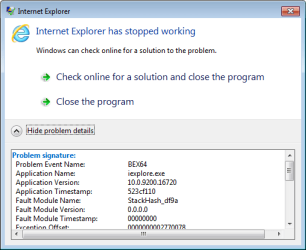
I tried to make a video showing the Avast add-on working - despite having been removed from the list of Toolbars and Extensions - but installing Avast caused IE10 to instantly crash:

IE11.png


So - why would UI5 only remove the AVAST add-ons from the list of installed add-ons. Simple, that is a safe/easy thing to do and it makes users happy. UI5 stayed out of the more delicate parts of the registry - plus UI5 does not have to keep up with all of the ways that an add-on is listed in the registry.

Automated tools like UI5 cannot (should not) simply search for certain text - then remove each occurrence. Doing that can really be dangerous.

I'll state once again that I've not studied UI5 - so my statements about it being snake oil are mere speculation.


My question to you would be:
What proof do you have that the Avast add-ons are not still there?

If the Avast add-ons had been set to Enabled before UI5 removed them from the list, then it is quite possible that the Avast add-ons could still be loading and functioning just like Chrome did in the video. Since the add-ons had been set to Disabled, then they are most likely not loading and it is safe to leave things as is.
 

My Computer My Computer

At a glance

W7 Pro SP1 64biti78GBIntel HD Graphics
Computer type
Laptop
Computer Manufacturer/Model Number
Employer provided Dell Latitude
OS
W7 Pro SP1 64bit
CPU
i7
Memory
8GB
Graphics Card(s)
Intel HD Graphics
Hard Drives
crappy SSD
Antivirus
Employer mandated Symantec Endpoint Protection
Browser
Pale Moon 64bit, IE11 64bit & Chrome 64bit
[FONT=Arial, sans-serif]UsernameIssues[/FONT]


[FONT=Arial, sans-serif]I am running Ashampoo Uninstaller 5, v5.04.00, release around 2014-01-17, according to c|net. I haven't read all of the 202 reviews at c|net (have you?), which powers the download.com site. The first one looked a little grim, didn't it? But that was v5.0.2 and one year ago. The other reviews run back to 2004, and v1.0 (of UI5)![/FONT]


[FONT=Arial, sans-serif]Performing a Ctrl-F on both Pros and Cons on the site already takes you back as far as 2010 just on the first page. A similar approach to a few more pages reveals a lot of satisfaction.[/FONT]


[FONT=Arial, sans-serif]c|net also relevantly states that of 218 votes cast, 130, or 60% rated it either 4-5 or 5-5, pretty good I'd say. Wouldn't you?[/FONT]


[FONT=Arial, sans-serif]I started with [/FONT][FONT=Arial, sans-serif]Ashampoo® UnInstaller 2000[/FONT][FONT=Arial, sans-serif] Version v2.01, 2002/01/01, went through various versions like Platinum, Uninstaller Suite, &c, through versions3 and 4 as well. All of them I have liked. I still have versions 2 and 3 running on the XP units. I had 3 on this unit, bought 4 in 2012, but have never used it, instead going straight to 5 in the last few weeks.[/FONT]


[FONT=Arial, sans-serif]With me, the jury is out, on how good it will be – time will tell, but it (v5) did the job I asked of it, and got rid of the reference to Avast, at least in IE's add-ons section, and that was, after all, the purpose of the Post – to get IE10 working, which it is now, and to get rid of the appearances of the Avast add-ons in it. Done and Done.[/FONT]


[FONT=Arial, sans-serif]With regard to your further points:[/FONT]


  1. [FONT=Arial, sans-serif]It is possible to remove a program from the list of installed Programs and Features without uninstalling the app.[/FONT]


[FONT=Arial, sans-serif]That is why I use Ashampoo's UI for installing/uninstalling, and also Revo with a deep thorough scan for others. Which one I use is determined by whether the full setup for the app is downloaded or just a stub.[/FONT]


  1. [FONT=Arial, sans-serif]It is also possible to remove add-ons from the list of Toolbars and Extensions without removing the files or the registry entries that attempt to load the files.[/FONT]


[FONT=Arial, sans-serif]I concur. See references to Regedit.[/FONT]


  1. [FONT=Arial, sans-serif]I've not studied Uninstaller 5 NOTED – nor have I, yet[/FONT]


  1. [FONT=Arial, sans-serif]but some of these reviews are unkind. SEE ABOVE[/FONT]


  1. [FONT=Arial, sans-serif]Hopefully, the disabled status that was in place before running UI5 ... nothing will attempt to load the add-ons (if they are indeed still around). Hope so, too[/FONT]


  1. [FONT=Arial, sans-serif]Thread #25 My point was (and still is): ...[/FONT]


[FONT=Arial, sans-serif]Too lengthy to deal with all points, but in summary:[/FONT]


  • [FONT=Arial, sans-serif]Thread #19 refers to my backup of Registry (60,000 itmes and 242 MB) when I was looking to use Regedit, prior to installing the Ashampoo UI 5 and getting it to do the work[/FONT]
  • [FONT=Arial, sans-serif]Following the backup, I took a wander through Registry, using (Find, Find Next F3) the phrase "avast! Online Security", which was after all, how the add-on appeared in IE. Seven (7) instances were found. For purposes of brevity I have enclosed only the last found, here.[/FONT]
  • [FONT=Arial, sans-serif]I have also determined the existence of 00avast in [/FONT]HKEY_LOCAL_MACHINE\software\microsoft\windows\currentversion\explorer\shelliconoverlayidentifiers\00avast
[FONT=Arial, sans-serif] but will look into that at my leisure. There may be other entries.[/FONT]


  1. [FONT=Arial, sans-serif]I tried to make a video showing the Avast add-on working - despite having been removed from the list of Toolbars and Extensions - but installing Avast caused IE10 to instantly crash:[/FONT]


[FONT=Arial, sans-serif]I had earlier determined from a Googling that many other Users had had probs with Avast (Free) versions and sub-version releases, from IE's 8 onwards, and XP onwards, through to Windows 8. Just as well I uninstalled it.[/FONT]


  1. [FONT=Arial, sans-serif]So - why would UI5 only remove the AVAST add-ons from the list of installed add-ons.[/FONT]


[FONT=Arial, sans-serif]I did not say it did. Running UI's Registry tool revealed (something like) 258 registry entries that were orphaned, obsolete, &c. They were all checked to delete, but I ran through them – a large number were in clusters of 5-8 by category, only took a minute or two to uncheck those I could check later, and leave checked those (eg Avast, AVG Free &c) I could do without ... then deleted them.[/FONT]


[FONT=Arial, sans-serif]A future search under eg "avast" instead of "avast! Online Security" will reveal any stragglers, which I can attend to deleting individually or as a batch subject to numbers determined. If I am not confident, or if I am, I can edit True values to Falso, 0 to 1, &c. Or not.[/FONT]


[FONT=Arial, sans-serif]All of the above has been done in a process that took minutes, as opposed to the alternatives. But I understand and appreciate your thoroughness.[/FONT]


  1. [FONT=Arial, sans-serif]...then they are most likely not loading and it is safe to leave things as is.[/FONT]


[FONT=Arial, sans-serif]I concur, and thank you for the video. Let me extend the same thanks to you as I am doing to ThrashZone, this has been quite interesting.[/FONT]


[FONT=Arial, sans-serif]PS I will Mark Solved now. Have a good weekend.[/FONT]
 

Attachments

  • Capture 22 - 7th instance Avast! Online Security in Registry.PNG
    Capture 22 - 7th instance Avast! Online Security in Registry.PNG
    40 KB · Views: 1

My Computer My Computer

At a glance

Windows 7 Home Premium 64bit2.80 gigahertz Intel Core i7-2600S8 GBNVIDIA GeForce GT 420 [Display adapter]
Computer type
PC/Desktop
Computer Manufacturer/Model Number
Acer Aspire Z5761
OS
Windows 7 Home Premium 64bit
CPU
2.80 gigahertz Intel Core i7-2600S
Motherboard
Acer Aspire Z5761
Memory
8 GB
Graphics Card(s)
NVIDIA GeForce GT 420 [Display adapter]
Hard Drives
WDC WD20EARS-22MVWB0 [Hard drive] (2000.40 GB) partitioned into two (2) drives of one TB each
Antivirus
Ashampoo AntiVirus 2014 v1.0.8
Browser
Mozilla Firefox v27.0.1
ThrashZone - [FONT=Arial, sans-serif]TZ – Thanks for the compliment.[/FONT]


[FONT=Arial, sans-serif]I would like to say a heartfelt thank you to you in particular, for your patience and help. This was my first experience of sevenforums, and I think it is wonderful work, unpaid, you do for boneheads like me, and for other unfortunate souls.[/FONT]


[FONT=Arial, sans-serif]My wife and I are maintain a 3-computer household. In the study are a Dell (slimline) Dimension C321 – 250GB HD, 1GB RAM, running XP Media Center Edition SP3, and an HP (Compaq) Presario C300 notebook – 60GB HD, 512MB RAM, running XP Home Edition SP3. Then there's this baby, in the garage – Acer Aspire Z5761 All-In-One, 2TB HD (2x1TB, partitioned), 8GB RAM, running Windows 7 Home, SP1.[/FONT]


[FONT=Arial, sans-serif]Being Pensioners (on welfare), and with "Uncle Bill" (Gates) about to end support for XP on 8th April, I have to look at a nil-cost/low-cost solution to safeguard our data. I have a Vista disk kicking around here somewhere, just got to find it. When I do, I will upgrade the Dell to Vista, and put her on it (she plays a lot of Solitaire), put the Acer in the study alongside her, and relegate the notebook to the garage.[/FONT]


[FONT=Arial, sans-serif]At the same time as that, I am migrating to Ubuntu Linux v12.04 LTS. I already have it as a dual-boot option with this PC, but have to go on a steep learning curve to become proficient ith it. The notebook I will populate with a few distros/different flavours of Linux to see how they compare with Ubuntu.[/FONT]


[FONT=Arial, sans-serif]That being said, I will still maintain a Windows presence to help friends and relatives, so you may "see me around from time to time", on the Forums.[/FONT]


[FONT=Arial, sans-serif]If you ever venture Down Under, look me up. I change ISPs like most people change their underwear (except when under contract with a sweet deal), but I always keep the Google email URL.[/FONT]


[FONT=Arial, sans-serif]I note I did not respond to your Thread #21 properly, if at all - can't ditch the Java, need it for Open Office, (mentioned earlier), Firefox works fine, no probs with its Extensions and Plug-Ins, and I have no Add-ons loaded, currently.
[/FONT]


[FONT=Arial, sans-serif]Cheers[/FONT]
[FONT=Arial, sans-serif]enc[/FONT]


[FONT=Arial, sans-serif]PS – Tks for the link on backups, had the briefest of looks, will digest more soon. Looking to buy a Toshiba Canvio 3TB External Drive, which will allow me to backup all three units.[/FONT]


[FONT=Arial, sans-serif]PPS I will Mark Solved now. Have a good weekend.[/FONT]
 

My Computer My Computer

At a glance

Windows 7 Home Premium 64bit2.80 gigahertz Intel Core i7-2600S8 GBNVIDIA GeForce GT 420 [Display adapter]
Computer type
PC/Desktop
Computer Manufacturer/Model Number
Acer Aspire Z5761
OS
Windows 7 Home Premium 64bit
CPU
2.80 gigahertz Intel Core i7-2600S
Motherboard
Acer Aspire Z5761
Memory
8 GB
Graphics Card(s)
NVIDIA GeForce GT 420 [Display adapter]
Hard Drives
WDC WD20EARS-22MVWB0 [Hard drive] (2000.40 GB) partitioned into two (2) drives of one TB each
Antivirus
Ashampoo AntiVirus 2014 v1.0.8
Browser
Mozilla Firefox v27.0.1
Hi Chris thanks for the feedback much appreciated,
Your always welcome back to SevenForums,
One note I believe the point is if a user would need Java as you do obviously is to disable it when your not actually in need of it,
That way your chances are lower to get corrupted, same actually goes for Adobe flash player,
Also as you've found out the hard way security suites are very difficult to remove completely and to be sure of it ;)
So this is where system images will save you allot of time,
Cheers.
 

My Computer My Computer

At a glance

Win-7-Pro64bit 7-H-Prem-64biti7-5930K 2nd i9-9940x both water blocked VRM'...Trident-z 3200C14 2nd Trident-z 3600C16EVGA 1080ti ftw3 2nd Titan Xp both water blocked
Computer type
PC/Desktop
Computer Manufacturer/Model Number
Custom assembled by me :}
OS
Win-7-Pro64bit 7-H-Prem-64bit
CPU
i7-5930K 2nd i9-9940x both water blocked VRM's too
Motherboard
ASUS SABERTOOTH X99 2nd ASUS x299 Apex
Memory
Trident-z 3200C14 2nd Trident-z 3600C16
Graphics Card(s)
EVGA 1080ti ftw3 2nd Titan Xp both water blocked
Sound Card
Built-in Realtek
Monitor(s) Displays
1-AOC G2460PG 24"G-Sync 144Hz/ 2nd 1-ASUS VG248QE 24" 144Hz
Screen Resolution
1920 x 1080 144Hz
Hard Drives
2-Samsung M.2 Evo & Evo Plus
2-Samsung 850 EVO 500GB SSD's/ 3-2.5 W.D. Black 1tb-&3-1tb/3-3.5 WD Black 1tb hdd's
PSU
EVGA SuperNOVA 1000-P2 2nd 1200-P2
Case
2-Corsair Obsidian Series 450D Black ATX Mid Tower
Cooling
Custom water loops
Keyboard
Logitech G710+/ 2nd Logitech G910
Mouse
2-RedDragon M901 Perdition 16400 dpi Gaming mouse = wired
Internet Speed
Comcast Ping 19ms 89.31mbps download speed 6.12mbps upload
Antivirus
Malwarebytes Pro/ Superantispyware Pro
Browser
FireFox & Pale moon
Other Info
2nd ASUS X299 Apex/Intel i9-9940x with Custom water loop/7H-Prem-x64/Corsair 450D case/Ram Trident-z 3600C16 4x8gb / Samsung970Evo plus 500gb SSD/Dual ssd EZ swap evo/PSU EVGA SuperNova 1200w-P2 80+Platinum/GPU Titan Xp /8-ML-140 on push-pull on 2-280GTX rads
Back
Top