Solved IE 9 Search Box Missing

gogreen

New member
Power User
VIP
Local time
2:15 PM
Messages
544
Location
Florida
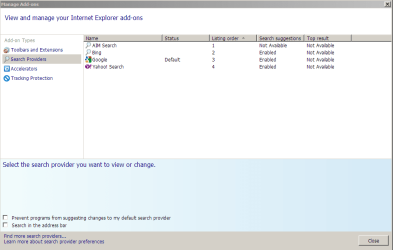
Just when I thought everything was OK with IE 9, I see that the search box is missing. I have assigned Google as the default search provider. I've experimented with both checking and unchecking the items in the search selection box lower left--still no search box.

What happened, and how do I get the search box to appear?

Thanks.
 

Attachments
  • search.png
    search.png
    19.7 KB · Views: 1,082

My Computer

Computer type
PC/Desktop
Computer Manufacturer/Model Number
Dell Studio XPS 8100, Dell XPS 15 laptop
OS
Windows 10 Home, 64 bit
CPU
Intel Core i7 860 @ 2.8 GHz
Motherboard
Dell 0T568R (CPU1)
Memory
8.0 GB Dual Channel DDR3 @ 664 MHz (9-9-9-24)
Graphics Card(s)
nVidia GeForce GTS 240
Sound Card
M-Audio Delta Audiophile 2496
Monitor(s) Displays
Dell 2407WFP
Screen Resolution
1920x1200
Hard Drives
977 GB Western Digital WDC WD1001FAES-75W7A0 (SCSI)
Antivirus
Windows Defender, MalwareBytes Anti-Malware, AdwCleaner
Browser
Firefox, occasionally IE and Edge
Other Info
Mozilla Firefox, Mozilla Thunderbird. Western Digital Passport 250 GB external HD, two Mushkin Enhanced Mulholland 32GB USB flash drives, AKG K240 Studio headphones, Asus AC-1900 dual band wireless router.
The address bar is now the search box.
 

My Computer

Computer Manufacturer/Model Number
Woz Special (home-built)
OS
Windows 7 Ultimate 64 Steve Ballmer Signature (jealous???)
CPU
i7 920
Motherboard
Asus P6T
Memory
G.SKILL 6 GB DDR3 1600
Graphics Card(s)
GeForce GTS 250 1 GB
Sound Card
Realtek integrated
Monitor(s) Displays
Acer 23" LCD
Screen Resolution
1920x1080
Hard Drives
Not enough space to list 'em all.
PSU
Kingwin Mach 1 800 Watt
Case
Antec SX1030B (yes...it's old)
Cooling
Stock CPU and GPU, 2x 80mm and 1x 120mm case fans
Keyboard
Logitech illuminated slim
Mouse
Logitech MX518
Internet Speed
1.5 DSL
What search box? The address bar is the search box as well, type the search string there.
 

My Computer

Computer Manufacturer/Model Number
Too many to describe...
OS
Windows 7 x64 pro/ Windows 7 x86 Pro/ XP SP3 x86
I hope you like typing your search queries over and over again because that's what you'll end up doing in the IE9 address bar. Unlike the old search box where your last entry remains, the address bar will switch to the URL you went to forcing you to re-enter your last query if you want to search for it again.

I also like how typing a one-word search query into the address bar and hitting Enter causes the browser to put an http:// in front of the word and then time out instead of searching for it.

Or if you're really lucky it will autocomplete a URL you previously typed and go to that site instead of searching for the similar word you started to enter. Brilliant.

If you don't like all these new "features" you can install the Google toolbar and use that as your search box. For me it was like a trip down memory lane to have that back on my machine again.
 

My Computer

Computer type
PC/Desktop
Computer Manufacturer/Model Number
System Builder
OS
Windows 7 Professional x64 (Retail)
CPU
AMD Phenom II X3 720
Motherboard
Asus M3A78-EM
Memory
8GB Patriot 800MHz DDR2 4-4-4-12
Graphics Card(s)
ATI 3200 (onboard)
Sound Card
Realtek onboard & M-Audio Delta 66
Monitor(s) Displays
Dell 2209WA
Hard Drives
Sandisk 2240GB SSD
Several non-raid SATA drives for storage
PSU
Antec 400W
Case
Antec
Cooling
Arctic Cooling
Keyboard
Logitech Illuminated
Mouse
Microsoft Comgort Mouse 6000
Internet Speed
Verizon FiOS 50/25
OK. I want a separate search box. Period. I give up. How do I install the Google toolbar? And just in case, how do I uninstall IE9 and go back to IE8? :mad:

Thanks.
 

My Computer

Computer type
PC/Desktop
Computer Manufacturer/Model Number
Dell Studio XPS 8100, Dell XPS 15 laptop
OS
Windows 10 Home, 64 bit
CPU
Intel Core i7 860 @ 2.8 GHz
Motherboard
Dell 0T568R (CPU1)
Memory
8.0 GB Dual Channel DDR3 @ 664 MHz (9-9-9-24)
Graphics Card(s)
nVidia GeForce GTS 240
Sound Card
M-Audio Delta Audiophile 2496
Monitor(s) Displays
Dell 2407WFP
Screen Resolution
1920x1200
Hard Drives
977 GB Western Digital WDC WD1001FAES-75W7A0 (SCSI)
Antivirus
Windows Defender, MalwareBytes Anti-Malware, AdwCleaner
Browser
Firefox, occasionally IE and Edge
Other Info
Mozilla Firefox, Mozilla Thunderbird. Western Digital Passport 250 GB external HD, two Mushkin Enhanced Mulholland 32GB USB flash drives, AKG K240 Studio headphones, Asus AC-1900 dual band wireless router.
Last edited:

My Computer

Computer type
PC/Desktop
Computer Manufacturer/Model Number
Self built custom
OS
64-bit Windows 11 Pro for Workstations
CPU
Intel i7-8700K OC'd to 5 GHz
Motherboard
ASUS ROG Maximus XI Formula Z390
Memory
64 GB (4x16GB) G.SKILL TridentZ RGB DDR4 3600 MHz
Graphics Card(s)
ASUS ROG-STRIX-GTX1080TI-O11G-GAMING
Sound Card
Integrated
Monitor(s) Displays
2 x Samsung Odyssey G7 27"
Screen Resolution
2560x1440
Hard Drives
1TB Samsung 990 PRO M.2,
4TB Samsung 990 PRO PRO M.2,
TerraMaster F8 SSD Plus NAS
PSU
Seasonic Prime Titanium 850W
Case
Thermaltake Core P3
Cooling
Corsair Hydro H115i
Keyboard
Logitech wireless K800
Mouse
Logitech MX Master 4
Internet Speed
2 Gb/s Download and 100 Mb/s Upload
Antivirus
Malwarebyte Anti-Malware Premium
Browser
Google Chrome
Other Info
Logitech Z625 speaker system,
Logitech BRIO 4K Pro webcam,
HP Color LaserJet Pro MFP M477fdn,
APC SMART-UPS RT 1000 XL - SURT1000XLI,
Galaxy S23 Plus phone
I have to agree with Carnivore.

The new search functionality is not the same as IE 8 AT ALL. It has been severely crippled for any kind of serious use :( The IE8 search box was just about perfect. Fast to use across multiple search providers, never have to retype searches when needing to change a word, even worked as the "find on this page" box.

IE 9 has caused me to have to cut and past and retype my searches ad nausium. It was a giant step backwards in functionality. :(

I'm really starting to hate all this "Dumbed down", "Streamlined" stuff. It works fine for the first day of use when "learning" something, then does nothing but get in the way for every day of actual use after that...

I like the html5 and hardware accelleration of IE 9 but please give me back my IE 8 interface!
 

My Computer

Computer Manufacturer/Model Number
Scratch built
OS
Windows 7 x64 Ultimate
CPU
i7 960
Motherboard
Asus P6X58D
Memory
12 Gig Corsair Dominator
Graphics Card(s)
Nvidia 480
Sound Card
Maudio Delta 44 + breakout box
Monitor(s) Displays
Dell UltraSharp U2410 24in and Samsung 21 dual monitors
Screen Resolution
1920x1200 and 1280x1024
Hard Drives
Primary: Intel X-25M G2 160G SSD
Secondary: Segate baracuda 1.0 TB
HDs in AHCI mode.
PSU
Corasair TX850
Case
Cooler Master HAF
Cooling
Corsair H50
Keyboard
Logitech G15 + N52 game pad
Mouse
Logitech MX518
Internet Speed
15kbs down 4.5kbps up
Other Info
WEI 7.6
CPU & RAM 7.6
Graphics 7.9
Hard disk 7.7
One of the reasons I'm still using Firefox/Minefield instead of IE9.
 

My Computer

Computer type
PC/Desktop
Computer Manufacturer/Model Number
Me
OS
Win 7 Ultimate x64
CPU
FX-8350 @ 4.6 GHz so far
Motherboard
Asus M5A97 EVO
Memory
ADATA XPG V1 Series Black 8GB DDR3 1600
Graphics Card(s)
Sapphire R9 270x Dual-X
Sound Card
Xonar DGX w/ Corsair Vengence 1300
Monitor(s) Displays
Acer S232HL Abid
Screen Resolution
1920x1080
Hard Drives
120 GB OCZ Vertex 3
500 GB Seagate 7200.12
PSU
Antec Earthwatts 650W Green
Case
Antec Three Hundred
Cooling
Cooler Master 212 EVO
Keyboard
Logitech G510
Mouse
Logitech G500s
Internet Speed
35000/3000
Thanks, Shawn. Good links!

One of the reasons I'm still using Firefox/Minefield instead of IE9.
Firefox is my default browser. I just wanted to test out IE9. It's disappointing.:(
 

My Computer

Computer type
PC/Desktop
Computer Manufacturer/Model Number
Dell Studio XPS 8100, Dell XPS 15 laptop
OS
Windows 10 Home, 64 bit
CPU
Intel Core i7 860 @ 2.8 GHz
Motherboard
Dell 0T568R (CPU1)
Memory
8.0 GB Dual Channel DDR3 @ 664 MHz (9-9-9-24)
Graphics Card(s)
nVidia GeForce GTS 240
Sound Card
M-Audio Delta Audiophile 2496
Monitor(s) Displays
Dell 2407WFP
Screen Resolution
1920x1200
Hard Drives
977 GB Western Digital WDC WD1001FAES-75W7A0 (SCSI)
Antivirus
Windows Defender, MalwareBytes Anti-Malware, AdwCleaner
Browser
Firefox, occasionally IE and Edge
Other Info
Mozilla Firefox, Mozilla Thunderbird. Western Digital Passport 250 GB external HD, two Mushkin Enhanced Mulholland 32GB USB flash drives, AKG K240 Studio headphones, Asus AC-1900 dual band wireless router.
IE9 apparently used the SQM data returned for both functionality and design choices, so if you guys have issue with the design or usage, it's best to make sure Microsoft knows. I don't know that a few drops in a larger bucket will make any kind of waves, but you wouldn't be the first to complain about the address bar/search box issues.
 

My Computer

Computer type
PC/Desktop
Computer Manufacturer/Model Number
Custom
OS
Windows 10 Pro x64
CPU
Intel Core i7 4790K @ 4.5GHz
Motherboard
Asus Maximus Hero VII
Memory
32GB DDR3
Graphics Card(s)
Nvidia GeForce GTX970
Sound Card
Realtek HD Audio
Screen Resolution
1920x1200
Hard Drives
1x Samsung 250GB SSD
4x WD RE 2TB (RAIDZ)
PSU
Corsair AX760i
Case
Fractal Design Define R4
Cooling
Noctua NH-D15
Add Google to your Favorites. In the address bar, click on the down arrow, look at your favorites from there, now click on Google using the mouse's 'middle button' to open Google in a separate/new tab.
 

My Computer

Computer type
PC/Desktop
Computer Manufacturer/Model Number
Bruce ... somewhere in his 40's
OS
Windows 7 Ultimate 32bit SP1
CPU
Intel(R) Core(TM)2 Quad CPU @ 2.40GHz, 2400 MHz
Motherboard
INTEL/D975XBX2
Memory
4 GB
Graphics Card(s)
ATI Radeon HD 2600 Pro
Monitor(s) Displays
Samsung SyncMaster 914v
Screen Resolution
1280 x 1024
Hard Drives
2/500GB each ... ST3500630AS ATA Device.
One is not connected
PSU
Rocketfish 700 W
Case
G.Skill Gigabyte Chassis
Keyboard
Standard PS/2 Keyboard
Mouse
Microsoft PS/2 Mouse
Internet Speed
DSL
Antivirus
Avira Internet Security
Browser
IE 11
Other Info
ATI HDMI Audio
Add Google to your Favorites. In the address bar, click on the down arrow, look at your favorites from there, now click on Google using the mouse's 'middle button' to open Google in a separate/new tab.
Thanks but the whole situation is just ridiculous. People shouldn't be made to jump through hoops just to do the simplest things with their browser, and they shouldn't have to read a tutorial to learn how to search.
 

My Computer

Computer type
PC/Desktop
Computer Manufacturer/Model Number
System Builder
OS
Windows 7 Professional x64 (Retail)
CPU
AMD Phenom II X3 720
Motherboard
Asus M3A78-EM
Memory
8GB Patriot 800MHz DDR2 4-4-4-12
Graphics Card(s)
ATI 3200 (onboard)
Sound Card
Realtek onboard & M-Audio Delta 66
Monitor(s) Displays
Dell 2209WA
Hard Drives
Sandisk 2240GB SSD
Several non-raid SATA drives for storage
PSU
Antec 400W
Case
Antec
Cooling
Arctic Cooling
Keyboard
Logitech Illuminated
Mouse
Microsoft Comgort Mouse 6000
Internet Speed
Verizon FiOS 50/25
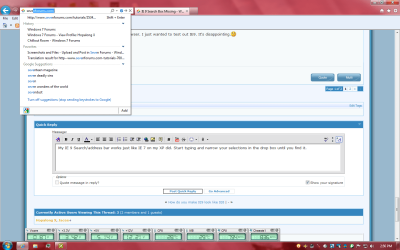
My IE 9 Search/address bar works just like IE 7 on my XP did. Start typing and narrow your selections in the drop box until you find it.

If you block the Search function it won't search the net for results just like any browser.
 

Attachments

  • Add-search bar.png
    Add-search bar.png
    61.7 KB · Views: 280

My Computer

Computer Manufacturer/Model Number
Hopalong/ Godzilla
OS
Windows7 Pro 64bit SP-1; Windows XP Pro 32bit
CPU
Intel Core i7-870 Lynnfield 2.93GHz LGA 1156 95W Quad-Core
Motherboard
ASUS P7P55D-E PRO
Memory
8GB@1400MHz Crucial Ballistix DDR3-1600 4x2GB
Graphics Card(s)
ASUS ENGTX460 DirectCU/2DI/1GD5 1GB 256-bit GDDR5
Sound Card
VIA Onboard
Monitor(s) Displays
Asus VS248H-P 24"; Samsung SyncMaster 941BW 19"ws
Screen Resolution
1920x1080; 1440x900
Hard Drives
Samsung 830 120GB SSD
Intel 320 120GB SSD
Western Digital Caviar Black WD7501AALS 750GB 7200 RPM SATA 3.0Gb/s
Western Digital Caviar Black WD6401AALS 640GB 7200 RPM SATA 3.0Gb/s
PSU
COOLER MASTER Silent Pro RS850-AMBAJ3-US 850W Modular
Case
COOLER MASTER HAF 932 RC-932-KKN5-GP Black
Cooling
Scythe "Mugen-2 Rev.B" (2 ScytheKaze-Jyuni PWM fans)
Keyboard
Logitech K-320
Mouse
Kensington
Antivirus
Avast Inernet Suite
Browser
IE 9 ; Chrome
Hmmm. I don't get the Google suggestions, but when I type "Sevenforums" in the address bar and click Enter, Google appears with search suggestions. I suppose that works as if there were a separate search box.

So, Carnivore, where do I address my complaint?
 

My Computer

Computer type
PC/Desktop
Computer Manufacturer/Model Number
Dell Studio XPS 8100, Dell XPS 15 laptop
OS
Windows 10 Home, 64 bit
CPU
Intel Core i7 860 @ 2.8 GHz
Motherboard
Dell 0T568R (CPU1)
Memory
8.0 GB Dual Channel DDR3 @ 664 MHz (9-9-9-24)
Graphics Card(s)
nVidia GeForce GTS 240
Sound Card
M-Audio Delta Audiophile 2496
Monitor(s) Displays
Dell 2407WFP
Screen Resolution
1920x1200
Hard Drives
977 GB Western Digital WDC WD1001FAES-75W7A0 (SCSI)
Antivirus
Windows Defender, MalwareBytes Anti-Malware, AdwCleaner
Browser
Firefox, occasionally IE and Edge
Other Info
Mozilla Firefox, Mozilla Thunderbird. Western Digital Passport 250 GB external HD, two Mushkin Enhanced Mulholland 32GB USB flash drives, AKG K240 Studio headphones, Asus AC-1900 dual band wireless router.
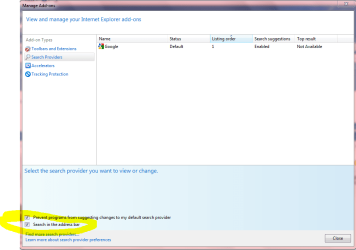
In the top right click on Tools- it looks like a star lock washer.
Click Manage Add ons.
Click Search Providers tab as in Snip.

If more than one search is listed on the top right make sure Google is Enabled.
Then check mark "Search in the address bar" then click Apply if it shows or close.
Mine is enabled so I'm not sure now if it had Apply the first time.

Mike

By the way this is a built in security measure by NOT doing Search automatically.
Some people do not want to send any info to Google or any other Search engine.
So MS set it to off as a default.
It isn't a mistake it was intentional.
Mike
 

Attachments

  • Manage add ons.PNG
    Manage add ons.PNG
    26 KB · Views: 217

My Computer

Computer Manufacturer/Model Number
Hopalong/ Godzilla
OS
Windows7 Pro 64bit SP-1; Windows XP Pro 32bit
CPU
Intel Core i7-870 Lynnfield 2.93GHz LGA 1156 95W Quad-Core
Motherboard
ASUS P7P55D-E PRO
Memory
8GB@1400MHz Crucial Ballistix DDR3-1600 4x2GB
Graphics Card(s)
ASUS ENGTX460 DirectCU/2DI/1GD5 1GB 256-bit GDDR5
Sound Card
VIA Onboard
Monitor(s) Displays
Asus VS248H-P 24"; Samsung SyncMaster 941BW 19"ws
Screen Resolution
1920x1080; 1440x900
Hard Drives
Samsung 830 120GB SSD
Intel 320 120GB SSD
Western Digital Caviar Black WD7501AALS 750GB 7200 RPM SATA 3.0Gb/s
Western Digital Caviar Black WD6401AALS 640GB 7200 RPM SATA 3.0Gb/s
PSU
COOLER MASTER Silent Pro RS850-AMBAJ3-US 850W Modular
Case
COOLER MASTER HAF 932 RC-932-KKN5-GP Black
Cooling
Scythe "Mugen-2 Rev.B" (2 ScytheKaze-Jyuni PWM fans)
Keyboard
Logitech K-320
Mouse
Kensington
Antivirus
Avast Inernet Suite
Browser
IE 9 ; Chrome
Mike: Thanks. Yup, those are my settings. When I click enter after entering a term or terms, the Google.com appears with my term or terms entered as the search topic. I'm not complaining--just explaining. I have no idea why my results would differ from yours.
 

My Computer

Computer type
PC/Desktop
Computer Manufacturer/Model Number
Dell Studio XPS 8100, Dell XPS 15 laptop
OS
Windows 10 Home, 64 bit
CPU
Intel Core i7 860 @ 2.8 GHz
Motherboard
Dell 0T568R (CPU1)
Memory
8.0 GB Dual Channel DDR3 @ 664 MHz (9-9-9-24)
Graphics Card(s)
nVidia GeForce GTS 240
Sound Card
M-Audio Delta Audiophile 2496
Monitor(s) Displays
Dell 2407WFP
Screen Resolution
1920x1200
Hard Drives
977 GB Western Digital WDC WD1001FAES-75W7A0 (SCSI)
Antivirus
Windows Defender, MalwareBytes Anti-Malware, AdwCleaner
Browser
Firefox, occasionally IE and Edge
Other Info
Mozilla Firefox, Mozilla Thunderbird. Western Digital Passport 250 GB external HD, two Mushkin Enhanced Mulholland 32GB USB flash drives, AKG K240 Studio headphones, Asus AC-1900 dual band wireless router.
There is another setting somewhere evidently.

Sorry that didn't cure the problem.
You can take a look at the tutorials already posted.

I just can't think of it at the moment what the problem is.
If I do I'll post it.
Sorry.
Mike

PS- Afterthought
Do you have more than one search engine listed?
If so disabling the others MAY resolve it. ??? Maybe.
As you can see I deleted all the others. Bing etc.
I just got used to Google over the years.
 

My Computer

Computer Manufacturer/Model Number
Hopalong/ Godzilla
OS
Windows7 Pro 64bit SP-1; Windows XP Pro 32bit
CPU
Intel Core i7-870 Lynnfield 2.93GHz LGA 1156 95W Quad-Core
Motherboard
ASUS P7P55D-E PRO
Memory
8GB@1400MHz Crucial Ballistix DDR3-1600 4x2GB
Graphics Card(s)
ASUS ENGTX460 DirectCU/2DI/1GD5 1GB 256-bit GDDR5
Sound Card
VIA Onboard
Monitor(s) Displays
Asus VS248H-P 24"; Samsung SyncMaster 941BW 19"ws
Screen Resolution
1920x1080; 1440x900
Hard Drives
Samsung 830 120GB SSD
Intel 320 120GB SSD
Western Digital Caviar Black WD7501AALS 750GB 7200 RPM SATA 3.0Gb/s
Western Digital Caviar Black WD6401AALS 640GB 7200 RPM SATA 3.0Gb/s
PSU
COOLER MASTER Silent Pro RS850-AMBAJ3-US 850W Modular
Case
COOLER MASTER HAF 932 RC-932-KKN5-GP Black
Cooling
Scythe "Mugen-2 Rev.B" (2 ScytheKaze-Jyuni PWM fans)
Keyboard
Logitech K-320
Mouse
Kensington
Antivirus
Avast Inernet Suite
Browser
IE 9 ; Chrome
This was the main reason I removed IE9 I need those boxes seperate. I mean I am not a big fan of the new look, but that box missing, right there made me want to uninstall. It also doesn't help that my college e-books don't work on IE9 kind of need to view those to, so back to IE8 (Oh I missed you search box)
 

My Computer

Computer Manufacturer/Model Number
Custom Build
OS
Windows 7 Professional 64-bit
CPU
Intel Core i7-920
Motherboard
Asus P6T
Memory
Corsair XMS 6144MB PC10666 DDR3
Graphics Card(s)
BFG GeForce GTX 285 OC
Sound Card
Onboard
Monitor(s) Displays
Acer x203w (for now)
Hard Drives
Seagate 1TB Serial ATA
PSU
Ultra X4 (1050W)
Case
Thermaltake Armor+
Cooling
Noctua NH-U12P SE1366, Case Stock Fans, Thermaltake TMG SL1
IE9 has what seems some very strange design decisions. Some of it copying chrome tho not all of it as I think chrome still has a search bar? I am guessing they removed it as the original design had the tabs sharing with the search bar which they had the sense just before release to make optional, now with tabs on their own row the address bar is huge and certianly has room for the search bar to be readded.
 

My Computer

Computer type
PC/Desktop
Computer Manufacturer/Model Number
home built
OS
windows 8.1 Pro x64
CPU
intel i5 4670k @ 4.3ghz
Motherboard
asus z87-plus
Memory
16 gig ram ddr3 @ 1600 corsair vengeance
Graphics Card(s)
evga 970 GTX 4 GIG FTW ACX 2.0
Sound Card
asus xonar D2X
Monitor(s) Displays
benq gw2765ht
Screen Resolution
2560x1440
Hard Drives
Samsung 850 pro SSD 512gig - boot device wooosh
WD black cavalier 640gig WD6401AALS
Seagate 500gig ST3500630AS
WD 2TB Green WDC20EARS
2 x WD Red 3TB WD30EFRX
Samsung 750gig HD753LG - on asmedia controller
PSU
coolermaster silent pro 600watt modular
Case
fractal define R4
Cooling
artic freezer i30, 3 case fans
Keyboard
microsoft business ps2 keyboard
Mouse
microsoft optical black mouse
Internet Speed
80/20 FTTC SkyBB
Antivirus
Nod32 AV v8, HitmanProAlert, SRP, System Hardening
Browser
Chrome x64
Other Info
Intel controller is in AHCI mode currently using IaSTOR 12.8.0.1016 drivers
Back
Top