IE 9 Windows 7 - Favourites are blank

Debful

New member
Local time
3:07 PM
Messages
1
I have windows 7 64 bit computer running IE9. When I click on the Favourites menu I can see the first level of websites and or folders that I have put there. But when I click on one of the folders to view the web addresses inside all I get is a blank area on the screen. I can search in Favourites within Explorer and the addresses are all there but when I am using IE9 and click on the Favourites the second level of addresses or addresses within the folders cannot be seen. It appears like a "ghost" box. So the flyout box is empty but if I click randomly in that box then I will go to a web address but they are invisable. Hope this makes sense!!:(
 

My Computer My Computer

At a glance

Windows 7 64 bit
OS
Windows 7 64 bit
Welcome to Windows Seven Forums.

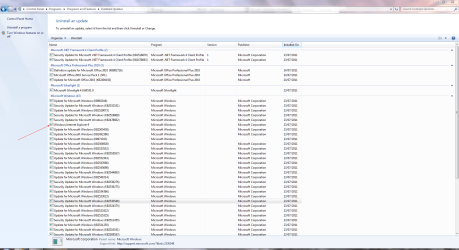
You could try uninstalling IE9 as the install may be corrupted, and then re-install it after a reboot.

WU.PNG
 

My Computer My Computer

At a glance

Windows 7 Ultimate SP1 64-BitIntel Core i7 870 @ 2.93GHz8Gb Dual-Channel DDR3 @ 664MHznVidia GeForce GTX 460 1024MB dedicated RAM
Computer Manufacturer/Model Number
HP Pavilion Elite 495UK
OS
Windows 7 Ultimate SP1 64-Bit
CPU
Intel Core i7 870 @ 2.93GHz
Motherboard
MSI 2A9C (CPU1)
Memory
8Gb Dual-Channel DDR3 @ 664MHz
Graphics Card(s)
nVidia GeForce GTX 460 1024MB dedicated RAM
Sound Card
Realtek HD Audio
Monitor(s) Displays
HP2310i
Screen Resolution
1920 x 1080
Hard Drives
1x1954GB Hitachi HDS22020ALA 330 (RAID), 1x1954GB Hitachi External for backup and storage
PSU
460W
Case
HP Elite
Cooling
Air cooled
Keyboard
Logitech K750 solar-powered keyboard
Mouse
Logitech Wireless M180 mouse
Internet Speed
2Mb
Other Info
Pure Avanti Flow Internet Radio with iPod Dock, 64Gb iPod, HP USB Speakers, Sony MDR-V500 Headphones, Sony Vaio F-Series Laptop
Back
Top