IE10 Up, FF Returns To Second Place

lehnerus2000

New member
Guru
Gold Member
VIP
Local time
9:04 AM
Messages
4,058
Location
Adelaide
IE10 Up, FF In Second Place

Summary:
Internet Explorer 10 has seen a recent bump in users, thanks to Microsoft's move to make the browser available on Windows 7. Meanwhile, when will Chrome gets its mojo back?
...
Looking at the rest of the browser market — a hotly contested and bitter market to be engaged in — Firefox remains on top of the second place spot with 20.3 percent, while Chrome stands in a good third place with 16.35 percent.
ZDNet - Zack Whittaker
IE10 doubles share in April; Chrome continues decline as Firefox leads in second | ZDNet
 
Last edited:

My Computer My Computer

Computer type
PC/Desktop
Computer Manufacturer/Model Number
n/a
OS
W7 Ultimate SP1, LM19.2 MATE, W10 Home 1703, W10 Pro 1703 VM, #All 64 bit
CPU
AMD Phenom II x6 1100T, 3.3 GHz
Motherboard
ASUS M4A88T-M/USB3 (AM3)
Memory
12GB DDR3 1333 G-Skill (4GB x 2), G-Skill (2GB x 2)
Graphics Card(s)
NVIDIA GeForce GTX 660
Sound Card
Realtek?
Monitor(s) Displays
Samsung S23B350
Screen Resolution
1920x1080
Hard Drives
WD Green 2TB (SATA), WD Green 3TB (SATA), WD Blue 4TB (SATA), WD Blue 6TB (SATA)
PSU
Cooler Master
Case
Antec GX300 Tower
Cooling
3x Antec TRICOOL 120mm Fans
Mouse
Wired Optical
Internet Speed
DSL
Antivirus
Avast
Browser
Pale Moon (64 bit)
Other Info
2018-12-27 Upgraded HDDs
2015-12-10 Upgraded case, graphics card, storage
2015-08-15 Upgraded motherboard & RAM
2015-07-15 Upgraded LM17.1 to LM17.2
In my real world stats I only see chrome marching further into the lead.

SF for the past 30 days
Chrome 40.79%
IE 25.76%
FF 23.99%
Safari 4.32%
Android Browser 1.87%
Opera 1.66%
Maxathon 0.14
Others
 

My Computer My Computer

Computer type
PC/Desktop
OS
Windows 11
Seem like a lot of SevenForum members love Chrome. :confused:
 

My Computer My Computer

Computer type
PC/Desktop
Computer Manufacturer/Model Number
n/a
OS
W7 Ultimate SP1, LM19.2 MATE, W10 Home 1703, W10 Pro 1703 VM, #All 64 bit
CPU
AMD Phenom II x6 1100T, 3.3 GHz
Motherboard
ASUS M4A88T-M/USB3 (AM3)
Memory
12GB DDR3 1333 G-Skill (4GB x 2), G-Skill (2GB x 2)
Graphics Card(s)
NVIDIA GeForce GTX 660
Sound Card
Realtek?
Monitor(s) Displays
Samsung S23B350
Screen Resolution
1920x1080
Hard Drives
WD Green 2TB (SATA), WD Green 3TB (SATA), WD Blue 4TB (SATA), WD Blue 6TB (SATA)
PSU
Cooler Master
Case
Antec GX300 Tower
Cooling
3x Antec TRICOOL 120mm Fans
Mouse
Wired Optical
Internet Speed
DSL
Antivirus
Avast
Browser
Pale Moon (64 bit)
Other Info
2018-12-27 Upgraded HDDs
2015-12-10 Upgraded case, graphics card, storage
2015-08-15 Upgraded motherboard & RAM
2015-07-15 Upgraded LM17.1 to LM17.2
The percentages are pretty much the same for VF & EF also.
 

My Computer My Computer

Computer type
PC/Desktop
OS
Windows 11
I suspect that there is some "member overlap" amongst these forums (VF, SF & EF). :D

It can't be long until the next FF update.

Update
I was right FF 21 is available.
I've just downloaded and installed it. :)
 
Last edited:

My Computer My Computer

Computer type
PC/Desktop
Computer Manufacturer/Model Number
n/a
OS
W7 Ultimate SP1, LM19.2 MATE, W10 Home 1703, W10 Pro 1703 VM, #All 64 bit
CPU
AMD Phenom II x6 1100T, 3.3 GHz
Motherboard
ASUS M4A88T-M/USB3 (AM3)
Memory
12GB DDR3 1333 G-Skill (4GB x 2), G-Skill (2GB x 2)
Graphics Card(s)
NVIDIA GeForce GTX 660
Sound Card
Realtek?
Monitor(s) Displays
Samsung S23B350
Screen Resolution
1920x1080
Hard Drives
WD Green 2TB (SATA), WD Green 3TB (SATA), WD Blue 4TB (SATA), WD Blue 6TB (SATA)
PSU
Cooler Master
Case
Antec GX300 Tower
Cooling
3x Antec TRICOOL 120mm Fans
Mouse
Wired Optical
Internet Speed
DSL
Antivirus
Avast
Browser
Pale Moon (64 bit)
Other Info
2018-12-27 Upgraded HDDs
2015-12-10 Upgraded case, graphics card, storage
2015-08-15 Upgraded motherboard & RAM
2015-07-15 Upgraded LM17.1 to LM17.2
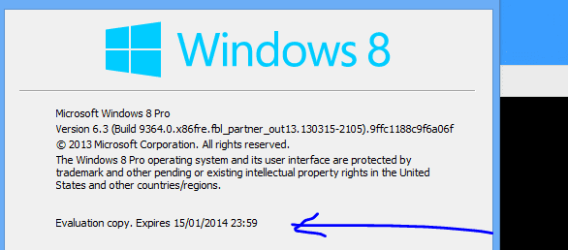
Hi there
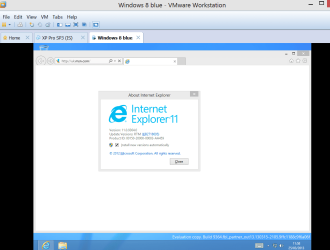
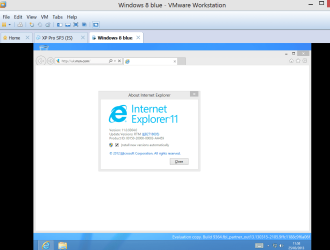
On the leaked previews of Windows Blue / 8.11 the latest version of IE (Now IE11) is available --this will I'm sure introduce a whole new factor into the equation -- works without needing flash (although flash still available via compatibility mode), uses HTML 5 and latest CSS etc. The other thing which is good it finally gets rid of those zillions of bloated "plug ins" you need to have in a lot of other browsers too.

Whether it will be back ported into W7 I don't know but once it's available publically it should be an interesting comparison in the "Browser wars".

Screenshots enc

Cheers
jimbo
 

Attachments

  • w8blue3.png
    w8blue3.png
    39.9 KB · Views: 15
  • w8blue4.png
    w8blue4.png
    6.9 KB · Views: 12

My Computer My Computer

Computer type
PC/Desktop
Computer Manufacturer/Model Number
Custom built, several laptops HP/ASUS
OS
Linux CENTOS 7 / various Windows OS'es and servers
CPU
Intel i7 Intel i5
Memory
8GB, 16GB
Graphics Card(s)
On Motherboard
Sound Card
Realtek HD audio
Monitor(s) Displays
Apple Cinema display, Samsung LCD
Screen Resolution
1920 X 1080
Hard Drives
4 X 1TB SATA
Mouse
Toshiba wireless laser
Internet Speed
> 20MB up
I'm proud to be contributing to the 1.66% of Opera users ;)
 

My Computer My Computer

Computer type
Laptop
I use to be a firefox user and loved it because of it's addons. Though I switched to IE 10 for a couple reseaons. First because firefox at least in my experience has slowed down and had more issues every release. Had issues with youtube loading times, sometimes videos not playing. Had no issues at all on ie 10 and yes I had all my flash updated and such when I had FF installed. Also firefox would randomly crash at times without warning. So it just pissed me off to the point that I decide to make IE 10 my default browser and works great and is pretty fast unlike previous versions of IE like in the xp days. Anyways enough of my rambling, I just felt FF has lost its touch. Not surprised about chrome though since I know a lot of friends of mine at school who are techy that love using chrome for it's addons and speed. Would use chrome but I hate the User interface, can't stand it.
 

My Computer My Computer

Computer type
PC/Desktop
Computer Manufacturer/Model Number
custom build
OS
Windows 10 64bit
CPU
AMD Phenom II X4 925 (Deneb)(2.8GHz) OC 3.4GHz
Motherboard
M5A78L-MLX Plus
Memory
Corsair Vengeance DDR3 4GBX2 (8192MB)
Graphics Card(s)
XFX HD 6870 1GB (OC)- 940MHz core, mem 1150MHz
Monitor(s) Displays
Vizio 26' 1920x1080 / Acer 1336x768
Screen Resolution
1920x1080 60Hz /1336x768
Hard Drives
Kingston Digital 60GB SSDNow V300/500gb HDD Western Digital 7200rpm (/WD 160GB HDD 7200rpm
PSU
CORSAIR CX600 600w
Case
AZZA Orion 202 EVO
Cooling
cooler master hyper TX3 cpu cooler
Keyboard
Razer DeathStalker
Mouse
Logitech Optical Gaming Mouse G400
Antivirus
Defualt on win 10
Browser
Firefox
Other Info
cpu is overclocked in bios
Wretched Adobe Flash

Not surprised about chrome though since I know a lot of friends of mine at school who are techy that love using chrome for it's addons and speed. Would use chrome but I hate the User interface, can't stand it.

Indeed.

If it isn't obvious, I'm a Firefox user. :)

I don't use Chrome (except for checking web page assignments) because Chrome:

  • Is made by "Big Brother" Google
  • Has an awful GUI
  • Doesn't have the add-ons that I like/use
I don't use IE (except for checking web page assignments) because IE:

  • Has an awful GUI
  • Doesn't have the add-ons that I like/use
Actually that is not entirely accurate. :o
I have one browser toolbar that only works in IE these days, so I occasionally start IE to use it.

When I first tried installing IE10, it somehow updated the toolbar to the more recent and less functional version.
When I tried updating it again, a couple of weeks ago, the toolbar survived unscathed. :party:

I am always intrigued by the fact that some software (e.g. Firefox) crashes non-stop for some users and yet other users have no problems. :confused:

I used to get (random) shutdown crashes with Firefox (they stopped after I installed v17).
My observations (using Process Explorer) indicated that Flash Player was the culprit (on my PC).

Flash Player would try to start running, as Firefox was closing. :shock:
It still does it to this very day, despite hundreds of patches/updates!
 
Last edited:

My Computer My Computer

Computer type
PC/Desktop
Computer Manufacturer/Model Number
n/a
OS
W7 Ultimate SP1, LM19.2 MATE, W10 Home 1703, W10 Pro 1703 VM, #All 64 bit
CPU
AMD Phenom II x6 1100T, 3.3 GHz
Motherboard
ASUS M4A88T-M/USB3 (AM3)
Memory
12GB DDR3 1333 G-Skill (4GB x 2), G-Skill (2GB x 2)
Graphics Card(s)
NVIDIA GeForce GTX 660
Sound Card
Realtek?
Monitor(s) Displays
Samsung S23B350
Screen Resolution
1920x1080
Hard Drives
WD Green 2TB (SATA), WD Green 3TB (SATA), WD Blue 4TB (SATA), WD Blue 6TB (SATA)
PSU
Cooler Master
Case
Antec GX300 Tower
Cooling
3x Antec TRICOOL 120mm Fans
Mouse
Wired Optical
Internet Speed
DSL
Antivirus
Avast
Browser
Pale Moon (64 bit)
Other Info
2018-12-27 Upgraded HDDs
2015-12-10 Upgraded case, graphics card, storage
2015-08-15 Upgraded motherboard & RAM
2015-07-15 Upgraded LM17.1 to LM17.2
In my real world stats I only see chrome marching further into the lead.

SF for the past 30 days
Chrome 40.79%
IE 25.76%
FF 23.99%
Safari 4.32%
Android Browser 1.87%
Opera 1.66%
Maxathon 0.14
Others
I'm probably not the only user that visits these forums using a browser that is not the default one on the computer and not the one used most often. I use Firefox for forums and IE10 most everywhere else.
 

My Computer My Computer

Computer type
Laptop
Computer Manufacturer/Model Number
Employer provided Dell Latitude
OS
W7 Pro SP1 64bit
CPU
i7
Memory
8GB
Graphics Card(s)
Intel HD Graphics
Hard Drives
crappy SSD
Antivirus
Employer mandated Symantec Endpoint Protection
Browser
Pale Moon 64bit, IE11 64bit & Chrome 64bit
......I don't use IE (except for checking web page assignments) because IE:

  • Has an awful GUI
  • Doesn't have the add-ons that I like/use
~~~
I abhor add-ons. I don't like the "build your own browser" model. I want a browser to act the same way no matter what computer I'm on. That said, I do understand why people like add-ons; they are just not for me.

People probably get tired of reading this statement from me: there are things the IE can do that no other browser can do and I use some of those things... so it is IE for me.


Firefox is flakey for me. It does crash from time to time, but that is not the weird part. The title bar does not behave like a normal window. It sometimes delays turning blue (W7 classic theme) when the window is brought into focus. No other app does that on this laptop.
 

My Computer My Computer

Computer type
Laptop
Computer Manufacturer/Model Number
Employer provided Dell Latitude
OS
W7 Pro SP1 64bit
CPU
i7
Memory
8GB
Graphics Card(s)
Intel HD Graphics
Hard Drives
crappy SSD
Antivirus
Employer mandated Symantec Endpoint Protection
Browser
Pale Moon 64bit, IE11 64bit & Chrome 64bit
I abhor add-ons. I don't like the "build your own browser" model. I want a browser to act the same way no matter what computer I'm on. That said, I do understand why people like add-ons; they are just not for me.

I can't surf the Internet without NoScript.
I also hate having to use a browser that doesn't have Tab Mix Plus.

Firefox is flakey for me. It does crash from time to time, but that is not the weird part. The title bar does not behave like a normal window. It sometimes delays turning blue (W7 classic theme) when the window is brought into focus. No other app does that on this laptop.

That is definitely a weird issue. :confused:

Do you have hardware acceleration turned on?
That feature seems to cause problems.

Does it do the same thing in "Safe Mode"?
http://www.sevenforums.com/tutorials/210670-firefox-start-firefox-safe-mode.html

I had a weird problem in FF 4 (can't remember what it was) that was related to some corrupt file in my FF profile.
I exported my Bookmarks and created a new profile and the problem disappeared.
 

My Computer My Computer

Computer type
PC/Desktop
Computer Manufacturer/Model Number
n/a
OS
W7 Ultimate SP1, LM19.2 MATE, W10 Home 1703, W10 Pro 1703 VM, #All 64 bit
CPU
AMD Phenom II x6 1100T, 3.3 GHz
Motherboard
ASUS M4A88T-M/USB3 (AM3)
Memory
12GB DDR3 1333 G-Skill (4GB x 2), G-Skill (2GB x 2)
Graphics Card(s)
NVIDIA GeForce GTX 660
Sound Card
Realtek?
Monitor(s) Displays
Samsung S23B350
Screen Resolution
1920x1080
Hard Drives
WD Green 2TB (SATA), WD Green 3TB (SATA), WD Blue 4TB (SATA), WD Blue 6TB (SATA)
PSU
Cooler Master
Case
Antec GX300 Tower
Cooling
3x Antec TRICOOL 120mm Fans
Mouse
Wired Optical
Internet Speed
DSL
Antivirus
Avast
Browser
Pale Moon (64 bit)
Other Info
2018-12-27 Upgraded HDDs
2015-12-10 Upgraded case, graphics card, storage
2015-08-15 Upgraded motherboard & RAM
2015-07-15 Upgraded LM17.1 to LM17.2
For the most part I only use IE, when I'm on my Notebook, which is most times, that runs Windows 8 which of course came with IE10 and that's all I use on there.

On my Windows 7 machine again I mainly use IE10 but I do have Maxthon installed plus Chrome, but Chrome is only used when I want to use Google +, and that's not that often.

The only toolbar I have on a browser is RoboForm, unless I start to get serious problems when I want to go somewhere I'll carry on with IE.:)
 

My Computer My Computer

Computer type
PC/Desktop
Computer Manufacturer/Model Number
Acer Aspire XC-704 x64 bit/ Asus K55A Notebook PC/HP Envy x360 Convertible 15-bq0xx
OS
Windows 10 64bit/Windows 10 64bit/Windows 10 64bit
CPU
Intel Pentium J3710 @ 60GHz/Intel B820,1.7GHz/AMD A9 Radeon
Motherboard
Acer Aspire XC-704 (SOCKET 0)/Asus/HP 8312 (Socket FP4)
Memory
8.00GB DDR3 @ 1599MHz/8GB 2 x 4GB DDR3/8.00GB Dual-Channel
Graphics Card(s)
Intel HD Graphics/Intel/512MB ATI AMD Radeon R5 Graphics (HP
Sound Card
Realtek High Definition Audio/Onboard/AMD High Definition Au
Monitor(s) Displays
Acer LCD K222HQL /Asus 15.6/Generic PnP Monitor (1920x1080@6
Screen Resolution
1920x1080@59Hz/1366 x 768/1920x1080@60Hz
Hard Drives
1863GBWesternn Digital WDC/Asus/119GB SanDisk SD8SN8U-128G-1006 (SSD)
931GB Hitachi HGST HTS721010A9E630 (SATA)
Keyboard
Microsoft Natural Ergonomic Keyboard 4000 (UK)/Inbuilt/Inbui
Mouse
Microsoft Optical Wheel Mouse/Same plus Touchpad/Same + Pad
Internet Speed
Infinity 2 up to 76 Mbps
Antivirus
MSE/MSE/MSE and all 3 have MalwareBytes Premium
Browser
Edge, Firefox/Edge, Firefox/Edge, Firefox, Chrome
Other Info
Seagate Expansion 500GB External Desktop Drive
Seagate Expansion Portable Drives 500GB and 1TB
Epson XP-332 Wireless Printer
I abhor add-ons. I don't like the "build your own browser" model. I want a browser to act the same way no matter what computer I'm on. That said, I do understand why people like add-ons; they are just not for me.

I can't surf the Internet without NoScript.
I also hate having to use a browser that doesn't have Tab Mix Plus.

Firefox is flakey for me. It does crash from time to time, but that is not the weird part. The title bar does not behave like a normal window. It sometimes delays turning blue (W7 classic theme) when the window is brought into focus. No other app does that on this laptop.

That is definitely a weird issue. :confused:

Do you have hardware acceleration turned on?
That feature seems to cause problems.

Does it do the same thing in "Safe Mode"?
http://www.sevenforums.com/tutorials/210670-firefox-start-firefox-safe-mode.html

I had a weird problem in FF 4 (can't remember what it was) that was related to some corrupt file in my FF profile.
I exported my Bookmarks and created a new profile and the problem disappeared.
It is not worth troubleshooting since it causes no problems; it just looks weird. Hardware acceleration is and was off. I did not test in the safe mode and here is why: I set up various windows to create a video. Firefox was was doing its weird thing really well (repeatable). I could alt-tab between Firefox/notepad/task manager windows or use the mouse. With alt-tab, I could have Firefox indicating that it was in focus and have notepad's overlapping window clearly in the foreground showing that it too had focus. This condition stays until I click on the title bar for Firefox.

Or I could do the opposite; have Firefox in focus, but indicating that it was not. I then setup a VM to see if the issue showed there too. It did not, but the VM was using Firefox version 21. (Installing Firefox version 20.0.1 in the VM did not show the issue either.)

I went back to the host computer and updated to version 21.... and now I cannot get the issue to happen. I checked the release notes and I don't see an entry mentioning this issue (but the bug list mentioned some work on the toolbar). It has done this for a longtime; maybe back to version 17. If it starts doing it again, I'll see if I can document it via video - then check the safe mode.
 

My Computer My Computer

Computer type
Laptop
Computer Manufacturer/Model Number
Employer provided Dell Latitude
OS
W7 Pro SP1 64bit
CPU
i7
Memory
8GB
Graphics Card(s)
Intel HD Graphics
Hard Drives
crappy SSD
Antivirus
Employer mandated Symantec Endpoint Protection
Browser
Pale Moon 64bit, IE11 64bit & Chrome 64bit
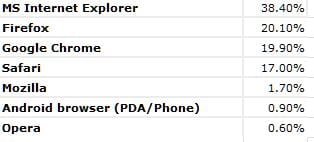
My business site's stats are pretty much in line with ZDNet's:

browsers.jpg

FF and Chrome may switch places from month to month...

My main browser is IE10, but have FF and Opera for some browsing and they come handy for web development purposes.

IE10 has Enhanced Protected Mode (EPM) that sandboxes the browser per tabs. Unfortunately, neither DNT+ nor Ghostery are they compatible with EPM, or the 64-bit version of IE10. It's pretty much a choice between security and privacy with IE10.

My solution is to use IE10 32-bit with DNT+ for privacy and MS EMET 4.0 for security.
 

My Computer My Computer

Computer type
PC/Desktop
Computer Manufacturer/Model Number
Custom built at Home
OS
Windows 7 64-bit, Windows 8.1 64-bit, OSX El Capitan, Windows 10 (VMware)
CPU
Intel i5-3350P 3.1 GHz
Motherboard
Gigabyte GA-Z77X-UP5 TH
Memory
16 GBs GSkill Sniper
Graphics Card(s)
Radeon HD 7850
Sound Card
VIA HD Audio
Monitor(s) Displays
Dell U2410 24"
Screen Resolution
1920x1200
Hard Drives
1 x Intel 520 240 GBs
1 x Seagate 1TBs SATA 2.0,
1 x Seagate 1TBs eSATA 2.0
PSU
Thermaltake 850W
Case
Antec P183
Cooling
Noctua NH-D14 Heatsink 2 x 120mm fans, 4 x 120mm case fans
Keyboard
Dell Multimedia keyboard
Mouse
Logitech Trackball
Internet Speed
28.5 Mb/s
I use Firefox and always will, have been since it was called Phoenix. I would never use Chrome.
 

My Computer My Computer

Computer type
PC/Desktop
Computer Manufacturer/Model Number
Custom Build
OS
Win 10 Pro 64
CPU
Intel Core i7 960 @3.20 GHz
Motherboard
MSI MS7522
Memory
24.0 GB DDR3
Graphics Card(s)
EVGA GTX 750Ti
Monitor(s) Displays
LG E2341 23 Inch
Screen Resolution
1920x1080
Hard Drives
1TB Western Dgital 1002FAEX-00Y9A0
1TB Hitachi HDS721010CLA322
PSU
700 Watt
Case
Haf 912
Cooling
Fans
Keyboard
Logitech MK710
Mouse
Logitech M705
Internet Speed
Cable
Antivirus
AIS 2015 .10.0.2225
Browser
Firefox 49
Other Info
MalwareBytes Anti-Rootkit utility
It is not worth troubleshooting since it causes no problems; it just looks weird.

Fair enough.

Like I posted before, "I am always intrigued by the fact that some software (e.g. Firefox) crashes non-stop for some users and yet other users have no problems. :confused:"

For example, I had something weird happen with the May MS Updates, but it doesn't seem to have happened to anyone else.
http://www.sevenforums.com/news/289...al-flaws-internet-explorer-2.html#post2399801

I use Firefox and always will, have been since it was called Phoenix. I would never use Chrome.

Once I "replaced" IE6 with Firefox (~2006), XP became "rock solid". :)

I've used Firefox ever since.
 

My Computer My Computer

Computer type
PC/Desktop
Computer Manufacturer/Model Number
n/a
OS
W7 Ultimate SP1, LM19.2 MATE, W10 Home 1703, W10 Pro 1703 VM, #All 64 bit
CPU
AMD Phenom II x6 1100T, 3.3 GHz
Motherboard
ASUS M4A88T-M/USB3 (AM3)
Memory
12GB DDR3 1333 G-Skill (4GB x 2), G-Skill (2GB x 2)
Graphics Card(s)
NVIDIA GeForce GTX 660
Sound Card
Realtek?
Monitor(s) Displays
Samsung S23B350
Screen Resolution
1920x1080
Hard Drives
WD Green 2TB (SATA), WD Green 3TB (SATA), WD Blue 4TB (SATA), WD Blue 6TB (SATA)
PSU
Cooler Master
Case
Antec GX300 Tower
Cooling
3x Antec TRICOOL 120mm Fans
Mouse
Wired Optical
Internet Speed
DSL
Antivirus
Avast
Browser
Pale Moon (64 bit)
Other Info
2018-12-27 Upgraded HDDs
2015-12-10 Upgraded case, graphics card, storage
2015-08-15 Upgraded motherboard & RAM
2015-07-15 Upgraded LM17.1 to LM17.2
~~~
Like I posted before, "I am always intrigued by the fact that some software (e.g. Firefox) crashes non-stop for some users and yet other users have no problems. :confused:"
~~~~
I just assume that this is due to different software combinations.


~~~
For example, I had something weird happen with the May MS Updates, but it doesn't seem to have happened to anyone else.
http://www.sevenforums.com/news/289...al-flaws-internet-explorer-2.html#post2399801
~~~~
Having an update replace a file like that is normal/desired.

In the post that you linked to, you said:
"After I installed the May updates I noticed that my theme was different.'
Then you showed a file that was different.

To which techtitan100 replied, "this didn't happen to me..."

Does this = theme change?
Does this = file change?

I've asked techtitan100 for clarification.

The file that you showed in you post did change for me and I hope that it changed for everyone that applied that update.
 

My Computer My Computer

Computer type
Laptop
Computer Manufacturer/Model Number
Employer provided Dell Latitude
OS
W7 Pro SP1 64bit
CPU
i7
Memory
8GB
Graphics Card(s)
Intel HD Graphics
Hard Drives
crappy SSD
Antivirus
Employer mandated Symantec Endpoint Protection
Browser
Pale Moon 64bit, IE11 64bit & Chrome 64bit
Hi there
The new IE11 is pretty good although not sure if W7 will get an upgrade -- there doesn't appear to be a reason why it wouldn't as IE was already upgraded to IE 10 for W7.

Opera is also good for some purposes as it contains a built in proxy so in places where some sites are blocked by ISP's this provides a simple bypass -- although I'm not sure who provides the proxy though.

What I like about IE 11 is that it doesn't rely on "add ins" etc -- often a source of malware / spyware etc.

(Note IE 11 is NOT a typo - it's there in the "leaked builds" of the upcoming update to windows - windows 8.1). Current latest build "out in the wild" is build 9385 - definitely Windows 8.1 but unfortunately this build is only x-86. IE 11 works fine though).

Cheers
jimbo
 

Attachments

  • w8blue3.png
    w8blue3.png
    39.9 KB · Views: 4
Last edited:

My Computer My Computer

Computer type
PC/Desktop
Computer Manufacturer/Model Number
Custom built, several laptops HP/ASUS
OS
Linux CENTOS 7 / various Windows OS'es and servers
CPU
Intel i7 Intel i5
Memory
8GB, 16GB
Graphics Card(s)
On Motherboard
Sound Card
Realtek HD audio
Monitor(s) Displays
Apple Cinema display, Samsung LCD
Screen Resolution
1920 X 1080
Hard Drives
4 X 1TB SATA
Mouse
Toshiba wireless laser
Internet Speed
> 20MB up
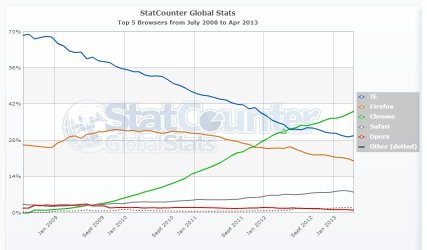
There are several way to measure browser dominance, but Statcounter and Wikimedia show that Chrome clearly dominates, and has for some time now.

StatCounter-browser-ww-monthly-200807-201304.jpg
StatCounter Global Stats - Browser, OS, Search Engine including Mobile Market Share

Hover over this map to see breakdown by country/region.

Wikimedia Traffic Analysis Report - Browsers e.a.

An interesting read on Usage share of browsers and statistics dating back to 1996 and Netscape Navigator:
Usage share of web browsers - Wikipedia, the free encyclopedia
 

My Computer My Computer

Computer type
PC/Desktop
Computer Manufacturer/Model Number
Golden Mk. I.4
OS
Windows 10 Pro x64 ; Xubuntu x64
CPU
Intel i7 860 @ 2.80 GHz O/C'ed to 4.0GHz
Motherboard
Gigabyte P55A-UD3R Rev.1. Award BIOS F13
Memory
16GB Corsair Vengance DDR3 @ 661 MHz Dual Channel (9-9-9-24)
Graphics Card(s)
EVGA NVidia GTX 560 1024MB
Sound Card
Realtek Integrated
Monitor(s) Displays
Dual Samsung SyncMaster 2494HS
Screen Resolution
1920*1080 and 1920*1080
Hard Drives
1*Samsung 840 EVO 120GB SSD;
1*OCZ Vertex 2 60GB SSD;
2*Samsung F3 SpinPoint 1TB in RAID0;
1*Samsung F1 SpinPoint 1TB;
2*Western Digital 1TB External USB 3.0
1*Western Digital 500GB External USB 3.0
1*Seagate 500GB External USB 2.0
PSU
Thermaltake ToughPower QFan 750W
Case
Thermaltake Element S VK60001W2Z
Cooling
Corsair H60 Water Cooling, 2*230mm and 2*80mm case fans
Keyboard
Logitech G110
Mouse
Logitech MX518
Back
Top