IE11 Release Preview for Windows 7 Now Available

Status
Not open for further replies.

Brink

Administrator
Staff member
Local time
1:33 AM
Messages
74,892
Location
Oklahoma
Internet Explorer 11 continues to provide the best Web experience that is fast, fluid and perfect for touch, across the full range of Windows devices and screen sizes. The IE11 Release Preview for Windows 7 is available for download today and includes performance improvements making it 30% faster than other browsers, updates to support the latest Web standards, and developer tools improvements in response to your feedback on the IE11 Developer Preview for Windows 7.


(see site)
This video shows some of the performance and developer tools enhancements in IE11 Release Preview for Windows 7

With IE11 on Windows 7, customers receive a fast, secure browser that is compatible with existing Web sites and delivers exciting new interactive Web experiences. For developers, IE11 supports the latest Web standards and technologies, making it easier to build sites that work across devices. The new F12 tools in IE11 enable developers to build high performance Web experiences, faster and more efficiently.


A Faster Web Experience

Performance matters to everyone who browses the Web. The IE11 Release Preview for Windows 7 includes additional performance tuning so that real-world sites download and display fast and are highly responsive and interactive.

You can experience IE11’s leading performance first hand with demos such as Levitation, Lawnmark, and Lite-Brite on the IE Test Drive site, showing real world Web site patterns for graphically rich, interactive, and 3D experiences. In honor of tomorrow's International Talk Like a Pirate Day, our newest test drive demo, PirateMarrrk, tests your browser’s HTML5, JavaScript, and Scalable Vector Graphics performance.


6787.irpfwftobaemsfws_2D00_image1_5F00_760x427.png
The new PirateMarrrk test drive demo tests your browser’s HTML5, JavaScript, and Scalable Vector Graphics performance.

Internet Explorer 11 advances the performance leadership of our JavaScript engine, Chakra, while ensuring compatibility, interoperability, and security. As we improve performance for real-world sites, IE11’s JavaScript performance on benchmarks like WebKit SunSpider continues to lead compared with latest version of other browsers. On Windows 7, IE11 Release Preview is 9% faster than IE10, which is a 5% improvement from the IE11 Developer Preview, and over 30% faster than the nearest competitive browser.

3716.irpfwftobaemsfws_2D00_image2_5F00_760x477.gif
IE11 extends its leadership in Javascript performance, so real-world sites are faster


Even More Web Standards and Increased Compatibility with Existing Web Sites

IE11 Release Preview for Windows 7 includes updates to reflect the latest emerging Web standards. For example, now that the Pointer Events specification is a Candidate Recommendation at the W3C, IE11 supports an un-prefixed version of the emerging standard.

With Pointer Events support across the full range of Windows devices (and soon to other browsers), Web sites can easily build experiences that work equally well with mouse, keyboard, pen, and touch.
IE11 Release Preview for Windows 7 adds new user controls for the Standard Delivery Profile for Closed Captioning. With the new control, accessible from the Internet Options menu, users can customize how captions appear in the browser, even overriding the default styling provided by the video source. This customization further advances IE11 as the best browser for professional-quality online video without plugins.


4380.irpfwftobaemsfws_2D00_image3.png
With IE11, users can customize the appearance of closed captions, enabling an improved online video experience

The IE11 Release Preview for Windows 7 also supports the latest Tracking Preference Expression (DNT) draft in the W3C. After installation, the IE11 Release Preview prompts the user set a default tracking preference that Internet Explorer will send to Web sites. On upgrade, IE11 Release Preview automatically preserves the user’s previous tracking preferences. .


Faster, More Efficient Developer Tools Productivity, Based on Your Feedback

IE11 includes a completely re-designed and enhanced suite of in-browser F12 developer tools. These tools help Web developers diagnose and optimize their apps quickly and efficiently. Having fast and reliable Web apps is more critical than ever.
The IE11 Release Preview for Windows 7 includes several tools enhancements to increase developer productivity and in response to the overwhelming enthusiasm and feedback we have received from developers. Here are just a few of the many improvements:


  • Console: IE11 makes it easier to debug WebGL content by mapping WebGL errors to the corresponding JavaScript location. Developer productivity is improved because primitives have been added to Intellisense. With IE11, developers can debug multi-threaded Web sites with full console access while targeting Web workers.
  • Debugger: An improved file picker allows faster access to files in a complex Web project.
  • DOM Explorer: With IE11, developers can tune Web sites more quickly by editing CSS property values and seeing those edits in the Live DOM without having to press the enter key
  • Memory: To make it easier to narrow down the source of memory leaks, the F12 tool now identifies what operations were performed on allocated data between memory snapshots.

7433.irpfwftobaemsfws_2D00_image4_5F00_760x404.png
The IE11 Memory tool identifies which memory was allocated, de-allocated, or modified between snapshots, supporting faster memory tuning and diagnosis

  • Networking: A new “always refresh from server” option creates reproduceable performance results while developers rapidly iterate to tune their site performance. The tool also includes new Search Next and Search Previous functions for analyzing complex network traces.

4278.irpfwftobaemsfws_2D00_image5_5F00_760x191.png
With IE11, the “always refresh from server” option supports iterative development by producing reproducible network performance results each time you reload the page


A Better Web Today, and Ahead

IE11 provides the best Web experience across the full range of Windows devices and screen sizes with mouse, keyboard, and especially touch. Try it out for yourself with Windows 8.1 RTM from MSDN, and if you are a Windows 7 user, download the IE11 Release Preview today. Virtual Machine images of IE11 Release Preview for Windows 7 will also be available on modern.ie later this week.

Now is the time for developers to confirm that your Web sites are ready for the hundreds of millions of Windows devices and customers moving to IE11 and for business customers to verify your readiness to deploy IE11. You can find a full list of new functionality available to developers in the IE11 Developer Guide here.

We look forward to your feedback. Please share your suggestions on Connect.

Sandeep Singhal and Rob Mauceri
Group Program Managers, Internet Explorer
Source: IE11 Release Preview for Windows 7: 30% Faster than Other Browsers and Even More Support for Web Standards - IEBlog - Site Home - MSDN Blogs


Download at:

(32-bit) Download Internet Explorer 11 Release Preview for Windows 7 from Official Microsoft Download Center

(64-bit) Download Internet Explorer 11 Release Preview for Windows 7 64-bit Edition and Windows Server 2008 R2 64-bit Edition from Official Microsoft Download Center

OR

Internet Explorer 11 Preview - Microsoft Windows
 
Last edited:

My Computer My Computer

At a glance

64-bit Windows 11 Pro for WorkstationsIntel i7-8700K OC'd to 5 GHz64 GB (4x16GB) G.SKILL TridentZ RGB DDR4 3600...ASUS ROG-STRIX-GTX1080TI-O11G-GAMING
Computer type
PC/Desktop
Computer Manufacturer/Model Number
Self built custom
OS
64-bit Windows 11 Pro for Workstations
CPU
Intel i7-8700K OC'd to 5 GHz
Motherboard
ASUS ROG Maximus XI Formula Z390
Memory
64 GB (4x16GB) G.SKILL TridentZ RGB DDR4 3600 MHz
Graphics Card(s)
ASUS ROG-STRIX-GTX1080TI-O11G-GAMING
Sound Card
Integrated
Monitor(s) Displays
2 x Samsung Odyssey G7 27"
Screen Resolution
2560x1440
Hard Drives
1TB Samsung 990 PRO M.2,
4TB Samsung 990 PRO PRO M.2,
TerraMaster F8 SSD Plus NAS
PSU
Seasonic Prime Titanium 850W
Case
Thermaltake Core P3
Cooling
Corsair Hydro H115i
Keyboard
Logitech wireless K800
Mouse
Logitech MX Master 4
Internet Speed
2 Gb/s Download and 100 Mb/s Upload
Antivirus
Malwarebyte Anti-Malware Premium
Browser
Google Chrome
Other Info
Logitech Z625 speaker system,
Logitech BRIO 4K Pro webcam,
HP Color LaserJet Pro MFP M477fdn,
APC SMART-UPS RT 1000 XL - SURT1000XLI,
Galaxy S23 Plus phone
Wow, that was a bombshell!!!

Thanks for the post, Shawn, can't wait to install it and see if some issues with the DP have been resolved :D

EDIT: Okay, for a moment I thought the RP was pure trouble as I had some page crashes when loading, and here's the irony, Bing and Outlook.com xD

But it didn't happen again and it works fine now, though I have to say that so far I'm not really seeing much improvements in terms of loading and stuff.
 
Last edited:

My Computer My Computer

At a glance

Windows 7 Home Premium x64Intel Core i5 2500K8GB DDR3nVidia GeForce GTX650 Ti BOOST
Computer type
Laptop
Computer Manufacturer/Model Number
Custom
OS
Windows 7 Home Premium x64
CPU
Intel Core i5 2500K
Motherboard
MSI MS-7750
Memory
8GB DDR3
Graphics Card(s)
nVidia GeForce GTX650 Ti BOOST
Sound Card
Realtek
Monitor(s) Displays
21' Philips
Screen Resolution
Full HD
Hard Drives
1TB
PSU
500W
I'm currently testing IE11 out now :geek:
 

My Computer My Computer

Computer type
Laptop
I'm currently testing IE11 out now :geek:

Ah, so the snippy n the post in the "testing IE11" thread was of the RP and not the DP, okay, my bad :D

I've been on it for a couple of hours now, no crashes or anything out of the ordinary. Even the tab focuss thing that was an issue in the DP has been fixed. The whole browser feels very fast and stable, as expected.
 

My Computer My Computer

At a glance

Windows 7 Home Premium x64Intel Core i5 2500K8GB DDR3nVidia GeForce GTX650 Ti BOOST
Computer type
Laptop
Computer Manufacturer/Model Number
Custom
OS
Windows 7 Home Premium x64
CPU
Intel Core i5 2500K
Motherboard
MSI MS-7750
Memory
8GB DDR3
Graphics Card(s)
nVidia GeForce GTX650 Ti BOOST
Sound Card
Realtek
Monitor(s) Displays
21' Philips
Screen Resolution
Full HD
Hard Drives
1TB
PSU
500W
I'm currently testing IE11 out now :geek:

Ah, so the snippy n the post in the "testing IE11" thread was of the RP and not the DP, okay, my bad :D

I've been on it for a couple of hours now, no crashes or anything out of the ordinary. Even the tab focuss thing that was an issue in the DP has been fixed. The whole browser feels very fast and stable, as expected.

It seems a little choppy with some things though, like loading the images in Shawn's quote.
 

My Computer My Computer

Computer type
Laptop
Really? I can't see a difference in loading images from the previous version(s)...
 

My Computer My Computer

At a glance

Windows 7 Home Premium x64Intel Core i5 2500K8GB DDR3nVidia GeForce GTX650 Ti BOOST
Computer type
Laptop
Computer Manufacturer/Model Number
Custom
OS
Windows 7 Home Premium x64
CPU
Intel Core i5 2500K
Motherboard
MSI MS-7750
Memory
8GB DDR3
Graphics Card(s)
nVidia GeForce GTX650 Ti BOOST
Sound Card
Realtek
Monitor(s) Displays
21' Philips
Screen Resolution
Full HD
Hard Drives
1TB
PSU
500W
I'm testing the RP for IE11, but Outlook.com doesn't work right for me. It loads fine, but when I click on an email message to open it, nothing happens. Not a deal breaker, but kind of ironic that one of Microsoft's own service pages doesn't respond properly.
 

My Computer My Computer

At a glance

Windows 7 UltimateAMD Sempron LE-1150 2.0 GhzATi Radeon HD 3650
OS
Windows 7 Ultimate
CPU
AMD Sempron LE-1150 2.0 Ghz
Motherboard
Gigabyte GA-M61PME-S2
Graphics Card(s)
ATi Radeon HD 3650
Sound Card
Realtek HD Onboard Audio
Monitor(s) Displays
HP 1702
Screen Resolution
1280x1024
Keyboard
Logitech Wireless
Mouse
Logitech Wireless
Internet Speed
7 MB DSL
I'm testing the RP for IE11, but Outlook.com doesn't work right for me. It loads fine, but when I click on an email message to open it, nothing happens. Not a deal breaker, but kind of ironic that one of Microsoft's own service pages doesn't respond properly.

I'll try it some time later and see if it fixes my issues below:
posting tools functionality on many forum sites, "force start" downloads, Facebook chat not working without modifying user agent string, UI not working properly when using Full screen mode
 

My Computer My Computer

At a glance

Windows 7 Professional x64 SP1Intel® Pentium® 4 @ 2.26 GHz, Intel Core i7-2...512MB Dual channel DDR SDRAM @ 400MHz 2.5-3-3...Intel 82865G, Nvidia GeForce 520M Graphics
Computer type
Laptop
Computer Manufacturer/Model Number
Dell Optiplex SX270, Lenovo Z470
OS
Windows 7 Professional x64 SP1
CPU
Intel® Pentium® 4 @ 2.26 GHz, Intel Core i7-2670QM @ 2.20 GH
Motherboard
Dell, Lenovo
Memory
512MB Dual channel DDR SDRAM @ 400MHz 2.5-3-3-7, 8 GB DDR3
Graphics Card(s)
Intel 82865G, Nvidia GeForce 520M Graphics
Sound Card
SoundMax Integrated Audio, Integrated HD Audio
Monitor(s) Displays
LG W1952
Screen Resolution
1440x900, 1366 x 768
Hard Drives
40 GB 2.5" IDE 4200 RPM HDD, 500 GB 5400 RPM Sata 1.5 + 32 GB SSD
PSU
Dell 145 Watt, Lenovo 120 Watt Power Adapter
Case
Optiplex SX270 Small Form Factor, Laptop
Cooling
Dell Proprietary Air Cooling, Stock laptop cooling
Keyboard
Dell SK-8125 USB Keyboard
Mouse
Dell PS/2 2 button ball mouse with wheel scroll
Internet Speed
300 Mbit down / 20 Mbps up Time Warner Cable
Antivirus
MSE, Malwarebytes Scanner
Browser
Internet (Aizawa) Explorer 11
Other Info
Running Windows Server 2012 Datacenter on a virtual machine to run Metro Apps.
I'm testing the RP for IE11, but Outlook.com doesn't work right for me. It loads fine, but when I click on an email message to open it, nothing happens. Not a deal breaker, but kind of ironic that one of Microsoft's own service pages doesn't respond properly.

I'll try it some time later and see if it fixes my issues below:
posting tools functionality on many forum sites, "force start" downloads, Facebook chat not working without modifying user agent string, UI not working properly when using Full screen mode

Facebook Chat works fine for me in IE11.
 

My Computer My Computer

Computer type
Laptop
Seems to be working well on my machine. Everything is working just as it did prior to the install and the upgrade went flawlessly.
 

My Computer My Computer

At a glance

Windows 7 64 bitAthlon X4 955 Black edition8GB DDR21x Radeon 4890
Computer Manufacturer/Model Number
Mesh 955 XGS
OS
Windows 7 64 bit
CPU
Athlon X4 955 Black edition
Motherboard
ASUS M4A78 Pro
Memory
8GB DDR2
Graphics Card(s)
1x Radeon 4890
Monitor(s) Displays
IIyama ProLite E2208HDS
Screen Resolution
1920X1080p
Hard Drives
2x 1TB Samsung SATA2
1x 320GB IDE
PSU
600 watt
Cooling
Standard
Keyboard
MS wireless 6000
Mouse
MS wireless laser 7000
Internet Speed
Not as fast as it should be......
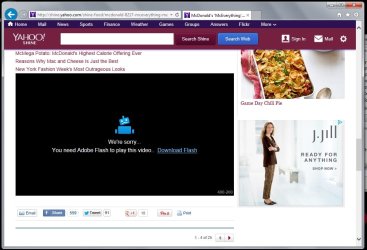
So I finally tried IE 11. I'm happy to report that it fixes most of my issues except for some banking sites, but it's just a matter of time before those fully support IE 11. A new problem is that some websites that uses Flash player aren't working correctly. See pics below

IE 11 RP:

Untitled.2.jpg

Chrome

Untitled.jpg

Hope this gets fixed with upcoming Adobe release or IE 11 RTM.

I haven't tried most of the features like pinning sites, etc. so I don't know if there are glitches on those areas.
 

My Computer My Computer

At a glance

Windows 7 Professional x64 SP1Intel® Pentium® 4 @ 2.26 GHz, Intel Core i7-2...512MB Dual channel DDR SDRAM @ 400MHz 2.5-3-3...Intel 82865G, Nvidia GeForce 520M Graphics
Computer type
Laptop
Computer Manufacturer/Model Number
Dell Optiplex SX270, Lenovo Z470
OS
Windows 7 Professional x64 SP1
CPU
Intel® Pentium® 4 @ 2.26 GHz, Intel Core i7-2670QM @ 2.20 GH
Motherboard
Dell, Lenovo
Memory
512MB Dual channel DDR SDRAM @ 400MHz 2.5-3-3-7, 8 GB DDR3
Graphics Card(s)
Intel 82865G, Nvidia GeForce 520M Graphics
Sound Card
SoundMax Integrated Audio, Integrated HD Audio
Monitor(s) Displays
LG W1952
Screen Resolution
1440x900, 1366 x 768
Hard Drives
40 GB 2.5" IDE 4200 RPM HDD, 500 GB 5400 RPM Sata 1.5 + 32 GB SSD
PSU
Dell 145 Watt, Lenovo 120 Watt Power Adapter
Case
Optiplex SX270 Small Form Factor, Laptop
Cooling
Dell Proprietary Air Cooling, Stock laptop cooling
Keyboard
Dell SK-8125 USB Keyboard
Mouse
Dell PS/2 2 button ball mouse with wheel scroll
Internet Speed
300 Mbit down / 20 Mbps up Time Warner Cable
Antivirus
MSE, Malwarebytes Scanner
Browser
Internet (Aizawa) Explorer 11
Other Info
Running Windows Server 2012 Datacenter on a virtual machine to run Metro Apps.
I'm testing the RP for IE11, but Outlook.com doesn't work right for me. It loads fine, but when I click on an email message to open it, nothing happens. Not a deal breaker, but kind of ironic that one of Microsoft's own service pages doesn't respond properly.

Outlook.com looks okay from here even though Tracking Protection has blocked some content from 7 services. Opening emails, replying, uploading attachments etc. Everything looks and works as it should for me.


So I finally tried IE 11. I'm happy to report that it fixes most of my issues except for some banking sites, but it's just a matter of time before those fully support IE 11. A new problem is that some websites that uses Flash player aren't working correctly. See pics below

IE 11 RP:

View attachment 286452

Chrome

View attachment 286453

Hope this gets fixed with upcoming Adobe release or IE 11 RTM.

I haven't tried most of the features like pinning sites, etc. so I don't know if there are glitches on those areas.

Odd. Flash works fine for me as well.

Capture.PNG
 

My Computer My Computer

At a glance

Windows 7 Home Premium x64Intel Core i5 2500K8GB DDR3nVidia GeForce GTX650 Ti BOOST
Computer type
Laptop
Computer Manufacturer/Model Number
Custom
OS
Windows 7 Home Premium x64
CPU
Intel Core i5 2500K
Motherboard
MSI MS-7750
Memory
8GB DDR3
Graphics Card(s)
nVidia GeForce GTX650 Ti BOOST
Sound Card
Realtek
Monitor(s) Displays
21' Philips
Screen Resolution
Full HD
Hard Drives
1TB
PSU
500W

OK, that first link takes you to the 32-bit version of IE11

If you want the 64-bit version go here - Download Internet Explorer 11 Release Preview for Windows 7 64-bit Edition and Windows Server 2008 R2 64-bit Edition from Official Microsoft Download Center

Incidentally the second link doesn't seem to be working for me. When I download it and click it to install, it progresses a little than just hangs :confused:
 

My Computer My Computer

At a glance

Windows 10 ProIntel Core i7-4770K (3.5Ghz)32 gig Corsair Dominator Platinum (4x8Gig)Sapphire Tri-X R9 Fury
Computer type
PC/Desktop
Computer Manufacturer/Model Number
Custom built by me.
OS
Windows 10 Pro
CPU
Intel Core i7-4770K (3.5Ghz)
Motherboard
Gigabyte G1 Sniper 5 (F10 Bios)
Memory
32 gig Corsair Dominator Platinum (4x8Gig)
Graphics Card(s)
Sapphire Tri-X R9 Fury
Sound Card
Soundblaster ZXR
Monitor(s) Displays
NEC PA242W 24" LCD Monitor
Screen Resolution
1920 x 1200
Hard Drives
Primary - Samsung 850 Pro (512gig), Samsung 840 Pro (256gig), 2TB WD Caviar Black.
PSU
EVGA Supernova 1000 G2
Case
Cooler Master HAF X
Cooling
Corsair H100i with Corsair Air Series SP120 Quiet Fans
Keyboard
Logitech Wireless Wave
Mouse
Logitech Performance MX
Internet Speed
High Speed Cable
Antivirus
Norton Security
Browser
IE11
Other Info
Memory Timings - 1866MHz @ 9-9-9-27-1T @ 1.5 volts
@ Gornot,

I made sure I have the latest Flash version "11,8,800,174". Changing the User Agent String from "default" to IE 10 or IE 9 using F12 developer tools makes the flash video work on Yahoo! Shine. Argh I don't know if the only one whose having this problem.

Edit. I noticed that you are in the Windows 8.1 RTM. Anybody with Windows 7 IE 11 Release preview can confirm if flash player works on Yahoo! Shine?
 

My Computer My Computer

At a glance

Windows 7 Professional x64 SP1Intel® Pentium® 4 @ 2.26 GHz, Intel Core i7-2...512MB Dual channel DDR SDRAM @ 400MHz 2.5-3-3...Intel 82865G, Nvidia GeForce 520M Graphics
Computer type
Laptop
Computer Manufacturer/Model Number
Dell Optiplex SX270, Lenovo Z470
OS
Windows 7 Professional x64 SP1
CPU
Intel® Pentium® 4 @ 2.26 GHz, Intel Core i7-2670QM @ 2.20 GH
Motherboard
Dell, Lenovo
Memory
512MB Dual channel DDR SDRAM @ 400MHz 2.5-3-3-7, 8 GB DDR3
Graphics Card(s)
Intel 82865G, Nvidia GeForce 520M Graphics
Sound Card
SoundMax Integrated Audio, Integrated HD Audio
Monitor(s) Displays
LG W1952
Screen Resolution
1440x900, 1366 x 768
Hard Drives
40 GB 2.5" IDE 4200 RPM HDD, 500 GB 5400 RPM Sata 1.5 + 32 GB SSD
PSU
Dell 145 Watt, Lenovo 120 Watt Power Adapter
Case
Optiplex SX270 Small Form Factor, Laptop
Cooling
Dell Proprietary Air Cooling, Stock laptop cooling
Keyboard
Dell SK-8125 USB Keyboard
Mouse
Dell PS/2 2 button ball mouse with wheel scroll
Internet Speed
300 Mbit down / 20 Mbps up Time Warner Cable
Antivirus
MSE, Malwarebytes Scanner
Browser
Internet (Aizawa) Explorer 11
Other Info
Running Windows Server 2012 Datacenter on a virtual machine to run Metro Apps.
@ Gornot,

I made sure I have the latest Flash version "11,8,800,174". Changing the User Agent String from "default" to IE 10 or IE 9 using F12 developer tools makes the flash video work on Yahoo! Shine. Argh I don't know if the only one whose having this problem.

Edit. I noticed that you are in the Windows 8.1 RTM. Anybody with Windows 7 IE 11 Release preview can confirm if flash player works on Yahoo! Shine?

Flash is working OK for me on Shine. However ... if I open a Yahoo news story and try to access reader comments, none of the comments will load. Happens with every website I've tried that has reader comments. :confused:
 

My Computer My Computer

At a glance

Win 7 Pro 64-bitIntel i5 2.4 Ghz8GB DDR3Intel HD 3000
Computer type
Laptop
Computer Manufacturer/Model Number
Sony Vaio VPCEB47GM Laptop
OS
Win 7 Pro 64-bit
CPU
Intel i5 2.4 Ghz
Memory
8GB DDR3
Graphics Card(s)
Intel HD 3000
Sound Card
IDT High Definition
Monitor(s) Displays
15.6 WGXA Anti-Glare LED
Screen Resolution
1280x800
Hard Drives
640Gb 7200rpm
Antivirus
MSE
Browser
Opera (primary) with IE9 backup
I like it

Everything here is working sweet so far. The only scare I got was when I went to sign-in for on-line class homework. The site stated the browser (IE11) wasn't compatible, but it gave me the option to try it anyway (green bar). I did, and no issues noticed.

Browser not supported.JPG

I also logged into my bank with it, no issues there. Same with flash content, no issues. It even plays nice with my antiquated (FrontPage made) website :D

And man this thing seems fast. Pages and content just seems to load a lot faster.

So far no problems or issues noted. Thumbs up thus far :thumbsup:

Too bad I can't try it on Windows 8 (not 8.1) as I would really love to see this running on my laptop. Oh well, we'll have to wait for the final release of 8.1.
 

My Computer My Computer

At a glance

Windows 10 ProIntel Core i7-4770K (3.5Ghz)32 gig Corsair Dominator Platinum (4x8Gig)Sapphire Tri-X R9 Fury
Computer type
PC/Desktop
Computer Manufacturer/Model Number
Custom built by me.
OS
Windows 10 Pro
CPU
Intel Core i7-4770K (3.5Ghz)
Motherboard
Gigabyte G1 Sniper 5 (F10 Bios)
Memory
32 gig Corsair Dominator Platinum (4x8Gig)
Graphics Card(s)
Sapphire Tri-X R9 Fury
Sound Card
Soundblaster ZXR
Monitor(s) Displays
NEC PA242W 24" LCD Monitor
Screen Resolution
1920 x 1200
Hard Drives
Primary - Samsung 850 Pro (512gig), Samsung 840 Pro (256gig), 2TB WD Caviar Black.
PSU
EVGA Supernova 1000 G2
Case
Cooler Master HAF X
Cooling
Corsair H100i with Corsair Air Series SP120 Quiet Fans
Keyboard
Logitech Wireless Wave
Mouse
Logitech Performance MX
Internet Speed
High Speed Cable
Antivirus
Norton Security
Browser
IE11
Other Info
Memory Timings - 1866MHz @ 9-9-9-27-1T @ 1.5 volts
I could search, but I'll ask here ;) Does this overwrite current IE? Can I test this and still have IE9 as is? I haven't tried 10 seeing all the issues here. Don't use IE much, but need it to work when I do. A Guy
 

My Computer My Computer

At a glance

Windows 10 Home x64INTEL Core i5-750 Quad-Core 3.37GHzHyperX Fury Black Series 8GB (2 x 4GB) 1866MhzEVGA GeForce GTX 750 Superclocked 1GB 128-Bit...
Computer type
PC/Desktop
OS
Windows 10 Home x64
CPU
INTEL Core i5-750 Quad-Core 3.37GHz
Motherboard
ASUS P7P55D
Memory
HyperX Fury Black Series 8GB (2 x 4GB) 1866Mhz
Graphics Card(s)
EVGA GeForce GTX 750 Superclocked 1GB 128-Bit GDDR5
Monitor(s) Displays
LG 32MA68HY 32" IPS
Screen Resolution
1920 x 1080
Hard Drives
Samsung 840 Evo 120GB, SEAGATE 500GB Barracuda® 7200.12, SATA 3 Gb/s, 7200 RPM, 16MB cache
PSU
ANTEC TruePower New TP-550, 80 PLUS, 550W
Case
ANTEC Three Hundred Illusion
Cooling
COOLER MASTER Hyper 212 Plus, 4 x 120mm 1 x 140mm Noctua's
Internet Speed
85 + Mbps
Antivirus
Avast
Browser
Vivaldi
I could search, but I'll ask here ;) Does this overwrite current IE? Can I test this and still have IE9 as is? I haven't tried 10 seeing all the issues here. Don't use IE much, but need it to work when I do. A Guy

Maybe I'm missing something but I never knew you could do what you're asking. :confused: I know when I upgraded from 9 to 10, 10 replaced 9, but kept the settings. Same here - 11 replaced 10.

If you mean will it keep your current settings from the previous version, yes it will.
 

My Computer My Computer

At a glance

Windows 10 ProIntel Core i7-4770K (3.5Ghz)32 gig Corsair Dominator Platinum (4x8Gig)Sapphire Tri-X R9 Fury
Computer type
PC/Desktop
Computer Manufacturer/Model Number
Custom built by me.
OS
Windows 10 Pro
CPU
Intel Core i7-4770K (3.5Ghz)
Motherboard
Gigabyte G1 Sniper 5 (F10 Bios)
Memory
32 gig Corsair Dominator Platinum (4x8Gig)
Graphics Card(s)
Sapphire Tri-X R9 Fury
Sound Card
Soundblaster ZXR
Monitor(s) Displays
NEC PA242W 24" LCD Monitor
Screen Resolution
1920 x 1200
Hard Drives
Primary - Samsung 850 Pro (512gig), Samsung 840 Pro (256gig), 2TB WD Caviar Black.
PSU
EVGA Supernova 1000 G2
Case
Cooler Master HAF X
Cooling
Corsair H100i with Corsair Air Series SP120 Quiet Fans
Keyboard
Logitech Wireless Wave
Mouse
Logitech Performance MX
Internet Speed
High Speed Cable
Antivirus
Norton Security
Browser
IE11
Other Info
Memory Timings - 1866MHz @ 9-9-9-27-1T @ 1.5 volts
No, I mean I thought it may be a stand alone application as it is a preview. I can have my regular Opera and the Opera next side by side, same for Firefox. Just thought it might not replace the current IE. Think you answered my question ;)

A Guy
 

My Computer My Computer

At a glance

Windows 10 Home x64INTEL Core i5-750 Quad-Core 3.37GHzHyperX Fury Black Series 8GB (2 x 4GB) 1866MhzEVGA GeForce GTX 750 Superclocked 1GB 128-Bit...
Computer type
PC/Desktop
OS
Windows 10 Home x64
CPU
INTEL Core i5-750 Quad-Core 3.37GHz
Motherboard
ASUS P7P55D
Memory
HyperX Fury Black Series 8GB (2 x 4GB) 1866Mhz
Graphics Card(s)
EVGA GeForce GTX 750 Superclocked 1GB 128-Bit GDDR5
Monitor(s) Displays
LG 32MA68HY 32" IPS
Screen Resolution
1920 x 1080
Hard Drives
Samsung 840 Evo 120GB, SEAGATE 500GB Barracuda® 7200.12, SATA 3 Gb/s, 7200 RPM, 16MB cache
PSU
ANTEC TruePower New TP-550, 80 PLUS, 550W
Case
ANTEC Three Hundred Illusion
Cooling
COOLER MASTER Hyper 212 Plus, 4 x 120mm 1 x 140mm Noctua's
Internet Speed
85 + Mbps
Antivirus
Avast
Browser
Vivaldi
They don't work that way. They just overwrite the files. If you want to go back to the earlier version, you'll have to uninstall the preview (or newer version).

I know you can have different cross browsers - Firefox, Mozilla, Safari and IE, but you can't have two instances of the same browser... i.e. IE9 & IE11. At least with Internet Explorer; I'd imagine others are the same.
 

My Computer My Computer

At a glance

Windows 10 ProIntel Core i7-4770K (3.5Ghz)32 gig Corsair Dominator Platinum (4x8Gig)Sapphire Tri-X R9 Fury
Computer type
PC/Desktop
Computer Manufacturer/Model Number
Custom built by me.
OS
Windows 10 Pro
CPU
Intel Core i7-4770K (3.5Ghz)
Motherboard
Gigabyte G1 Sniper 5 (F10 Bios)
Memory
32 gig Corsair Dominator Platinum (4x8Gig)
Graphics Card(s)
Sapphire Tri-X R9 Fury
Sound Card
Soundblaster ZXR
Monitor(s) Displays
NEC PA242W 24" LCD Monitor
Screen Resolution
1920 x 1200
Hard Drives
Primary - Samsung 850 Pro (512gig), Samsung 840 Pro (256gig), 2TB WD Caviar Black.
PSU
EVGA Supernova 1000 G2
Case
Cooler Master HAF X
Cooling
Corsair H100i with Corsair Air Series SP120 Quiet Fans
Keyboard
Logitech Wireless Wave
Mouse
Logitech Performance MX
Internet Speed
High Speed Cable
Antivirus
Norton Security
Browser
IE11
Other Info
Memory Timings - 1866MHz @ 9-9-9-27-1T @ 1.5 volts
Status
Not open for further replies.
Back
Top