IE8 mixing up default icon?

Tiffer

New member
Member
VIP
Local time
4:30 AM
Messages
36
Location
United Kingdom
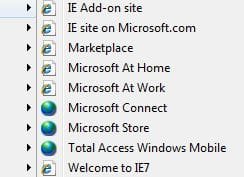
Internet Explorer 8 seems to be displaying the wrong default icon for URL shortcuts.

I'm sure it's a registry problem or something but I can't seem to fix it. IE8 displays a "World" icon instead of the normal IE icon. On my Favourites bar it's all world icons and in the Menu some appear correct with others showing world icons. See screenshots below:

ie81.jpg

ie82.jpg

Any ideas anyone? I really don't like the "world" icons!
 

My Computer My Computer

Computer Manufacturer/Model Number
Self Build
OS
Windows 7 Home Premium x64
CPU
Intel Core 2 Quad Q6600 @ 2.40GHz
Motherboard
Asus P5B-E
Memory
4Gb (2x Corsair CM2X2048-6400C5)
Graphics Card(s)
NVIDIA GeForce 9600 GT 512Mb
Sound Card
Realtek High Definition Audio Device
Monitor(s) Displays
Mirai 22" Widescreen and LG 19" Standard
Screen Resolution
1680 x 1050 and 1280 x 1024
Hard Drives
Western Digital 500Gb SATA x 2
Samsung 1Tb SATA
PSU
Hiper Modular 530W
Case
Akasa Ecplise 62 Midi
Cooling
Artic Cooling Freezer Pro 7
Keyboard
Advent Standard with Hotkeys
Mouse
PC Line PCL-FL1 Wired Laser
Internet Speed
ISP: Fast.co.uk up to 8Mb
Other Info
Netgear Router plus 5 Way LAN Switch, Samsung Ethernet Laser Printer, Epson PX650 Colour PSC, plus 2 more Desktop PCs, 3 Laptops and 2 Netbooks in same Home Network.
I am having the same problem. I wish there was more to this thread. I did search, but this is the only relevant thread I've found. Can anyone point me to a thread which solves this?
 

My Computer My Computer

Computer Manufacturer/Model Number
Toshiba A505-S6980
OS
Windows 7 x64
they're called "favicons"

Found this on the web:
Clear the Temporary Internet Files and the correct favicons should be acquired on the next visit to the site.
On the Delete Browsing History screen, you may have to uncheck the "Preserve Favorites websites data" box to get the incorrect favicons deleted.

- in ie8, it's accessible via the "Tools" option on any web page.. :huh:

also found this:
It recommends the following steps to preserve favicons.

1.. Create a local directory (e.g., c:\favicons)
2.. Copy the desired favicon into the directory created above.
3.. Right click the mouse over the favorite/bookmark and select
properties.
4.. Enter the path (or use the 'browse' feature) to the favicon you want
for that bookmark.

someone else also recommends that you track down the favicons and make them read-only..
not sure if this works or not - can anybody confirm this..??
 
Last edited:

My Computer My Computer

Computer type
PC/Desktop
Computer Manufacturer/Model Number
benchtec, built to personal specs
OS
Windows10 Pro - 64Bit vs.10547
CPU
i7-965 Extreme Edition (8 Cores) at 3.3GHz (no OC)
Motherboard
BloodRageX58 (Socket1366)
Memory
12G Corsair Dominator DDR3 - tripled
Graphics Card(s)
2xAMD SapphireNITRO R9 380(4G) crossfire
Sound Card
Sonar(SB)X-Fi onboard
Monitor(s) Displays
SyncMaster P2050 20"
Screen Resolution
1600x900 (widescreen)
Hard Drives
480G\OCZSolid3SSD, 64G\OCZVertex3SSD,60G\OCZVertex2SSD, 1TB\spinpointF1SATAHDD
PSU
1200w Power Station Gold
Case
ANTEC 900/2 all blue lights, etc..
Cooling
Noctua SE1366 NH-U12P - a tight fit, but a monster cooler!!
Keyboard
Logitech G19 (wired)
Mouse
Logitech G9 Laser (wired)
Internet Speed
150mb unlimited
Browser
IE11(RP)
Other Info
Xbox One, Nokia735 Windows10 mobile, LG HD/DVD/Blu-Ray r/w, CyberlinkPowerDVD15, LogitechZ5500-SS(5.1), LogitechG35Phones-SS(7.1),MSOffice 2007,CorelDrawX7,Painter2016, Wacom Intuos Pro-SE
Back
Top