
IE8 Script errors and other problems

You don't need Ccleaner to get rid of that stuff. Disk cleanup or even the internet options can do that for you. I have 199680KB with weeks of browsing. Check your settings in internet options. under the general tab, under browsing history, click settings. set temp internet files to automatic, and only use 50-250MB disk space. days to keep pages in history, set it to less than 20. KB is a small unit of measurement. It is like saying you drank 200 Ml, but it is only .2 L. It isn't alot.

in internet options, you can have it delete history by clicking delete, checking everything that you want deleted, and ok. Again, I recommend not doing this because if everything is deleted all the time, then nothing is saved. It just makes you have to enter any information into the browser over and over again, which I find annoying and slow. But up to you.

I also recommend MSE and malwarebytes. I KNOW that superantispyware is aggressive, be very careful with it. It CAN damage your system. It may find viruses better, but it can also mistake an important file for a virus more easily.

If Spyware blaster is dealing with ActiveX scripting, that should give a clue as to a major potential culprit right there for scripting problems. do you have addons that maybe you don't need? they can affect the errors too

I am surprised that you heard horror stories or IE9 (perhaps they were in anticipation)? I can think of no reasons, other than a slightly different look that you will need to get used to. I'll post a picture of what I mean:
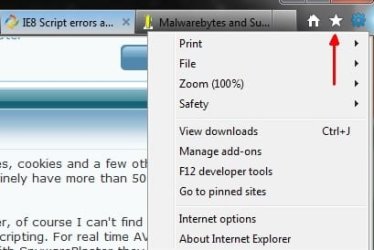
s (2).jpg

I would guess your problems are not IE at all, but the security software you have installed. While security is very important, too much is like locking a child in a crib, because outside of the crib, they can get hurt. You loose functionality, and the child may scream (script errors)

Holy cow, that is a stinkin awesome analogy!

Usage wise, IE has shown itself to be on the decline, with Google chrome drastically on the increase. Recently, however, IE has begun to increase, and Google chrome has surpased firefox as the web's #2 browser (with IE still in 1st place). Why is IE doing better? Because of IE9.
 
Last edited:

My Computer

Computer type
PC/Desktop
Computer Manufacturer/Model Number
Custom Asus Build
OS
Microsoft Windows 8.1 Pro 64-bit
CPU
Intel(R) Core(TM) i3-4130 CPU @ 3.40GHz
Motherboard
B85M-E
Memory
8.00 GB
Graphics Card(s)
None
Sound Card
Realtek High Definition Audio
Monitor(s) Displays
Asus 23.6" Monitor
Screen Resolution
1920 x 1080 x 32 bits (4294967296 colors) @ 60 Hz
Hard Drives
INTEL SSDSC2BW180A4
Samsung SSD 840 PRO Series
PSU
Seasonic S12II-380Bronze
Case
Lian Li
Cooling
Fan, Passive
Keyboard
Logitech K120
Mouse
Microsoft Touch Mouse
Internet Speed
4ms Ping, 19.0 Mbps Download, 19.0 Mbps Upload
Antivirus
Eset Endpoint
Browser
Internet Explorer, Chrome
I wanted to add this:
You can update to IE10 whenever you want, it doesn't matter if you update to IE9 first or not. This shouldn't be a reason you don't install IE9, nor should it be the reason you install it.

Also, as you say, that antivirus/malware software you have is all highly regarded, but problems happen no matter what you have. The more you have, the more chance you will have trouble at least sometime. For example, MSE recently released a virus list that included google as potentially unsafe. It was quickly remedied, but people began to ocmplain. Accidents happen. For more aggressive programs, I would recommend not using them unless you are very knowledgeable in the computer field and know what you are removing/blocking.

Hope this helps
 

My Computer

Computer type
PC/Desktop
Computer Manufacturer/Model Number
Custom Asus Build
OS
Microsoft Windows 8.1 Pro 64-bit
CPU
Intel(R) Core(TM) i3-4130 CPU @ 3.40GHz
Motherboard
B85M-E
Memory
8.00 GB
Graphics Card(s)
None
Sound Card
Realtek High Definition Audio
Monitor(s) Displays
Asus 23.6" Monitor
Screen Resolution
1920 x 1080 x 32 bits (4294967296 colors) @ 60 Hz
Hard Drives
INTEL SSDSC2BW180A4
Samsung SSD 840 PRO Series
PSU
Seasonic S12II-380Bronze
Case
Lian Li
Cooling
Fan, Passive
Keyboard
Logitech K120
Mouse
Microsoft Touch Mouse
Internet Speed
4ms Ping, 19.0 Mbps Download, 19.0 Mbps Upload
Antivirus
Eset Endpoint
Browser
Internet Explorer, Chrome
I am so frustrated by this. Websites that I used to visit dozens of times a day just don't work.

If I use Yahoo to search for something, say Target. It brings up a little map. If I click on the map I should get a larger map, right? Wrong. I get an error. I see .js in the long string so it has to be related to javascript. My browsing experience has been ruined.

Webpage error details
User Agent: Mozilla/4.0 (compatible; MSIE 8.0; Windows NT 6.1; WOW64; Trident/4.0; SLCC2; .NET CLR 2.0.50727; .NET CLR 3.5.30729; .NET CLR 3.0.30729; HPDTDF; .NET4.0C; InfoPath.2; Media Center PC 6.0)
Timestamp: Sun, 26 Feb 2012 01:57:09 UTC

Message: Missing or invalid argument
Line: 45
Char: 3651
Code: 0
URI: http://l.yimg.com/d/combo?yui/2.7.0...pandedmap_066b0194821a91af645744906ad28f91.js&
 

My Computer

Computer Manufacturer/Model Number
HP p6608f
OS
Win 7 Home Premium x64
CPU
Intel Core i3-540 3.07 GHz
Motherboard
MS-7613 (Iona-GL8E)
Memory
4 GB (2 X 2) Dual-Channel PC-10600 DDR3 @ 665MHz (9-9-9-24)
Graphics Card(s)
Integrated Intel H57
Sound Card
Integrated Realtek ALC888S Audio
Monitor(s) Displays
17" SDM-HS73 (a vestige from my old computer)
Screen Resolution
1280 X 1024
Hard Drives
750GB SATA 7200 RPM
PSU
250W
Keyboard
HP USB keyboard
Mouse
HP USB optical mouse
Internet Speed
15Mbps/1Mbps
Here's another. Can anyone help? It is obviously something wrong with javascript. I have uninstalled and reinstalled Java.

Webpage error details
User Agent: Mozilla/4.0 (compatible; MSIE 8.0; Windows NT 6.1; WOW64; Trident/4.0; SLCC2; .NET CLR 2.0.50727; .NET CLR 3.5.30729; .NET CLR 3.0.30729; HPDTDF; .NET4.0C; InfoPath.2; Media Center PC 6.0)
Timestamp: Sun, 26 Feb 2012 02:27:18 UTC

Message: '$.tablesorter' is null or not an object
Line: 341
Char: 5
Code: 0
URI: http://schools.chicagotribune.com/reportcards.js

Message: Object doesn't support this property or method
Line: 277
Char: 60
Code: 0
URI: http://www.chicagotribune.com/hive/javascripts/prototype.js
 

My Computer

Computer Manufacturer/Model Number
HP p6608f
OS
Win 7 Home Premium x64
CPU
Intel Core i3-540 3.07 GHz
Motherboard
MS-7613 (Iona-GL8E)
Memory
4 GB (2 X 2) Dual-Channel PC-10600 DDR3 @ 665MHz (9-9-9-24)
Graphics Card(s)
Integrated Intel H57
Sound Card
Integrated Realtek ALC888S Audio
Monitor(s) Displays
17" SDM-HS73 (a vestige from my old computer)
Screen Resolution
1280 X 1024
Hard Drives
750GB SATA 7200 RPM
PSU
250W
Keyboard
HP USB keyboard
Mouse
HP USB optical mouse
Internet Speed
15Mbps/1Mbps
JavaScript Versus Java

"The process of writing a Java applet can be complicated-writing the source code, compiling, and making the applet available on the server. JavaScript provides a much simpler alternative for small projects. The JavaScript source code is interpreted directly by the browser. The source can either be included directly within an HTML page or referenced in a separate file.

Although JavaScript doesn't really have any features that eclipse Java, it adds some conveniences, simplifies programming, and provides better integration with the browser. The key differences include the following (explained in the following sections):
  • JavaScript can be combined directly with HTML.
  • The JavaScript language structure is simpler than that of Java.
  • The JavaScript interpreter is built into a Web browser.
  • JavaScript is supported on more platforms than Java."
Java Script Vs Java ~ Dot Net Support

In other words, Java (the program you add to Programs and Features) has nothing to do with Javascript code which is part of most web pages. Most people don't need Java on their PC at all, but if you do install it you should keep it up to date since it is frequently updated for security reasons. Javascript (scripting on web pages) can also be a security problem but those issues are covered by the updates that come with your browser.

Your problem is a bit complex for me, but if it were my problem I'd start by uninstalling Java and resetting IE (tools/internet options/advanced/reset).
 

My Computer

Computer type
PC/Desktop
Computer Manufacturer/Model Number
OQO 2+
OS
Windows 8 Pro w/MC 32-bit
CPU
Intel Atom 1.86 GHz
Motherboard
OQO 2+
Memory
2 GB
Graphics Card(s)
Intel GMA 500
Sound Card
IDT
Monitor(s) Displays
LCD
Screen Resolution
800 x 480 (portable) 1280 x 1024 (docked)
Hard Drives
64 GB SSD
PSU
9 Ah Battery (portable) or OQO Brick (docked)
Case
Shirt Pocket Sized
Cooling
Tiny Fan
Keyboard
Slide out (portable) DiNovo Edge (docked)
Mouse
Eraser head (portable) Logitech Bluetooth (docked)
Internet Speed
WWAN or 802.11G (portable) T1 (docked)
Browser
IE 10
Other Info
DVD-RW OQO Docking Station
I definitely understand the difference between JavaScript and Java. I am getting JavaScript errors when using IE. I'd like to know how to resolve them. I found one site that has a script written that essentially reregisters files associated with IE. I suppose I can try that.
 

My Computer

Computer Manufacturer/Model Number
HP p6608f
OS
Win 7 Home Premium x64
CPU
Intel Core i3-540 3.07 GHz
Motherboard
MS-7613 (Iona-GL8E)
Memory
4 GB (2 X 2) Dual-Channel PC-10600 DDR3 @ 665MHz (9-9-9-24)
Graphics Card(s)
Integrated Intel H57
Sound Card
Integrated Realtek ALC888S Audio
Monitor(s) Displays
17" SDM-HS73 (a vestige from my old computer)
Screen Resolution
1280 X 1024
Hard Drives
750GB SATA 7200 RPM
PSU
250W
Keyboard
HP USB keyboard
Mouse
HP USB optical mouse
Internet Speed
15Mbps/1Mbps
Back
Top