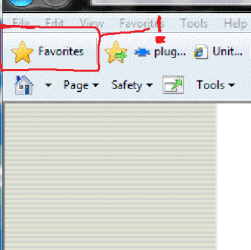
IE9 Favorite Panel and Access Icon

cartel

Banned
Local time
6:53 AM
Messages
93
Location
Hope, BC
I HATE THIS IE9 PUTTING MY FAVORITES ON THE RIGHT AND THE ICON TO OPEN ON THE HIGH RIGHT CORNER.
HOW CAN I FIX IT TO BEFORE WITHOUT PINNING?
PLEASE THIS IS COSTING ME MUCH PRECIOUS TIME HERE!!
 

My Computer My Computer

At a glance

Windows 7 SP1 Ultimate 64bitAMD Phenom II X4 940OCZ PC8500 Platinum 4GBSapphire HD4870 1GB 256-bit GDDR5
Computer Manufacturer/Model Number
ME!
OS
Windows 7 SP1 Ultimate 64bit
CPU
AMD Phenom II X4 940
Motherboard
ASUS M4A79 Deluxe (BIOS 3603)
Memory
OCZ PC8500 Platinum 4GB
Graphics Card(s)
Sapphire HD4870 1GB 256-bit GDDR5
Sound Card
HT Omega Claro
Monitor(s) Displays
ViewSonic G220fb still rocks
Screen Resolution
1600x1200@85hz
Hard Drives
160GB Seagate 7200.10 Sata
150GB WD Raptor 10,000rpm Sata
PSU
Corsair TX950W
Cooling
Zalman 9700NT
Keyboard
Logitech Standard
Mouse
Microsoft SideWinder
Internet Speed
5.26MB down 0.86MB up
Other Info
APC BackUps 900VA
Perhaps you would prefer the favorites on the left?
http://www.sevenforums.com/tutorial...r-9-favorites-center-pin-unpin-left-side.html
Also check out the comments below this tutorial.

Go to this indexed link of the tutorials, and scroll down alphabetically to Internet Explorer you will start to see numerous listings for IE9:
http://www.sevenforums.com/1072-post8.html

There is a nice link here: http://www.sevenforums.com/browsers-mail/151497-how-deal-ie9-tips-tricks-ie9-we-find.html

I am looking for more customization tips for you, as I do not have IE9 installed yet.


Btw, did you toggle your caps lock on, and did not realize it?
 

My Computer My Computer

At a glance

Originally Win 7 Hm Prem x64 Ver 6.1.7600 Bui...Intel i3 530 2.93GHz, 2933MHz 2 Cores 4 Logic...6GB of 1,333MHz DDR3 SDRAM32MB Intel Graphics Media Accelerator HD IGChip
Computer type
PC/Desktop
Computer Manufacturer/Model Number
Gateway DX4831-01e (Mid-Tower Desktop)
OS
Originally Win 7 Hm Prem x64 Ver 6.1.7600 Build 7601-SP1 | Upgraded to Windows 10 December 14, 2019
CPU
Intel i3 530 2.93GHz, 2933MHz 2 Cores 4 Logical Processors
Motherboard
Gateway H57M01 133 megahertz
Memory
6GB of 1,333MHz DDR3 SDRAM
Graphics Card(s)
32MB Intel Graphics Media Accelerator HD IGChip
Sound Card
Realtek High Definition Audio
Monitor(s) Displays
Gateway HX2000 20inch TFT active matrix TN
Screen Resolution
1600 x 900 x 59 hertz
Hard Drives
WDC WD10EADS-00M2B0 [HDD] (1000.20 GB) -- drive 0,
HL-DT-ST DVDRAM GH41N [CD-ROM dr]
Four card readers, and Four USB 2.0
PSU
300watts.
Case
Mid-Tower Desktop
Cooling
Stock from Gateway
Keyboard
Natural Ergonomic Keyboard 4000, see Other Info
Mouse
Orig. Gateway wore out now using Insignia USB wired optical
Internet Speed
Vz FIOS 10ms png 57.64Mbps down 65.53Mbps up Speedtest.org
Antivirus
Zamana Anti-logger with Anti-malware, MSE, Windows Firewall,
Browser
IE11.0.9600.19399-Upd ver11.0.135, Firefox 68.0.1 x64
Other Info
System Specs by Belarc.

BIOS: American Megatrends Inc. P01-A0 11/17/2009

Replaced the MS 'Natural' Standard PS/2 Enhanced 101-102 Keyboard with a new Natural Ergonomic Keyboard 4000 on August 1st 2014.

Canon Pixma MG3222 Printer.

Updated to IE11 on 12102015 | Fios Quantum Router g1100

Additional AV: SpywareBlaster, manual Mbam, SAS
Sorry I am seriously in a hurry, caps "off" sir thank you and God Bless you and all on 7 forums
 

My Computer My Computer

At a glance

Windows 7 SP1 Ultimate 64bitAMD Phenom II X4 940OCZ PC8500 Platinum 4GBSapphire HD4870 1GB 256-bit GDDR5
Computer Manufacturer/Model Number
ME!
OS
Windows 7 SP1 Ultimate 64bit
CPU
AMD Phenom II X4 940
Motherboard
ASUS M4A79 Deluxe (BIOS 3603)
Memory
OCZ PC8500 Platinum 4GB
Graphics Card(s)
Sapphire HD4870 1GB 256-bit GDDR5
Sound Card
HT Omega Claro
Monitor(s) Displays
ViewSonic G220fb still rocks
Screen Resolution
1600x1200@85hz
Hard Drives
160GB Seagate 7200.10 Sata
150GB WD Raptor 10,000rpm Sata
PSU
Corsair TX950W
Cooling
Zalman 9700NT
Keyboard
Logitech Standard
Mouse
Microsoft SideWinder
Internet Speed
5.26MB down 0.86MB up
Other Info
APC BackUps 900VA

My Computer My Computer

At a glance

Originally Win 7 Hm Prem x64 Ver 6.1.7600 Bui...Intel i3 530 2.93GHz, 2933MHz 2 Cores 4 Logic...6GB of 1,333MHz DDR3 SDRAM32MB Intel Graphics Media Accelerator HD IGChip
Computer type
PC/Desktop
Computer Manufacturer/Model Number
Gateway DX4831-01e (Mid-Tower Desktop)
OS
Originally Win 7 Hm Prem x64 Ver 6.1.7600 Build 7601-SP1 | Upgraded to Windows 10 December 14, 2019
CPU
Intel i3 530 2.93GHz, 2933MHz 2 Cores 4 Logical Processors
Motherboard
Gateway H57M01 133 megahertz
Memory
6GB of 1,333MHz DDR3 SDRAM
Graphics Card(s)
32MB Intel Graphics Media Accelerator HD IGChip
Sound Card
Realtek High Definition Audio
Monitor(s) Displays
Gateway HX2000 20inch TFT active matrix TN
Screen Resolution
1600 x 900 x 59 hertz
Hard Drives
WDC WD10EADS-00M2B0 [HDD] (1000.20 GB) -- drive 0,
HL-DT-ST DVDRAM GH41N [CD-ROM dr]
Four card readers, and Four USB 2.0
PSU
300watts.
Case
Mid-Tower Desktop
Cooling
Stock from Gateway
Keyboard
Natural Ergonomic Keyboard 4000, see Other Info
Mouse
Orig. Gateway wore out now using Insignia USB wired optical
Internet Speed
Vz FIOS 10ms png 57.64Mbps down 65.53Mbps up Speedtest.org
Antivirus
Zamana Anti-logger with Anti-malware, MSE, Windows Firewall,
Browser
IE11.0.9600.19399-Upd ver11.0.135, Firefox 68.0.1 x64
Other Info
System Specs by Belarc.

BIOS: American Megatrends Inc. P01-A0 11/17/2009

Replaced the MS 'Natural' Standard PS/2 Enhanced 101-102 Keyboard with a new Natural Ergonomic Keyboard 4000 on August 1st 2014.

Canon Pixma MG3222 Printer.

Updated to IE11 on 12102015 | Fios Quantum Router g1100

Additional AV: SpywareBlaster, manual Mbam, SAS
Ok I know I can PIN it there I want it to appear there as always.
Pinning dont help me when I want quick access.
Why they mess with this has been over 15 years.

!!!!!!!!!!!!!:mad:
 

Attachments

  • Win 7 RTM137.png
    Win 7 RTM137.png
    9 KB · Views: 4

My Computer My Computer

At a glance

Windows 7 SP1 Ultimate 64bitAMD Phenom II X4 940OCZ PC8500 Platinum 4GBSapphire HD4870 1GB 256-bit GDDR5
Computer Manufacturer/Model Number
ME!
OS
Windows 7 SP1 Ultimate 64bit
CPU
AMD Phenom II X4 940
Motherboard
ASUS M4A79 Deluxe (BIOS 3603)
Memory
OCZ PC8500 Platinum 4GB
Graphics Card(s)
Sapphire HD4870 1GB 256-bit GDDR5
Sound Card
HT Omega Claro
Monitor(s) Displays
ViewSonic G220fb still rocks
Screen Resolution
1600x1200@85hz
Hard Drives
160GB Seagate 7200.10 Sata
150GB WD Raptor 10,000rpm Sata
PSU
Corsair TX950W
Cooling
Zalman 9700NT
Keyboard
Logitech Standard
Mouse
Microsoft SideWinder
Internet Speed
5.26MB down 0.86MB up
Other Info
APC BackUps 900VA

My Computer My Computer

At a glance

Windows 7 SP1 Ultimate 64bitAMD Phenom II X4 940OCZ PC8500 Platinum 4GBSapphire HD4870 1GB 256-bit GDDR5
Computer Manufacturer/Model Number
ME!
OS
Windows 7 SP1 Ultimate 64bit
CPU
AMD Phenom II X4 940
Motherboard
ASUS M4A79 Deluxe (BIOS 3603)
Memory
OCZ PC8500 Platinum 4GB
Graphics Card(s)
Sapphire HD4870 1GB 256-bit GDDR5
Sound Card
HT Omega Claro
Monitor(s) Displays
ViewSonic G220fb still rocks
Screen Resolution
1600x1200@85hz
Hard Drives
160GB Seagate 7200.10 Sata
150GB WD Raptor 10,000rpm Sata
PSU
Corsair TX950W
Cooling
Zalman 9700NT
Keyboard
Logitech Standard
Mouse
Microsoft SideWinder
Internet Speed
5.26MB down 0.86MB up
Other Info
APC BackUps 900VA

My Computer My Computer

At a glance

Originally Win 7 Hm Prem x64 Ver 6.1.7600 Bui...Intel i3 530 2.93GHz, 2933MHz 2 Cores 4 Logic...6GB of 1,333MHz DDR3 SDRAM32MB Intel Graphics Media Accelerator HD IGChip
Computer type
PC/Desktop
Computer Manufacturer/Model Number
Gateway DX4831-01e (Mid-Tower Desktop)
OS
Originally Win 7 Hm Prem x64 Ver 6.1.7600 Build 7601-SP1 | Upgraded to Windows 10 December 14, 2019
CPU
Intel i3 530 2.93GHz, 2933MHz 2 Cores 4 Logical Processors
Motherboard
Gateway H57M01 133 megahertz
Memory
6GB of 1,333MHz DDR3 SDRAM
Graphics Card(s)
32MB Intel Graphics Media Accelerator HD IGChip
Sound Card
Realtek High Definition Audio
Monitor(s) Displays
Gateway HX2000 20inch TFT active matrix TN
Screen Resolution
1600 x 900 x 59 hertz
Hard Drives
WDC WD10EADS-00M2B0 [HDD] (1000.20 GB) -- drive 0,
HL-DT-ST DVDRAM GH41N [CD-ROM dr]
Four card readers, and Four USB 2.0
PSU
300watts.
Case
Mid-Tower Desktop
Cooling
Stock from Gateway
Keyboard
Natural Ergonomic Keyboard 4000, see Other Info
Mouse
Orig. Gateway wore out now using Insignia USB wired optical
Internet Speed
Vz FIOS 10ms png 57.64Mbps down 65.53Mbps up Speedtest.org
Antivirus
Zamana Anti-logger with Anti-malware, MSE, Windows Firewall,
Browser
IE11.0.9600.19399-Upd ver11.0.135, Firefox 68.0.1 x64
Other Info
System Specs by Belarc.

BIOS: American Megatrends Inc. P01-A0 11/17/2009

Replaced the MS 'Natural' Standard PS/2 Enhanced 101-102 Keyboard with a new Natural Ergonomic Keyboard 4000 on August 1st 2014.

Canon Pixma MG3222 Printer.

Updated to IE11 on 12102015 | Fios Quantum Router g1100

Additional AV: SpywareBlaster, manual Mbam, SAS
its stupid of them to do this.
 

My Computer My Computer

At a glance

Windows 7 SP1 Ultimate 64bitAMD Phenom II X4 940OCZ PC8500 Platinum 4GBSapphire HD4870 1GB 256-bit GDDR5
Computer Manufacturer/Model Number
ME!
OS
Windows 7 SP1 Ultimate 64bit
CPU
AMD Phenom II X4 940
Motherboard
ASUS M4A79 Deluxe (BIOS 3603)
Memory
OCZ PC8500 Platinum 4GB
Graphics Card(s)
Sapphire HD4870 1GB 256-bit GDDR5
Sound Card
HT Omega Claro
Monitor(s) Displays
ViewSonic G220fb still rocks
Screen Resolution
1600x1200@85hz
Hard Drives
160GB Seagate 7200.10 Sata
150GB WD Raptor 10,000rpm Sata
PSU
Corsair TX950W
Cooling
Zalman 9700NT
Keyboard
Logitech Standard
Mouse
Microsoft SideWinder
Internet Speed
5.26MB down 0.86MB up
Other Info
APC BackUps 900VA
I know, but we all have to get used to change. I did not like win7 for a while, but I got used to it.

If you are still pressed for time revert back to IE8 if you still have it on your machine, and only use IE9 when you are more relaxed, and have the time to work with it.

Trying to work or understand anything in an aggravated state only increases a persons dislike of it. In time you might wonder what all the fuss was about.
 

My Computer My Computer

At a glance

Originally Win 7 Hm Prem x64 Ver 6.1.7600 Bui...Intel i3 530 2.93GHz, 2933MHz 2 Cores 4 Logic...6GB of 1,333MHz DDR3 SDRAM32MB Intel Graphics Media Accelerator HD IGChip
Computer type
PC/Desktop
Computer Manufacturer/Model Number
Gateway DX4831-01e (Mid-Tower Desktop)
OS
Originally Win 7 Hm Prem x64 Ver 6.1.7600 Build 7601-SP1 | Upgraded to Windows 10 December 14, 2019
CPU
Intel i3 530 2.93GHz, 2933MHz 2 Cores 4 Logical Processors
Motherboard
Gateway H57M01 133 megahertz
Memory
6GB of 1,333MHz DDR3 SDRAM
Graphics Card(s)
32MB Intel Graphics Media Accelerator HD IGChip
Sound Card
Realtek High Definition Audio
Monitor(s) Displays
Gateway HX2000 20inch TFT active matrix TN
Screen Resolution
1600 x 900 x 59 hertz
Hard Drives
WDC WD10EADS-00M2B0 [HDD] (1000.20 GB) -- drive 0,
HL-DT-ST DVDRAM GH41N [CD-ROM dr]
Four card readers, and Four USB 2.0
PSU
300watts.
Case
Mid-Tower Desktop
Cooling
Stock from Gateway
Keyboard
Natural Ergonomic Keyboard 4000, see Other Info
Mouse
Orig. Gateway wore out now using Insignia USB wired optical
Internet Speed
Vz FIOS 10ms png 57.64Mbps down 65.53Mbps up Speedtest.org
Antivirus
Zamana Anti-logger with Anti-malware, MSE, Windows Firewall,
Browser
IE11.0.9600.19399-Upd ver11.0.135, Firefox 68.0.1 x64
Other Info
System Specs by Belarc.

BIOS: American Megatrends Inc. P01-A0 11/17/2009

Replaced the MS 'Natural' Standard PS/2 Enhanced 101-102 Keyboard with a new Natural Ergonomic Keyboard 4000 on August 1st 2014.

Canon Pixma MG3222 Printer.

Updated to IE11 on 12102015 | Fios Quantum Router g1100

Additional AV: SpywareBlaster, manual Mbam, SAS
look I ran 98se till vista came out.
Then ran the beta, the bought the OS.
Then ran 7 beta and bought 7 ultimate x64.

The start button is were its been for over a decade.
The favourites issue are gonna break IE9 as far as I'm concerned this is making me puke.
This "little" issue will make be seek a alternative browser and I used IE exclusivly all this time.
Fail IE9
 

My Computer My Computer

At a glance

Windows 7 SP1 Ultimate 64bitAMD Phenom II X4 940OCZ PC8500 Platinum 4GBSapphire HD4870 1GB 256-bit GDDR5
Computer Manufacturer/Model Number
ME!
OS
Windows 7 SP1 Ultimate 64bit
CPU
AMD Phenom II X4 940
Motherboard
ASUS M4A79 Deluxe (BIOS 3603)
Memory
OCZ PC8500 Platinum 4GB
Graphics Card(s)
Sapphire HD4870 1GB 256-bit GDDR5
Sound Card
HT Omega Claro
Monitor(s) Displays
ViewSonic G220fb still rocks
Screen Resolution
1600x1200@85hz
Hard Drives
160GB Seagate 7200.10 Sata
150GB WD Raptor 10,000rpm Sata
PSU
Corsair TX950W
Cooling
Zalman 9700NT
Keyboard
Logitech Standard
Mouse
Microsoft SideWinder
Internet Speed
5.26MB down 0.86MB up
Other Info
APC BackUps 900VA
I don't like it on the right either, but i've gotten really used to opening IE, opening the favorites, then pinning it to the left....it takes a whole 1 second to do. And it's there until you close it or close the browser.

Edit: I just noticed something. I pinned it to the left but left it open, then closed the browser. When I opened it again, the favorites list was still open, on the left. Hmmm....so, unless you actually close the favorites panel separately, it will stay there.
 

My Computer My Computer

At a glance

Windows 7 Home PremiumAmd Semperon 2.10GHz2 GigATI Radeon 3100
Computer Manufacturer/Model Number
Toshiba Satellite L455D
OS
Windows 7 Home Premium
CPU
Amd Semperon 2.10GHz
Memory
2 Gig
Graphics Card(s)
ATI Radeon 3100
Sound Card
Realtek
Monitor(s) Displays
15.6 inch
Screen Resolution
1366x768
Hard Drives
250gig
Mouse
Logitech Wireless
Internet Speed
16/2 cable
I don't like it on the right either, but i've gotten really used to opening IE, opening the favorites, then pinning it to the left....it takes a whole 1 second to do. And it's there until you close it or close the browser.

Edit: I just noticed something. I pinned it to the left but left it open, then closed the browser. When I opened it again, the favorites list was still open, on the left. Hmmm....so, unless you actually close the favorites panel separately, it will stay there.
Since I have been reading up on IE9 what you describe in your edit will work for some users YMMV.
 

My Computer My Computer

At a glance

Originally Win 7 Hm Prem x64 Ver 6.1.7600 Bui...Intel i3 530 2.93GHz, 2933MHz 2 Cores 4 Logic...6GB of 1,333MHz DDR3 SDRAM32MB Intel Graphics Media Accelerator HD IGChip
Computer type
PC/Desktop
Computer Manufacturer/Model Number
Gateway DX4831-01e (Mid-Tower Desktop)
OS
Originally Win 7 Hm Prem x64 Ver 6.1.7600 Build 7601-SP1 | Upgraded to Windows 10 December 14, 2019
CPU
Intel i3 530 2.93GHz, 2933MHz 2 Cores 4 Logical Processors
Motherboard
Gateway H57M01 133 megahertz
Memory
6GB of 1,333MHz DDR3 SDRAM
Graphics Card(s)
32MB Intel Graphics Media Accelerator HD IGChip
Sound Card
Realtek High Definition Audio
Monitor(s) Displays
Gateway HX2000 20inch TFT active matrix TN
Screen Resolution
1600 x 900 x 59 hertz
Hard Drives
WDC WD10EADS-00M2B0 [HDD] (1000.20 GB) -- drive 0,
HL-DT-ST DVDRAM GH41N [CD-ROM dr]
Four card readers, and Four USB 2.0
PSU
300watts.
Case
Mid-Tower Desktop
Cooling
Stock from Gateway
Keyboard
Natural Ergonomic Keyboard 4000, see Other Info
Mouse
Orig. Gateway wore out now using Insignia USB wired optical
Internet Speed
Vz FIOS 10ms png 57.64Mbps down 65.53Mbps up Speedtest.org
Antivirus
Zamana Anti-logger with Anti-malware, MSE, Windows Firewall,
Browser
IE11.0.9600.19399-Upd ver11.0.135, Firefox 68.0.1 x64
Other Info
System Specs by Belarc.

BIOS: American Megatrends Inc. P01-A0 11/17/2009

Replaced the MS 'Natural' Standard PS/2 Enhanced 101-102 Keyboard with a new Natural Ergonomic Keyboard 4000 on August 1st 2014.

Canon Pixma MG3222 Printer.

Updated to IE11 on 12102015 | Fios Quantum Router g1100

Additional AV: SpywareBlaster, manual Mbam, SAS
I don't like it on the right either, but i've gotten really used to opening IE, opening the favorites, then pinning it to the left....it takes a whole 1 second to do. And it's there until you close it or close the browser.

Edit: I just noticed something. I pinned it to the left but left it open, then closed the browser. When I opened it again, the favorites list was still open, on the left. Hmmm....so, unless you actually close the favorites panel separately, it will stay there.
Since I have been reading up on IE9 what you describe in your edit will work for some users YMMV.
I just happened to notice it while playing around with the favorites. I tried everything I could think of.......

Edit again: Ok, so after running CCleaner, and a restart, it's still there. The only drawback is that it has to stay open all the time for it to stay on that side. Once the favorites panel is closed, it reverts back to the right side next time you open it.
 

My Computer My Computer

At a glance

Windows 7 Home PremiumAmd Semperon 2.10GHz2 GigATI Radeon 3100
Computer Manufacturer/Model Number
Toshiba Satellite L455D
OS
Windows 7 Home Premium
CPU
Amd Semperon 2.10GHz
Memory
2 Gig
Graphics Card(s)
ATI Radeon 3100
Sound Card
Realtek
Monitor(s) Displays
15.6 inch
Screen Resolution
1366x768
Hard Drives
250gig
Mouse
Logitech Wireless
Internet Speed
16/2 cable
Here's a thought: use the Favorites "star" only to save a new Favorite. When you want to access a Favorite, keep a shortcut to the Favorites folder on your desktop and use that with Windows Explorer set to details view and sorted by modified date so your newest links are on top. Later, sort them into sub folders so you can find them more easily in the future. (Another more common way to find old favorites is via the start/search feature of Windows.)
 

My Computer My Computer

At a glance

Windows 8 Pro w/MC 32-bitIntel Atom 1.86 GHz2 GBIntel GMA 500
Computer type
PC/Desktop
Computer Manufacturer/Model Number
OQO 2+
OS
Windows 8 Pro w/MC 32-bit
CPU
Intel Atom 1.86 GHz
Motherboard
OQO 2+
Memory
2 GB
Graphics Card(s)
Intel GMA 500
Sound Card
IDT
Monitor(s) Displays
LCD
Screen Resolution
800 x 480 (portable) 1280 x 1024 (docked)
Hard Drives
64 GB SSD
PSU
9 Ah Battery (portable) or OQO Brick (docked)
Case
Shirt Pocket Sized
Cooling
Tiny Fan
Keyboard
Slide out (portable) DiNovo Edge (docked)
Mouse
Eraser head (portable) Logitech Bluetooth (docked)
Internet Speed
WWAN or 802.11G (portable) T1 (docked)
Browser
IE 10
Other Info
DVD-RW OQO Docking Station
If you enable the "menu bar" you have access to your favorites from a "Favorites" menu bar option via a dropdown in the upper left hand corner. This has the behavior you want.

In IE9 you can now access favorites from either upper corner.
 
Last edited:

My Computer My Computer

At a glance

Windows 7 x64
OS
Windows 7 x64
WORST EVER decision to remove FAVORITE DROP DOWN from LEFT

WORST EVER DECISION TO TAKE THIS AWAY and put it on a tiny icon tucked up in the right corner!!!

I had to switch to Chrome, where I can find the Favorites without using up half my browser screen to keep it on the LEFT side.

Just STUPID decision by some programmer who wants Carpal Tunnel prevail.

Sadistic.
 

My Computer My Computer

At a glance

Windows 7
OS
Windows 7
Back
Top