IE9 GPU rendering

freedomdoc

New member
Local time
4:52 PM
Messages
13
In Internet Options under the Advanced tab, I see where "Use software rendering instead of GPU rendering" is checked, and it cannot be unchecked. I have a decent graphics card, I would like to try GPU rendering -- how?
 

My Computer

OS
Windows 7 Pro 32 bit
Your GPU and or drivers for it must not meet some minimum spec. What are you running?

You need a DX10 card minumum for HW acelleration...
 

My Computer

Computer Manufacturer/Model Number
Scratch built
OS
Windows 7 x64 Ultimate
CPU
i7 960
Motherboard
Asus P6X58D
Memory
12 Gig Corsair Dominator
Graphics Card(s)
Nvidia 480
Sound Card
Maudio Delta 44 + breakout box
Monitor(s) Displays
Dell UltraSharp U2410 24in and Samsung 21 dual monitors
Screen Resolution
1920x1200 and 1280x1024
Hard Drives
Primary: Intel X-25M G2 160G SSD
Secondary: Segate baracuda 1.0 TB
HDs in AHCI mode.
PSU
Corasair TX850
Case
Cooler Master HAF
Cooling
Corsair H50
Keyboard
Logitech G15 + N52 game pad
Mouse
Logitech MX518
Internet Speed
15kbs down 4.5kbps up
Other Info
WEI 7.6
CPU & RAM 7.6
Graphics 7.9
Hard disk 7.7
I've seen reports that ie9 doesn't play nice with ati cards sometimes. It's possible you are experiencing that bug.
 

My Computer

Computer Manufacturer/Model Number
Insane hobo technologies. ;-)
OS
Windows 7 x64
CPU
Intel i7 2600k
Motherboard
Asrock z68 extreme 4 gen 3
Memory
G.skill Ripjaw 16gigs @ 1866
Graphics Card(s)
Nvidia gtx580 (evga)
Sound Card
Integrated HD audio + hdmi
Monitor(s) Displays
24" ASUS widescreen + 42" insignia
Screen Resolution
1080p (1920x1080)
Hard Drives
128 Samsung 830
256 Samsung 840
3 x 1tb storage drive (various)
1 western digital 1tb (eSATA)
1 Seagate 1tb (eSATA)
PSU
1 kilowatt SLI/Crossfire rated Silverstone modular
Case
NZXT Phantom + additional 220 fan
Cooling
Zalmann
Keyboard
Microsoft wireless 3000 (v2)
Mouse
MS - wireless 5000 (bluetrack)
Internet Speed
depends on if you ask me or my provider.
Other Info
The above information is provided as is, and the author assumes no responsibility for issues it may cause with your sanity or fanboyism.
In Internet Options under the Advanced tab, I see where "Use software rendering instead of GPU rendering" is checked, and it cannot be unchecked. I have a decent graphics card, I would like to try GPU rendering -- how?
You need to update the GPU driver.
 

My Computer

Computer Manufacturer/Model Number
Acer Aspire 5750
OS
Windows 7 Home Premium 64bit
CPU
Intel Core i3-2310M
Motherboard
Acer OEM
Memory
8GB
Graphics Card(s)
Intel HD3000
Screen Resolution
1366x768
Hard Drives
320GB Toshiba
In Internet Options under the Advanced tab, I see where "Use software rendering instead of GPU rendering" is checked, and it cannot be unchecked. I have a decent graphics card, I would like to try GPU rendering -- how?
I have the same thing with my laptop, because there is not graphic card who support directx10.
 

My Computer

OS
Windows 7 pro 64 bit
Memory
2 Go
Graphics Card(s)
Nvidia
Mouse
Microsoft optical mouse
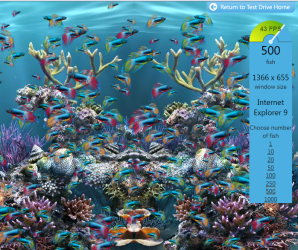
Not being able to un-check it means your GPU shares memory with the computer (in most cases), and is not using dedicated memory, and IE9 will automatically enable hardware acceleration where available. You can test this by trying some of the IE test drive sites (Fish Tank comes to mind as the beta version of IE would only go to about 20 FPS without HA, and a full 60 FPS with HA. Now without being able to un-check the box IE gets around 40 FPS, so HA does help where it can). For the most part you will see a good overall improvement on graphic intense sites.
 

My Computer

Computer type
Laptop
Computer Manufacturer/Model Number
Dell Inspiron
OS
Windows 7 Ultimate
What do you mean "Fish Tank"?
In trying fishtank.com, it could not find that.
 

My Computer

OS
Windows 7 Pro 32 bit
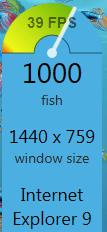
With 50 fish in the tank, I could get right at 30fps. I would like to try HA but it doesn't allow that.
 

My Computer

OS
Windows 7 Pro 32 bit
:d

Capture.PNG

:D x

That was with hardware GPU rendering enabled. Compare with the following, showing the dramatic difference with the rendering done in software.

Capture1.PNG
 

My Computer

Computer type
PC/Desktop
Computer Manufacturer/Model Number
Dwarf Dwf/11/2012 r09/2013
OS
Windows 8.1 Pro RTM x64
CPU
Intel Core-i5-3570K 4-core @ 3.4GHz (Ivy Bridge) (OC 4.4GHz)
Motherboard
ASRock Z77 Extreme4-M
Memory
4 x 4GB DDR3-1600 Corsair Vengeance CMZ8GX3M2A1600C9B (16GB)
Graphics Card(s)
MSI GeForce GTX770 Gaming OC 2GB
Sound Card
Realtek High Definition on board solution (ALC 898)
Monitor(s) Displays
ViewSonic VA1912w Widescreen (VGA)
Screen Resolution
1440x900
Hard Drives
OCZ Agility 3 SSD 120GB SATA III x2 (RAID 0)
Samsung HD501LJ 500GB SATA II x2
Hitachi HDS721010CLA332 1TB SATA II
Iomega 1.5TB Ext USB 2.0
WD 2.0TB Ext USB 3.0
PSU
XFX Pro Series 850W Semi-Modular
Case
Gigabyte IF233
Cooling
1 x 120mm Front Inlet 1 x 120mm Rear Exhaust
Keyboard
Microsoft Comfort Curve Keyboard 3000 (USB)
Mouse
Microsoft Comfort Mouse 3000 for Business (USB)
Internet Speed
NetGear DG834Gv3 ADSL Modem/Router (Ethernet) ~4.0 Mb/s (O2)
Antivirus
Avast! 8.0.1497
Browser
IE 11
Other Info
Optical Drive: HL-DT-ST BD-RE BH10LS30 SATA Bluray
Lexmark S305 Printer/Scanner/Copier (USB)
WEI Score: 8.1/8.1/8.5/8.5/8.25
Asus Eee PC 1011PX Netbook (Windows 7 x86 Starter)
Right. If no HA is there you will maybe get 5. So to get 30 that means HA is enable as much as possible.
 

My Computer

Computer type
Laptop
Computer Manufacturer/Model Number
Dell Inspiron
OS
Windows 7 Ultimate
Not being able to un-check it means your GPU shares memory with the computer (in most cases), and is not using dedicated memory, and IE9 will automatically enable hardware acceleration where available. You can test this by trying some of the IE test drive sites (Fish Tank comes to mind as the beta version of IE would only go to about 20 FPS without HA, and a full 60 FPS with HA. Now without being able to un-check the box IE gets around 40 FPS, so HA does help where it can). For the most part you will see a good overall improvement on graphic intense sites.


Not quite, Shared memory makes no difference as long as the card is DX10 comliant. In most cases simply updating or reinstalling your GPU drivers after IE9 is installed resolves the issue. I've seen this on the new i5 laptops.
 

My Computer

Computer Manufacturer/Model Number
Custom Built By Me
OS
Windows 7 Ultimate x64
CPU
Core 2 Extreme QX9770 @ 4.3ghz
Motherboard
EVGA 780i A2
Memory
4GB DDR2 1000
Graphics Card(s)
EVGA 8800GT SSC SLI
Sound Card
Creative Xifi Xtreme Gamer
Monitor(s) Displays
Westinghouse L2210NW
Screen Resolution
1680x1050
Hard Drives
2 x 150gb WD Raptors Raid 0 For OS/
750gb Hitachi for Storage
PSU
Enermax Galaxy kilowatt Modular
Case
Custom Lian Li Extended ATX
Cooling
Ultra 120 Lapped with twin 120mm fans
Keyboard
Razor Reclusa
Mouse
Logitech Optical
Internet Speed
Verizon Fios 30mb down / 20mb up
Don't forget to update your WEI after updating your graphics driver.

I had another look at the fish, and I'm getting 60fps with 500. :)
 

My Computer

Computer type
PC/Desktop
Computer Manufacturer/Model Number
Dwarf Dwf/11/2012 r09/2013
OS
Windows 8.1 Pro RTM x64
CPU
Intel Core-i5-3570K 4-core @ 3.4GHz (Ivy Bridge) (OC 4.4GHz)
Motherboard
ASRock Z77 Extreme4-M
Memory
4 x 4GB DDR3-1600 Corsair Vengeance CMZ8GX3M2A1600C9B (16GB)
Graphics Card(s)
MSI GeForce GTX770 Gaming OC 2GB
Sound Card
Realtek High Definition on board solution (ALC 898)
Monitor(s) Displays
ViewSonic VA1912w Widescreen (VGA)
Screen Resolution
1440x900
Hard Drives
OCZ Agility 3 SSD 120GB SATA III x2 (RAID 0)
Samsung HD501LJ 500GB SATA II x2
Hitachi HDS721010CLA332 1TB SATA II
Iomega 1.5TB Ext USB 2.0
WD 2.0TB Ext USB 3.0
PSU
XFX Pro Series 850W Semi-Modular
Case
Gigabyte IF233
Cooling
1 x 120mm Front Inlet 1 x 120mm Rear Exhaust
Keyboard
Microsoft Comfort Curve Keyboard 3000 (USB)
Mouse
Microsoft Comfort Mouse 3000 for Business (USB)
Internet Speed
NetGear DG834Gv3 ADSL Modem/Router (Ethernet) ~4.0 Mb/s (O2)
Antivirus
Avast! 8.0.1497
Browser
IE 11
Other Info
Optical Drive: HL-DT-ST BD-RE BH10LS30 SATA Bluray
Lexmark S305 Printer/Scanner/Copier (USB)
WEI Score: 8.1/8.1/8.5/8.5/8.25
Asus Eee PC 1011PX Netbook (Windows 7 x86 Starter)
Got that on my sub-laptop (max 45fps)!
 

Attachments

  • Capture.PNG
    Capture.PNG
    991.7 KB · Views: 22

My Computer

Computer type
PC/Desktop
Computer Manufacturer/Model Number
Custom Build
OS
Windows 7 Professional SP1 - x64 [Non-UEFI Boot]
CPU
Ivy Bridge Core i5 3570K (Delidded)
Motherboard
Asus P8Z77-V LE PLUS
Memory
G.Skill "Ares" DDR3 PC3-12800 - 1600MHz (16Gb)
Graphics Card(s)
Asus Dual-RX480-O4G
Sound Card
Creative Sound Blaster Z w/5.1 sound system
Monitor(s) Displays
Asus IPS 23"
Screen Resolution
16/9
Hard Drives
Internal:
500Go Sata 6Gb/s (x2)
500Go Sata 3Gb/s (x2)
SSD 60Go Sata 6Gb/s
PSU
In Win C 900W Series 80+ Platinum
Case
Thermaltake Chaser A71
Cooling
Custom Water Cooling Loop
Keyboard
Cooler Master QuickFire XTi
Mouse
Razer Imperator 2012 (4G)
Antivirus
MSE
Browser
IE 11.0.xxx Rtm
Other Info
"Raid0" with Intel Smart Response Technology (HDD/SSD)
Back
Top