IE9 not giving option to save CSVs

hadenough

New member
Member
Local time
8:40 PM
Messages
34
Hi

I am trying to download csvs from a HTTP stock exchange site.

I do not get the usual IE9 open save dialog when I click the site link to download the file. Instead I get another browser window showing the required data in delimited format only. There is no option to save.

In my settings 'Do not save encrypted pages to disk' is unchecked.
IE9 is updated.

I would be grateful for any advice
 

My Computer My Computer

At a glance

Windows 7 Professional 64 biti7 950 @ 4.2GHz6 Gb Corsair 3x2Gb DDR3NVidia GeForce GTX460 1Gb
Computer Manufacturer/Model Number
Overclockers UK
OS
Windows 7 Professional 64 bit
CPU
i7 950 @ 4.2GHz
Motherboard
Asus Rampage 2 Extreme
Memory
6 Gb Corsair 3x2Gb DDR3
Graphics Card(s)
NVidia GeForce GTX460 1Gb
Sound Card
SupremeFX X-Fi
Monitor(s) Displays
Samsung F2380 23" Widescreen LCD
Hard Drives
INTEL SSD 80.03 Gb
2 x WD Caviar Black 500GB SATA-II 32Mb RAID 1
PSU
Corsair HX1000W
Case
Coolermaster ATCS 840 Classic
Cooling
Overclocker's 'water' cooled system

My Computer My Computer

At a glance

Windows 10 Home x64INTEL Core i5-750 Quad-Core 3.37GHzHyperX Fury Black Series 8GB (2 x 4GB) 1866MhzEVGA GeForce GTX 750 Superclocked 1GB 128-Bit...
Computer type
PC/Desktop
OS
Windows 10 Home x64
CPU
INTEL Core i5-750 Quad-Core 3.37GHz
Motherboard
ASUS P7P55D
Memory
HyperX Fury Black Series 8GB (2 x 4GB) 1866Mhz
Graphics Card(s)
EVGA GeForce GTX 750 Superclocked 1GB 128-Bit GDDR5
Monitor(s) Displays
LG 32MA68HY 32" IPS
Screen Resolution
1920 x 1080
Hard Drives
Samsung 840 Evo 120GB, SEAGATE 500GB Barracuda® 7200.12, SATA 3 Gb/s, 7200 RPM, 16MB cache
PSU
ANTEC TruePower New TP-550, 80 PLUS, 550W
Case
ANTEC Three Hundred Illusion
Cooling
COOLER MASTER Hyper 212 Plus, 4 x 120mm 1 x 140mm Noctua's
Internet Speed
85 + Mbps
Antivirus
Avast
Browser
Vivaldi
If this was working before, and has stopped working


I can't be sure because downloading files hasn't been a regular thing for me.

I tried a Reset as you suggested.
Little difference. The 'Save' bar isn't shown, the file is opened delimited in a new tab and the tab is opened. The tab opening is different but still no save options.
 

My Computer My Computer

At a glance

Windows 7 Professional 64 biti7 950 @ 4.2GHz6 Gb Corsair 3x2Gb DDR3NVidia GeForce GTX460 1Gb
Computer Manufacturer/Model Number
Overclockers UK
OS
Windows 7 Professional 64 bit
CPU
i7 950 @ 4.2GHz
Motherboard
Asus Rampage 2 Extreme
Memory
6 Gb Corsair 3x2Gb DDR3
Graphics Card(s)
NVidia GeForce GTX460 1Gb
Sound Card
SupremeFX X-Fi
Monitor(s) Displays
Samsung F2380 23" Widescreen LCD
Hard Drives
INTEL SSD 80.03 Gb
2 x WD Caviar Black 500GB SATA-II 32Mb RAID 1
PSU
Corsair HX1000W
Case
Coolermaster ATCS 840 Classic
Cooling
Overclocker's 'water' cooled system
My Computer My Computer

At a glance

Windows 10 Home x64INTEL Core i5-750 Quad-Core 3.37GHzHyperX Fury Black Series 8GB (2 x 4GB) 1866MhzEVGA GeForce GTX 750 Superclocked 1GB 128-Bit...
Computer type
PC/Desktop
OS
Windows 10 Home x64
CPU
INTEL Core i5-750 Quad-Core 3.37GHz
Motherboard
ASUS P7P55D
Memory
HyperX Fury Black Series 8GB (2 x 4GB) 1866Mhz
Graphics Card(s)
EVGA GeForce GTX 750 Superclocked 1GB 128-Bit GDDR5
Monitor(s) Displays
LG 32MA68HY 32" IPS
Screen Resolution
1920 x 1080
Hard Drives
Samsung 840 Evo 120GB, SEAGATE 500GB Barracuda® 7200.12, SATA 3 Gb/s, 7200 RPM, 16MB cache
PSU
ANTEC TruePower New TP-550, 80 PLUS, 550W
Case
ANTEC Three Hundred Illusion
Cooling
COOLER MASTER Hyper 212 Plus, 4 x 120mm 1 x 140mm Noctua's
Internet Speed
85 + Mbps
Antivirus
Avast
Browser
Vivaldi
I will get back.
It's the locating of a file that does download correctly that may be a problem.

Thanks for the responses.
 

My Computer My Computer

At a glance

Windows 7 Professional 64 biti7 950 @ 4.2GHz6 Gb Corsair 3x2Gb DDR3NVidia GeForce GTX460 1Gb
Computer Manufacturer/Model Number
Overclockers UK
OS
Windows 7 Professional 64 bit
CPU
i7 950 @ 4.2GHz
Motherboard
Asus Rampage 2 Extreme
Memory
6 Gb Corsair 3x2Gb DDR3
Graphics Card(s)
NVidia GeForce GTX460 1Gb
Sound Card
SupremeFX X-Fi
Monitor(s) Displays
Samsung F2380 23" Widescreen LCD
Hard Drives
INTEL SSD 80.03 Gb
2 x WD Caviar Black 500GB SATA-II 32Mb RAID 1
PSU
Corsair HX1000W
Case
Coolermaster ATCS 840 Classic
Cooling
Overclocker's 'water' cooled system

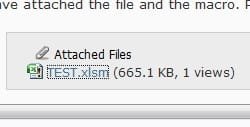
I had never downloaded a csv file, so I found this site with a sample. I went to IE9 and clicked on download, I got the usual save dialog popup at bottom.

vowunq.jpg


I'm assuming that is the save dialog you are missing?

What happens if you right click the file and choose save target as?

A Guy
 

My Computer My Computer

At a glance

Windows 10 Home x64INTEL Core i5-750 Quad-Core 3.37GHzHyperX Fury Black Series 8GB (2 x 4GB) 1866MhzEVGA GeForce GTX 750 Superclocked 1GB 128-Bit...
Computer type
PC/Desktop
OS
Windows 10 Home x64
CPU
INTEL Core i5-750 Quad-Core 3.37GHz
Motherboard
ASUS P7P55D
Memory
HyperX Fury Black Series 8GB (2 x 4GB) 1866Mhz
Graphics Card(s)
EVGA GeForce GTX 750 Superclocked 1GB 128-Bit GDDR5
Monitor(s) Displays
LG 32MA68HY 32" IPS
Screen Resolution
1920 x 1080
Hard Drives
Samsung 840 Evo 120GB, SEAGATE 500GB Barracuda® 7200.12, SATA 3 Gb/s, 7200 RPM, 16MB cache
PSU
ANTEC TruePower New TP-550, 80 PLUS, 550W
Case
ANTEC Three Hundred Illusion
Cooling
COOLER MASTER Hyper 212 Plus, 4 x 120mm 1 x 140mm Noctua's
Internet Speed
85 + Mbps
Antivirus
Avast
Browser
Vivaldi

My Computer My Computer

At a glance

Windows 7 Professional 64 biti7 950 @ 4.2GHz6 Gb Corsair 3x2Gb DDR3NVidia GeForce GTX460 1Gb
Computer Manufacturer/Model Number
Overclockers UK
OS
Windows 7 Professional 64 bit
CPU
i7 950 @ 4.2GHz
Motherboard
Asus Rampage 2 Extreme
Memory
6 Gb Corsair 3x2Gb DDR3
Graphics Card(s)
NVidia GeForce GTX460 1Gb
Sound Card
SupremeFX X-Fi
Monitor(s) Displays
Samsung F2380 23" Widescreen LCD
Hard Drives
INTEL SSD 80.03 Gb
2 x WD Caviar Black 500GB SATA-II 32Mb RAID 1
PSU
Corsair HX1000W
Case
Coolermaster ATCS 840 Classic
Cooling
Overclocker's 'water' cooled system

My Computer My Computer

At a glance

Windows 10 Home x64INTEL Core i5-750 Quad-Core 3.37GHzHyperX Fury Black Series 8GB (2 x 4GB) 1866MhzEVGA GeForce GTX 750 Superclocked 1GB 128-Bit...
Computer type
PC/Desktop
OS
Windows 10 Home x64
CPU
INTEL Core i5-750 Quad-Core 3.37GHz
Motherboard
ASUS P7P55D
Memory
HyperX Fury Black Series 8GB (2 x 4GB) 1866Mhz
Graphics Card(s)
EVGA GeForce GTX 750 Superclocked 1GB 128-Bit GDDR5
Monitor(s) Displays
LG 32MA68HY 32" IPS
Screen Resolution
1920 x 1080
Hard Drives
Samsung 840 Evo 120GB, SEAGATE 500GB Barracuda® 7200.12, SATA 3 Gb/s, 7200 RPM, 16MB cache
PSU
ANTEC TruePower New TP-550, 80 PLUS, 550W
Case
ANTEC Three Hundred Illusion
Cooling
COOLER MASTER Hyper 212 Plus, 4 x 120mm 1 x 140mm Noctua's
Internet Speed
85 + Mbps
Antivirus
Avast
Browser
Vivaldi
I'm assuming that is the save dialog you are missing?

Yes.

What happens if you right click the file and choose save target as?

Now that was strange. When i right clicked then 'Save Target As' the first time it opened a SaveAs dialog with the file type as .TXT. The second time it opened the SaveAs dialog with file type as .CSV.
But still no 'Save Open' option bar.
 

My Computer My Computer

At a glance

Windows 7 Professional 64 biti7 950 @ 4.2GHz6 Gb Corsair 3x2Gb DDR3NVidia GeForce GTX460 1Gb
Computer Manufacturer/Model Number
Overclockers UK
OS
Windows 7 Professional 64 bit
CPU
i7 950 @ 4.2GHz
Motherboard
Asus Rampage 2 Extreme
Memory
6 Gb Corsair 3x2Gb DDR3
Graphics Card(s)
NVidia GeForce GTX460 1Gb
Sound Card
SupremeFX X-Fi
Monitor(s) Displays
Samsung F2380 23" Widescreen LCD
Hard Drives
INTEL SSD 80.03 Gb
2 x WD Caviar Black 500GB SATA-II 32Mb RAID 1
PSU
Corsair HX1000W
Case
Coolermaster ATCS 840 Classic
Cooling
Overclocker's 'water' cooled system
Unfortunately they do not show, not sure why if you followed the tute.

It seemed to go ok. I saved as a jpg. Does it matter what type?
 

My Computer My Computer

At a glance

Windows 7 Professional 64 biti7 950 @ 4.2GHz6 Gb Corsair 3x2Gb DDR3NVidia GeForce GTX460 1Gb
Computer Manufacturer/Model Number
Overclockers UK
OS
Windows 7 Professional 64 bit
CPU
i7 950 @ 4.2GHz
Motherboard
Asus Rampage 2 Extreme
Memory
6 Gb Corsair 3x2Gb DDR3
Graphics Card(s)
NVidia GeForce GTX460 1Gb
Sound Card
SupremeFX X-Fi
Monitor(s) Displays
Samsung F2380 23" Widescreen LCD
Hard Drives
INTEL SSD 80.03 Gb
2 x WD Caviar Black 500GB SATA-II 32Mb RAID 1
PSU
Corsair HX1000W
Case
Coolermaster ATCS 840 Classic
Cooling
Overclocker's 'water' cooled system
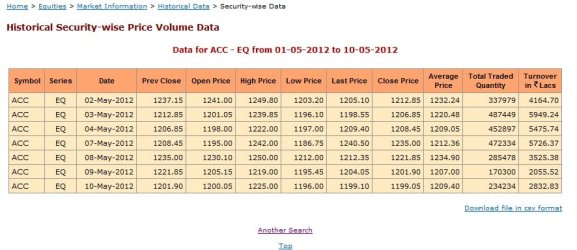
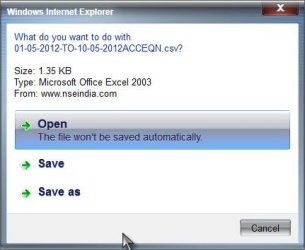
I'll try the attachments again. Images show in 'Preview'. 1 and 2 are from a forum download. 3 and 4 are the csv.

DL 1.jpg

DL 2.jpg

DL 3.jpg

DL 4.jpg
 

My Computer My Computer

At a glance

Windows 7 Professional 64 biti7 950 @ 4.2GHz6 Gb Corsair 3x2Gb DDR3NVidia GeForce GTX460 1Gb
Computer Manufacturer/Model Number
Overclockers UK
OS
Windows 7 Professional 64 bit
CPU
i7 950 @ 4.2GHz
Motherboard
Asus Rampage 2 Extreme
Memory
6 Gb Corsair 3x2Gb DDR3
Graphics Card(s)
NVidia GeForce GTX460 1Gb
Sound Card
SupremeFX X-Fi
Monitor(s) Displays
Samsung F2380 23" Widescreen LCD
Hard Drives
INTEL SSD 80.03 Gb
2 x WD Caviar Black 500GB SATA-II 32Mb RAID 1
PSU
Corsair HX1000W
Case
Coolermaster ATCS 840 Classic
Cooling
Overclocker's 'water' cooled system
That worked ;). Am I correct that in the 1st 2 shots you clicked a file, and got the correct dialog. In the 2nd 2 shots, you clicked the CSV file, and it opened in your browser with no choice to save? In reading, they are calling that the information bar. The setting to automatically display information bar is missing in IE9 (great :( ). Suggestions for the information bar not showing involve resetting the internet security zone
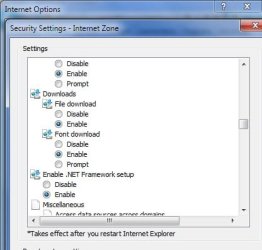
Open IE> Tools> Internet options> Security tab> Click on Internet zone> Custom level> Reset

Not sure if that is different from the reset for all of IE.

If you try to download the CSV file from HERE, do you get the information bar? Is the site you are having problems with something I can access without signing in or joining?

A Guy
 

My Computer My Computer

At a glance

Windows 10 Home x64INTEL Core i5-750 Quad-Core 3.37GHzHyperX Fury Black Series 8GB (2 x 4GB) 1866MhzEVGA GeForce GTX 750 Superclocked 1GB 128-Bit...
Computer type
PC/Desktop
OS
Windows 10 Home x64
CPU
INTEL Core i5-750 Quad-Core 3.37GHz
Motherboard
ASUS P7P55D
Memory
HyperX Fury Black Series 8GB (2 x 4GB) 1866Mhz
Graphics Card(s)
EVGA GeForce GTX 750 Superclocked 1GB 128-Bit GDDR5
Monitor(s) Displays
LG 32MA68HY 32" IPS
Screen Resolution
1920 x 1080
Hard Drives
Samsung 840 Evo 120GB, SEAGATE 500GB Barracuda® 7200.12, SATA 3 Gb/s, 7200 RPM, 16MB cache
PSU
ANTEC TruePower New TP-550, 80 PLUS, 550W
Case
ANTEC Three Hundred Illusion
Cooling
COOLER MASTER Hyper 212 Plus, 4 x 120mm 1 x 140mm Noctua's
Internet Speed
85 + Mbps
Antivirus
Avast
Browser
Vivaldi
Am I correct that in the 1st 2 shots you clicked a file, and got the correct dialog.
Yes.


In the 2nd 2 shots, you clicked the CSV file, and it opened in your browser with no choice to save?
Yes.


Suggestions for the information bar not showing involve resetting the internet security zone
Not done a reset just yet because as you can see Download is set to 'Enable' and the forum file was ok. This suggests it is a site specific problem i think.

DL 5.jpg

If you try to download the CSV file from HERE, do you get the information bar?
Yes.

Is the site you are having problems with something I can access without signing in or joining?
Yes.

My directions will hopefully provide you with the page I attached earlier. Please be warned, the csv download link more times than not will produce a 'Not Found' error. The file most definately DOES exist. I think that issue is more about the number of queries their server is attempting to resolve. But that is a seperate issue with the site, the success rate of csv links is very poor. If you fail with 'ACC' try 'ABAN' or 'ABB'.

http://www.nseindia.com/content/equities/eq_scriphistdata.htm

In Symbol type ACC
In Series dropdown select EQ
In From Date picker select 01-05-2012
In To date picker select 10-05-2012
Click on 'Get Results'
A data sample page will appear on which will appear the csv download link.
 

My Computer My Computer

At a glance

Windows 7 Professional 64 biti7 950 @ 4.2GHz6 Gb Corsair 3x2Gb DDR3NVidia GeForce GTX460 1Gb
Computer Manufacturer/Model Number
Overclockers UK
OS
Windows 7 Professional 64 bit
CPU
i7 950 @ 4.2GHz
Motherboard
Asus Rampage 2 Extreme
Memory
6 Gb Corsair 3x2Gb DDR3
Graphics Card(s)
NVidia GeForce GTX460 1Gb
Sound Card
SupremeFX X-Fi
Monitor(s) Displays
Samsung F2380 23" Widescreen LCD
Hard Drives
INTEL SSD 80.03 Gb
2 x WD Caviar Black 500GB SATA-II 32Mb RAID 1
PSU
Corsair HX1000W
Case
Coolermaster ATCS 840 Classic
Cooling
Overclocker's 'water' cooled system
I got the same result as you. Clicking the download link opens a new window with the results displayed. The address to the link is:

http://www.nseindia.com/content/equities/scripvol/datafiles/01-05-2012-TO-10-05-2012ACCEQN.csv

I right clicked save target as, changed the file type to all files, changed the name to .csv and saved it to desktop. I got an excel file (CSV=Excel comma separated values file), which opened in excel.

Now, going back to the download link and clicking opened a new window...with a download dialog!

CSV.jpg

Are you experiencing this issue on any other sites? I'm thinking it is the site, rather then a problem on your end. Do you have excel? If so, open an excel file of any type, then visit the page and click the download link. For me it will no longer display in browser, but rather I get the download dialog every time now. If I cancel it, the page closes. A Guy
 

My Computer My Computer

At a glance

Windows 10 Home x64INTEL Core i5-750 Quad-Core 3.37GHzHyperX Fury Black Series 8GB (2 x 4GB) 1866MhzEVGA GeForce GTX 750 Superclocked 1GB 128-Bit...
Computer type
PC/Desktop
OS
Windows 10 Home x64
CPU
INTEL Core i5-750 Quad-Core 3.37GHz
Motherboard
ASUS P7P55D
Memory
HyperX Fury Black Series 8GB (2 x 4GB) 1866Mhz
Graphics Card(s)
EVGA GeForce GTX 750 Superclocked 1GB 128-Bit GDDR5
Monitor(s) Displays
LG 32MA68HY 32" IPS
Screen Resolution
1920 x 1080
Hard Drives
Samsung 840 Evo 120GB, SEAGATE 500GB Barracuda® 7200.12, SATA 3 Gb/s, 7200 RPM, 16MB cache
PSU
ANTEC TruePower New TP-550, 80 PLUS, 550W
Case
ANTEC Three Hundred Illusion
Cooling
COOLER MASTER Hyper 212 Plus, 4 x 120mm 1 x 140mm Noctua's
Internet Speed
85 + Mbps
Antivirus
Avast
Browser
Vivaldi
I right clicked save target as, changed the file type to all files, changed the name to .csv and saved it to desktop.
I also got the 'Info Bar' acknowledging the download was complete.

Up to that point we are identical.

Now, going back to the download link and clicking opened a new window...with a download dialog!
Not so for me. No change. Left clicking just opened a new tab in delimited format.

Are you experiencing this issue on any other sites?
No. I too think it is site specific.

I do have Excel and use it a great deal. And no I do not get a dialog.

Are you thinking of saved file preferences on my pc perhaps?
 

My Computer My Computer

At a glance

Windows 7 Professional 64 biti7 950 @ 4.2GHz6 Gb Corsair 3x2Gb DDR3NVidia GeForce GTX460 1Gb
Computer Manufacturer/Model Number
Overclockers UK
OS
Windows 7 Professional 64 bit
CPU
i7 950 @ 4.2GHz
Motherboard
Asus Rampage 2 Extreme
Memory
6 Gb Corsair 3x2Gb DDR3
Graphics Card(s)
NVidia GeForce GTX460 1Gb
Sound Card
SupremeFX X-Fi
Monitor(s) Displays
Samsung F2380 23" Widescreen LCD
Hard Drives
INTEL SSD 80.03 Gb
2 x WD Caviar Black 500GB SATA-II 32Mb RAID 1
PSU
Corsair HX1000W
Case
Coolermaster ATCS 840 Classic
Cooling
Overclocker's 'water' cooled system
My situation is different I belive. I rarely use excel, but when I do, it always goes to a "windows is installing" dialog, then a blank screen. I have to close it and click on the file again, then it will open. Something I do causes this, but I have never investigated as I rarely need to open excel. I'm thinking I got the open/save dialog the 2nd time only because I had already let windows enable excel. BTW, Opera also just opens another window with the results. I'm a bit at a loss to be honest.

A Guy

P.S. Just went back with IE, no save dialog...I'm going to point the Gurus to this thread, see if anyone has any ideas. Sorry I've been no help.
 

My Computer My Computer

At a glance

Windows 10 Home x64INTEL Core i5-750 Quad-Core 3.37GHzHyperX Fury Black Series 8GB (2 x 4GB) 1866MhzEVGA GeForce GTX 750 Superclocked 1GB 128-Bit...
Computer type
PC/Desktop
OS
Windows 10 Home x64
CPU
INTEL Core i5-750 Quad-Core 3.37GHz
Motherboard
ASUS P7P55D
Memory
HyperX Fury Black Series 8GB (2 x 4GB) 1866Mhz
Graphics Card(s)
EVGA GeForce GTX 750 Superclocked 1GB 128-Bit GDDR5
Monitor(s) Displays
LG 32MA68HY 32" IPS
Screen Resolution
1920 x 1080
Hard Drives
Samsung 840 Evo 120GB, SEAGATE 500GB Barracuda® 7200.12, SATA 3 Gb/s, 7200 RPM, 16MB cache
PSU
ANTEC TruePower New TP-550, 80 PLUS, 550W
Case
ANTEC Three Hundred Illusion
Cooling
COOLER MASTER Hyper 212 Plus, 4 x 120mm 1 x 140mm Noctua's
Internet Speed
85 + Mbps
Antivirus
Avast
Browser
Vivaldi
Thank you for trying. And judging by your number of posts you must know a thing or two. ;)
Many thanks for what you have done so far.
 

My Computer My Computer

At a glance

Windows 7 Professional 64 biti7 950 @ 4.2GHz6 Gb Corsair 3x2Gb DDR3NVidia GeForce GTX460 1Gb
Computer Manufacturer/Model Number
Overclockers UK
OS
Windows 7 Professional 64 bit
CPU
i7 950 @ 4.2GHz
Motherboard
Asus Rampage 2 Extreme
Memory
6 Gb Corsair 3x2Gb DDR3
Graphics Card(s)
NVidia GeForce GTX460 1Gb
Sound Card
SupremeFX X-Fi
Monitor(s) Displays
Samsung F2380 23" Widescreen LCD
Hard Drives
INTEL SSD 80.03 Gb
2 x WD Caviar Black 500GB SATA-II 32Mb RAID 1
PSU
Corsair HX1000W
Case
Coolermaster ATCS 840 Classic
Cooling
Overclocker's 'water' cooled system
I have probably tracked down why, but fixing it will be the issue. The issue if the Always ask before opening this type of file box is unchecked. I found instructions for a registry hack in Vista, but the key doesn't exist in 7.

Reset Open/Save Choice for Internet Explorer Downloads in Vista - How-To Geek

All searches lead to the same method, which doesn't apply to 7. I am not giving up, as I think if we can figure out how to reset the choice, we'll be back in business.

A Guy
 

My Computer My Computer

At a glance

Windows 10 Home x64INTEL Core i5-750 Quad-Core 3.37GHzHyperX Fury Black Series 8GB (2 x 4GB) 1866MhzEVGA GeForce GTX 750 Superclocked 1GB 128-Bit...
Computer type
PC/Desktop
OS
Windows 10 Home x64
CPU
INTEL Core i5-750 Quad-Core 3.37GHz
Motherboard
ASUS P7P55D
Memory
HyperX Fury Black Series 8GB (2 x 4GB) 1866Mhz
Graphics Card(s)
EVGA GeForce GTX 750 Superclocked 1GB 128-Bit GDDR5
Monitor(s) Displays
LG 32MA68HY 32" IPS
Screen Resolution
1920 x 1080
Hard Drives
Samsung 840 Evo 120GB, SEAGATE 500GB Barracuda® 7200.12, SATA 3 Gb/s, 7200 RPM, 16MB cache
PSU
ANTEC TruePower New TP-550, 80 PLUS, 550W
Case
ANTEC Three Hundred Illusion
Cooling
COOLER MASTER Hyper 212 Plus, 4 x 120mm 1 x 140mm Noctua's
Internet Speed
85 + Mbps
Antivirus
Avast
Browser
Vivaldi
The issue if the Always ask before opening this type of file box is unchecked.

If I understand correctly... what I would do to reset a file, in this case csv, opening preference is....
Right click on a csv >Open With>Choose Default program> either check or uncheck the listed choice

Or is that not what you are thinking of here?
 

My Computer My Computer

At a glance

Windows 7 Professional 64 biti7 950 @ 4.2GHz6 Gb Corsair 3x2Gb DDR3NVidia GeForce GTX460 1Gb
Computer Manufacturer/Model Number
Overclockers UK
OS
Windows 7 Professional 64 bit
CPU
i7 950 @ 4.2GHz
Motherboard
Asus Rampage 2 Extreme
Memory
6 Gb Corsair 3x2Gb DDR3
Graphics Card(s)
NVidia GeForce GTX460 1Gb
Sound Card
SupremeFX X-Fi
Monitor(s) Displays
Samsung F2380 23" Widescreen LCD
Hard Drives
INTEL SSD 80.03 Gb
2 x WD Caviar Black 500GB SATA-II 32Mb RAID 1
PSU
Corsair HX1000W
Case
Coolermaster ATCS 840 Classic
Cooling
Overclocker's 'water' cooled system
OK, try this. Got to the page with the csv file> Right click and choose Save target as> If the name shows as .txt, click on the arrow to the right of save as type, and change it to all files> Now in the File name change the .txt to .csv> Save the file to desktop> In IE, click on Tools> View downloads (or Ctrl + J)> Right click on the file you just downloaded> See if the Always ask before opening this type of file is checked> If not, check it, then try to left click the csv file on the webpage again, and see if you get a save dialog.

A Guy
 

My Computer My Computer

At a glance

Windows 10 Home x64INTEL Core i5-750 Quad-Core 3.37GHzHyperX Fury Black Series 8GB (2 x 4GB) 1866MhzEVGA GeForce GTX 750 Superclocked 1GB 128-Bit...
Computer type
PC/Desktop
OS
Windows 10 Home x64
CPU
INTEL Core i5-750 Quad-Core 3.37GHz
Motherboard
ASUS P7P55D
Memory
HyperX Fury Black Series 8GB (2 x 4GB) 1866Mhz
Graphics Card(s)
EVGA GeForce GTX 750 Superclocked 1GB 128-Bit GDDR5
Monitor(s) Displays
LG 32MA68HY 32" IPS
Screen Resolution
1920 x 1080
Hard Drives
Samsung 840 Evo 120GB, SEAGATE 500GB Barracuda® 7200.12, SATA 3 Gb/s, 7200 RPM, 16MB cache
PSU
ANTEC TruePower New TP-550, 80 PLUS, 550W
Case
ANTEC Three Hundred Illusion
Cooling
COOLER MASTER Hyper 212 Plus, 4 x 120mm 1 x 140mm Noctua's
Internet Speed
85 + Mbps
Antivirus
Avast
Browser
Vivaldi
Back
Top