
vin2ktalks
New member
- Local time
- 12:41 PM
- Messages
- 1
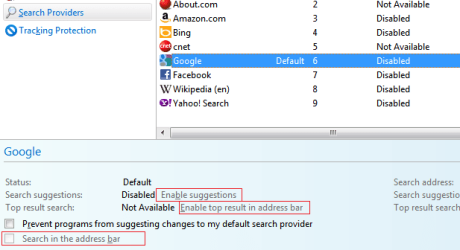
I've a trouble, under the Manage Add-ons->Search Providers, I can't select the Search in the address bar checkbox as well as link to enable Search suggestions, Top result search links, it is totally disabled to select. I've gone through few blogs and pages similar to this: Ten IE9 Toolbar Tips You Should Try. But could not find a solution to this issue, all were discussion how to enable the search by directly selecting the checkbox but for me the checkbox itself is disabled. 
Some of the IE9 settings are managed by the system administrator, so hope that would a reason why those are disabled. Please help me if any of you know some Registry or GpEdit tweaks to enable this checkbox and other links. I appreciate your help in advance.
Some of the IE9 settings are managed by the system administrator, so hope that would a reason why those are disabled. Please help me if any of you know some Registry or GpEdit tweaks to enable this checkbox and other links. I appreciate your help in advance.
Attachments
My Computer
At a glance
Windows7-32bitIntel Core i54Gb
- Computer Manufacturer/Model Number
- Lenovo-T410
- OS
- Windows7-32bit
- CPU
- Intel Core i5
- Memory
- 4Gb
- Monitor(s) Displays
- Integrated
- Hard Drives
- 140 Gb
