IE9 - when downloading can't change download location

jimbo45

New member
Guru
Gold Member
VIP
Local time
5:13 PM
Messages
5,941
Location
Hafnarfjörður IS
Hi all
I'm struggling with IE9 -- don't really like what I've seen so far

1) needs a registry fix to enable menu bars which IMO is a bit of b/s since when this is rolled out to users I'm sure most companies won't let users run registry changing programs or scripts and users especially if they are coming from XP want menus on their explorer and IE programs.

2) Downloading programs doesn't give a prompt as to where you want to save data SAVE AS -- it seems to always go in C:\downloads etc . Again some companies on company laptops lock out volume C and allow users to only create data on a "D" partition.

3) Display language on IE9 still very limited as of yet.


Nr 2 -- download location prompt is a MUST IMO -- it might be easy but I can't find out how to do it.


I did see some sort of post saying this wasn't possible -- if this is true then IE9 is a NO GO.

........

According to a microsoft forum post, this option is not available... Seems quite rudimentary but they removed this capability. The best you can do is change the Default Location to somewhere you'll easily get to and move files around.


....

That's not an option for me I'm afraid --- that's a SHOW STOPPER.

Cheers
jimbo
 

My Computer My Computer

At a glance

Linux CENTOS 7 / various Windows OS'es and se...Intel i7 Intel i58GB, 16GBOn Motherboard
Computer type
PC/Desktop
Computer Manufacturer/Model Number
Custom built, several laptops HP/ASUS
OS
Linux CENTOS 7 / various Windows OS'es and servers
CPU
Intel i7 Intel i5
Memory
8GB, 16GB
Graphics Card(s)
On Motherboard
Sound Card
Realtek HD audio
Monitor(s) Displays
Apple Cinema display, Samsung LCD
Screen Resolution
1920 X 1080
Hard Drives
4 X 1TB SATA
Mouse
Toshiba wireless laser
Internet Speed
> 20MB up
Hi all
I'm struggling with IE9 -- don't really like what I've seen so far


Nr 2 -- download location prompt is a MUST IMO -- it might be easy but I can't find out how to do it.


I did see some sort of post saying this wasn't possible -- if this is true then IE9 is a NO GO.


That's not an option for me I'm afraid --- that's a SHOW STOPPER.

Cheers
jimbo

Jimbo:

I set the download location on ie9 by clicking on the tools option on the right side of the menu bar. Select View downloads, at the bottom left of the screen then select Options, then you can browse the directory where you wish all of your downloads to be placed. Of course I turn on the menu bars so that tools is available.

Works for me

rich
 

My Computer My Computer

At a glance

Windows 7 Pro x64 SP1Intel Core I716 GigsNVIDIA GeForce GTX 670M
Computer type
Laptop
Computer Manufacturer/Model Number
Toshiba Laptop Qosimo X870
OS
Windows 7 Pro x64 SP1
CPU
Intel Core I7
Motherboard
Toshiba Qosmio
Memory
16 Gigs
Graphics Card(s)
NVIDIA GeForce GTX 670M
Monitor(s) Displays
17.7" laptop
Screen Resolution
1600 x 900
Hard Drives
256 Gig SanDisk SSD for C
256 Gig Intel SSD for D
Internet Speed
50/25 FIOS
Antivirus
Vipre (all you can eat for 10 machines)
Browser
IE and FF
Other Info
I have dos 6.22, wfwg 3.11, win98, 2000 and xp VHD's available for testing. MS's Virtual PC works great.
Jimbo,

To display the menu bar, right click anywhere at the top of the browser and check the menu bar option.

To get the download location prompt, the save button has a drop-down box attached, when you open the box there is the option to SAVE AS, when you click save as the option for file location pops up just the same as before.

For the language, check this.

Change your Internet Explorer 9 language encoding settings
 

My Computer My Computer

At a glance

Windows 7 x64 pro/ Windows 7 x86 Pro/ XP SP3 x86
Computer Manufacturer/Model Number
Too many to describe...
OS
Windows 7 x64 pro/ Windows 7 x86 Pro/ XP SP3 x86
Jimbo,

To display the menu bar, right click anywhere at the top of the browser and check the menu bar option.

To get the download location prompt, the save button has a drop-down box attached, when you open the box there is the option to SAVE AS, when you click save as the option for file location pops up just the same as before.

For the language, check this.

Change your Internet Explorer 9 language encoding settings

Hi there
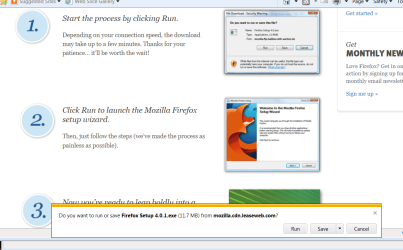
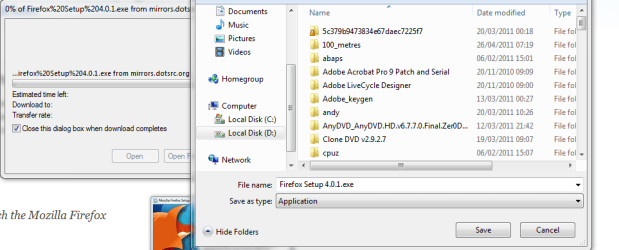
I get a SAVE box but not the old "Save as" where I could change / select the location EACH TIME and also change the file type too if I wanted


IE9 offers this horrible little box at the bottom of your screen and when you click save - it just saves to a pre-determined location -- no prompt.-- can't find a way to get the SAVE AS like we had in IE8 and earlier

The IE9 version just downloads to a previously set download location -- the IE8 version offers a file and directory list


see attachments

Also IE9 DOESN't add display languages when you can only install a "LIP -- Language Interface pack -- where the base language is still the original W7 installation but a lot of the user commands and menus have been translated.

For example IE8 IS version (3rd screen shot)


(On IE8 W7 Enterprise x-64)

BTW click and setting the menu bar only works UNTIL YOU LOGON AGAIN -- not good enough for some of our users -- they want it on all the time. We shouldn't have to employ a registry fix for this -- wanting menus seems a perfectly normal and standard option to want as far as I can see.


cheers
jimbo
 

Attachments

  • ff.png
    ff.png
    66.7 KB · Views: 35
  • ie8.png
    ie8.png
    26.3 KB · Views: 22
  • ie8is.png
    ie8is.png
    9.8 KB · Views: 19

My Computer My Computer

At a glance

Linux CENTOS 7 / various Windows OS'es and se...Intel i7 Intel i58GB, 16GBOn Motherboard
Computer type
PC/Desktop
Computer Manufacturer/Model Number
Custom built, several laptops HP/ASUS
OS
Linux CENTOS 7 / various Windows OS'es and servers
CPU
Intel i7 Intel i5
Memory
8GB, 16GB
Graphics Card(s)
On Motherboard
Sound Card
Realtek HD audio
Monitor(s) Displays
Apple Cinema display, Samsung LCD
Screen Resolution
1920 X 1080
Hard Drives
4 X 1TB SATA
Mouse
Toshiba wireless laser
Internet Speed
> 20MB up
Strange. When I click on the drop down arrow next to "save" and choose "save as", I can select the download location I want. E.g. I just went to majorgeeks.com and downloaded a small .exe file to test. My default download location is set to "Downloads" in the user folder but I changed this to the data drive (D:). Also I could choose between .exe and "All files". The downloaded file is located in D: as per my choice.
 

My Computer My Computer

At a glance

Windows 7 x64 pro/ Windows 7 x86 Pro/ XP SP3 x86
Computer Manufacturer/Model Number
Too many to describe...
OS
Windows 7 x64 pro/ Windows 7 x86 Pro/ XP SP3 x86

My Computer My Computer

At a glance

Win 10 Pro x64Intel I5-2500K @3.3GHz16GB G.Skill Ripjaws X (4x4GB)EVGA GeForce 750 Ti SC 2GB
Computer type
PC/Desktop
Computer Manufacturer/Model Number
Self Built
OS
Win 10 Pro x64
CPU
Intel I5-2500K @3.3GHz
Motherboard
Asrock P67 Extreme4
Memory
16GB G.Skill Ripjaws X (4x4GB)
Graphics Card(s)
EVGA GeForce 750 Ti SC 2GB
Sound Card
ASUS Xonar DG 5.1 Channels 24-bit 96KHz PCI Interface Sound
Monitor(s) Displays
auria eq2367
Screen Resolution
1920 x 1080
Hard Drives
250GB Samsung 850 EVO SSD
1TB WD Blue
1TB Hitachi
PSU
SeaSonic X 650W 80 Plus Gold
Case
Corsair Obsidian 750D
Cooling
Corsair H60, Three 140mm case fans
Keyboard
Logitech Wireless Keyboard K520
Mouse
Logitech Wireless Mouse M310
Internet Speed
Wave Broadband ~ 100 dn 5 up
Antivirus
Windows Defender, Malwarebytes Premium
Browser
Edge, IE11, Chrome
Other Info
Laptop specs: HP g7-1365dx /
CPU: AMD A6-3420M APU with Radeon(tm) HD Graphics /
RAM: Crucial 8Gb (2x4Gb) /
SSD: Crucial M4-CT128M4SSD2 ATA Device/ FW 000F /
GFX: AMD Radeon HD 6520G /
OS: Windows 10 Pro x64

My Computer My Computer

At a glance

Windows 7 x64 pro/ Windows 7 x86 Pro/ XP SP3 x86
Computer Manufacturer/Model Number
Too many to describe...
OS
Windows 7 x64 pro/ Windows 7 x86 Pro/ XP SP3 x86
Hi there
I just don't get the location to save in -- it uses the one I selected in settings.

Maybe it's a 64 bit problem -- I'll fire up a W7 X-86 system and see what happens there.

BTW SP1 WAS applied to the system BEFORE updating to IE9 -- I can revert back to IE8 which I'll probably do for now.

Cheers
jimbo
 

My Computer My Computer

At a glance

Linux CENTOS 7 / various Windows OS'es and se...Intel i7 Intel i58GB, 16GBOn Motherboard
Computer type
PC/Desktop
Computer Manufacturer/Model Number
Custom built, several laptops HP/ASUS
OS
Linux CENTOS 7 / various Windows OS'es and servers
CPU
Intel i7 Intel i5
Memory
8GB, 16GB
Graphics Card(s)
On Motherboard
Sound Card
Realtek HD audio
Monitor(s) Displays
Apple Cinema display, Samsung LCD
Screen Resolution
1920 X 1080
Hard Drives
4 X 1TB SATA
Mouse
Toshiba wireless laser
Internet Speed
> 20MB up
Hi all
just tried uninstalling, reverting back to IE8, re-booting and then re-installing IE9 -- now the file prompt appears. Maybe SP1 install had a few "funny effects".


However I still have issues against the "Registry fix" to enable Menus are ALWAYS on -- settings don't re-set after next logon and I don't really like that little box at the BOTTOM of the screen when downloading -- if you are using a very large screen you might not want to scroll down to the bottom of the page --I wish this box would appear at THE CENTRE of the screen.

The language issue is still there as well.

Cheers
jimbo
 

My Computer My Computer

At a glance

Linux CENTOS 7 / various Windows OS'es and se...Intel i7 Intel i58GB, 16GBOn Motherboard
Computer type
PC/Desktop
Computer Manufacturer/Model Number
Custom built, several laptops HP/ASUS
OS
Linux CENTOS 7 / various Windows OS'es and servers
CPU
Intel i7 Intel i5
Memory
8GB, 16GB
Graphics Card(s)
On Motherboard
Sound Card
Realtek HD audio
Monitor(s) Displays
Apple Cinema display, Samsung LCD
Screen Resolution
1920 X 1080
Hard Drives
4 X 1TB SATA
Mouse
Toshiba wireless laser
Internet Speed
> 20MB up
Back
Top