
Solved iexplorer.exe Crashing - IE8, IE9 and sometimes IE10(Platform Preview)

natedp

New member
Local time
10:54 AM
Messages
22
I am having a terribly difficult time browsing because almost every time I open IE, I get an iexplorer.exe crash and it wont let me do anything.

Sometimes I get to my home page, sometimes not.
Sometimes I can open a 2nd tab / window. Never a 3rd or more...

I've tried uninstall/reinstall each version and running the 32bit/64bit versions, I've also tried running IE With No Addons from System Tools... same crashing.

Here is a log from Event Viewer on this Error:

Faulting application name: iexplore.exe, version: 9.0.8112.16421, time stamp: 0x4d76255d
Faulting module name: unknown, version: 0.0.0.0, time stamp: 0x00000000
Exception code: 0xc0000005
Fault offset: 0x00000000
Faulting process id: 0x12b0
Faulting application start time: 0x01cc24ab4e68ceb2
Faulting application path: C:\Program Files (x86)\Internet Explorer\iexplore.exe
Faulting module path: unknown
Report Id: 91fce361-909e-11e0-84f0-bcaec53258c3

Any help is appreciated!

System Specs in the down arrow on the left.
 

My Computer My Computer

At a glance

Windows 7 Home Premium 64-bitIntel® Core™ i7 990X Processor Extreme Editio...6GB [2GB X3] DDR3-1600 - Corsair(x2) ATI Radeon HD 5770 - 1GB - Core: 875MHz ...
Computer Manufacturer/Model Number
American Megatrends, Inc.
OS
Windows 7 Home Premium 64-bit
CPU
Intel® Core™ i7 990X Processor Extreme Edition (6x 3.46GHz)
Motherboard
[SLI] ASUS Sabertooth X58
Memory
6GB [2GB X3] DDR3-1600 - Corsair
Graphics Card(s)
(x2) ATI Radeon HD 5770 - 1GB - Core: 875MHz CrossFire Mode
Sound Card
Creative Labs Sound Blaster X-Fi Xtreme Audio
Monitor(s) Displays
Sceptre 24" LCD
Screen Resolution
1920x1080
Hard Drives
1 TB HARD DRIVE -- 64M Cache, 7200 RPM, 6.0Gb/s
PSU
750 Watt -- Thermaltake TR2 TRX-750M
Case
Thermaltake V9 BlacX Edition Gaming Case - Black
Cooling
Asetek 550LC Liquid Cooling System (Intel) Standard 120mm
Anyone else getting similar problem?

The "More information" says something about Data Execution Prevention (DEP) caused by an Addon trying to do something. But I don't know what it could possibly be. I don't want to disable DEP for iexplorer.exe... but even when I load IE without Addons, I get this.
 

My Computer My Computer

At a glance

Windows 7 Home Premium 64-bitIntel® Core™ i7 990X Processor Extreme Editio...6GB [2GB X3] DDR3-1600 - Corsair(x2) ATI Radeon HD 5770 - 1GB - Core: 875MHz ...
Computer Manufacturer/Model Number
American Megatrends, Inc.
OS
Windows 7 Home Premium 64-bit
CPU
Intel® Core™ i7 990X Processor Extreme Edition (6x 3.46GHz)
Motherboard
[SLI] ASUS Sabertooth X58
Memory
6GB [2GB X3] DDR3-1600 - Corsair
Graphics Card(s)
(x2) ATI Radeon HD 5770 - 1GB - Core: 875MHz CrossFire Mode
Sound Card
Creative Labs Sound Blaster X-Fi Xtreme Audio
Monitor(s) Displays
Sceptre 24" LCD
Screen Resolution
1920x1080
Hard Drives
1 TB HARD DRIVE -- 64M Cache, 7200 RPM, 6.0Gb/s
PSU
750 Watt -- Thermaltake TR2 TRX-750M
Case
Thermaltake V9 BlacX Edition Gaming Case - Black
Cooling
Asetek 550LC Liquid Cooling System (Intel) Standard 120mm
Did this start happening after a specific addon was installed?
 

My Computer My Computer

At a glance

W7 Professional x64AMD Athlon II X3 445 Rana 3.10 GHzPNY XLR DDR3 1600 4x2GBNVIDIA GeForce GTS 450 (fermi) 1GB GDDR5
Computer Manufacturer/Model Number
Pugh Technologies
OS
W7 Professional x64
CPU
AMD Athlon II X3 445 Rana 3.10 GHz
Motherboard
MSI 870A-G54
Memory
PNY XLR DDR3 1600 4x2GB
Graphics Card(s)
NVIDIA GeForce GTS 450 (fermi) 1GB GDDR5
Sound Card
Realtek ALC892 onboard
Monitor(s) Displays
ASUS VE205t, Viewsonic VX2035WM
Screen Resolution
1600x900, 1600x1050
Hard Drives
977GB Hitachi Hitachi HDS721010CLA332
244GB Western Digital WDC WD2500AAJS-65B4A0
488GB Western Digital WDC WD5000AAJS-00A8B0
488GB Western Digital WDC WD5000AAKS-00UU3A0
PSU
Antec EarthWatts EA650 650W
Case
ThermalTake Armor A90 Mid Tower
Cooling
3x 120mm in, 1x 120mm & 200mm out, self built hydro-cooler
Keyboard
Logitec 55
Mouse
Razer Deathadder
Internet Speed
20 Mbps D/L, 9 Mbps U/L
Also, you mentioned the IE10 platform preview. Did it start after installing that?

When installing early preview or beta software, sometimes that's the kind of thing that happens...
 

My Computer My Computer

At a glance

Windows 7 x64 Ultimatei7 96012 Gig Corsair DominatorNvidia 480
Computer Manufacturer/Model Number
Scratch built
OS
Windows 7 x64 Ultimate
CPU
i7 960
Motherboard
Asus P6X58D
Memory
12 Gig Corsair Dominator
Graphics Card(s)
Nvidia 480
Sound Card
Maudio Delta 44 + breakout box
Monitor(s) Displays
Dell UltraSharp U2410 24in and Samsung 21 dual monitors
Screen Resolution
1920x1200 and 1280x1024
Hard Drives
Primary: Intel X-25M G2 160G SSD
Secondary: Segate baracuda 1.0 TB
HDs in AHCI mode.
PSU
Corasair TX850
Case
Cooler Master HAF
Cooling
Corsair H50
Keyboard
Logitech G15 + N52 game pad
Mouse
Logitech MX518
Internet Speed
15kbs down 4.5kbps up
Other Info
WEI 7.6
CPU & RAM 7.6
Graphics 7.9
Hard disk 7.7
I can't say for sure when it started. I have been having major problems with BSODs over the past few weeks and have been trying to get help here on the Win 7 Crashes Forums.

I was using the internet browser very little compared to what I normally used it before the Fresh Installs (OEM) of Windows 7 and so everything pretty much started from there, Fresh Windows 7 Home Premium 64 Bit install.

I disable Automatic Updates, in order to have control over how/when/what, and this erroring was happening before ANY Windows Updates were applied and it is still happening after all Windows Updates except about 4 updates which are either failing (2) or are known for BSOD / bad stuff (Malacious Content Remover update)...

So right now, I know that the errors were occuring:

Fresh Windows 7 64bit Install (No Updates)

IE8 (No Updates)
IE8 (W/ Updates)

IE9 (No Updates)
IE9 (W/ Updates)

IE10 Platform Viewer

IE (No Addons)


I have chosen the option to Not Download Updates (when Upgrading from IE8 to IE9) and then I chose to Allow Download Updates - Same results both times.

I attached a Snipping of the Error that it is reporting in the browser window. This is in a normal 32bit IE9 browser window.
 

Attachments

  • ie9error.PNG
    ie9error.PNG
    36.2 KB · Views: 336

My Computer My Computer

At a glance

Windows 7 Home Premium 64-bitIntel® Core™ i7 990X Processor Extreme Editio...6GB [2GB X3] DDR3-1600 - Corsair(x2) ATI Radeon HD 5770 - 1GB - Core: 875MHz ...
Computer Manufacturer/Model Number
American Megatrends, Inc.
OS
Windows 7 Home Premium 64-bit
CPU
Intel® Core™ i7 990X Processor Extreme Edition (6x 3.46GHz)
Motherboard
[SLI] ASUS Sabertooth X58
Memory
6GB [2GB X3] DDR3-1600 - Corsair
Graphics Card(s)
(x2) ATI Radeon HD 5770 - 1GB - Core: 875MHz CrossFire Mode
Sound Card
Creative Labs Sound Blaster X-Fi Xtreme Audio
Monitor(s) Displays
Sceptre 24" LCD
Screen Resolution
1920x1080
Hard Drives
1 TB HARD DRIVE -- 64M Cache, 7200 RPM, 6.0Gb/s
PSU
750 Watt -- Thermaltake TR2 TRX-750M
Case
Thermaltake V9 BlacX Edition Gaming Case - Black
Cooling
Asetek 550LC Liquid Cooling System (Intel) Standard 120mm

I would do a thorough scan for viruses and malware, just to rule those out.
 

My Computer My Computer

At a glance

W7 Professional x64AMD Athlon II X3 445 Rana 3.10 GHzPNY XLR DDR3 1600 4x2GBNVIDIA GeForce GTS 450 (fermi) 1GB GDDR5
Computer Manufacturer/Model Number
Pugh Technologies
OS
W7 Professional x64
CPU
AMD Athlon II X3 445 Rana 3.10 GHz
Motherboard
MSI 870A-G54
Memory
PNY XLR DDR3 1600 4x2GB
Graphics Card(s)
NVIDIA GeForce GTS 450 (fermi) 1GB GDDR5
Sound Card
Realtek ALC892 onboard
Monitor(s) Displays
ASUS VE205t, Viewsonic VX2035WM
Screen Resolution
1600x900, 1600x1050
Hard Drives
977GB Hitachi Hitachi HDS721010CLA332
244GB Western Digital WDC WD2500AAJS-65B4A0
488GB Western Digital WDC WD5000AAJS-00A8B0
488GB Western Digital WDC WD5000AAKS-00UU3A0
PSU
Antec EarthWatts EA650 650W
Case
ThermalTake Armor A90 Mid Tower
Cooling
3x 120mm in, 1x 120mm & 200mm out, self built hydro-cooler
Keyboard
Logitec 55
Mouse
Razer Deathadder
Internet Speed
20 Mbps D/L, 9 Mbps U/L
I would do a thorough scan for viruses and malware, just to rule those out.


The following are always Enabled:

Windows Firewall
Windows Defender
Microsoft Security Essentials (Real-time Protection)
Malwarebytes' Anti-Malware (Protection Enabled)


The following are used Daily:

Malwarebytes' Anti-Malware (Quick Scan)
Advance System Care 4 (Quick Scan: Startup and Shutdown)
Auslogics Defrag (Defrag + Shutdown every night)


The following are used Weekly:

Malwarebyte's Anti-Malware (Full Scan)
Advanced System Care 4 (Deep Scan)
Auslogics Defrag (Defrag + Optimize)
CCleaner (Registry Scan/Fix)


Any suggestions?

Is there a way I can easily (haha) remove all Addons associated with IE and have them repopulate the Default ones automatically? To get rid of any I might have unknowingly installed.
 

My Computer My Computer

At a glance

Windows 7 Home Premium 64-bitIntel® Core™ i7 990X Processor Extreme Editio...6GB [2GB X3] DDR3-1600 - Corsair(x2) ATI Radeon HD 5770 - 1GB - Core: 875MHz ...
Computer Manufacturer/Model Number
American Megatrends, Inc.
OS
Windows 7 Home Premium 64-bit
CPU
Intel® Core™ i7 990X Processor Extreme Edition (6x 3.46GHz)
Motherboard
[SLI] ASUS Sabertooth X58
Memory
6GB [2GB X3] DDR3-1600 - Corsair
Graphics Card(s)
(x2) ATI Radeon HD 5770 - 1GB - Core: 875MHz CrossFire Mode
Sound Card
Creative Labs Sound Blaster X-Fi Xtreme Audio
Monitor(s) Displays
Sceptre 24" LCD
Screen Resolution
1920x1080
Hard Drives
1 TB HARD DRIVE -- 64M Cache, 7200 RPM, 6.0Gb/s
PSU
750 Watt -- Thermaltake TR2 TRX-750M
Case
Thermaltake V9 BlacX Edition Gaming Case - Black
Cooling
Asetek 550LC Liquid Cooling System (Intel) Standard 120mm
Possibly Solved:

I installed Chrome, opened tabs until it crashed (2 tabs) and when I re-opened Chrome, it showed... AVG Security Toolbar had crashed... Which I specifically indicated to UNINSTALL when I removed AVG from my PC!

I scoured the Addons list in IE and found that somehow AVG Security Toolbar was still on the list, so I clicked on it and did a Remove. Then I searched my hard drive and did a Registry scan, cleaned up and sooooo far...

No Crashes... yet

Now, if I can just figure out why my PC's performance is so staggeringly slow. It shouldn't take 5 seconds for Right-Click menus to appear or 10-15 seconds for IE to open and load to Google.com ...


Question!

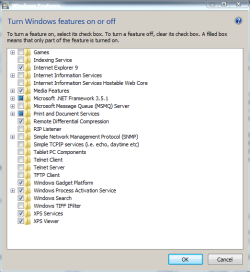
Are there any performance/stability benefits to activating/deactivating Features shown in my Attachment? I don't really understand what they do for me, besides the few obvious ones like Printers, IE9, Games, etc...
 

Attachments

  • features.PNG
    features.PNG
    15.4 KB · Views: 199

My Computer My Computer

At a glance

Windows 7 Home Premium 64-bitIntel® Core™ i7 990X Processor Extreme Editio...6GB [2GB X3] DDR3-1600 - Corsair(x2) ATI Radeon HD 5770 - 1GB - Core: 875MHz ...
Computer Manufacturer/Model Number
American Megatrends, Inc.
OS
Windows 7 Home Premium 64-bit
CPU
Intel® Core™ i7 990X Processor Extreme Edition (6x 3.46GHz)
Motherboard
[SLI] ASUS Sabertooth X58
Memory
6GB [2GB X3] DDR3-1600 - Corsair
Graphics Card(s)
(x2) ATI Radeon HD 5770 - 1GB - Core: 875MHz CrossFire Mode
Sound Card
Creative Labs Sound Blaster X-Fi Xtreme Audio
Monitor(s) Displays
Sceptre 24" LCD
Screen Resolution
1920x1080
Hard Drives
1 TB HARD DRIVE -- 64M Cache, 7200 RPM, 6.0Gb/s
PSU
750 Watt -- Thermaltake TR2 TRX-750M
Case
Thermaltake V9 BlacX Edition Gaming Case - Black
Cooling
Asetek 550LC Liquid Cooling System (Intel) Standard 120mm
What add-ons are still installed in IE 8 and IE9? AVG is notoriously hard to uninstall all of it. Probably have a few bits left over. Use the CCleaner Registry cleaner to see if that helps. In you regular browser (not the IE without add-ons) Disable all add-ons then re-enable them one-by one until you get the error again.

You might manually go through your registry to search for AVG to see what might be left, and in Sys32 .dll related to AVG.

Sorry I just re-read your post you got it solved.
In the Windows Features, I also un-check both XML entries.
 

My Computer My Computer

At a glance

Windows 7 Ultimate X64 SP1Intel i5-2550K, Differing ~4.4-4.8GHz No buil...16GB G.Skill Sniper 1866MHz @ 2133MHz 2x8GBASUS GTX650TIB-DC2OC-2GD5, (650TI Boost)
Computer type
PC/Desktop
Computer Manufacturer/Model Number
Home Built Desktop By DataTech
OS
Windows 7 Ultimate X64 SP1
CPU
Intel i5-2550K, Differing ~4.4-4.8GHz No built in GPU
Motherboard
ASUS P8Z68-V PRO/GEN3
Memory
16GB G.Skill Sniper 1866MHz @ 2133MHz 2x8GB
Graphics Card(s)
ASUS GTX650TIB-DC2OC-2GD5, (650TI Boost)
Sound Card
Onboard Realtek 5-1
Monitor(s) Displays
Samsung P2570HD
Screen Resolution
1920x1080
Hard Drives
Samsung 840 Pro 256GB SSD for OS, 500GB Seagate Constellation (Enterprise drive) for Data
PSU
Corsair HX650W
Case
Inwin Dragon Rider
Cooling
Hyper 212 EVO w/two Noctua fans, push-pull, @1300 RPM
Keyboard
E-Z Eyes, bright yellow keys with large characters
Mouse
steelseries SENSEI Laser Pro Gaming
Internet Speed
48-51Mbs Mbs down, 11 Mbs up Xfinity Cable
Antivirus
Norton Internet Security 2013
Browser
IE 10, Opera, Pale Moon if needed
Other Info
4 case fans, LG BluRay-RE, ASUS DVD-RW, Mr. Fusion power supply, 1.21 gigawatts.
I recently had to fix my granddaughter's PC it was running like a snail with chronic arthritis the only thing wrong was the system hard drive was completely full hence no space for the page file.
Is your PC slow in general or is it only browsers ?
Are there any performance/stability benefits to activating/deactivating Features shown in my Attachment?
I don't think there is anything in the Window feature list that is going to affect performance
The Indexing service I think only applies to vista & is disabled by default.
Open Control Panel & search for indexing options if you don't use search much disabling it will help.
Also click on start & search for advanced system settings there's options related to performance there.
 

My Computer My Computer

At a glance

Windows 7 Ultimate 64 bitIntel Core i7 4770K overclocked to 4.7GHz Qua...16GB Team Group Vulcan Gold 2133MHzATI Radeon HD 7880 Series Display adapter
Computer type
PC/Desktop
Computer Manufacturer/Model Number
self build
OS
Windows 7 Ultimate 64 bit
CPU
Intel Core i7 4770K overclocked to 4.7GHz Quad Core Haswell
Motherboard
Asus Z87 Pro (Socket 1150) ATX Motherboard
Memory
16GB Team Group Vulcan Gold 2133MHz
Graphics Card(s)
ATI Radeon HD 7880 Series Display adapter
Monitor(s) Displays
NEC LCD2690WUXi2
Screen Resolution
26" 1920 x 1200
Hard Drives
Samsung 500GB SSD 840 EVO SATA 6Gb/s
Samsung 250GB SSD 840 EVO SATA 6Gb/s
PSU
Corsair AX760 Platinum
Case
Cooler Master HAF X Gaming Tower
Cooling
XSPC RayStorm 750 RS360 Water cooling
Mouse
Razer Death Adder left handed
Internet Speed
126Mb download 11.5Mb up
Antivirus
Avast free
Browser
Opera
Other Info
Main Browser is Opera
Favorite software Adobe Lightroom & Photoshop
best plugins Nik software
Firewall : Private firewall 7
Back
Top