If Then Start Stop Service from Command Line

brubakes

New member
Local time
7:50 PM
Messages
14
Location
Ohio
Is there a away from the windows 7 command line I can check if a specific service is running and if it is stop it? If not specifically stop it is it possible to just check if its there?
 

My Computer My Computer

Computer type
PC/Desktop
Computer Manufacturer/Model Number
Custom Build
OS
Windows 8.1 Professional 64bit
CPU
Core i5
Browser
Chrome
Dont know of a command line script.

i know that running services can be checked in the Task Manager (ctrl+alt+delete).

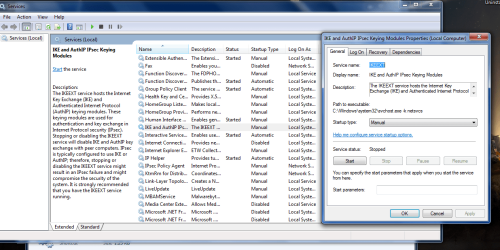
You can also view and stop them from
Control Panel>Admin tools>Services>rightclick properties.


Roy
 

Attachments

  • services.PNG
    services.PNG
    64.9 KB · Views: 0

My Computer My Computer

Computer type
PC/Desktop
Computer Manufacturer/Model Number
medionl/Aspire 6930G/acer x55a
OS
W7 home premium 32bit/W7HP 64bit/w10 tp insider ring
CPU
E5300 dual core
Motherboard
medion MS7366
Memory
3gb
Graphics Card(s)
Nvidia Geforce 7100 Nforce 630i
Monitor(s) Displays
avixc
Internet Speed
n (isp resticted to 72)
Antivirus
mse/pands
Browser
palemoon
Other Info
Belkin Fd7050 n USB using Railink RT2870 drivers, more upto date
You can use the SC command for this purpose to manage services. It supports a wide range of operations on system services, but particularly useful for you question are sc query and sc stop. Use them like this:

Code:
SC QUERY <service name>

To get a brief information about the service. Weather or not it's running will be displayed there.

Code:
SC STOP <service name>

This will stop the service, if possible. If it's wasn't running it will simply show an error message, but it doesn't does anything else, so issuing this one right away without querying will do no harm at all.

Code:
SC START <service name>

Just for completeness, this will, as the name suggest, start a service again.

Note that for starting and stopping services you need to have administrative privileges. Querying state can be done by plain users too. Also, the <service name> you need to enter is each service internal name, NOT the display name shown in control panel. Look at the screenshot by torchwood, where the properties dialog shows both.

 

My Computer My Computer

Computer type
Laptop
Computer Manufacturer/Model Number
Toshiba Sattelite A665-S6092
OS
Windows 7 Ultimate x64
CPU
Intel Core i7-740QM
Memory
8 GB DDR3
Graphics Card(s)
NVIDIA GeForce 330GT
Screen Resolution
1366x768
Hard Drives
Samsung 840 SSD 500GB
1TB USB3 external HD
Cooling
Coolermaster Notepal U3 notebook cooling pad
Internet Speed
3mbps ASDL
Antivirus
ClamWin 0.98.7
Browser
Opera 12.17 x86 (main), Firefox 38 (sec), IE11 (last resort)
Thank you for the responses. Alejandros85, thanks, I did not know about the query part of SC.
 

My Computer My Computer

Computer type
PC/Desktop
Computer Manufacturer/Model Number
Custom Build
OS
Windows 8.1 Professional 64bit
CPU
Core i5
Browser
Chrome
Back
Top