I'm trying to move my W7 OS to a new W10 laptop; anyone know how?

T38

New member
Local time
1:43 PM
Messages
17
I realize I'm one of the last folks using 7, as I've had a rock-solid W7 on my 2012 Toshi for 11 years. It's on its third keyboard, third HD, doing okay but starting to have problems. SO...saw a Gateway with 500 GB SSD, 16 GB RAM for under $300. Took a chance. Nice laptop...but I really hate W10 (as a lot of folks reportedly do).

In prior computer moves I've been able to move old pgms to the new device, and some pgms work on the new GW. But my Office12 (2007) doesn't, and Micro$oft confirms that 2007 won't work under W10.

Obviously I could just "subscribe" to "365" or whatever MSoft calls it, but it irritates me that M$oft obsoleted my paid-for programs! So I wondered if I could move my W7 to the new Gateway, making it a dual-boot system.

I've used Macrium Reflect free edition to clone drives in the past, but not sure how to move the entire OS. Some net folks say Windoze hates dual-boot drives. Anyone tried this? Thanks!
 

My Computers My Computers

  • At a glance

    W7 home premium 64-bitAMD A-6 3420M6 GBunknown
    Computer type
    Laptop
    Computer Manufacturer/Model Number
    Toshiba L755
    OS
    W7 home premium 64-bit
    CPU
    AMD A-6 3420M
    Motherboard
    unknown
    Memory
    6 GB
    Graphics Card(s)
    unknown
    Hard Drives
    Hitachi 500 GB
    Antivirus
    AVG
    Browser
    Firefox
  • Computer type
    PC/Desktop
In prior computer moves I've been able to move old pgms to the new device, and some pgms work on the new GW. But my Office12 (2007) doesn't, and Micro$oft confirms that 2007 won't work under W10.
Do not confuse 'no longer supported' with 'won't work'. Note that MS only say that versions before Office 2007 may not work, not 2007 itself.

Microsoft said:
Office 2010 (Version 14) and Office 2007 (Version 12) are no longer part of mainstream support. Versions of Office prior to Office 2007 are also no longer supported and may not work on Windows 10.
Which versions of Office work with Windows 10? - Microsoft Support

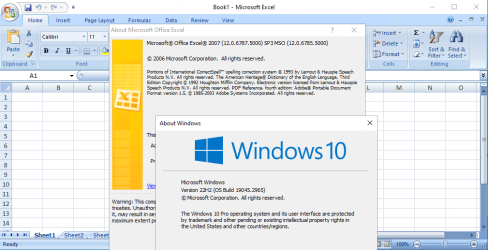
Office 2007 works well under Windows 10.

image.png
 

My Computers My Computers

  • At a glance

    Windows 7 Home Premium x64AMD V1204GB
    Computer type
    Laptop
    Computer Manufacturer/Model Number
    Toshiba satellite C650D
    OS
    Windows 7 Home Premium x64
    CPU
    AMD V120
    Memory
    4GB
    Internet Speed
    150 Mbps
    Antivirus
    MSE
    Browser
    IE11, Edge, Firefox
    Other Info
    I also have W7 Pro on my System Two, and several W7 Hyper-V VMs. My other machines run Windows 10/11. Their specs are in my Ten Forums & Eleven Forum profiles.
  • At a glance

    Windows 7 Pro x64Intel i5-3320M8 GB
    Computer type
    Laptop
    System Manufacturer/Model Number
    Lenovo Thinkpad T430
    OS
    Windows 7 Pro x64
    CPU
    Intel i5-3320M
    Memory
    8 GB
    Hard Drives
    250GB Samsung SSD 860 EVO
    Antivirus
    MSE
Getting Office12 (2007) to work on W10

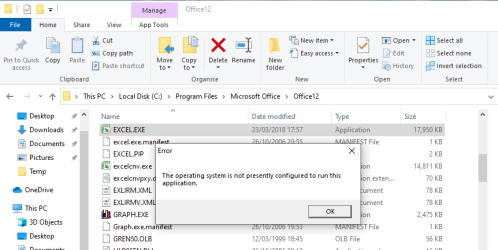
Thanks for replying, Bree. Looks like we're running exactly the same version of 7: home premium 64. But when I clicked on any of the executables in Office (powerpoint, excel and word) I got the same message: "This OS is not configured to run this program."

SO...somehow you solved the mystery. Now if we can just figure out what you did that I didn't, I won't need to deal w/ the challenge of loading 7 on my new laptop and going thru the dual-booting headache.

I just copied my Office folder to the new laptop, which has always worked when changing computers before. Is there some hidden switch ("/-f" or similar) that needs to be called when doing the switch? Thanks.
 

My Computers My Computers

  • At a glance

    W7 home premium 64-bitAMD A-6 3420M6 GBunknown
    Computer type
    Laptop
    Computer Manufacturer/Model Number
    Toshiba L755
    OS
    W7 home premium 64-bit
    CPU
    AMD A-6 3420M
    Motherboard
    unknown
    Memory
    6 GB
    Graphics Card(s)
    unknown
    Hard Drives
    Hitachi 500 GB
    Antivirus
    AVG
    Browser
    Firefox
  • Computer type
    PC/Desktop
I don't use office, but I expect it needs to be installed rather than just copied.

"This OS is not configured to run this program."

The message would seem to indicate that is the case
 

My Computers My Computers

  • At a glance

    7 X64i5 84002x8gb 3200mhz
    Computer type
    PC/Desktop
    OS
    7 X64
    CPU
    i5 8400
    Motherboard
    gigabyte b365m ds3h
    Memory
    2x8gb 3200mhz
    Hard Drives
    various
    PSU
    pure power 11 400w cm
    Case
    Coolermaster
    Cooling
    cryorig m9i
  • At a glance

    7x64g54008gb ddr4 2400
    Computer type
    PC/Desktop
    OS
    7x64
    CPU
    g5400
    Motherboard
    ga b365m ds3h
    Memory
    8gb ddr4 2400
    PSU
    xfx pro 450w
I just copied my Office folder to the new laptop, which has always worked when changing computers before. Is there some hidden switch ("/-f" or similar) that needs to be called when doing the switch? Thanks.
I don't use office, but I expect it needs to be installed rather than just copied.
The message would seem to indicate that is the case
I agree, Office requires installing so that all the required registry settings are correctly configured.

- - - Updated - - -

SO...somehow you solved the mystery. Now if we can just figure out what you did that I didn't, I won't need to deal w/ the challenge of loading 7 on my new laptop and going thru the dual-booting headache.
I did nothing. That W10 machine already had Office 2007 installed when it was running Windows 7, then that PC was upgraded to Windows 10.

I just copied my Office folder to the new laptop, which has always worked when changing computers before...
I'm surprised that ever worked for Office. I've just tried in a W10 VM and can confirm it doesn't for copying Office to a W10 machine.


image.png
 

My Computers My Computers

  • At a glance

    Windows 7 Home Premium x64AMD V1204GB
    Computer type
    Laptop
    Computer Manufacturer/Model Number
    Toshiba satellite C650D
    OS
    Windows 7 Home Premium x64
    CPU
    AMD V120
    Memory
    4GB
    Internet Speed
    150 Mbps
    Antivirus
    MSE
    Browser
    IE11, Edge, Firefox
    Other Info
    I also have W7 Pro on my System Two, and several W7 Hyper-V VMs. My other machines run Windows 10/11. Their specs are in my Ten Forums & Eleven Forum profiles.
  • At a glance

    Windows 7 Pro x64Intel i5-3320M8 GB
    Computer type
    Laptop
    System Manufacturer/Model Number
    Lenovo Thinkpad T430
    OS
    Windows 7 Pro x64
    CPU
    Intel i5-3320M
    Memory
    8 GB
    Hard Drives
    250GB Samsung SSD 860 EVO
    Antivirus
    MSE
Thanks to both Bree and SIW for your ideas. I'd moved Office twice from older computers by just copying the folder, and it worked, so I was surprised (though only a bit) that it didn't work with 10. Unfortunately the original CD vanished two divorces ago.
So looks like my next plan is to try to move my W7 to the 10 laptop.
 

My Computers My Computers

  • At a glance

    W7 home premium 64-bitAMD A-6 3420M6 GBunknown
    Computer type
    Laptop
    Computer Manufacturer/Model Number
    Toshiba L755
    OS
    W7 home premium 64-bit
    CPU
    AMD A-6 3420M
    Motherboard
    unknown
    Memory
    6 GB
    Graphics Card(s)
    unknown
    Hard Drives
    Hitachi 500 GB
    Antivirus
    AVG
    Browser
    Firefox
  • Computer type
    PC/Desktop
Thanks to both Bree and SIW for your ideas. I'd moved Office twice from older computers by just copying the folder, and it worked, so I was surprised (though only a bit) that it didn't work with 10. Unfortunately the original CD vanished two divorces ago.
So looks like my next plan is to try to move my W7 to the 10 laptop.
I've used Macrium Reflect free edition to clone drives in the past, but not sure how to move the entire OS. Some net folks say Windoze hates dual-boot drives. Anyone tried this? Thanks!
What are the specs on your Windows 10 laptop? Does it have NVME? Does it have USB 3.0? Is it UEFI-only or can you boot CSM? Also, do you have 7 x86 or 7 x64? These specs matter as if you have these, you will have to do a bit of work to get Windows 7 working on your laptop. If you have 64 bit UEFI, but x86 Windows 7, you will have to upgrade to x64 first (it's possible, but tedious). Since you are doing a dual boot, you need to make sure you have enough space for a dual boot on your Windows 10 laptop. I would shrink your Windows 10 partition from 476 GB to 238 GB. Then, on your Windows 7 partition, make sure it's no more than 238 GB. If it is, shrink it to at most 238 GB. After that, make sure you have all the drivers set up on your Windows 7 partition. A great source for drivers that you can use are in the XP2ESD driverpack, see here: [TOOL] XP2ESD - Create modern Windows XP installer v1.6.2 | My Digital Life Forums, you can also get a USB 3.0 driver here: USB 3/XHCI driver stack for Windows 7 | My Digital Life Forums,. If you have UEFI Class 3, you will need to convert your drive into GPT, then you will need to use EFI files from something like UEFISeven or FlashBootPro, both of which can be found in the XP2ESD pack. You need to do something like this, otherwise Windows 7 will hang at "Starting Windows" or give you the 0xc0000000d error. Personally I recommend FlashBootPro, as I used it to help me install Windows Vista and Windows 7 on a UEFI-only Surface Pro 1, see here: How to install Windows 7 on a Surface Pro 1. Here are some EFI files you can use:
- FlashBootPro (look in the apps folder in the XP2ESD pack)
- MSFN article on native UEFI support apparently added:
Error
- UefiSeven (didn't work for me but has worked for others apparently): Release 1.30 . manatails/uefiseven . GitHub
- Quibble (probably won't work as you don't have CSM): Release Version 20230328 . maharmstone/quibble . GitHub
- Disable vga.sys (didn't work for me either, but this was on my Surface Pro 6): Install Windows 7 at UEFI Graphics Output Protocol (GOP) hardware - Windows 7 - reboot.pro
- Windows 10 bootmgr (again, didn't work for me either, but this was on my Surface Pro 6, but this guy w.keller claims for it to work flawlessly for him every time):
   Tip
Windows 7 UEFI install without CSM | My Digital Life Forums
   Tip

-VgaShim: GitHub - davidcie/VgaShim: Enables some recent Apple computers to run Windows 7, [GUIDE] Install Windows 7 on Air 2015 | MacRumors Forums
- Normal boot files as you have a graphics driver installed (this worked for me on my Surface Pro 1 once I got drivers working, but in your case since you didn't get the graphics fully working it may not fully work) What I would probably do is get a Windows 7 ISO, integrate the necessary drivers into install.wim, then do a repair install (upgrade Windows 7 to Windows 7) with that ISO, then once the laptop shuts down DO NOT BOOT INTO WINDOWS 7 ON YOUR OLD LAPTOP. After the first reboot, I would boot into the Macrium Reflect media and back up the hard drive with the incomplete upgrade. Then after you have done that, go on your Windows 10 laptop and open Macrium Reflect (you can do this with the media or in Windows 10) and restore the Windows 7 partition. After that, if necessary add Windows 7 to Boot Manager and boot into Windows 7 and finish the upgrade/repair install. Here's a helpful video: How to clone a virtual machine to a physical/real computer tutorual - YouTube (think of the VM as your old laptop and the other laptop as your new laptop). Let me know if you need assistance or have any questions.
 

My Computer My Computer

At a glance

Windows 11 x64
Computer type
Laptop
Computer Manufacturer/Model Number
MSI
OS
Windows 11 x64
  • Like
Reactions: T38
Thanks for your reply, 2W10. I'll try to answer all your questions. Let me start by saying I've been using W7 on the same laptop every day for 11 years or so, so I'm almost totally out of touch with newer tech like "NVMe," so bear with me.
New W10 laptop: 64-bit, 500 GB SSD, 16 GB ram, usb3. Can boot UEFI and bios. I don't know how to determine whether it can do CSM, which I gather is needed to run some legacy programs.
My W7 is 64-bit "home premium," SP1.
I'll check out all the links you thoughtfully provided. Also, I'm looking at a pgm called WinNTsetup that looks like a clean way to install 7 on the 10 laptop. Only think is, you have to have either a WIM image or similar, and a key. Since my W7 came installed on my old laptop, the key is OEM, and all the sources I've seen say that won't work. Are you familiar with that pgm?
 

My Computers My Computers

  • At a glance

    W7 home premium 64-bitAMD A-6 3420M6 GBunknown
    Computer type
    Laptop
    Computer Manufacturer/Model Number
    Toshiba L755
    OS
    W7 home premium 64-bit
    CPU
    AMD A-6 3420M
    Motherboard
    unknown
    Memory
    6 GB
    Graphics Card(s)
    unknown
    Hard Drives
    Hitachi 500 GB
    Antivirus
    AVG
    Browser
    Firefox
  • Computer type
    PC/Desktop
I'm almost totally out of touch with newer tech like "NVMe," so bear with me.
Send me the hardware ID of your SSD and I will be able to determine if it's NVME or not. This is important as vanilla Windows 7 will not boot on NVME hard drives.
New W10 laptop: 64-bit, 500 GB SSD, 16 GB ram, usb3. Can boot UEFI and bios. I don't know how to determine whether it can do CSM, which I gather is needed to run some legacy programs.
That's great. Make sure both OSES are either UEFI or BIOS. CSM is essentially the same thing as BIOS, which allows BIOS to boot on UEFI. If you install on BIOS you don't need any of the EFI files I provided.
Also, I'm looking at a pgm called WinNTsetup that looks like a clean way to install 7 on the 10 laptop. Only think is, you have to have either a WIM image or similar, and a key. Since my W7 came installed on my old laptop, the key is OEM, and all the sources I've seen say that won't work. Are you familiar with that pgm?
Yes I have used it before. I believe you don't need a key. However, you do need installation media. But if you want to keep all your data, try what I suggested in the earlier post.
 

My Computer My Computer

At a glance

Windows 11 x64
Computer type
Laptop
Computer Manufacturer/Model Number
MSI
OS
Windows 11 x64
Winntsetup either applies the image from wim/esd and creates the boot critical files. You need to partition the target disk first and point at the windows partition and the system partition.

Or it can copy the contents of an existing windows partition direct to the target disk without using an intermediate image file. The target disk needs to be partitioned first.

It is not necssary to have a key to install. Can be activated later. You could call ms freefone activation, it was quick and easy when I did it.

Depends if it is feasible to run win7 on the new machine.
 

My Computers My Computers

  • At a glance

    7 X64i5 84002x8gb 3200mhz
    Computer type
    PC/Desktop
    OS
    7 X64
    CPU
    i5 8400
    Motherboard
    gigabyte b365m ds3h
    Memory
    2x8gb 3200mhz
    Hard Drives
    various
    PSU
    pure power 11 400w cm
    Case
    Coolermaster
    Cooling
    cryorig m9i
  • At a glance

    7x64g54008gb ddr4 2400
    Computer type
    PC/Desktop
    OS
    7x64
    CPU
    g5400
    Motherboard
    ga b365m ds3h
    Memory
    8gb ddr4 2400
    PSU
    xfx pro 450w
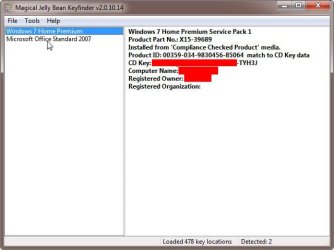
As long as you can find the keys you don't need the original CDs. A program called Magical Jelly Bean Keyfinder can be run on your computer to find product keys for some installed programs. Examples, are Windows 7 and Office 2007. You can even use this program to scan a non-booting drive for product keys on it.

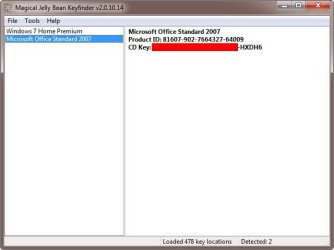
I was given an old laptop that didn't work. I pulled out the drive and placed it in an external enclosure. I used Magical Jelly Bean Keyfinder to extract the keys from the drive. I found keys for Windows 7 Home Premium and Office 2007 Standard.

Once I had the keys I searched and found setup programs for Windows 7 and Office 2007. I then installed them on one of my computers.

Windows 7 Home Premium with SP1

Z_Windows Key.jpg

Microsoft Office Standard 2007

Z_Office Key.jpg
 

My Computers My Computers

  • At a glance

    Windows 7 Professional 64bit / Windows 10 Hom...AMD FX-8350GSKILL Ripjaw-X PC3 12800 12GB (2x4GB, 2x2GB)ASUS ENGTX560 DCII OC/2DI/1GD5 1GB
    Computer type
    PC/Desktop
    Computer Manufacturer/Model Number
    Custom build
    OS
    Windows 7 Professional 64bit / Windows 10 Home 64bit
    CPU
    AMD FX-8350
    Motherboard
    Gigabyte GA-990FXA-UD3 (AM3+) Rev. 4.0
    Memory
    GSKILL Ripjaw-X PC3 12800 12GB (2x4GB, 2x2GB)
    Graphics Card(s)
    ASUS ENGTX560 DCII OC/2DI/1GD5 1GB
    Sound Card
    Integrated
    Monitor(s) Displays
    Asus VE228H (21.5-in)
    Screen Resolution
    1920x1080 60Hz
    Hard Drives
    SAMSUNG 870 EVO 1TB (2.5" SATA SSD)
    SAMSUNG 870 EVO 500GB (2.5" SATA SSD)
    PSU
    Antec TruePower (new) TP-650 (650 watts)
    Case
    Antec Three Hundred
    Cooling
    AMD stock (plan to upgrade to Cooler Master Hyper 212 EVO)
    Keyboard
    Logitech K540 (wireless)
    Mouse
    Logitech M310 (wireless)
    Internet Speed
    Comcast Gigabit X2 Internet (2100Mbps down / 300Mbps up)
    Browser
    Firefox, Edge, Chrome
    Other Info
    Optical drive: ASUS DRW-24B3ST/BLK/G (Black) (24X)
    External hard drives: 2TB & 6TB
    Internet Gateway: Comcast XB8
  • Computer type
    PC/Desktop
  • Like
Reactions: T38
2W10: My SSD is a "W800S." I see that may be a generic spec but I would they'd all use the same technology. Amusingly, when I did a search on the W10 (the laptop itself) for both HD and "SSD" it said "Nothing found." Doesn't surprise me.

SIW: Thanks. By total chance I saw your piece on WinNTsetup to someone else and wanted to ask you more about it. I can partition the SSD, and copy both system and entire contents of W7's C:, just didn't know that would work, since their site said you had to have either a WIM, SWM or ESD file. Plus it said you needed not just "a" key, but the retail key, not an OEM key. And naturally my copy came on my old Toshi. So you've given me a glimmer of hope.
 

My Computers My Computers

  • At a glance

    W7 home premium 64-bitAMD A-6 3420M6 GBunknown
    Computer type
    Laptop
    Computer Manufacturer/Model Number
    Toshiba L755
    OS
    W7 home premium 64-bit
    CPU
    AMD A-6 3420M
    Motherboard
    unknown
    Memory
    6 GB
    Graphics Card(s)
    unknown
    Hard Drives
    Hitachi 500 GB
    Antivirus
    AVG
    Browser
    Firefox
  • Computer type
    PC/Desktop

My Computers My Computers

  • At a glance

    Windows 7 Professional 64bit / Windows 10 Hom...AMD FX-8350GSKILL Ripjaw-X PC3 12800 12GB (2x4GB, 2x2GB)ASUS ENGTX560 DCII OC/2DI/1GD5 1GB
    Computer type
    PC/Desktop
    Computer Manufacturer/Model Number
    Custom build
    OS
    Windows 7 Professional 64bit / Windows 10 Home 64bit
    CPU
    AMD FX-8350
    Motherboard
    Gigabyte GA-990FXA-UD3 (AM3+) Rev. 4.0
    Memory
    GSKILL Ripjaw-X PC3 12800 12GB (2x4GB, 2x2GB)
    Graphics Card(s)
    ASUS ENGTX560 DCII OC/2DI/1GD5 1GB
    Sound Card
    Integrated
    Monitor(s) Displays
    Asus VE228H (21.5-in)
    Screen Resolution
    1920x1080 60Hz
    Hard Drives
    SAMSUNG 870 EVO 1TB (2.5" SATA SSD)
    SAMSUNG 870 EVO 500GB (2.5" SATA SSD)
    PSU
    Antec TruePower (new) TP-650 (650 watts)
    Case
    Antec Three Hundred
    Cooling
    AMD stock (plan to upgrade to Cooler Master Hyper 212 EVO)
    Keyboard
    Logitech K540 (wireless)
    Mouse
    Logitech M310 (wireless)
    Internet Speed
    Comcast Gigabit X2 Internet (2100Mbps down / 300Mbps up)
    Browser
    Firefox, Edge, Chrome
    Other Info
    Optical drive: ASUS DRW-24B3ST/BLK/G (Black) (24X)
    External hard drives: 2TB & 6TB
    Internet Gateway: Comcast XB8
  • Computer type
    PC/Desktop
MisterEd wrote "As long as you can find the keys you don't need the original CDs. A program called Magical Jelly Bean Keyfinder can be run on your computer to find product keys for some installed programs. Examples, are Windows 7 and Office 2007. You can even use this program to scan a non-booting drive for product keys on it.

Thanks! Unfortunately my old W7 laptop came with Windoze, and it gives me the key--but it's an OEM key, and MSoft says those won't work--gotta have the 25-character *retail* key. But I'll store your tip in my "tips and tweaks" file for future use!

The crux of the problem is that the HD in the 7 laptop is MBR-format, and as I understand it you can't transfer *image files* from one format to the other. So looks like my best bet--as suggested by SIW2--is to copy the entire C: from the 7 laptop *as non-img files* to a usb, then move those to a new partition on the new 10.
I still don't understand how to move data in the "system" partition, or how to make the 10 device understand that the new D: drive is bootable, but will just keep plugging away!
 

My Computers My Computers

  • At a glance

    W7 home premium 64-bitAMD A-6 3420M6 GBunknown
    Computer type
    Laptop
    Computer Manufacturer/Model Number
    Toshiba L755
    OS
    W7 home premium 64-bit
    CPU
    AMD A-6 3420M
    Motherboard
    unknown
    Memory
    6 GB
    Graphics Card(s)
    unknown
    Hard Drives
    Hitachi 500 GB
    Antivirus
    AVG
    Browser
    Firefox
  • Computer type
    PC/Desktop
When I used Magical Jelly Bean Keyfinder, the drive wasn't in a computer. It was in an external enclosure. Both of the keys it read were on the this hard drive.
 

My Computers My Computers

  • At a glance

    Windows 7 Professional 64bit / Windows 10 Hom...AMD FX-8350GSKILL Ripjaw-X PC3 12800 12GB (2x4GB, 2x2GB)ASUS ENGTX560 DCII OC/2DI/1GD5 1GB
    Computer type
    PC/Desktop
    Computer Manufacturer/Model Number
    Custom build
    OS
    Windows 7 Professional 64bit / Windows 10 Home 64bit
    CPU
    AMD FX-8350
    Motherboard
    Gigabyte GA-990FXA-UD3 (AM3+) Rev. 4.0
    Memory
    GSKILL Ripjaw-X PC3 12800 12GB (2x4GB, 2x2GB)
    Graphics Card(s)
    ASUS ENGTX560 DCII OC/2DI/1GD5 1GB
    Sound Card
    Integrated
    Monitor(s) Displays
    Asus VE228H (21.5-in)
    Screen Resolution
    1920x1080 60Hz
    Hard Drives
    SAMSUNG 870 EVO 1TB (2.5" SATA SSD)
    SAMSUNG 870 EVO 500GB (2.5" SATA SSD)
    PSU
    Antec TruePower (new) TP-650 (650 watts)
    Case
    Antec Three Hundred
    Cooling
    AMD stock (plan to upgrade to Cooler Master Hyper 212 EVO)
    Keyboard
    Logitech K540 (wireless)
    Mouse
    Logitech M310 (wireless)
    Internet Speed
    Comcast Gigabit X2 Internet (2100Mbps down / 300Mbps up)
    Browser
    Firefox, Edge, Chrome
    Other Info
    Optical drive: ASUS DRW-24B3ST/BLK/G (Black) (24X)
    External hard drives: 2TB & 6TB
    Internet Gateway: Comcast XB8
  • Computer type
    PC/Desktop
Hi

there should be a "spare key" in your battery compartment
 

My Computer My Computer

At a glance

W7 home premium 32bit/W7HP 64bit/w10 tp insid...E5300 dual core3gbNvidia Geforce 7100 Nforce 630i
Computer type
PC/Desktop
Computer Manufacturer/Model Number
medionl/Aspire 6930G/acer x55a
OS
W7 home premium 32bit/W7HP 64bit/w10 tp insider ring
CPU
E5300 dual core
Motherboard
medion MS7366
Memory
3gb
Graphics Card(s)
Nvidia Geforce 7100 Nforce 630i
Monitor(s) Displays
avixc
Internet Speed
n (isp resticted to 72)
Antivirus
mse/pands
Browser
palemoon
Other Info
Belkin Fd7050 n USB using Railink RT2870 drivers, more upto date
The crux of the problem is that the HD in the 7 laptop is MBR-format, and as I understand it you can't transfer *image files* from one format to the other. So looks like my best bet--as suggested by SIW2--is to copy the entire C: from the 7 laptop *as non-img files* to a usb, then move those to a new partition on the new 10. I still don't understand how to move data in the "system" partition, or how to make the 10 device understand that the new D: drive is bootable, but will just keep plugging away!
You will not need to integrate any drivers as you have an M2 SSD. However, I would copy over USB 3.0
files, which I have provided links for. So what you’re saying is that your Windows 7 laptop is formatted in MBR (BIOS) and your Windows 10 laptop is formatted in GPT (UEFI)? If so, all you need to do is do what I suggested in my first post, but either convert your Windows 10 drive from GPT to MBR, or to convert your Windows 7 drive from MBR to GPT after the first reboot. I recommend doing the former (first option), as you may have problems booting 7 on UEFI (which is fixable but tedious). If you convert your Windows 10 drive to MBR, you will need to use a third party program to do so such as AOMEI Partition Wizard (which does cost money) to convert GPT to MBR. If you convert your Windows 7 drive to GPT, you can use mbr2gpt which can be found on Windows 10 setup. Again, try the first option (Win10 drive to MBR), as you will have less problems.
 
Last edited:

My Computer My Computer

At a glance

Windows 11 x64
Computer type
Laptop
Computer Manufacturer/Model Number
MSI
OS
Windows 11 x64
Hi. There should be a "spare key" in your battery compartment
Thanks for that info. Unfortunately my old laptop came with W7 installed, so the key is an "OEM key" instead of the retail 25-character key. Everyone says you have to have a retail key to download an image of 7, and that you can't do it with an OEM key.
Does that square with your understanding?
 

My Computers My Computers

  • At a glance

    W7 home premium 64-bitAMD A-6 3420M6 GBunknown
    Computer type
    Laptop
    Computer Manufacturer/Model Number
    Toshiba L755
    OS
    W7 home premium 64-bit
    CPU
    AMD A-6 3420M
    Motherboard
    unknown
    Memory
    6 GB
    Graphics Card(s)
    unknown
    Hard Drives
    Hitachi 500 GB
    Antivirus
    AVG
    Browser
    Firefox
  • Computer type
    PC/Desktop
search the internet for:

en_windows_7_home_premium_with_sp1_x64_dvd_u_676549.iso

SHA1: 6C9058389C1E2E5122B7C933275F963EDF1C07B9

very easy to find
 

My Computers My Computers

  • At a glance

    7 X64i5 84002x8gb 3200mhz
    Computer type
    PC/Desktop
    OS
    7 X64
    CPU
    i5 8400
    Motherboard
    gigabyte b365m ds3h
    Memory
    2x8gb 3200mhz
    Hard Drives
    various
    PSU
    pure power 11 400w cm
    Case
    Coolermaster
    Cooling
    cryorig m9i
  • At a glance

    7x64g54008gb ddr4 2400
    Computer type
    PC/Desktop
    OS
    7x64
    CPU
    g5400
    Motherboard
    ga b365m ds3h
    Memory
    8gb ddr4 2400
    PSU
    xfx pro 450w
search the internet for: en_windows_7_home_premium_with_sp1_x64_dvd_u_676549.iso
SHA1: 6C9058389C1E2E5122B7C933275F963EDF1C07B9
very easy to find
Thanks! I'll try that.
 

My Computers My Computers

  • At a glance

    W7 home premium 64-bitAMD A-6 3420M6 GBunknown
    Computer type
    Laptop
    Computer Manufacturer/Model Number
    Toshiba L755
    OS
    W7 home premium 64-bit
    CPU
    AMD A-6 3420M
    Motherboard
    unknown
    Memory
    6 GB
    Graphics Card(s)
    unknown
    Hard Drives
    Hitachi 500 GB
    Antivirus
    AVG
    Browser
    Firefox
  • Computer type
    PC/Desktop
Back
Top