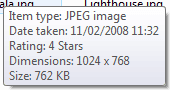
image pixel dimensions when hovering over an image

darklite

New member
Local time
12:33 AM
Messages
20
I hope I'm wording this correctly. I was wondering if there was a way to see image pixel dimensions when hovering over an image in windows 7. This is a standard function in XP, but in 7, it only happens off and on. I do a lot of web design and would like to have that quick info when hovering over images. Otherwise I have to right-click, choose properties, and then choose details. I attached a screenshot of what I'm talking about. Thanks!
 

Attachments

  • pxldim.gif
    pxldim.gif
    1.3 KB · Views: 340

My Computer

OS
windows 7 64-bit
Just click on the picture, all details including dimensions will appear in the Details Pane (located at the bottom)

Or just hover over the image without clicking it and the details will appear
 

Attachments

  • Untitled.png
    Untitled.png
    2.6 KB · Views: 333

My Computer

Computer type
PC/Desktop
Computer Manufacturer/Model Number
Custom Build
OS
Windows 10 Pro x64, Arch Linux
CPU
Intel Core 2 Quad Q8200 OC'd 3.08GHz
Motherboard
Asus Rampage formula LGA775
Memory
8GB DDR2 900Mhz
Graphics Card(s)
MSI GT730 2GB GDDR5 (Kepler)
Sound Card
Supreme FX2
Monitor(s) Displays
Samsung LS22F350 LED
Screen Resolution
1080P
Hard Drives
Kingston SSDNow UV400 120GB, 500GB Hitachi, 2TB Samsung, 500GB Seagate FreeAgent, 640GB Samsung, 160GB Toshiba (Arch)
PSU
AeroCool 500W Bronze
Cooling
Cooler Master V6 + 3X fans
Keyboard
Prolink keyboard
Mouse
Logitech M705
Internet Speed
1MiB/s
Browser
Chrome Beta
I appreciate the reply, but hovering over the image doesn't always work. It only works once in awhile. I was hoping there would be some setting I could change to make it work consistently.
 

My Computer

OS
windows 7 64-bit
Hovering over the image works just fine, the point is to give focus to the folder the image is located in. For example, if you have an image located on your desktop, and your browser window open: hovering over the image while the browser has focus won't display these details. However, if you click on the desktop, then hover over the image, the details will appear. Same thing for multiple opened folders.
 

My Computer

Computer type
Laptop
Computer Manufacturer/Model Number
Custom
OS
Windows 7 Home Premium x64
CPU
Intel Core i5 2500K
Motherboard
MSI MS-7750
Memory
8GB DDR3
Graphics Card(s)
nVidia GeForce GTX650 Ti BOOST
Sound Card
Realtek
Monitor(s) Displays
21' Philips
Screen Resolution
Full HD
Hard Drives
1TB
PSU
500W
I replaced a Windows 7 64-bit machine with a new Dell Precision workstation that came with Windows 7 64-bit installed. The old machine displayed the pixel size of an image without fail when hovering over it with the cursor, the new machine only displays Type, Size and Date Modified. I too routinely work with photographs and the web and I assume there's something happening here that needs to be fixed. Again, it's not intermittent on my machine as Darklite described, and going to Properties-Details while doing production work takes too much time.
 

My Computer

OS
California
Sorry that I'm answering four years late, but I'm having the same problem. I notice when I hover an image that is in a Pictures folder, I see the dimensions. But when I hover over an image that is in a general or documents folder, I do not see the dimensions. Even if I set the folder properties (I'm using Windows 8.1) to say the folder s/b optimized for pictures, I still do not see the dimensions of the image. I don't have a fix for this.
 

My Computer

Computer type
PC/Desktop
Computer Manufacturer/Model Number
Dell
OS
Texas
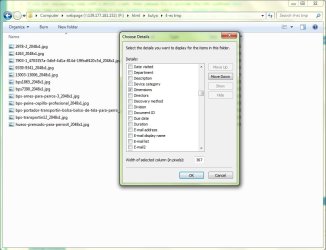
I found it

I have found the answer:

I am showing it on the image, it is a Windows 7 setting on the file browser
 

Attachments

  • the_answer.jpg
    the_answer.jpg
    63.2 KB · Views: 0

My Computer

Computer type
PC/Desktop
Computer Manufacturer/Model Number
custom
OS
Windows 7 Home Premium 64 bit
CPU
Intel Q6600 2,4 GHz ( Quad Core CPU from 2007 )
Motherboard
Gigabyte Technology Co., Ltd. P35C-DS3R
Memory
6 GB
Graphics Card(s)
GeForce 250 GTS
Antivirus
Norton 360
Browser
Chrome
Back
Top