Image thumbnails aren't loading in anything

JohnnyScience

New member
Power User
Local time
1:47 AM
Messages
889
So image thumbnails have stopped loading any time I try to view them in explorer - what is the easiest way to fix this? Isn't this a memory issue?
 

My Computer

Computer Manufacturer/Model Number
Built it myself
OS
Windows 7 64 & Ubuntu 64
CPU
Intel Quad Core Q6600 2.40GHz
Motherboard
Asus
Memory
8g
Graphics Card(s)
Nvidia 9600 GT & 9800 GT
Sound Card
Turtle Beach 5.1
Monitor(s) Displays
Three 19" Dell's & one 46" Samsung 750
Hi JohnnyScience,

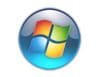
Is your folder option to show thumbnails enabled? Start ORB, search box type folder options, > select it > click view tab > Always show icons never thumbnails should be unchecked. If that is what you have, then...

Peruse: Shawn Brink's tutorial, Thumbnail Cache - Clear and Reset
 

My Computer

Computer type
PC/Desktop
Computer Manufacturer/Model Number
HP Desktop & Compaq Laptop
OS
Win 10 x64, Linux Lite, Win 7 x64, BlackArch, & Kali
Hard Drives
Samsung 850 Pro 256Gb,
Hitachi HDD 1Tb,
Crucial MX SSD 250Gb
Segate 3Tb USB 3.0 Ext. Backup HDD
Internet Speed
150Mbps dn, 20Mbps up
Antivirus
Avast Free, Malwarebytes Anti-Exploit & Anti-Ransomware
Browser
Firefox, Chrome, Opera, & VPN
Ok what is ORB?
 

My Computer

Computer Manufacturer/Model Number
Built it myself
OS
Windows 7 64 & Ubuntu 64
CPU
Intel Quad Core Q6600 2.40GHz
Motherboard
Asus
Memory
8g
Graphics Card(s)
Nvidia 9600 GT & 9800 GT
Sound Card
Turtle Beach 5.1
Monitor(s) Displays
Three 19" Dell's & one 46" Samsung 750
Google is your friend!

Start ORB .jpg
 

My Computer

Computer type
PC/Desktop
Computer Manufacturer/Model Number
HP Desktop & Compaq Laptop
OS
Win 10 x64, Linux Lite, Win 7 x64, BlackArch, & Kali
Hard Drives
Samsung 850 Pro 256Gb,
Hitachi HDD 1Tb,
Crucial MX SSD 250Gb
Segate 3Tb USB 3.0 Ext. Backup HDD
Internet Speed
150Mbps dn, 20Mbps up
Antivirus
Avast Free, Malwarebytes Anti-Exploit & Anti-Ransomware
Browser
Firefox, Chrome, Opera, & VPN
Yeah and I can't find anything. I'm here for help, not scavenger hunts. If someone else could chime in, I just ran disk cleanup. I think it also may be a memory problem as I was running a crypto miner for a little while.

Is there a way to clean/dump the memory?
 

My Computer

Computer Manufacturer/Model Number
Built it myself
OS
Windows 7 64 & Ubuntu 64
CPU
Intel Quad Core Q6600 2.40GHz
Motherboard
Asus
Memory
8g
Graphics Card(s)
Nvidia 9600 GT & 9800 GT
Sound Card
Turtle Beach 5.1
Monitor(s) Displays
Three 19" Dell's & one 46" Samsung 750
Clearing the Thumbnail Cache usually resolves your problem. Again, I reiterate "usually"!
Response such as: Yeah and I can't find anything. I'm here for help, not scavenger hunts, will most likely result in no-one willing to try and assist you. I am not a proponent of same (read my footer). Crypto miner is not something I would recommend installing/running! Have you run any malware scanners to see if your Crypto miner has installed any nasties on your machine? Malwarebytes anti-malware free is gold standard on SevenForums.
Resolving computer issues is not an exact science, it's a continuous learning process. We're here to try to assist you. Many others review your thread, (see currently active user viewing this thread below posts) and if a definitive resolution is known by them they will most probably chime in! No-one on SevenForums is paid for their assistance, it is totally voluntary contributions, and no-one has all the answers! Continuous learning process, as computer science is evolving!
As to your question, are you referring to windows memory dump? If so, disk cleanup removes said if you have that option checked.
If you perused my BIO, I'm a computer science student, and for your info, 4.0 at local community college.
It's ironic that you have assembled a computer yourself (kudos for that) and you are not familiar with Star ORB term! Irregardless, I am willing to continue to assist you.
In folder options, try "Reset Folders" / "Restore Defaults" buttons as something may have gone wrong on a option that you cannot see. If that doesn't correct your problem, give Shawn Brink a PM shout directly for recommendations or referral to another. @Brink
I will continue to monitor posts on your thread via email notifications.

Wishing you the best on your issue!

Nic

 

My Computer

Computer type
PC/Desktop
Computer Manufacturer/Model Number
HP Desktop & Compaq Laptop
OS
Win 10 x64, Linux Lite, Win 7 x64, BlackArch, & Kali
Hard Drives
Samsung 850 Pro 256Gb,
Hitachi HDD 1Tb,
Crucial MX SSD 250Gb
Segate 3Tb USB 3.0 Ext. Backup HDD
Internet Speed
150Mbps dn, 20Mbps up
Antivirus
Avast Free, Malwarebytes Anti-Exploit & Anti-Ransomware
Browser
Firefox, Chrome, Opera, & VPN
Back
Top