
Pictures aren't loading in any browser

dubbemiah

New member
Local time
6:50 AM
Messages
6
The pictures that aren't loading seem to often trace back to akamaihd.net, but that could be nothing. The last time I refreshed Facebook.com, this happened, and happens quite often on other sites. Another site uses a different host, so that can't be the problem. They've all been JPEG links, and this keeps happening quite frequently, as well:
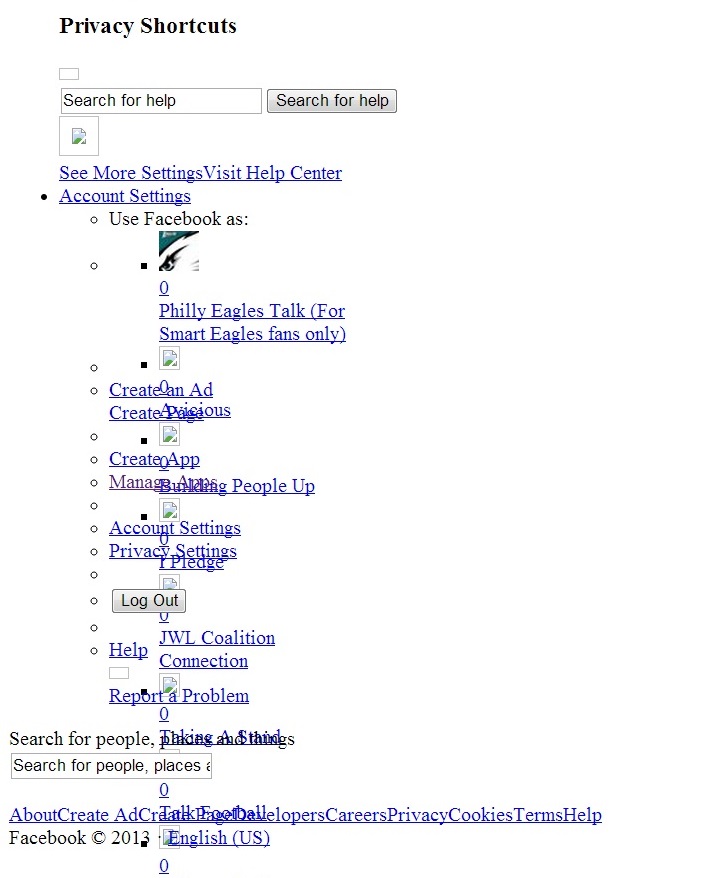
Hwu4cCt.jpg


Had a friend load Facebook, and he had no problems. I ran Malwarebytes and it found like 6 registry keys from an old extension that some malware installed (which I removed quite some time ago). That's about it. I can't think of anything I've downloaded recently that could be considered malicious. Any ideas?
 

My Computer My Computer

Computer type
PC/Desktop
Computer Manufacturer/Model Number
custom build
OS
Windows 7 Home Premium 32-bit
CPU
AMD Athlon(tm) 64 X2 Dual Core Processor 5000+ (2 CPUs), ~2.
Motherboard
NVDAACPI - x86
Memory
3072 mb
Graphics Card(s)
NVIDIA GeForce GT 240
Hard Drives
Drive: C:
Free Space: 231.5 GB
Total Space: 476.9 GB
File System: NTFS
Model: ST350032 0AS SCSI Disk Device

Drive: D:
Free Space: 10.2 GB
Total Space: 38.1 GB
File System: NTFS
Model: ST340211 1AS SCSI Disk Device
Antivirus
(undisclosed)
Browser
Chrome
Hi there ... Does this happen in safe mode too .. If images aren’t displaying please try the steps below in order. While every issue is different, these steps can help resolve a number of common issues.

If you are using Chrome, Firefox or Internet Explorer, try performing an image search in Chrome’s Incognito mode, Firefox’s Private Browsing, or Internet Explorer’s InPrivate Browsing. If this fixes the problem, there could be an issue with other programs that you're running while using Google Images, such as an extension, plug-in and toolbar.

Try clearing your browser’s cache or cookies.

Disable all browser toolbars and extensions.
 

My Computer My Computer

Computer Manufacturer/Model Number
W530-3630QM1
OS
windows 7 home 64bit
CPU
INTEL-CORE I7
Memory
16GB
Hard Drives
750GB
Browser
Chrome
Use Disk cleanup if more than one user exists on the machine use System clean up as well,
If you run System cleanup watch out for a new listing for cleaning up old Windows updates,
Leave it checked unless you want to research what that really does,
http://www.sevenforums.com/news/307588-update-available-enables-you-delete-outdated-windows-update.html
http://www.sevenforums.com/tutorials/818-disk-cleanup-open-use.html
http://windows.microsoft.com/en-us/windows/delete-files-using-disk-cleanup#delete-files-using-disk-cleanup=windows-7

A follow up tutorial,
Delete browser history,
http://www.sevenforums.com/tutorials/162582-internet-explorer-9-delete-browsing-history.html
To Clear the cache Uncheck the top box in delete browser history,
Normally I would Check all the rest of the boxes for a fresh start but you can leave Form fills Unchecked if you use that feature.
 

My Computer My Computer

Computer type
PC/Desktop
Computer Manufacturer/Model Number
Custom assembled by me :}
OS
Win-7-Pro64bit 7-H-Prem-64bit
CPU
i7-5930K 2nd i9-9940x both water blocked VRM's too
Motherboard
ASUS SABERTOOTH X99 2nd ASUS x299 Apex
Memory
Trident-z 3200C14 2nd Trident-z 3600C16
Graphics Card(s)
EVGA 1080ti ftw3 2nd Titan Xp both water blocked
Sound Card
Built-in Realtek
Monitor(s) Displays
1-AOC G2460PG 24"G-Sync 144Hz/ 2nd 1-ASUS VG248QE 24" 144Hz
Screen Resolution
1920 x 1080 144Hz
Hard Drives
2-Samsung M.2 Evo & Evo Plus
2-Samsung 850 EVO 500GB SSD's/ 3-2.5 W.D. Black 1tb-&3-1tb/3-3.5 WD Black 1tb hdd's
PSU
EVGA SuperNOVA 1000-P2 2nd 1200-P2
Case
2-Corsair Obsidian Series 450D Black ATX Mid Tower
Cooling
Custom water loops
Keyboard
Logitech G710+/ 2nd Logitech G910
Mouse
2-RedDragon M901 Perdition 16400 dpi Gaming mouse = wired
Internet Speed
Comcast Ping 19ms 89.31mbps download speed 6.12mbps upload
Antivirus
Malwarebytes Pro/ Superantispyware Pro
Browser
FireFox & Pale moon
Other Info
2nd ASUS X299 Apex/Intel i9-9940x with Custom water loop/7H-Prem-x64/Corsair 450D case/Ram Trident-z 3600C16 4x8gb / Samsung970Evo plus 500gb SSD/Dual ssd EZ swap evo/PSU EVGA SuperNova 1200w-P2 80+Platinum/GPU Titan Xp /8-ML-140 on push-pull on 2-280GTX rads
whenever i have seen this in the past it was always to do with my internet connection. i would power off the router for ten seconds and then turn it back on to see if it makes a difference ,if not you have ruled out a connection issue
 

My Computer My Computer

Computer Manufacturer/Model Number
Hewlett packard/p6512uk
OS
Microsoft Windows 7 Home Premium 64-bit 7600
CPU
IIx4 amd athelon 635 processor
Motherboard
FOXCONN 2AA9
Memory
2x2gb
Graphics Card(s)
ati radeon HD 5450
Sound Card
(1) Realtek High Definition Audio (2) AMD High Definition
Monitor(s) Displays
samsung lcd tv 32"
Screen Resolution
1360x 768
Hard Drives
(1) WDC WD10 01FAES-60Z2A0 SATA Disk Device (2) Maxtor OneTouch USB Device (3) ST310003 33AS USB Device (4) WD My Book 1111 USB Device
PSU
?
Cooling
air!
Keyboard
wireless hp
Mouse
wireless Hp,optical
Internet Speed
1.10mb/s
Antivirus
MSE
Browser
Firefox
Appreciate the responses guys. I'll try them all and let you know! thanks!
 

My Computer My Computer

Computer type
PC/Desktop
Computer Manufacturer/Model Number
custom build
OS
Windows 7 Home Premium 32-bit
CPU
AMD Athlon(tm) 64 X2 Dual Core Processor 5000+ (2 CPUs), ~2.
Motherboard
NVDAACPI - x86
Memory
3072 mb
Graphics Card(s)
NVIDIA GeForce GT 240
Hard Drives
Drive: C:
Free Space: 231.5 GB
Total Space: 476.9 GB
File System: NTFS
Model: ST350032 0AS SCSI Disk Device

Drive: D:
Free Space: 10.2 GB
Total Space: 38.1 GB
File System: NTFS
Model: ST340211 1AS SCSI Disk Device
Antivirus
(undisclosed)
Browser
Chrome
Back
Top