rwstarrett
New member
- Local time
- 5:41 PM
- Messages
- 4
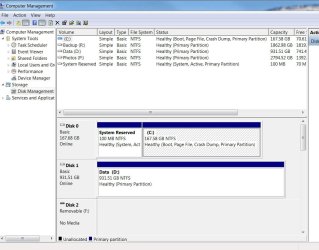
My Win 7 Pro 64bit system boots from an Intel SSD, my C drive. My D drive is a standard HD that I use for data, no programs or OS files so far as I know. There are no hidden partitions on that D drive.
I want to create a system image on an external USB drive, but when I attempt to do that, Windows wants to back up my entire D drive as well as the C drive. The choice to uncheck the D drive is greyed out in the backup dialogue. Is the D drive actually needed to run windows? Could there be some system files somewhere on the D drive that are causing this behavior? Since I have ~900GB of stuff on that D drive, I don't want to incorporate it into an Image Backup.
I want to create a system image on an external USB drive, but when I attempt to do that, Windows wants to back up my entire D drive as well as the C drive. The choice to uncheck the D drive is greyed out in the backup dialogue. Is the D drive actually needed to run windows? Could there be some system files somewhere on the D drive that are causing this behavior? Since I have ~900GB of stuff on that D drive, I don't want to incorporate it into an Image Backup.
My Computer
At a glance
- Computer type
- PC/Desktop
- Computer Manufacturer/Model Number
- HP
- OS
- Win 7 Pro 64bit
- CPU
- IntelCore i7 [email protected]
- Memory
- 9Gb
- Hard Drives
- SSD Intel boot drive 180GB
ST31000528AS 1TB
- Antivirus
- McAfee
- Browser
- Chrome