Solved Image your system with free Macrium

Hello guys need a little help

I've been playing today with win 8 and made a mess of things. I made an image of my C partition this morning before joining the fun. It's an 80 gig partition with 28 gig used. Macrium free imaged this in 11 minutes to my Usb external HDD.
I booted the Usb stick with the Macrium recovery software, choose the Image on my external, choose the partition to replace of off it went.
But it didn't did it. It has just taken 2 hours 28 mins to complete the restore with no integrity check before or after.
Surely this can't be right. Windows Imaging feature does it in about 20 minutes on my system.
I am now up and running as I was before but will be removing Macrium unless I can find a reason for the hours it took to restore.
Any help gratefully received.

Danny
 

My Computer My Computer

Computer Manufacturer/Model Number
acer aspire 5935g
OS
Windows 7 Home Premium x64 SP1
CPU
intel(R)core(TM)2 duo CPU T6600 @ 2.20GHz
Motherboard
intel gm45/gm47 revision 07
Memory
3 gb ddr3
Graphics Card(s)
ati radeon hd4570/512mb
Monitor(s) Displays
lop156wh2-tle1 15.3 flat
Screen Resolution
1366x768
Hard Drives
OCZ-Agility3 60gig ssd
320gig external hdd
500gig external hdd
Mouse
Optical
Internet Speed
30Mbps Down/30Mbps Up
Hello guys need a little help

I've been playing today with win 8 and made a mess of things. I made an image of my C partition this morning before joining the fun. It's an 80 gig partition with 28 gig used. Macrium free imaged this in 11 minutes to my Usb external HDD.
I booted the Usb stick with the Macrium recovery software, choose the Image on my external, choose the partition to replace of off it went.
But it didn't did it. It has just taken 2 hours 28 mins to complete the restore with no integrity check before or after.
Surely this can't be right. Windows Imaging feature does it in about 20 minutes on my system.
I am now up and running as I was before but will be removing Macrium unless I can find a reason for the hours it took to restore.
Any help gratefully received.

Danny

Not sure about that. I have restored a Macrium image of my C drive. It took longer than the backup but nowhere near that long.
 

My Computer My Computer

Computer type
Laptop
Computer Manufacturer/Model Number
Hewlett-Packard/G62-107SA Notebook
OS
Microsoft Windows 7 Home Premium 64-bit Service Pack 1
CPU
Intel(R) Core(TM) i3 CPU M 330 @ 2.13GHz
Motherboard
Hewlett-Packard 1425
Memory
8 GB DDR3
Graphics Card(s)
Intel(R) HD Graphics
Sound Card
Realtek High Definition Audio
Monitor(s) Displays
Builtin
Screen Resolution
1366 x 768 x 32 bits (4294967296 colors) @ 60 Hz
Hard Drives
250 GB SATA Hard Disk Drive 7200 rpm
2TB Seagate GoFlex USB 2 Drive
1TB Iomega Prestige USB 2 Drive
1.5TB Iomega Prestige USB 2 Drive (Samsung)
2TB WD MyBook Live NAS.
Mouse
Logitech Anywhere MX
Internet Speed
152 Mbs download 10 Mbs upload
Antivirus
Norton 360
Browser
Chrome
Hello kado897

At least you got windows 8 on lol.
I don't know mate. It's hard to work out what the issue is as I've never had to use it before.I tried from a different usb after about 20 mins with the first run, as I noticed it was really slow so I don't think its that, One was with YUMI multiboot and one from Hirens mini xp mode, and both run at the same speed.It took half an hour to get to 3% and gradually sped up.
Unless its the way Ive made the Image but I just used all the defaults apart from the name as I used my own date.
Need to find out whats happened thought before I do any more playing.

Danny
 

My Computer My Computer

Computer Manufacturer/Model Number
acer aspire 5935g
OS
Windows 7 Home Premium x64 SP1
CPU
intel(R)core(TM)2 duo CPU T6600 @ 2.20GHz
Motherboard
intel gm45/gm47 revision 07
Memory
3 gb ddr3
Graphics Card(s)
ati radeon hd4570/512mb
Monitor(s) Displays
lop156wh2-tle1 15.3 flat
Screen Resolution
1366x768
Hard Drives
OCZ-Agility3 60gig ssd
320gig external hdd
500gig external hdd
Mouse
Optical
Internet Speed
30Mbps Down/30Mbps Up
It really shouldn't have taken that long. I restore from eSATA and it seems like it took 10-20 minutes at the most, it was real quick. I really don't know unless it was the drive transfer you were restoring from. WHS is the resident Macrium Guru, maybe he has some Ideas. My C drive is about the same size as yours, but it takes me 3 minutes to do a backup and maybe 20 to restore.
 

My Computers My Computers

System One System Two

  • Computer type
    PC/Desktop
    Computer Manufacturer/Model Number
    ALWAYS UNDER CONSTRUCTION
    OS
    Windows 11 Pro
    CPU
    Ryzen 9 5900X
    Motherboard
    Asus X570 Crosshair Viii Hero
    Memory
    32GB G Skill DDR4-3600
    Graphics Card(s)
    EVGA RTX 3080 FTW 3 Ultra
    Sound Card
    On Board/Sennheiser PC37X Headset
    Monitor(s) Displays
    3 X Asus 27"
    Screen Resolution
    2560x1440
    Hard Drives
    2 X 1 TB NVME drives
    PSU
    EVGA 850
    Case
    Phanteks Eclipse P400A
    Cooling
    EVGA 280 AIO
    Keyboard
    Logitech G510s/ Logitech G13
    Mouse
    Logitech G502
    Internet Speed
    24/1
    Antivirus
    ESET/MBAM Pro/SAS Pro
    Browser
    Chrome/ Firefox/ Edge
  • Computer type
    Laptop
    System Manufacturer/Model Number
    Dell 16 Plus
    OS
    Windows 11 Pro
    CPU
    Intel Ultra 9 288V
    Memory
    32 GB LPDDR5X 8533
    Monitor(s) Displays
    16" Mini-LED HDR600 Touch 90 Hz
    Screen Resolution
    2560X1600
    Hard Drives
    1 TB NVME
It really shouldn't have taken that long. I restore from eSATA and it seems like it took 10-20 minutes at the most, it was real quick. I really don't know unless it was the drive transfer you were restoring from. WHS is the resident Macrium Guru, maybe he has some Ideas. My C drive is about the same size as yours, but it takes me 3 minutes to do a backup and maybe 20 to restore.

To be honest its not a proper external it's an internal with an enclosure job but it always did the job with windows image program in about 20 mins so im not convinced its that.I'm just going to run a transfer test on it now.
 

My Computer My Computer

Computer Manufacturer/Model Number
acer aspire 5935g
OS
Windows 7 Home Premium x64 SP1
CPU
intel(R)core(TM)2 duo CPU T6600 @ 2.20GHz
Motherboard
intel gm45/gm47 revision 07
Memory
3 gb ddr3
Graphics Card(s)
ati radeon hd4570/512mb
Monitor(s) Displays
lop156wh2-tle1 15.3 flat
Screen Resolution
1366x768
Hard Drives
OCZ-Agility3 60gig ssd
320gig external hdd
500gig external hdd
Mouse
Optical
Internet Speed
30Mbps Down/30Mbps Up
to me, that is a proper enclosure. It is what all of mine are. I have a black x and 2 rosewill enclosures with internal hd's in them. I was just searching for a reason. USB 2.0 should take longer, but not nearly that long.
 

My Computers My Computers

System One System Two

  • Computer type
    PC/Desktop
    Computer Manufacturer/Model Number
    ALWAYS UNDER CONSTRUCTION
    OS
    Windows 11 Pro
    CPU
    Ryzen 9 5900X
    Motherboard
    Asus X570 Crosshair Viii Hero
    Memory
    32GB G Skill DDR4-3600
    Graphics Card(s)
    EVGA RTX 3080 FTW 3 Ultra
    Sound Card
    On Board/Sennheiser PC37X Headset
    Monitor(s) Displays
    3 X Asus 27"
    Screen Resolution
    2560x1440
    Hard Drives
    2 X 1 TB NVME drives
    PSU
    EVGA 850
    Case
    Phanteks Eclipse P400A
    Cooling
    EVGA 280 AIO
    Keyboard
    Logitech G510s/ Logitech G13
    Mouse
    Logitech G502
    Internet Speed
    24/1
    Antivirus
    ESET/MBAM Pro/SAS Pro
    Browser
    Chrome/ Firefox/ Edge
  • Computer type
    Laptop
    System Manufacturer/Model Number
    Dell 16 Plus
    OS
    Windows 11 Pro
    CPU
    Intel Ultra 9 288V
    Memory
    32 GB LPDDR5X 8533
    Monitor(s) Displays
    16" Mini-LED HDR600 Touch 90 Hz
    Screen Resolution
    2560X1600
    Hard Drives
    1 TB NVME
You need to do an integrity check, and maybe a speed test, on your external drive. I doubt it's a Macrium issue--more likely heat or noise on the USB cable (errors it had to correct) or just a flaky drive (that's a techknuckle term!).

;)
 

My Computer My Computer

Computer type
Laptop
Computer Manufacturer/Model Number
Dell Latitude E6540 Laptop
OS
Windows 7 Professional 64bit
CPU
Intel Core i7 4600M @ 2.90GHz
Motherboard
Dell Inc. 0CYT5F (SOCKET 0)
Memory
16.0GB Dual-Channel DDR3 @ 797MHz (11-11-11-28)
Graphics Card(s)
Intel HD Graphics 4600 (Dell) 2048MB ATI AMD Radeon HD 8790M
Sound Card
Realtek High Definition Audio
Monitor(s) Displays
HP ZR30w (2560x1600@60Hz)
Hard Drives
256GB LITEONIT LMT-256M6M-41 mm SATA (SSD)
1TB Samsung SSD 860 EVO mSATA SATA (SSD)
2TB USB 3.0 USB Device
115GB SanDisk Ultra Fit USB
Other Info
Multiple Dell E-Port Plus II Port Replicator/Docking Stations 0Y72NH USB 3.0 + 130W AC Adapters
Hello guys need a little help
... to complete the restore with no integrity check before or after.
With some knowledge of the Professional v4.2 I query the omission of the integrity check.
There are many hash checksums at regular intervals in the image file,
and restoring a non-system partition under Windows fails if any checksum error is found, unless a special registry key/value authorises an over-ride.

I do not know if there is any over-ride when running from the Boot CD.
I strongly suspect that had there been a checksum error then restoration would abort.

Typically there is a 100 MB System Reserved partition that needs to be backed up as well as C:\
Could there have been something unusual about your restoration options, including whether or not to restore MBR and first track ?

I suggest that you try validating the image under Windows to test whether there are multiple read retries on a failing disc.
 

My Computer My Computer

Computer Manufacturer/Model Number
ASUSTeK Computer INC. M3A32-MVP DELUXE (CPU 1)
OS
Windows 7 Ultimate 64 bit SP1 x64
CPU
AMD Phenom X4 9500
Motherboard
ASUSTeK M3A32-MVP Deluxe (CPU 1)
Memory
8 GB
Graphics Card(s)
ATI Radeon HD 4600 Series
Sound Card
AMD High Definition Audio Device
Monitor(s) Displays
SyncMaster (1680x1050@60Hz)
Hard Drives
59GB OCZ-VERTEX2 ATA Device
+
977GB SAMSUNG HD103SJ ATA Device
+
625GB WDC WD6401AALS-00L3B2 ATA Device
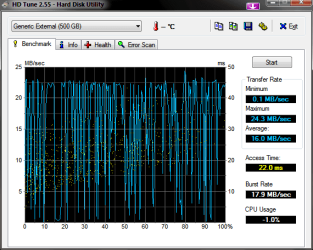
Ok Guys sorry for the delay just popped to the local computer shop. Here is the HD tune test result with a new Usb cable. Nothing unusual there. Ran chkdsk on all partitions on the drive, all fine.
HDTune_Benchmark_Generic_External.png
I've just Imaged with the windows native program to my external and it took 21mins. Then restored from that image, which took 31mins.
I'm interested in whether my procedure was correct using Macrium so I'm going to bore you with what I did this morning, see if anything jumps out.
Opened Macrium(free) Backup/Create Image. Selected sys res and C:/.Selected disk Y:/(my image drive) unchecked use image id as file name, entered todays date. Compression set at medium recommended file size to recommended.(didn't change any advanced defaults)Run now.
This took about 10 minutes.
Messed with my system:o.
Booted from the Yumi created usb ran rescue cd. Here I navigated to the image on the external pressed ok. Now it would only let me choose one partition at a time which I thought was odd as there was 2 on the Image(sys res and c:/)so proceeded to repace C:/ on the internal with the image.
Anything else that popped up about MBR etc I said no to was this my error. 2 1/2 hours later this finished and I repeated the steps above for the sys res part.
Sorry for the long post but I want to get this working, was impressed with the imaging process but now im concerned about recovery.
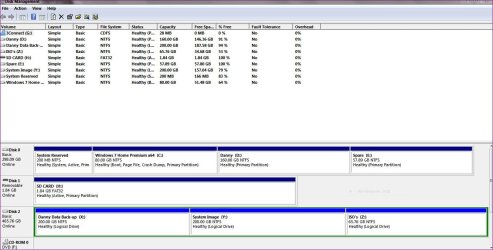
Capture.JPG

Thankyou all
 

My Computer My Computer

Computer Manufacturer/Model Number
acer aspire 5935g
OS
Windows 7 Home Premium x64 SP1
CPU
intel(R)core(TM)2 duo CPU T6600 @ 2.20GHz
Motherboard
intel gm45/gm47 revision 07
Memory
3 gb ddr3
Graphics Card(s)
ati radeon hd4570/512mb
Monitor(s) Displays
lop156wh2-tle1 15.3 flat
Screen Resolution
1366x768
Hard Drives
OCZ-Agility3 60gig ssd
320gig external hdd
500gig external hdd
Mouse
Optical
Internet Speed
30Mbps Down/30Mbps Up
@xxxdannyxxx
Your restore time for an 80GB partition does seem far too long.
BUT
My experience with Macrium reimaging is that the reimaging time depends on partition size as well of course as the size of the information imaged.
I recall imaging ~50GB from a 465GB partition. The reimaging with Macrium was considerably longer than with Windows imaging (one of the reasons I mainly use Windows imaging). I'm guessing that Macrium does something with the remaining "empty" space on the partition.
 

My Computer My Computer

Computer type
PC/Desktop
Computer Manufacturer/Model Number
Own build
OS
Windows 7x64 Home Premium SP1
CPU
Intel i7 2600k
Motherboard
ASUS P8Z68 Deluxe
Memory
G.Skill Ripjaws (DDR3-1600) 2x4GB
Graphics Card(s)
Nvidia GeForce GTS 450; Intel HD Graphics 3000(GT2+)
Monitor(s) Displays
Dell Ultrasharp IPS panel U2311H, Samsung SyncMaster P2350
Screen Resolution
1920x1080
Hard Drives
Samsung 850 Pro SSD 256GB, Samsung SSD 840 120GB, Seagates 1TB Barracuda ST31000528AS x2
PSU
Seasonic M12II 520W
Case
Lian Li Lancool PC-K60
Cooling
Case: 1x120mm, 3x140mm CPU: Hyper 212+
Keyboard
Logitech MK520 (wireless)
Mouse
Logitech MK520
Internet Speed
6-7 Mbps
Antivirus
Norton Security Premium, Malwarebytes on 2 (MSE on 3rd PC)
Browser
FireFox
Other Info
Audio: Logitech Z523 2.1
I always use the randomly allocated default name which is reasonably consistent no matter how it is viewed.

Your chosen and specified file name appears as such with Windows explorer and sundry file managers,
but there are some image file selection tools in Macrium which may use the random default name,
and this makes life confusing.

Your hardware looks unusual :-
Disc 0 is maxxed out with 4 primary partitions, unless it is GPT
Disc 2 has no primary partition and 3 logical partitions on Disc 2.

I do not see how the above would cause a big slow down, but it has potential.

Yumi appears to be associated with Linux.
Free Macrium 4.2 has no WinPE but offers Linux.

Linux based drivers do not perform as well as Windows drivers, and may lack compatibility with your hardware.

When I used Acronis I found that restoring C:\ from an image backup took a similar time to the creation for images on a FAT32 partition,
but took perhaps 4 times as long if the backup was on a NTFS partition.
I deduced that Acronis used Linux drivers that were tolerably compatible with my hardware, but had massive CPU processing overheads when reading NTFS.

I do not know whether you are using Macrium original Linux drivers,
or whether YUMI is interposing its own.
Whatever the Linux, this could be significantly slower than "native Windows" in reading NTFS backup files and writing to your hardware.

I can raise questions but not give answers - sorry.

Alan
 

My Computer My Computer

Computer Manufacturer/Model Number
ASUSTeK Computer INC. M3A32-MVP DELUXE (CPU 1)
OS
Windows 7 Ultimate 64 bit SP1 x64
CPU
AMD Phenom X4 9500
Motherboard
ASUSTeK M3A32-MVP Deluxe (CPU 1)
Memory
8 GB
Graphics Card(s)
ATI Radeon HD 4600 Series
Sound Card
AMD High Definition Audio Device
Monitor(s) Displays
SyncMaster (1680x1050@60Hz)
Hard Drives
59GB OCZ-VERTEX2 ATA Device
+
977GB SAMSUNG HD103SJ ATA Device
+
625GB WDC WD6401AALS-00L3B2 ATA Device
Interesting comments guys. Thanks

I don't think the disk configuration is an issue the reason for the four primaries on disk 1 was just for ease, I could I suppose change 2 at least to an extended partition but see no value really.The disk 2 is only used for backups so there was no need to apply primary partitions and logical gives me flexibility to create more if needed.
I see the point your making with YUMI but its my understanding lots of people use the multiboot app to add the recovery distro to the usb.
So like you say more questions than answers.
To cure my curiosity im going to move that image to the internal drive and run it again now I have a windows image as backup, see what happens

Danny
 

My Computer My Computer

Computer Manufacturer/Model Number
acer aspire 5935g
OS
Windows 7 Home Premium x64 SP1
CPU
intel(R)core(TM)2 duo CPU T6600 @ 2.20GHz
Motherboard
intel gm45/gm47 revision 07
Memory
3 gb ddr3
Graphics Card(s)
ati radeon hd4570/512mb
Monitor(s) Displays
lop156wh2-tle1 15.3 flat
Screen Resolution
1366x768
Hard Drives
OCZ-Agility3 60gig ssd
320gig external hdd
500gig external hdd
Mouse
Optical
Internet Speed
30Mbps Down/30Mbps Up
Again.
Macrium can be slow to reimage and is dependent on the size of the partition not just the imaged data.
Try an experiment if you like but don't just use tiny partitions.

Edit: to save endless posts.
I thought your main concern was reimage time???

Is your external HDD the one with one extended partition, 3 logicals?? Why do this as opposed to 3 primary partitions.
I don't know if this would add some additional overhead. The logicals within an extended partition are chained.
 
Last edited:

My Computer My Computer

Computer type
PC/Desktop
Computer Manufacturer/Model Number
Own build
OS
Windows 7x64 Home Premium SP1
CPU
Intel i7 2600k
Motherboard
ASUS P8Z68 Deluxe
Memory
G.Skill Ripjaws (DDR3-1600) 2x4GB
Graphics Card(s)
Nvidia GeForce GTS 450; Intel HD Graphics 3000(GT2+)
Monitor(s) Displays
Dell Ultrasharp IPS panel U2311H, Samsung SyncMaster P2350
Screen Resolution
1920x1080
Hard Drives
Samsung 850 Pro SSD 256GB, Samsung SSD 840 120GB, Seagates 1TB Barracuda ST31000528AS x2
PSU
Seasonic M12II 520W
Case
Lian Li Lancool PC-K60
Cooling
Case: 1x120mm, 3x140mm CPU: Hyper 212+
Keyboard
Logitech MK520 (wireless)
Mouse
Logitech MK520
Internet Speed
6-7 Mbps
Antivirus
Norton Security Premium, Malwarebytes on 2 (MSE on 3rd PC)
Browser
FireFox
Other Info
Audio: Logitech Z523 2.1
Danny, it's been a while since I restored an image. I agree that the name should be shosen by Macrium and left that way, when doing the image, you come to a point where you can choose advanced options. One of the advanced options is comments where you can enter any comments you would like. During the restore procedure it will ask if you want to restore the MBR and the next screen is whether it is to be an active partition. Due to the fact I don't have a 100MB system reserve I choose no to the MBR and just restore C and make it active. I am assuming that asking if you want to restore the MBR is asking if you want to restore the system reserve. If that is true, you can restore the entire disk in one restore process. But, I really don't know as I don't use it.
 

My Computers My Computers

System One System Two

  • Computer type
    PC/Desktop
    Computer Manufacturer/Model Number
    ALWAYS UNDER CONSTRUCTION
    OS
    Windows 11 Pro
    CPU
    Ryzen 9 5900X
    Motherboard
    Asus X570 Crosshair Viii Hero
    Memory
    32GB G Skill DDR4-3600
    Graphics Card(s)
    EVGA RTX 3080 FTW 3 Ultra
    Sound Card
    On Board/Sennheiser PC37X Headset
    Monitor(s) Displays
    3 X Asus 27"
    Screen Resolution
    2560x1440
    Hard Drives
    2 X 1 TB NVME drives
    PSU
    EVGA 850
    Case
    Phanteks Eclipse P400A
    Cooling
    EVGA 280 AIO
    Keyboard
    Logitech G510s/ Logitech G13
    Mouse
    Logitech G502
    Internet Speed
    24/1
    Antivirus
    ESET/MBAM Pro/SAS Pro
    Browser
    Chrome/ Firefox/ Edge
  • Computer type
    Laptop
    System Manufacturer/Model Number
    Dell 16 Plus
    OS
    Windows 11 Pro
    CPU
    Intel Ultra 9 288V
    Memory
    32 GB LPDDR5X 8533
    Monitor(s) Displays
    16" Mini-LED HDR600 Touch 90 Hz
    Screen Resolution
    2560X1600
    Hard Drives
    1 TB NVME
Again.
Macrium can be slow to reimage and is dependent on the size of the partition not just the imaged data.
Try an experiment if you like but don't just use tiny partitions.

I do get your point and I'm not disputing it.I only started using Macrium a few months ago so it was just a shock it took that long to restore.All I can say is thank goodness I didn't just have 1 500gig partition.
I'm going to do a clean install tomorrow anyway so I'm just testing now but I ran the restore from a CD instead (same image)with the same result.I quit after half an hour at 5%

Yes my only concern is image time.I do quite a bit of playing so like to have an image I can boot quick from.
Will have a look at that disk though maybe primary drives would be faster I'm not sure

Danny, it's been a while since I restored an image. I agree that the name should be shosen by Macrium and left that way, when doing the image, you come to a point where you can choose advanced options. One of the advanced options is comments where you can enter any comments you would like. During the restore procedure it will ask if you want to restore the MBR and the next screen is whether it is to be an active partition. Due to the fact I don't have a 100MB system reserve I choose no to the MBR and just restore C and make it active. I am assuming that asking if you want to restore the MBR is asking if you want to restore the system reserve. If that is true, you can restore the entire disk in one restore process. But, I really don't know as I don't use it.

Yes that makes sense. I would only want to do that though if I was having boot issues.In future if I use Macrium I will image the sysres after a clean install on its own then only image the C:/ partition, that way I can restore C:/ without having to worry about sysres which should never change anyway.

Danny
 

My Computer My Computer

Computer Manufacturer/Model Number
acer aspire 5935g
OS
Windows 7 Home Premium x64 SP1
CPU
intel(R)core(TM)2 duo CPU T6600 @ 2.20GHz
Motherboard
intel gm45/gm47 revision 07
Memory
3 gb ddr3
Graphics Card(s)
ati radeon hd4570/512mb
Monitor(s) Displays
lop156wh2-tle1 15.3 flat
Screen Resolution
1366x768
Hard Drives
OCZ-Agility3 60gig ssd
320gig external hdd
500gig external hdd
Mouse
Optical
Internet Speed
30Mbps Down/30Mbps Up
If you do not also have a validated image of sysres then sysres is certain to be destroyed on your next disaster ! !
 

My Computer My Computer

Computer Manufacturer/Model Number
ASUSTeK Computer INC. M3A32-MVP DELUXE (CPU 1)
OS
Windows 7 Ultimate 64 bit SP1 x64
CPU
AMD Phenom X4 9500
Motherboard
ASUSTeK M3A32-MVP Deluxe (CPU 1)
Memory
8 GB
Graphics Card(s)
ATI Radeon HD 4600 Series
Sound Card
AMD High Definition Audio Device
Monitor(s) Displays
SyncMaster (1680x1050@60Hz)
Hard Drives
59GB OCZ-VERTEX2 ATA Device
+
977GB SAMSUNG HD103SJ ATA Device
+
625GB WDC WD6401AALS-00L3B2 ATA Device
Alan, I think you place too much faith in validation. Validation only means it is validated at the time you run it. I had the paid version of Acronis. I validated the backup each time I ran one. I consistantly received the message that the image was corrupted on restoration. For that reason, I do still validate the image, but put little faith in the validation. And I no longer have Acronis' paid version. But, I have never had that problem with Macrium.
 

My Computers My Computers

System One System Two

  • Computer type
    PC/Desktop
    Computer Manufacturer/Model Number
    ALWAYS UNDER CONSTRUCTION
    OS
    Windows 11 Pro
    CPU
    Ryzen 9 5900X
    Motherboard
    Asus X570 Crosshair Viii Hero
    Memory
    32GB G Skill DDR4-3600
    Graphics Card(s)
    EVGA RTX 3080 FTW 3 Ultra
    Sound Card
    On Board/Sennheiser PC37X Headset
    Monitor(s) Displays
    3 X Asus 27"
    Screen Resolution
    2560x1440
    Hard Drives
    2 X 1 TB NVME drives
    PSU
    EVGA 850
    Case
    Phanteks Eclipse P400A
    Cooling
    EVGA 280 AIO
    Keyboard
    Logitech G510s/ Logitech G13
    Mouse
    Logitech G502
    Internet Speed
    24/1
    Antivirus
    ESET/MBAM Pro/SAS Pro
    Browser
    Chrome/ Firefox/ Edge
  • Computer type
    Laptop
    System Manufacturer/Model Number
    Dell 16 Plus
    OS
    Windows 11 Pro
    CPU
    Intel Ultra 9 288V
    Memory
    32 GB LPDDR5X 8533
    Monitor(s) Displays
    16" Mini-LED HDR600 Touch 90 Hz
    Screen Resolution
    2560X1600
    Hard Drives
    1 TB NVME
Macrium stores backup sets. I always include the system reserved (100MB) as a partition in the set. When you pick the image set to restore just don't this partition in the set to restore.
It's a nuisance but for a single boot OS the system reserved can be rebuilt.
 

My Computer My Computer

Computer type
PC/Desktop
Computer Manufacturer/Model Number
Own build
OS
Windows 7x64 Home Premium SP1
CPU
Intel i7 2600k
Motherboard
ASUS P8Z68 Deluxe
Memory
G.Skill Ripjaws (DDR3-1600) 2x4GB
Graphics Card(s)
Nvidia GeForce GTS 450; Intel HD Graphics 3000(GT2+)
Monitor(s) Displays
Dell Ultrasharp IPS panel U2311H, Samsung SyncMaster P2350
Screen Resolution
1920x1080
Hard Drives
Samsung 850 Pro SSD 256GB, Samsung SSD 840 120GB, Seagates 1TB Barracuda ST31000528AS x2
PSU
Seasonic M12II 520W
Case
Lian Li Lancool PC-K60
Cooling
Case: 1x120mm, 3x140mm CPU: Hyper 212+
Keyboard
Logitech MK520 (wireless)
Mouse
Logitech MK520
Internet Speed
6-7 Mbps
Antivirus
Norton Security Premium, Malwarebytes on 2 (MSE on 3rd PC)
Browser
FireFox
Other Info
Audio: Logitech Z523 2.1
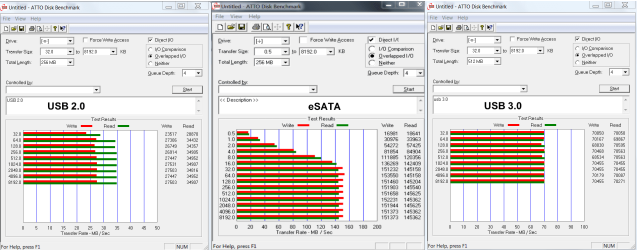
The question about transfer speed came up. I have tests on different hard drives I have. Both USB's are the same drive, the eSATA is a different hard drive. These are the speeds I get. YMMV

esata-usb 3-2.png
 

My Computers My Computers

System One System Two

  • Computer type
    PC/Desktop
    Computer Manufacturer/Model Number
    ALWAYS UNDER CONSTRUCTION
    OS
    Windows 11 Pro
    CPU
    Ryzen 9 5900X
    Motherboard
    Asus X570 Crosshair Viii Hero
    Memory
    32GB G Skill DDR4-3600
    Graphics Card(s)
    EVGA RTX 3080 FTW 3 Ultra
    Sound Card
    On Board/Sennheiser PC37X Headset
    Monitor(s) Displays
    3 X Asus 27"
    Screen Resolution
    2560x1440
    Hard Drives
    2 X 1 TB NVME drives
    PSU
    EVGA 850
    Case
    Phanteks Eclipse P400A
    Cooling
    EVGA 280 AIO
    Keyboard
    Logitech G510s/ Logitech G13
    Mouse
    Logitech G502
    Internet Speed
    24/1
    Antivirus
    ESET/MBAM Pro/SAS Pro
    Browser
    Chrome/ Firefox/ Edge
  • Computer type
    Laptop
    System Manufacturer/Model Number
    Dell 16 Plus
    OS
    Windows 11 Pro
    CPU
    Intel Ultra 9 288V
    Memory
    32 GB LPDDR5X 8533
    Monitor(s) Displays
    16" Mini-LED HDR600 Touch 90 Hz
    Screen Resolution
    2560X1600
    Hard Drives
    1 TB NVME
Alan, I think you place too much faith in validation. Validation only means it is validated at the time you run it. I had the paid version of Acronis. I validated the backup each time I ran one. I consistantly received the message that the image was corrupted on restoration. For that reason, I do still validate the image, but put little faith in the validation. And I no longer have Acronis' paid version. But, I have never had that problem with Macrium.

No, you misunderstood me. My faith is adequate but not excessive ! !

I ensure my backup is validated when it is created and should it ever fail validation I will make another backup. But never had a Macrium backup fail.

I do not validate before restoring.
I am confidant that if there is an error in the image file the hash checksum will signal corruption and the restoration will abort.
I readily accept that an aborted restoration is a disaster, but that is why I keep a few dozen of the latest image files on my secondary internal drive, and occasionally copy some to an external drive.

If you make a backup of a small partition you can attempt restoration to unallocated space.
If you use a binary file editor to first change the data in the image file I am reasonably confidant that Macrium restoration will abort.
I was merely responding to
"with no integrity check before or after"
which suggested a possibly concern that restoration had been corrupt but without warning.

Alan
 

My Computer My Computer

Computer Manufacturer/Model Number
ASUSTeK Computer INC. M3A32-MVP DELUXE (CPU 1)
OS
Windows 7 Ultimate 64 bit SP1 x64
CPU
AMD Phenom X4 9500
Motherboard
ASUSTeK M3A32-MVP Deluxe (CPU 1)
Memory
8 GB
Graphics Card(s)
ATI Radeon HD 4600 Series
Sound Card
AMD High Definition Audio Device
Monitor(s) Displays
SyncMaster (1680x1050@60Hz)
Hard Drives
59GB OCZ-VERTEX2 ATA Device
+
977GB SAMSUNG HD103SJ ATA Device
+
625GB WDC WD6401AALS-00L3B2 ATA Device
Back
Top