Solved Image your system with free Macrium

Hello alan10

Your theory is correct validation should be done when an Image is created.I'm talking about the restore though.I have checked the integrity of the image and its fine.Can you imagine if I had validated before or after the restore how long I would have been waiting lol. I did some testing overnight with Paragon, Macrium and Windows native backup feature and have come to the conclusion that - I don't know what happened.
Paragon and windows images of the same drive restore in 25-30 mins but are considerably larger in size so it may be a compression issue with my system. Can,t explain it.
I'm not putting the finger on Macrium, there are many happy users here, and thats one of the reasons I tried it in the first place but at this point its not usable for me 2 1/2 hours to restore would drive me crazy.

Danny
 

My Computer My Computer

Computer Manufacturer/Model Number
acer aspire 5935g
OS
Windows 7 Home Premium x64 SP1
CPU
intel(R)core(TM)2 duo CPU T6600 @ 2.20GHz
Motherboard
intel gm45/gm47 revision 07
Memory
3 gb ddr3
Graphics Card(s)
ati radeon hd4570/512mb
Monitor(s) Displays
lop156wh2-tle1 15.3 flat
Screen Resolution
1366x768
Hard Drives
OCZ-Agility3 60gig ssd
320gig external hdd
500gig external hdd
Mouse
Optical
Internet Speed
30Mbps Down/30Mbps Up
I have 16 GB used space in C:\
7 GB is pagefile.sys and hiberfil.sys which are excluded from the Macrium image backup.
With default settings Macrium compresses the 9 GB of information into a 6 GB image file.
It is comparable to how Acronis worked.

If your backup file is less than 50% the size of the used space perhaps something vital got omitted. Windows VSS errors can give grief.

When you have created a backup you can mount it for exploration as a duplicate to C:\ but with a different drive letter.
I recommend free-ware BestSync to compare the real and virtual partitions.
I use the 64 bit portable version which is item 6 down at
Download BestSync

Alan
 
Last edited:

My Computer My Computer

Computer Manufacturer/Model Number
ASUSTeK Computer INC. M3A32-MVP DELUXE (CPU 1)
OS
Windows 7 Ultimate 64 bit SP1 x64
CPU
AMD Phenom X4 9500
Motherboard
ASUSTeK M3A32-MVP Deluxe (CPU 1)
Memory
8 GB
Graphics Card(s)
ATI Radeon HD 4600 Series
Sound Card
AMD High Definition Audio Device
Monitor(s) Displays
SyncMaster (1680x1050@60Hz)
Hard Drives
59GB OCZ-VERTEX2 ATA Device
+
977GB SAMSUNG HD103SJ ATA Device
+
625GB WDC WD6401AALS-00L3B2 ATA Device
I found out why Macrium v4.2 couldn't see my backup hard-drive. I wrote the following last week.

whs,

Based, partly, on your writeups and other reports, I'm trying out Macrium v4.2 before I spend money on v5.0. It's not working. My computer has 3 hard-drives. Each hard-drive is a single partition. I only have one OS, W7/64, installed. (No multi-boot options or anything complicated.) My drives are C, for everything; D, which is a backup of C; and E, which has some old data I'm not using or backing up. I have AHCI enabled in BIOS and all 3 drives are formatted using NTFS.

I imaged C and saved it on D. I created the linux boot CD and rebooted. The Macrium restore which opened up at the reboot did NOT see any hard-drive other than C. Since my image is on D, the restore environment fails. (Yes, I tried another boot CD using the "compatibility" option. No good. It, too, only saw one hard drive.)

How can I get Macrium to find my other hard-drives when I boot off the linux boot CD?

(My goal is far loftier than just solving this issue. I have 4 machines networked at home. I would like to store the image from computer 1 on a dedicated hard-drive on, say, computer 2. That will be something I try to tackle AFTER I get Macrium working on a simple computer with 2 hard-drives.)

Thanks,
Ken


The part in bold, that all 3 are formatted in NTFS is wrong. :) The two that are invisible to Macrium's rescueCD are both formatted in GPT. Macrium's release notes state that v4.2 (free) does NOT support GPT disks. They claim that v5.0 (purchased) does.

I'll wipe my backup, reformat as NTFS, take another image and then see if I can restore my machine. (I'll pull my C drive and toss in a spare of the same capacity.)

Thanks,
Ken
 

My Computer My Computer

Computer type
PC/Desktop
Computer Manufacturer/Model Number
Custom build
OS
Microsoft Windows 7 Home Premium 64-bit 7601 Multiprocessor Free Service Pack 1
CPU
AMD FX(tm)-8350 Eight-Core Processor
Motherboard
ASUSTeK Computer INC. M5A88-M
Memory
16.00 GB
Graphics Card(s)
NVIDIA GeForce GTX 670
Sound Card
(1) Realtek High Definition Audio (2) NVIDIA Virtual Audio
Monitor(s) Displays
Through AVR to one of two TV/Projector
Screen Resolution
1920 x 1080 x 32 bits (4294967296 colors) @ 60 Hz
Hard Drives
Samsung SSD 850 PRO 256G SATA Disk Device
Case
Silverstone GD09
Cooling
Air
Antivirus
Kaspersky Internet Security, 2015
If that dosen't work try to use hiren's boot CD. Load the mini XP mode and it has a Macrium rescue in it. That is what I have to use. For some reason the Macrium rescue CD freezes my computer when I boot from it. But it works perfect with Hiren's. I know that has nothing to do with GPT partitions, but it is another option for you.
 

My Computers My Computers

System One System Two

  • Computer type
    PC/Desktop
    Computer Manufacturer/Model Number
    ALWAYS UNDER CONSTRUCTION
    OS
    Windows 11 Pro
    CPU
    Ryzen 9 5900X
    Motherboard
    Asus X570 Crosshair Viii Hero
    Memory
    32GB G Skill DDR4-3600
    Graphics Card(s)
    EVGA RTX 3080 FTW 3 Ultra
    Sound Card
    On Board/Sennheiser PC37X Headset
    Monitor(s) Displays
    3 X Asus 27"
    Screen Resolution
    2560x1440
    Hard Drives
    2 X 1 TB NVME drives
    PSU
    EVGA 850
    Case
    Phanteks Eclipse P400A
    Cooling
    EVGA 280 AIO
    Keyboard
    Logitech G510s/ Logitech G13
    Mouse
    Logitech G502
    Internet Speed
    24/1
    Antivirus
    ESET/MBAM Pro/SAS Pro
    Browser
    Chrome/ Firefox/ Edge
  • Computer type
    Laptop
    System Manufacturer/Model Number
    Dell 16 Plus
    OS
    Windows 11 Pro
    CPU
    Intel Ultra 9 288V
    Memory
    32 GB LPDDR5X 8533
    Monitor(s) Displays
    16" Mini-LED HDR600 Touch 90 Hz
    Screen Resolution
    2560X1600
    Hard Drives
    1 TB NVME
Try the macrium v5 trial version.

If you can be bothered to download WAIK - it will run off a winpe3 recovery disc for you ( that is not a trial and works forever. It is also backward compatible with v4 images ).

If you can't be bothered to d/l WAIK - then if you are on 64 bit win 7 - you can use my little app. to make it for you - without WAIK.

64 BIT HERE

If you are on win 7 32 bit 32 bit here
 

My Computers My Computers

System One System Two

  • Computer type
    PC/Desktop
    OS
    7 X64
    CPU
    i5 8400
    Motherboard
    gigabyte b365m ds3h
    Memory
    2x8gb 3200mhz
    Hard Drives
    various
    PSU
    pure power 11 400w cm
    Case
    Coolermaster
    Cooling
    cryorig m9i
  • Computer type
    PC/Desktop
    OS
    7x64
    CPU
    g5400
    Motherboard
    ga b365m ds3h
    Memory
    8gb ddr4 2400
    PSU
    xfx pro 450w
  • Like
Reactions: whs
I just started using Macrium and I thought that I share the way that I make the linux version of the rescue cd
instead of saveing the the rescue cd I save to a iso and then use either linux live cd or unetbootin to copy it to a usb drive . then boot the computer with the usb drive
 

My Computer My Computer

Computer type
PC/Desktop
Computer Manufacturer/Model Number
Compac
OS
Microsoft Windows 7 Ultimate 32-bit 7601
CPU
Intel(R) Pentium(R) Dual CPU E2160 @ 1.80GHz
Motherboard
MSI Boston
Memory
4.00 GB
Graphics Card(s)
(1) VNC Mirror Driver (2) Intel(R) G33/G31 Express Chipset
Sound Card
Disabled
Monitor(s) Displays
Headless
Screen Resolution
1280 x 960 x 32 bits (4294967296 colors) @ 60 Hz
Hard Drives
ST3320820AS ATA Device
Keyboard
Headless
Mouse
Headless
Antivirus
Malwarebytes pro
Other Info
Also
Windows 8.1 Laptop and Desktop both Acer
I think you will find the .iso is already in the Macrium\Reflect folder.
 

My Computers My Computers

System One System Two

  • Computer type
    PC/Desktop
    OS
    7 X64
    CPU
    i5 8400
    Motherboard
    gigabyte b365m ds3h
    Memory
    2x8gb 3200mhz
    Hard Drives
    various
    PSU
    pure power 11 400w cm
    Case
    Coolermaster
    Cooling
    cryorig m9i
  • Computer type
    PC/Desktop
    OS
    7x64
    CPU
    g5400
    Motherboard
    ga b365m ds3h
    Memory
    8gb ddr4 2400
    PSU
    xfx pro 450w
Hello guys need a little help

I've been playing today with win 8 and made a mess of things. I made an image of my C partition this morning before joining the fun. It's an 80 gig partition with 28 gig used. Macrium free imaged this in 11 minutes to my Usb external HDD.
I booted the Usb stick with the Macrium recovery software, choose the Image on my external, choose the partition to replace of off it went.
But it didn't did it. It has just taken 2 hours 28 mins to complete the restore with no integrity check before or after.
Surely this can't be right. Windows Imaging feature does it in about 20 minutes on my system.
I am now up and running as I was before but will be removing Macrium unless I can find a reason for the hours it took to restore.
Any help gratefully received.

Danny

Not sure about that. I have restored a Macrium image of my C drive. It took longer than the backup but nowhere near that long.

FYI. I have just had to re-image my Windows drive (53GB) today with Macrium from a backup on a USB attached drive. It took 46mins which is not much longer than the backup.
 

My Computer My Computer

Computer type
Laptop
Computer Manufacturer/Model Number
Hewlett-Packard/G62-107SA Notebook
OS
Microsoft Windows 7 Home Premium 64-bit Service Pack 1
CPU
Intel(R) Core(TM) i3 CPU M 330 @ 2.13GHz
Motherboard
Hewlett-Packard 1425
Memory
8 GB DDR3
Graphics Card(s)
Intel(R) HD Graphics
Sound Card
Realtek High Definition Audio
Monitor(s) Displays
Builtin
Screen Resolution
1366 x 768 x 32 bits (4294967296 colors) @ 60 Hz
Hard Drives
250 GB SATA Hard Disk Drive 7200 rpm
2TB Seagate GoFlex USB 2 Drive
1TB Iomega Prestige USB 2 Drive
1.5TB Iomega Prestige USB 2 Drive (Samsung)
2TB WD MyBook Live NAS.
Mouse
Logitech Anywhere MX
Internet Speed
152 Mbs download 10 Mbs upload
Antivirus
Norton 360
Browser
Chrome
Hello guys need a little help

I've been playing today with win 8 and made a mess of things. I made an image of my C partition this morning before joining the fun. It's an 80 gig partition with 28 gig used. Macrium free imaged this in 11 minutes to my Usb external HDD.
I booted the Usb stick with the Macrium recovery software, choose the Image on my external, choose the partition to replace of off it went.
But it didn't did it. It has just taken 2 hours 28 mins to complete the restore with no integrity check before or after.
Surely this can't be right. Windows Imaging feature does it in about 20 minutes on my system.
I am now up and running as I was before but will be removing Macrium unless I can find a reason for the hours it took to restore.
Any help gratefully received.

Danny

Not sure about that. I have restored a Macrium image of my C drive. It took longer than the backup but nowhere near that long.

FYI. I have just had to re-image my Windows drive (53GB) today with Macrium from a backup on a USB attached drive. It took 46mins which is not much longer than the backup.

Thanks for the info Kado897

I've temporally gone back to windows imaging until I get a chance to look at Macrium again
 

My Computer My Computer

Computer Manufacturer/Model Number
acer aspire 5935g
OS
Windows 7 Home Premium x64 SP1
CPU
intel(R)core(TM)2 duo CPU T6600 @ 2.20GHz
Motherboard
intel gm45/gm47 revision 07
Memory
3 gb ddr3
Graphics Card(s)
ati radeon hd4570/512mb
Monitor(s) Displays
lop156wh2-tle1 15.3 flat
Screen Resolution
1366x768
Hard Drives
OCZ-Agility3 60gig ssd
320gig external hdd
500gig external hdd
Mouse
Optical
Internet Speed
30Mbps Down/30Mbps Up
@xxxdannyxxx
Your problem is strange. Like I said earlier I find Macrium restores can take a lot longer than Windows depending on your partition size but it doesn't explain your problem really.

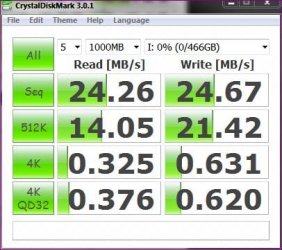
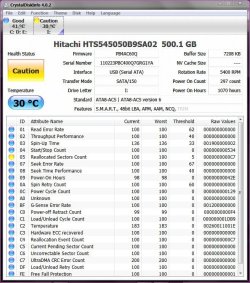
Can you check your external HDD out again? The HDTune screenshot looked a little odd to me. Can you try CrystalDiskMark and Crystal DiskInfo.
Also, can you get your hands on another external HDD to try?
 

My Computer My Computer

Computer type
PC/Desktop
Computer Manufacturer/Model Number
Own build
OS
Windows 7x64 Home Premium SP1
CPU
Intel i7 2600k
Motherboard
ASUS P8Z68 Deluxe
Memory
G.Skill Ripjaws (DDR3-1600) 2x4GB
Graphics Card(s)
Nvidia GeForce GTS 450; Intel HD Graphics 3000(GT2+)
Monitor(s) Displays
Dell Ultrasharp IPS panel U2311H, Samsung SyncMaster P2350
Screen Resolution
1920x1080
Hard Drives
Samsung 850 Pro SSD 256GB, Samsung SSD 840 120GB, Seagates 1TB Barracuda ST31000528AS x2
PSU
Seasonic M12II 520W
Case
Lian Li Lancool PC-K60
Cooling
Case: 1x120mm, 3x140mm CPU: Hyper 212+
Keyboard
Logitech MK520 (wireless)
Mouse
Logitech MK520
Internet Speed
6-7 Mbps
Antivirus
Norton Security Premium, Malwarebytes on 2 (MSE on 3rd PC)
Browser
FireFox
Other Info
Audio: Logitech Z523 2.1
Hi mjf Im on to that now

Mmmm not looking to good
Capture.JPG Capture 2.JPG
 
Last edited:

My Computer My Computer

Computer Manufacturer/Model Number
acer aspire 5935g
OS
Windows 7 Home Premium x64 SP1
CPU
intel(R)core(TM)2 duo CPU T6600 @ 2.20GHz
Motherboard
intel gm45/gm47 revision 07
Memory
3 gb ddr3
Graphics Card(s)
ati radeon hd4570/512mb
Monitor(s) Displays
lop156wh2-tle1 15.3 flat
Screen Resolution
1366x768
Hard Drives
OCZ-Agility3 60gig ssd
320gig external hdd
500gig external hdd
Mouse
Optical
Internet Speed
30Mbps Down/30Mbps Up
This is my main backup drive USB attached Seagate GoFlex which is the limiting factor for speed.
Capture.JPG
 

My Computer My Computer

Computer type
Laptop
Computer Manufacturer/Model Number
Hewlett-Packard/G62-107SA Notebook
OS
Microsoft Windows 7 Home Premium 64-bit Service Pack 1
CPU
Intel(R) Core(TM) i3 CPU M 330 @ 2.13GHz
Motherboard
Hewlett-Packard 1425
Memory
8 GB DDR3
Graphics Card(s)
Intel(R) HD Graphics
Sound Card
Realtek High Definition Audio
Monitor(s) Displays
Builtin
Screen Resolution
1366 x 768 x 32 bits (4294967296 colors) @ 60 Hz
Hard Drives
250 GB SATA Hard Disk Drive 7200 rpm
2TB Seagate GoFlex USB 2 Drive
1TB Iomega Prestige USB 2 Drive
1.5TB Iomega Prestige USB 2 Drive (Samsung)
2TB WD MyBook Live NAS.
Mouse
Logitech Anywhere MX
Internet Speed
152 Mbs download 10 Mbs upload
Antivirus
Norton 360
Browser
Chrome
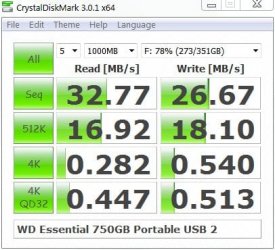
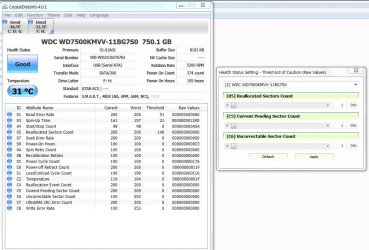
Here are my results 750GB USB2 portable
WD-DM-23_9_11.jpg
WD-DI-23_9_11.jpg
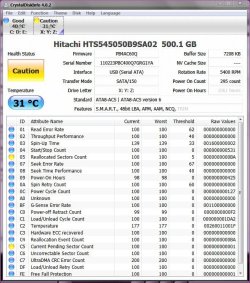
Sorry to say your HDD is looking a bit sick. Read speed is way too low. Defragmenting may help but your reallocated sector count I think is too high for the number of hours on the HDD.
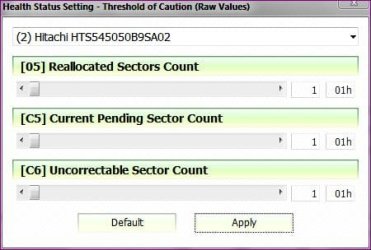
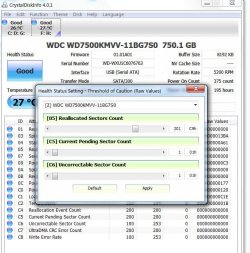
With CrystalDiskInfo go to Function>Health status settings
as shown. Try setting your threshold warning just above the current count and see how it behaves over say the next month.

But I think your drive is may be stuffed Danny.

Edit: I believe the RAW values of sector counts are the actual number
 
Last edited:

My Computer My Computer

Computer type
PC/Desktop
Computer Manufacturer/Model Number
Own build
OS
Windows 7x64 Home Premium SP1
CPU
Intel i7 2600k
Motherboard
ASUS P8Z68 Deluxe
Memory
G.Skill Ripjaws (DDR3-1600) 2x4GB
Graphics Card(s)
Nvidia GeForce GTS 450; Intel HD Graphics 3000(GT2+)
Monitor(s) Displays
Dell Ultrasharp IPS panel U2311H, Samsung SyncMaster P2350
Screen Resolution
1920x1080
Hard Drives
Samsung 850 Pro SSD 256GB, Samsung SSD 840 120GB, Seagates 1TB Barracuda ST31000528AS x2
PSU
Seasonic M12II 520W
Case
Lian Li Lancool PC-K60
Cooling
Case: 1x120mm, 3x140mm CPU: Hyper 212+
Keyboard
Logitech MK520 (wireless)
Mouse
Logitech MK520
Internet Speed
6-7 Mbps
Antivirus
Norton Security Premium, Malwarebytes on 2 (MSE on 3rd PC)
Browser
FireFox
Other Info
Audio: Logitech Z523 2.1
Hi mjf
Try setting your threshold warning just above the current count and see how it behaves over say the next month.
Not sure what you mean by this can you explain please

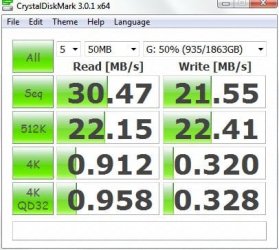
I took my data off and gave it a good clean.These are the results after a clean all and full format

Capture.JPG Capture 2.JPG
 

My Computer My Computer

Computer Manufacturer/Model Number
acer aspire 5935g
OS
Windows 7 Home Premium x64 SP1
CPU
intel(R)core(TM)2 duo CPU T6600 @ 2.20GHz
Motherboard
intel gm45/gm47 revision 07
Memory
3 gb ddr3
Graphics Card(s)
ati radeon hd4570/512mb
Monitor(s) Displays
lop156wh2-tle1 15.3 flat
Screen Resolution
1366x768
Hard Drives
OCZ-Agility3 60gig ssd
320gig external hdd
500gig external hdd
Mouse
Optical
Internet Speed
30Mbps Down/30Mbps Up
With the sliders I'd set the threshold of warning "Reallocated sector count" to say C9. Your current reading is C7. Your post before last it was BA.
(CrystalDiskInfo - select Function > Health Status Setting - adjust the reallocated sector count slider to C9. I haven't had these errors but I think the amber warning will go away until this new threshold is hit)

The speeds still look a bit low to me but for your PC & ext HDD they could be normal. What I think you need to watch is "Reallocated Sector Count". If it climbed from C7 to C9 in say 1 month then if it was my HDD, I wouldn't trust it.
Is it still under warranty by any chance?????
 

My Computer My Computer

Computer type
PC/Desktop
Computer Manufacturer/Model Number
Own build
OS
Windows 7x64 Home Premium SP1
CPU
Intel i7 2600k
Motherboard
ASUS P8Z68 Deluxe
Memory
G.Skill Ripjaws (DDR3-1600) 2x4GB
Graphics Card(s)
Nvidia GeForce GTS 450; Intel HD Graphics 3000(GT2+)
Monitor(s) Displays
Dell Ultrasharp IPS panel U2311H, Samsung SyncMaster P2350
Screen Resolution
1920x1080
Hard Drives
Samsung 850 Pro SSD 256GB, Samsung SSD 840 120GB, Seagates 1TB Barracuda ST31000528AS x2
PSU
Seasonic M12II 520W
Case
Lian Li Lancool PC-K60
Cooling
Case: 1x120mm, 3x140mm CPU: Hyper 212+
Keyboard
Logitech MK520 (wireless)
Mouse
Logitech MK520
Internet Speed
6-7 Mbps
Antivirus
Norton Security Premium, Malwarebytes on 2 (MSE on 3rd PC)
Browser
FireFox
Other Info
Audio: Logitech Z523 2.1
With the sliders I'd set the threshold of warning "Reallocated sector count" to say C9. Your current reading is C7. Your post before last it was BA.

The speeds still look a bit low to me but for your PC & ext HDD they could be normal. What I think you need to watch is "Reallocated Sector Count". If it climbed from C7 to C9 in say 1 month then if it was my HDD, I wouldn't trust it.
Is it still under warranty by any chance?????

Thanks mjf

No warranty unfortunately. They do still look a tad slow but an improvement none the less. Would enabling Write Caching on the drive help (this is not my area at all, Ive never lost a HDD before).
Will do as you suggested with the reallocated sector count but must admit I don't understand it at all. What do the numbers and letters mean.
I'm just going on the school run so going to run a full chkdsk /f/r whilst out.Will check in when I get back.

Thankyou for the help

Danny


Edit - Sorry mate where's C9 on the sliders I don't understand it
Capture.JPG
 

My Computer My Computer

Computer Manufacturer/Model Number
acer aspire 5935g
OS
Windows 7 Home Premium x64 SP1
CPU
intel(R)core(TM)2 duo CPU T6600 @ 2.20GHz
Motherboard
intel gm45/gm47 revision 07
Memory
3 gb ddr3
Graphics Card(s)
ati radeon hd4570/512mb
Monitor(s) Displays
lop156wh2-tle1 15.3 flat
Screen Resolution
1366x768
Hard Drives
OCZ-Agility3 60gig ssd
320gig external hdd
500gig external hdd
Mouse
Optical
Internet Speed
30Mbps Down/30Mbps Up
chkdsk is a good idea.
I'm certainly only a little bit knowledgeable here. As I understand it reallocated sectors are bad sectors which have been mapped out by the firmware. I think when they start to grow too quickly, it is an indicator that your disk is failing.

C7 hex = 12x16+7 = 199 sectors have needed to be reallocated.
In absolute terms I would have thought this high for a disk with ~1000hours on it.
Setting
WD-DI-23_9_11EX.jpg
It's just a reference point. It doesn't "fix" anything.
------------------------------------------------------------------
Someone more knowledgeable can step in here and give us both their opinion.
------------------------------------------------------------------
 

My Computer My Computer

Computer type
PC/Desktop
Computer Manufacturer/Model Number
Own build
OS
Windows 7x64 Home Premium SP1
CPU
Intel i7 2600k
Motherboard
ASUS P8Z68 Deluxe
Memory
G.Skill Ripjaws (DDR3-1600) 2x4GB
Graphics Card(s)
Nvidia GeForce GTS 450; Intel HD Graphics 3000(GT2+)
Monitor(s) Displays
Dell Ultrasharp IPS panel U2311H, Samsung SyncMaster P2350
Screen Resolution
1920x1080
Hard Drives
Samsung 850 Pro SSD 256GB, Samsung SSD 840 120GB, Seagates 1TB Barracuda ST31000528AS x2
PSU
Seasonic M12II 520W
Case
Lian Li Lancool PC-K60
Cooling
Case: 1x120mm, 3x140mm CPU: Hyper 212+
Keyboard
Logitech MK520 (wireless)
Mouse
Logitech MK520
Internet Speed
6-7 Mbps
Antivirus
Norton Security Premium, Malwarebytes on 2 (MSE on 3rd PC)
Browser
FireFox
Other Info
Audio: Logitech Z523 2.1
chkdsk is a good idea.
I'm certainly only a little bit knowledgeable here. As I understand it reallocated sectors are bad sectors which have been mapped out by the firmware. I think when they start to grow too quickly, it is an indicator that your disk is failing.

C7 hex = 12x16+7 = 199 sectors have needed to be reallocated.
In absolute terms I would have thought this high for a disk with ~1000hours on it.
Setting
View attachment 176550
It's just a reference point. It doesn't "fix" anything.
------------------------------------------------------------------
Someone more knowledgeable can step in here and give us both their opinion.
------------------------------------------------------------------

I managed to find the warranty for that drive and got a replacement through yesterday. They sent me a Seagate instead of Hitachi(not sure if thats an upgrade of not)but alls well again.

Disk Info 01-10-2011.JPG

Thanks for all the help

Danny
 

My Computer My Computer

Computer Manufacturer/Model Number
acer aspire 5935g
OS
Windows 7 Home Premium x64 SP1
CPU
intel(R)core(TM)2 duo CPU T6600 @ 2.20GHz
Motherboard
intel gm45/gm47 revision 07
Memory
3 gb ddr3
Graphics Card(s)
ati radeon hd4570/512mb
Monitor(s) Displays
lop156wh2-tle1 15.3 flat
Screen Resolution
1366x768
Hard Drives
OCZ-Agility3 60gig ssd
320gig external hdd
500gig external hdd
Mouse
Optical
Internet Speed
30Mbps Down/30Mbps Up
I've got 2 Seagate internals and I've been quite happy with them so far. I have a Hitachi hanging around as a backup spare and it never caused me grief.
I think sometimes it's the luck of the draw and make sure the temps don't get too hot.
 

My Computer My Computer

Computer type
PC/Desktop
Computer Manufacturer/Model Number
Own build
OS
Windows 7x64 Home Premium SP1
CPU
Intel i7 2600k
Motherboard
ASUS P8Z68 Deluxe
Memory
G.Skill Ripjaws (DDR3-1600) 2x4GB
Graphics Card(s)
Nvidia GeForce GTS 450; Intel HD Graphics 3000(GT2+)
Monitor(s) Displays
Dell Ultrasharp IPS panel U2311H, Samsung SyncMaster P2350
Screen Resolution
1920x1080
Hard Drives
Samsung 850 Pro SSD 256GB, Samsung SSD 840 120GB, Seagates 1TB Barracuda ST31000528AS x2
PSU
Seasonic M12II 520W
Case
Lian Li Lancool PC-K60
Cooling
Case: 1x120mm, 3x140mm CPU: Hyper 212+
Keyboard
Logitech MK520 (wireless)
Mouse
Logitech MK520
Internet Speed
6-7 Mbps
Antivirus
Norton Security Premium, Malwarebytes on 2 (MSE on 3rd PC)
Browser
FireFox
Other Info
Audio: Logitech Z523 2.1
Hello to All,
This may not be the place to ask the question, but it looks the closest. I apologize in advance. I just installed the upgraded Macrium Reflect with the new WAIK download to get a restore disk. When running the system image, I was unable to locate the verify system image option. Did I just miss it or did they remove it??
Thanks for any assistance!
Glenn
 

My Computer My Computer

Computer type
PC/Desktop
Computer Manufacturer/Model Number
Self-Built
OS
Windows 7 Ultimate
CPU
AMD Phenom-II X4 965
Motherboard
Gigabyte GA-MA785GM-US2H
Memory
8192 MB DDR2-SDRAM
Graphics Card(s)
ATI Radeon HD 4200
Sound Card
ATI Radeon HD 4200 High Definition Audo
Monitor(s) Displays
LG Electronics W1943
Screen Resolution
1360 X 768
Hard Drives
C: 500 GB Caviar Black SATA
E: 500 GB Caviar Black SATA
PSU
Ultra LSP 750
Case
Ultra XBlaster
Cooling
2 Fans, CPU Fan, PS Fan
Keyboard
Acer
Mouse
Logitech
Internet Speed
6 MB
Back
Top