Solved Image your system with free Macrium

Lost in the jungle of crashes, partitions and recoveries

Hello all,

First, sorry for my naive questions :confused:. It looks like I am lost in the jungle of crashes, partitions and recoveries. In the last two weeks have had 2 crashes! Luckily I am copying most of my data to an external HD as a backup. Before the last crash, few days ago, I tried to backup the whole C drive Of 1 TB (actually there are 2 drives installed as Raid 1) using the Windows backup possibility to an external HD. This did not help me to restore the system for a reason or another :(, so I re install the computer with the original Windows 7 (ultimate) CD. Of course I lost all the favourites of the Firefox and now trying to put it back manually.

To overcome such problem in the future I was looking in the forum and found this useful thread. Downloaded and install MiniTool Partition Wizard and Macrium Reflect. Went to Macrium (Backup Tasks) and chosen (Create a backup image of the entire HD) and let it be saved on the external HD as (Backup image C HD). It is a directory full with files which I have no idea about! Now trying to make the rescue CD and got the question: choose Linux or BartPE :confused:? The same about the partitions, both programs shows that there are two partitions: Recovery of 6.34GB (active) and Windows C: of 925 GB primary. The question is: What I have to do with them?

I will highly appreciated if anyone of you will tell me if I did it good or more things should be done.

Best regards,

Anne
 

My Computer

OS
Windows 7 Ultimate x64
Hmm, something is not right here. An active recovery partition is at least unusual and not right. I suggest you post a picture of your Disk Management so that we can have a look. Also tell us whether your current OS installation is on Raid0. That would complicate the matter.

With the free Macrium you have to use the Linux CD.
 

My Computer

Computer Manufacturer/Model Number
HP, Dell, Gateway, Toshiba - 4 laptops and 2 desktops
OS
Vista, Windows7, Mint Mate, Zorin, Windows 8
CPU
from 1.6GHz Duo to i7
Monitor(s) Displays
2x HP w2207
Hard Drives
5x HDD, 7x SSD, 12x Externals
Keyboard
with trackball - no mices
Mouse
Trackball mice
Internet Speed
DSL 6000
I vaguely recall one of the OEMs (?Dell?) doing something odd with the "recovery" partition also making it the active system partition.
I assumed any logic could have been to do with the ability to boot directly into the recovery partition when needed.
I thought at the time the recovery partition should be quite separate from daily activities.
 

My Computer

Computer type
PC/Desktop
Computer Manufacturer/Model Number
Own build
OS
Windows 7x64 Home Premium SP1
CPU
Intel i7 2600k
Motherboard
ASUS P8Z68 Deluxe
Memory
G.Skill Ripjaws (DDR3-1600) 2x4GB
Graphics Card(s)
Nvidia GeForce GTS 450; Intel HD Graphics 3000(GT2+)
Monitor(s) Displays
Dell Ultrasharp IPS panel U2311H, Samsung SyncMaster P2350
Screen Resolution
1920x1080
Hard Drives
Samsung 850 Pro SSD 256GB, Samsung SSD 840 120GB, Seagates 1TB Barracuda ST31000528AS x2
PSU
Seasonic M12II 520W
Case
Lian Li Lancool PC-K60
Cooling
Case: 1x120mm, 3x140mm CPU: Hyper 212+
Keyboard
Logitech MK520 (wireless)
Mouse
Logitech MK520
Internet Speed
6-7 Mbps
Antivirus
Norton Security Premium, Malwarebytes on 2 (MSE on 3rd PC)
Browser
FireFox
Other Info
Audio: Logitech Z523 2.1
Hmm, something is not right here. An active recovery partition is at least unusual and not right. I suggest you post a picture of your Disk Management so that we can have a look. Also tell us whether your current OS installation is on Raid0. That would complicate the matter.

With the free Macrium you have to use the Linux CD.

Hello whs & mjf,

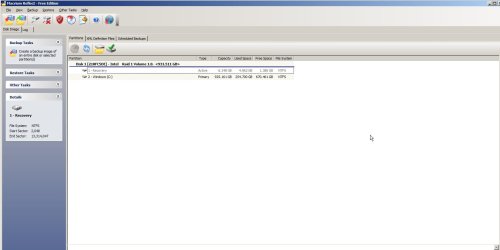
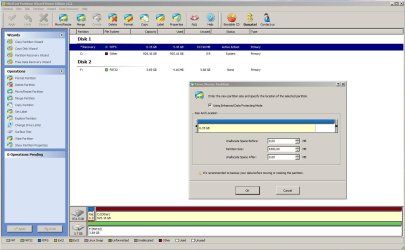
Thank you for your reactions. The current OS installation is on Raid1. Here you see 3 screenshots for the partition Wizard and Macrium Reflect which I hope it will give more information about the Disk Management of my computer. Yesterday I made a check for the image which I made using Macrium Reflect for errors using The (Other Tasks) which says that the verification is OK.


Will be happy to hear from you,

Best regards,

Anne
 

Attachments

  • ScreenShot Partition Wizard.jpg
    ScreenShot Partition Wizard.jpg
    151.4 KB · Views: 40
  • ScreenShot Macrium Reflect.jpg
    ScreenShot Macrium Reflect.jpg
    140 KB · Views: 32
  • ScreenShot Macrium Reflect Rescue CD.jpg
    ScreenShot Macrium Reflect Rescue CD.jpg
    199.3 KB · Views: 31

My Computer

OS
Windows 7 Ultimate x64
I don't think that's a good idea.

I would use the macrium pe media - it supports many raid configurations natively - or you could load your controller drivers into it if necessary.

If you don't have the Macrium winpe media - you will need to make your own.

Fortunately, macrium provide afree plugin.
 

My Computers

System One System Two

  • Computer type
    PC/Desktop
    OS
    7 X64
    CPU
    i5 8400
    Motherboard
    gigabyte b365m ds3h
    Memory
    2x8gb 3200mhz
    Hard Drives
    various
    PSU
    pure power 11 400w cm
    Case
    Coolermaster
    Cooling
    cryorig m9i
  • Computer type
    PC/Desktop
    OS
    7x64
    CPU
    g5400
    Motherboard
    ga b365m ds3h
    Memory
    8gb ddr4 2400
    PSU
    xfx pro 450w
I think SIW may be right. I am not sure how the Linux recovery disk would deal with a Raid - never tried that.

Why are you complicating your life with a Raid setup anyway.
 

My Computer

Computer Manufacturer/Model Number
HP, Dell, Gateway, Toshiba - 4 laptops and 2 desktops
OS
Vista, Windows7, Mint Mate, Zorin, Windows 8
CPU
from 1.6GHz Duo to i7
Monitor(s) Displays
2x HP w2207
Hard Drives
5x HDD, 7x SSD, 12x Externals
Keyboard
with trackball - no mices
Mouse
Trackball mice
Internet Speed
DSL 6000
Hello SIW2 & whs,

As you see from the following screenshot that BartPE is not compatible with Windows Vista or Windows 7. As I honestly mentioned in my first post, I have no experience with backups and partitions. Macrium pe media does not say that much to me nor I know how to load and install the controller drivers.

whs, you asked me why am I complicating my life with a Raid setup. To answer your question I should tell you that 2 months ago I have had a HD failure in my old computer in which I lost lots of my data. Before buying this computer (2 months ago) I consulted a computer shop about the best way to avoid such problem. He advised me to have this computer with this construction (2x HD's WD Caviar Black 1TB, 7200rpm, 64MB, SATA3). Later, I found out that this advice is not as good as he pretend. Now I am having a new computer with 2 crashes in 2 weeks time. Some people advised me to use (AcronisTrueImageWDEditionUM) which is free to the users of WD. The question is it a reasonable easy software for some one who has no experience with backups.

Best regards,


Anne
 

Attachments

  • ScreenShot Macrium Reflect Bart PE.jpg
    ScreenShot Macrium Reflect Bart PE.jpg
    226.1 KB · Views: 27

My Computer

OS
Windows 7 Ultimate x64
Understand your problem given your past experience. Imaging is the best assurance to keep your data safe. Acronis is OK but I find Macrium (as explained in this tutorial) the easiest and the most reliable. And there are many people around here using it. So if you have a question, you can always ask and get a swift answer.

I suggest you dismantle this Raid setup and do a daily image to the second disk. That will be fast and you do not have that constant overhead of the mirroring with Raid1. Once you defined your imaging file, go to the XML in Macrium, right click on it and set an automatic schedule. Best is to set it to a time when you know the PC is running. I did, for a while, set it to boot time. But that is a bit of a pain if you reboot during the day - e.g. because updates were installed. Because then Macrium would start up at the boot too.

In addition you can make additional images to an external disk. I image to 3 different disks (1 internal and 2 external) - but in turn, not all at the same time. It is better to be safe than sorry.
 

My Computer

Computer Manufacturer/Model Number
HP, Dell, Gateway, Toshiba - 4 laptops and 2 desktops
OS
Vista, Windows7, Mint Mate, Zorin, Windows 8
CPU
from 1.6GHz Duo to i7
Monitor(s) Displays
2x HP w2207
Hard Drives
5x HDD, 7x SSD, 12x Externals
Keyboard
with trackball - no mices
Mouse
Trackball mice
Internet Speed
DSL 6000
Hello whs,

I think it is a good idea to dismantle the Raid1 setup and do a daily image to the second disk. This will save space and not to forget that most of the crashes comes from software problems which Raid1 can not help because same fault is mirrored directly to the second HD. Now, I do not know if this is a safe and easy operation to do without having a 3rd crash within the 2nd week (lol).

Best regards,

Anne
 

My Computer

OS
Windows 7 Ultimate x64
I would be amazed if images cause crashes - at least I have never seen any and I image all the time on 5 different systems. Imaging is in fact a very straight forward bit by bit copy operation. So there should really be no problem. The Raid1, which is constantly double writing (and most of it is probably for the system and not for your own stuff) is much more at risk. In addition, there is a lot more wear and tear on the second disk than with a daily image.
 

My Computer

Computer Manufacturer/Model Number
HP, Dell, Gateway, Toshiba - 4 laptops and 2 desktops
OS
Vista, Windows7, Mint Mate, Zorin, Windows 8
CPU
from 1.6GHz Duo to i7
Monitor(s) Displays
2x HP w2207
Hard Drives
5x HDD, 7x SSD, 12x Externals
Keyboard
with trackball - no mices
Mouse
Trackball mice
Internet Speed
DSL 6000
Raid issues aside if you want a Macrium pe disk without making one try
Hirens Boot CD v13 (or later if there is one) which has the Macrium pe built in to it's mini XP environment.
I've recovered a Windows 7x64 system using it. Plus you can make images using the boot CD if needed. You can also add RoboRestore if you like to reimage to smaller partitions..
 

My Computer

Computer type
PC/Desktop
Computer Manufacturer/Model Number
Own build
OS
Windows 7x64 Home Premium SP1
CPU
Intel i7 2600k
Motherboard
ASUS P8Z68 Deluxe
Memory
G.Skill Ripjaws (DDR3-1600) 2x4GB
Graphics Card(s)
Nvidia GeForce GTS 450; Intel HD Graphics 3000(GT2+)
Monitor(s) Displays
Dell Ultrasharp IPS panel U2311H, Samsung SyncMaster P2350
Screen Resolution
1920x1080
Hard Drives
Samsung 850 Pro SSD 256GB, Samsung SSD 840 120GB, Seagates 1TB Barracuda ST31000528AS x2
PSU
Seasonic M12II 520W
Case
Lian Li Lancool PC-K60
Cooling
Case: 1x120mm, 3x140mm CPU: Hyper 212+
Keyboard
Logitech MK520 (wireless)
Mouse
Logitech MK520
Internet Speed
6-7 Mbps
Antivirus
Norton Security Premium, Malwarebytes on 2 (MSE on 3rd PC)
Browser
FireFox
Other Info
Audio: Logitech Z523 2.1
  • Like
Reactions: whs
Yes, mjf idea is a good one - easy way to get macrium pe1 functions.

Not sure if the pe1 environment will support your RAID, tho.

If you aren't using raid any more - it will be fine.
 

My Computers

System One System Two

  • Computer type
    PC/Desktop
    OS
    7 X64
    CPU
    i5 8400
    Motherboard
    gigabyte b365m ds3h
    Memory
    2x8gb 3200mhz
    Hard Drives
    various
    PSU
    pure power 11 400w cm
    Case
    Coolermaster
    Cooling
    cryorig m9i
  • Computer type
    PC/Desktop
    OS
    7x64
    CPU
    g5400
    Motherboard
    ga b365m ds3h
    Memory
    8gb ddr4 2400
    PSU
    xfx pro 450w
Hi Folks,


For sure, I am going to dismantle the Raid1 setup but the problem is now I am very busy with this computer for my study. I must deliver my work before the end of this month and do not know if it is safe and easy to dismantle it now without loosing lots of time. I see that this Raid1 is complicating and limiting the possibilities of finding a backup program. Now looking for a temporary program which will backup my computer till I finish this work.

mjf, do you know if (Hirens Boot CD v13) is supporting backups of RAID1? If yes, do you know where can I download it?

Best regards,

Anne
 

My Computer

OS
Windows 7 Ultimate x64
For a temporary solution I would just backup your user files from time to time (to an external drive and "manually") and hope that the system restore points (shadows) will work for the system. In fact, you can create system restore points yourself as often as desired. And allocate a big shadowstorage (maybe 50GB) since you have a big HDD. You can do that either in System Protection ( Control Panel\System and Security\System ) or with this cmd command:

vssadmin resize shadowstorage /for=C: / on=C: /maxsize=50GB
 

My Computer

Computer Manufacturer/Model Number
HP, Dell, Gateway, Toshiba - 4 laptops and 2 desktops
OS
Vista, Windows7, Mint Mate, Zorin, Windows 8
CPU
from 1.6GHz Duo to i7
Monitor(s) Displays
2x HP w2207
Hard Drives
5x HDD, 7x SSD, 12x Externals
Keyboard
with trackball - no mices
Mouse
Trackball mice
Internet Speed
DSL 6000
Hi whs,

Indeed for a temporary solution it is good option to backup the work files manually and regularly to an external drive. It is strange that the shadowstorage is limited to maximum of 6.35 GB!

Best regards,

Anne
 

My Computer

OS
Windows 7 Ultimate x64
Hi Anne, how come your shadowstorage is limited to 6.35GBs - from where do you get that info. If you run the command I posted above, it should set it to 50GB or any number of GBs that you put in (in lieu of 50). Just paste the command from above into an elevated Command Prompt (with the number of your choice) and hit Enter. Be aware that each restore point (shadow) is between 500MB and 1GB in size.
 

My Computer

Computer Manufacturer/Model Number
HP, Dell, Gateway, Toshiba - 4 laptops and 2 desktops
OS
Vista, Windows7, Mint Mate, Zorin, Windows 8
CPU
from 1.6GHz Duo to i7
Monitor(s) Displays
2x HP w2207
Hard Drives
5x HDD, 7x SSD, 12x Externals
Keyboard
with trackball - no mices
Mouse
Trackball mice
Internet Speed
DSL 6000
mjf, do you know if (Hirens Boot CD v13) is supporting backups of RAID1? If yes, do you know where can I download it?

Best regards,

Anne
Sorry but I have no idea.

Given your priorities and time constraints I'd be treading carefully at this stage no matter what you do.
I'd put study constraints first and go ultra conservative.
 

My Computer

Computer type
PC/Desktop
Computer Manufacturer/Model Number
Own build
OS
Windows 7x64 Home Premium SP1
CPU
Intel i7 2600k
Motherboard
ASUS P8Z68 Deluxe
Memory
G.Skill Ripjaws (DDR3-1600) 2x4GB
Graphics Card(s)
Nvidia GeForce GTS 450; Intel HD Graphics 3000(GT2+)
Monitor(s) Displays
Dell Ultrasharp IPS panel U2311H, Samsung SyncMaster P2350
Screen Resolution
1920x1080
Hard Drives
Samsung 850 Pro SSD 256GB, Samsung SSD 840 120GB, Seagates 1TB Barracuda ST31000528AS x2
PSU
Seasonic M12II 520W
Case
Lian Li Lancool PC-K60
Cooling
Case: 1x120mm, 3x140mm CPU: Hyper 212+
Keyboard
Logitech MK520 (wireless)
Mouse
Logitech MK520
Internet Speed
6-7 Mbps
Antivirus
Norton Security Premium, Malwarebytes on 2 (MSE on 3rd PC)
Browser
FireFox
Other Info
Audio: Logitech Z523 2.1
Hi Anne, how come your shadowstorage is limited to 6.35GBs - from where do you get that info. If you run the command I posted above, it should set it to 50GB or any number of GBs that you put in (in lieu of 50). Just paste the command from above into an elevated Command Prompt (with the number of your choice) and hit Enter. Be aware that each restore point (shadow) is between 500MB and 1GB in size.


Hi whs,

First time yesterday when tried to manage the shadowstorage, the recovery option was off !? Is this a default value when installing Win7? Anyway, turned it on and could get max a 6.35 GB. When started the computer this morning noticed that the 6.35 GB could be increased to much higher value. Now, I put it on 5% (46.26 GB). Was it a reboot problem? Anyway this problem is solved.

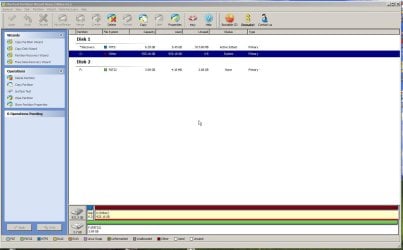
Went to Partition Wizard trying to increase the partition space of the recovery part but it looks that this is not possible. Tried to decrease the space of the C: but get the option (Move/Resize) in a gray color. Followed the instruction on the video of the FAQ of the (Partition Wizard) but could not reach a solution? Do you have an idea about this problem.

Thanks & regards,

Anne
 

Attachments

  • ScreenShot Partition Wizard Recovery partition.jpg
    ScreenShot Partition Wizard Recovery partition.jpg
    274.8 KB · Views: 19
  • ScreenShot Partition Wizard C HD.jpg
    ScreenShot Partition Wizard C HD.jpg
    206.4 KB · Views: 12

My Computer

OS
Windows 7 Ultimate x64
Well,

1. I have no idea why you would want to increase the recovery partition, That is really not neccessary.
2. As far as shrinking C is concerned, PW shows 0 (zero) bytes free. Any idea why that could be the case.
 

My Computer

Computer Manufacturer/Model Number
HP, Dell, Gateway, Toshiba - 4 laptops and 2 desktops
OS
Vista, Windows7, Mint Mate, Zorin, Windows 8
CPU
from 1.6GHz Duo to i7
Monitor(s) Displays
2x HP w2207
Hard Drives
5x HDD, 7x SSD, 12x Externals
Keyboard
with trackball - no mices
Mouse
Trackball mice
Internet Speed
DSL 6000
Hi whs,

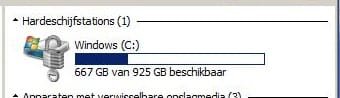
PW is showing 0 (zero) bytes free while as you see in the following screenshot (sorry it is written in Dutch) that there is a free space of 667 GB from the whole space of 925 GB.


Regards,


Anne
 

Attachments

  • ScreenShot C HD.jpg
    ScreenShot C HD.jpg
    15.1 KB · Views: 10

My Computer

OS
Windows 7 Ultimate x64
Back
Top