Solved Image your system with free Macrium

Thank you so much for your prompt reply. But perhaps I DO belong right here, after all! During my search on this forum for info from another question elsewhere, I discovered that WIN 7's Restore may NOT always work as its supposed to. So, my best bet is to have a complete image OFF the computer, like on an external HD, a website facility or on DVDs. Perhaps Macrium is what I want to use. I've seen it mentioned in other areas on here, soooo . thanks for ALL the info! Havvagudden!
 

My Computer My Computer

Computer Manufacturer/Model Number
HP
OS
Windows 7 64 and 32
Thank you so much for your prompt reply. But perhaps I DO belong right here, after all! During my search on this forum for info from another question elsewhere, I discovered that WIN 7's Restore may NOT always work as its supposed to. So, my best bet is to have a complete image OFF the computer, like on an external HD, a website facility or on DVDs. Perhaps Macrium is what I want to use. I've seen it mentioned in other areas on here, soooo . thanks for ALL the info! Havvagudden!
It would be useful if you could post a full picture of your Disk Management and tell us which of the partitions you want to image to your 250GB Iomega. The images may fit because they take only about 55% of the original space due to compression.
Once we can have a look at your Disk Management situation, we will advise you with further details.
 

My Computer My Computer

Computer Manufacturer/Model Number
HP, Dell, Gateway, Toshiba - 4 laptops and 2 desktops
OS
Vista, Windows7, Mint Mate, Zorin, Windows 8
CPU
from 1.6GHz Duo to i7
Monitor(s) Displays
2x HP w2207
Hard Drives
5x HDD, 7x SSD, 12x Externals
Keyboard
with trackball - no mices
Mouse
Trackball mice
Internet Speed
DSL 6000
glennc;1606298Yeap said:
Did you ever get a response?

I looked into this myself as I didn't want to buy yet ANOTHER license, so I installed the FREE version on a PC. As I am use to automatically verifying the backup in the paid version, I went to set the same option in the FREE version.

And, yep -- it's NOT there.

So, from what I can see, setting an option to automatically verify the backup after it's been created is not included in the FREE version.
 

My Computer My Computer

Computer type
PC/Desktop
Computer Manufacturer/Model Number
Custom
OS
Win7 Pro 32-bit, Win8 Pro 32-bit
CPU
AMD Phenom II X6 1090T
Motherboard
Gigabyte
Memory
4GB ddr3 1300
Graphics Card(s)
AMD HD 4290 onboard
Sound Card
Builtin Realtek HD Audio
Monitor(s) Displays
Samsung 24" widescreen, LG 23" widescreen
Screen Resolution
1920x1200/1920x1080
Hard Drives
Kingston 256GB SSD
Keyboard
Logitech Illuminated Keyboard
Mouse
Logitech M705 wireless mouse
Antivirus
Norton Av 2013
Browser
IE v10
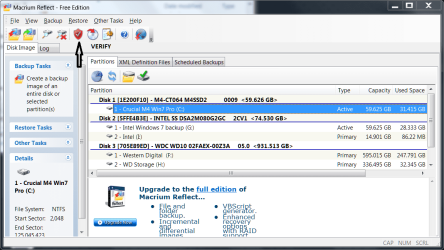
I have the free version of Macrium and do have the verify option.

mac.PNG
 

My Computers My Computers

System One System Two

  • Computer type
    PC/Desktop
    Computer Manufacturer/Model Number
    ALWAYS UNDER CONSTRUCTION
    OS
    Windows 11 Pro
    CPU
    Ryzen 9 5900X
    Motherboard
    Asus X570 Crosshair Viii Hero
    Memory
    32GB G Skill DDR4-3600
    Graphics Card(s)
    EVGA RTX 3080 FTW 3 Ultra
    Sound Card
    On Board/Sennheiser PC37X Headset
    Monitor(s) Displays
    3 X Asus 27"
    Screen Resolution
    2560x1440
    Hard Drives
    2 X 1 TB NVME drives
    PSU
    EVGA 850
    Case
    Phanteks Eclipse P400A
    Cooling
    EVGA 280 AIO
    Keyboard
    Logitech G510s/ Logitech G13
    Mouse
    Logitech G502
    Internet Speed
    24/1
    Antivirus
    ESET/MBAM Pro/SAS Pro
    Browser
    Chrome/ Firefox/ Edge
  • Computer type
    Laptop
    System Manufacturer/Model Number
    Dell 16 Plus
    OS
    Windows 11 Pro
    CPU
    Intel Ultra 9 288V
    Memory
    32 GB LPDDR5X 8533
    Monitor(s) Displays
    16" Mini-LED HDR600 Touch 90 Hz
    Screen Resolution
    2560X1600
    Hard Drives
    1 TB NVME

My Computer My Computer

Computer type
Laptop
Computer Manufacturer/Model Number
Hewlett-Packard/G62-107SA Notebook
OS
Microsoft Windows 7 Home Premium 64-bit Service Pack 1
CPU
Intel(R) Core(TM) i3 CPU M 330 @ 2.13GHz
Motherboard
Hewlett-Packard 1425
Memory
8 GB DDR3
Graphics Card(s)
Intel(R) HD Graphics
Sound Card
Realtek High Definition Audio
Monitor(s) Displays
Builtin
Screen Resolution
1366 x 768 x 32 bits (4294967296 colors) @ 60 Hz
Hard Drives
250 GB SATA Hard Disk Drive 7200 rpm
2TB Seagate GoFlex USB 2 Drive
1TB Iomega Prestige USB 2 Drive
1.5TB Iomega Prestige USB 2 Drive (Samsung)
2TB WD MyBook Live NAS.
Mouse
Logitech Anywhere MX
Internet Speed
152 Mbs download 10 Mbs upload
Antivirus
Norton 360
Browser
Chrome
I can't install this. I run the reflect_setup_free installer, click next to extract and install, it extracts and then disappears. It's process stays running with 0% cpu usage.
 

My Computer My Computer

OS
Windows 7 Ultimate x64
CPU
Intel i7 2600K HT=Off, Turbo=Off
Motherboard
Gigabyte P67A-UD7-B3 BIOS: F7c
Memory
G.Skill RipjawsX 4x4GB 1333MHz 9-9-9-24 2T 1.5v
Graphics Card(s)
EVGA GTX 580 3GB
Sound Card
Creative X-Fi Titanium HD
Monitor(s) Displays
LG W2363D-PF
Screen Resolution
1290x1080 120Hz
Hard Drives
Hard Drives: Four Samsung F3 1TB (HD103SJ) #1: Operating System/Apps (Short Stroke 100GB) #2+3: Programs (Intel RAID0 64k Short Stroke 500GB) #4: General Storage.
PSU
Seasonic X-850 850W
Case
Silverstone FT02 Original USB2.0/Non-AP Fan version
Cooling
Cooler Master Hyper212+ NT-H1 TIM, AC F12 Pro fan on auto
Internet Speed
Piss poor
What would normally be running with approx 0% cpu is the macrium mounting service.
Normally you should have a desktop icon or a folder entry "Macrium" under programs.
Also look under C:\program files for a 64 bit OS or c:\program files (x86) and find Reflect.exe.
If you can't find these it hasn't installed properly and try again if you haven't already.
 

My Computer My Computer

Computer type
PC/Desktop
Computer Manufacturer/Model Number
Own build
OS
Windows 7x64 Home Premium SP1
CPU
Intel i7 2600k
Motherboard
ASUS P8Z68 Deluxe
Memory
G.Skill Ripjaws (DDR3-1600) 2x4GB
Graphics Card(s)
Nvidia GeForce GTS 450; Intel HD Graphics 3000(GT2+)
Monitor(s) Displays
Dell Ultrasharp IPS panel U2311H, Samsung SyncMaster P2350
Screen Resolution
1920x1080
Hard Drives
Samsung 850 Pro SSD 256GB, Samsung SSD 840 120GB, Seagates 1TB Barracuda ST31000528AS x2
PSU
Seasonic M12II 520W
Case
Lian Li Lancool PC-K60
Cooling
Case: 1x120mm, 3x140mm CPU: Hyper 212+
Keyboard
Logitech MK520 (wireless)
Mouse
Logitech MK520
Internet Speed
6-7 Mbps
Antivirus
Norton Security Premium, Malwarebytes on 2 (MSE on 3rd PC)
Browser
FireFox
Other Info
Audio: Logitech Z523 2.1
I can't install this. I run the reflect_setup_free installer, click next to extract and install, it extracts and then disappears. It's process stays running with 0% cpu usage.


When it extracts it should show you the location it is extracting the files to.
 

My Computers My Computers

System One System Two

  • Computer type
    PC/Desktop
    Computer Manufacturer/Model Number
    ALWAYS UNDER CONSTRUCTION
    OS
    Windows 11 Pro
    CPU
    Ryzen 9 5900X
    Motherboard
    Asus X570 Crosshair Viii Hero
    Memory
    32GB G Skill DDR4-3600
    Graphics Card(s)
    EVGA RTX 3080 FTW 3 Ultra
    Sound Card
    On Board/Sennheiser PC37X Headset
    Monitor(s) Displays
    3 X Asus 27"
    Screen Resolution
    2560x1440
    Hard Drives
    2 X 1 TB NVME drives
    PSU
    EVGA 850
    Case
    Phanteks Eclipse P400A
    Cooling
    EVGA 280 AIO
    Keyboard
    Logitech G510s/ Logitech G13
    Mouse
    Logitech G502
    Internet Speed
    24/1
    Antivirus
    ESET/MBAM Pro/SAS Pro
    Browser
    Chrome/ Firefox/ Edge
  • Computer type
    Laptop
    System Manufacturer/Model Number
    Dell 16 Plus
    OS
    Windows 11 Pro
    CPU
    Intel Ultra 9 288V
    Memory
    32 GB LPDDR5X 8533
    Monitor(s) Displays
    16" Mini-LED HDR600 Touch 90 Hz
    Screen Resolution
    2560X1600
    Hard Drives
    1 TB NVME
glennc;1606298Yeap said:
Did you ever get a response?

I looked into this myself as I didn't want to buy yet ANOTHER license, so I installed the FREE version on a PC. As I am use to automatically verifying the backup in the paid version, I went to set the same option in the FREE version.

And, yep -- it's NOT there.

So, from what I can see, setting an option to automatically verify the backup after it's been created is not included in the FREE version.

Howdy,
No I haven't gotten any response from Macrium as yet. Will have to see......
Glenn
 

My Computer My Computer

Computer type
PC/Desktop
Computer Manufacturer/Model Number
Self-Built
OS
Windows 7 Ultimate
CPU
AMD Phenom-II X4 965
Motherboard
Gigabyte GA-MA785GM-US2H
Memory
8192 MB DDR2-SDRAM
Graphics Card(s)
ATI Radeon HD 4200
Sound Card
ATI Radeon HD 4200 High Definition Audo
Monitor(s) Displays
LG Electronics W1943
Screen Resolution
1360 X 768
Hard Drives
C: 500 GB Caviar Black SATA
E: 500 GB Caviar Black SATA
PSU
Ultra LSP 750
Case
Ultra XBlaster
Cooling
2 Fans, CPU Fan, PS Fan
Keyboard
Acer
Mouse
Logitech
Internet Speed
6 MB

My Computer My Computer

Computer type
PC/Desktop
Computer Manufacturer/Model Number
Self-Built
OS
Windows 7 Ultimate
CPU
AMD Phenom-II X4 965
Motherboard
Gigabyte GA-MA785GM-US2H
Memory
8192 MB DDR2-SDRAM
Graphics Card(s)
ATI Radeon HD 4200
Sound Card
ATI Radeon HD 4200 High Definition Audo
Monitor(s) Displays
LG Electronics W1943
Screen Resolution
1360 X 768
Hard Drives
C: 500 GB Caviar Black SATA
E: 500 GB Caviar Black SATA
PSU
Ultra LSP 750
Case
Ultra XBlaster
Cooling
2 Fans, CPU Fan, PS Fan
Keyboard
Acer
Mouse
Logitech
Internet Speed
6 MB
I have the free version of Macrium and do have the verify option.

View attachment 179043

It is the Auto Verify option that is missing.

Hello kado897,
If I remember correctly the previous version with the page as shown in the above snippet didn't have auto verfiy, it had to be verified after the image was created. Now I don't even have that. Weird!
Glenn
 

My Computer My Computer

Computer type
PC/Desktop
Computer Manufacturer/Model Number
Self-Built
OS
Windows 7 Ultimate
CPU
AMD Phenom-II X4 965
Motherboard
Gigabyte GA-MA785GM-US2H
Memory
8192 MB DDR2-SDRAM
Graphics Card(s)
ATI Radeon HD 4200
Sound Card
ATI Radeon HD 4200 High Definition Audo
Monitor(s) Displays
LG Electronics W1943
Screen Resolution
1360 X 768
Hard Drives
C: 500 GB Caviar Black SATA
E: 500 GB Caviar Black SATA
PSU
Ultra LSP 750
Case
Ultra XBlaster
Cooling
2 Fans, CPU Fan, PS Fan
Keyboard
Acer
Mouse
Logitech
Internet Speed
6 MB
Value in upgrading

I have been wondering if there is any significant value in upgrading from V4.2 (free) to V5 (free) at this stage. The pe disk isn't really an issue.
Any opinions?
 

My Computer My Computer

Computer type
PC/Desktop
Computer Manufacturer/Model Number
Own build
OS
Windows 7x64 Home Premium SP1
CPU
Intel i7 2600k
Motherboard
ASUS P8Z68 Deluxe
Memory
G.Skill Ripjaws (DDR3-1600) 2x4GB
Graphics Card(s)
Nvidia GeForce GTS 450; Intel HD Graphics 3000(GT2+)
Monitor(s) Displays
Dell Ultrasharp IPS panel U2311H, Samsung SyncMaster P2350
Screen Resolution
1920x1080
Hard Drives
Samsung 850 Pro SSD 256GB, Samsung SSD 840 120GB, Seagates 1TB Barracuda ST31000528AS x2
PSU
Seasonic M12II 520W
Case
Lian Li Lancool PC-K60
Cooling
Case: 1x120mm, 3x140mm CPU: Hyper 212+
Keyboard
Logitech MK520 (wireless)
Mouse
Logitech MK520
Internet Speed
6-7 Mbps
Antivirus
Norton Security Premium, Malwarebytes on 2 (MSE on 3rd PC)
Browser
FireFox
Other Info
Audio: Logitech Z523 2.1
I can't install this. I run the reflect_setup_free installer, click next to extract and install, it extracts and then disappears. It's process stays running with 0% cpu usage.


When it extracts it should show you the location it is extracting the files to.

It doesn't. The progress bar just flicks across a couple of times and then it's gone.
 

My Computer My Computer

OS
Windows 7 Ultimate x64
CPU
Intel i7 2600K HT=Off, Turbo=Off
Motherboard
Gigabyte P67A-UD7-B3 BIOS: F7c
Memory
G.Skill RipjawsX 4x4GB 1333MHz 9-9-9-24 2T 1.5v
Graphics Card(s)
EVGA GTX 580 3GB
Sound Card
Creative X-Fi Titanium HD
Monitor(s) Displays
LG W2363D-PF
Screen Resolution
1290x1080 120Hz
Hard Drives
Hard Drives: Four Samsung F3 1TB (HD103SJ) #1: Operating System/Apps (Short Stroke 100GB) #2+3: Programs (Intel RAID0 64k Short Stroke 500GB) #4: General Storage.
PSU
Seasonic X-850 850W
Case
Silverstone FT02 Original USB2.0/Non-AP Fan version
Cooling
Cooler Master Hyper212+ NT-H1 TIM, AC F12 Pro fan on auto
Internet Speed
Piss poor
I have been wondering if there is any significant value in upgrading from V4.2 (free) to V5 (free) at this stage. The pe disk isn't really an issue.
Any opinions?

Hello mjf,
Since I've only used the features of System Image and then verifying the image and successfully reinstalling twice, I can not comment on any of the other features or changes made in functionality or speed. I do not like the idea of not being able to verify a system image and knowing it is good, prior to moving on and feeling confident with the whole back up. Also the not having the Winpe without downloading the Microsoft program to create the rescue disk in Winpe is a bit more troublesome. So I am considering uninstalling v5.0 and hoping I can get a copy of 4.2 and use that again. That is unless there is a verification function and I just haven't found it. Wish Macrium would have responded by now, to my inquiry.
Glenn
 

My Computer My Computer

Computer type
PC/Desktop
Computer Manufacturer/Model Number
Self-Built
OS
Windows 7 Ultimate
CPU
AMD Phenom-II X4 965
Motherboard
Gigabyte GA-MA785GM-US2H
Memory
8192 MB DDR2-SDRAM
Graphics Card(s)
ATI Radeon HD 4200
Sound Card
ATI Radeon HD 4200 High Definition Audo
Monitor(s) Displays
LG Electronics W1943
Screen Resolution
1360 X 768
Hard Drives
C: 500 GB Caviar Black SATA
E: 500 GB Caviar Black SATA
PSU
Ultra LSP 750
Case
Ultra XBlaster
Cooling
2 Fans, CPU Fan, PS Fan
Keyboard
Acer
Mouse
Logitech
Internet Speed
6 MB
I have the free version of Macrium and do have the verify option.

View attachment 179043

It is the Auto Verify option that is missing.

Hello kado897,
If I remember correctly the previous version with the page as shown in the above snippet didn't have auto verfiy, it had to be verified after the image was created. Now I don't even have that. Weird!
Glenn

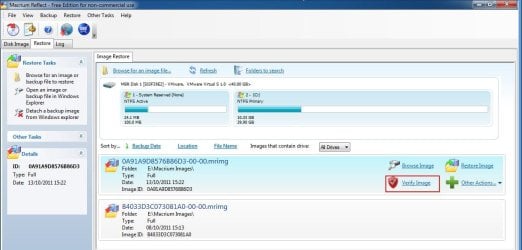
Yes it has moved to the restore tab, which makes sense as there is a list of images there.
2011-10-15 07-17-58_Greenshot.jpg
 

My Computer My Computer

Computer type
Laptop
Computer Manufacturer/Model Number
Hewlett-Packard/G62-107SA Notebook
OS
Microsoft Windows 7 Home Premium 64-bit Service Pack 1
CPU
Intel(R) Core(TM) i3 CPU M 330 @ 2.13GHz
Motherboard
Hewlett-Packard 1425
Memory
8 GB DDR3
Graphics Card(s)
Intel(R) HD Graphics
Sound Card
Realtek High Definition Audio
Monitor(s) Displays
Builtin
Screen Resolution
1366 x 768 x 32 bits (4294967296 colors) @ 60 Hz
Hard Drives
250 GB SATA Hard Disk Drive 7200 rpm
2TB Seagate GoFlex USB 2 Drive
1TB Iomega Prestige USB 2 Drive
1.5TB Iomega Prestige USB 2 Drive (Samsung)
2TB WD MyBook Live NAS.
Mouse
Logitech Anywhere MX
Internet Speed
152 Mbs download 10 Mbs upload
Antivirus
Norton 360
Browser
Chrome
I have been wondering if there is any significant value in upgrading from V4.2 (free) to V5 (free) at this stage. The pe disk isn't really an issue.
Any opinions?

Hello mjf,
Since I've only used the features of System Image and then verifying the image and successfully reinstalling twice, I can not comment on any of the other features or changes made in functionality or speed. I do not like the idea of not being able to verify a system image and knowing it is good, prior to moving on and feeling confident with the whole back up. Also the not having the Winpe without downloading the Microsoft program to create the rescue disk in Winpe is a bit more troublesome. So I am considering uninstalling v5.0 and hoping I can get a copy of 4.2 and use that again. That is unless there is a verification function and I just haven't found it. Wish Macrium would have responded by now, to my inquiry.
Glenn
The Hirens boot CD is compatible with V4 and I find this convenient to have in addition to a pe disk. I'll probably wait until Hirens adopt V5 (free).
I'm also hoping that V5 restore media will be backwards compatible with V4 images.
 

My Computer My Computer

Computer type
PC/Desktop
Computer Manufacturer/Model Number
Own build
OS
Windows 7x64 Home Premium SP1
CPU
Intel i7 2600k
Motherboard
ASUS P8Z68 Deluxe
Memory
G.Skill Ripjaws (DDR3-1600) 2x4GB
Graphics Card(s)
Nvidia GeForce GTS 450; Intel HD Graphics 3000(GT2+)
Monitor(s) Displays
Dell Ultrasharp IPS panel U2311H, Samsung SyncMaster P2350
Screen Resolution
1920x1080
Hard Drives
Samsung 850 Pro SSD 256GB, Samsung SSD 840 120GB, Seagates 1TB Barracuda ST31000528AS x2
PSU
Seasonic M12II 520W
Case
Lian Li Lancool PC-K60
Cooling
Case: 1x120mm, 3x140mm CPU: Hyper 212+
Keyboard
Logitech MK520 (wireless)
Mouse
Logitech MK520
Internet Speed
6-7 Mbps
Antivirus
Norton Security Premium, Malwarebytes on 2 (MSE on 3rd PC)
Browser
FireFox
Other Info
Audio: Logitech Z523 2.1
I have been wondering if there is any significant value in upgrading from V4.2 (free) to V5 (free) at this stage. The pe disk isn't really an issue.
Any opinions?

Hello mjf,
Since I've only used the features of System Image and then verifying the image and successfully reinstalling twice, I can not comment on any of the other features or changes made in functionality or speed. I do not like the idea of not being able to verify a system image and knowing it is good, prior to moving on and feeling confident with the whole back up. Also the not having the Winpe without downloading the Microsoft program to create the rescue disk in Winpe is a bit more troublesome. So I am considering uninstalling v5.0 and hoping I can get a copy of 4.2 and use that again. That is unless there is a verification function and I just haven't found it. Wish Macrium would have responded by now, to my inquiry.
Glenn
The Hirens boot CD is compatible with V4 and I find this convenient to have in addition to a pe disk. I'll probably wait until Hirens adopt V5 (free).
I'm also hoping that V5 restore media will be backwards compatible with V4 images.

As I understand it the V4 restore media can restore a V5 image and vice versa. The restore media on Hirens I think is even earlier and that is still compatible.

Just checked on Hirens. It is 4.2
 
Last edited:

My Computer My Computer

Computer type
Laptop
Computer Manufacturer/Model Number
Hewlett-Packard/G62-107SA Notebook
OS
Microsoft Windows 7 Home Premium 64-bit Service Pack 1
CPU
Intel(R) Core(TM) i3 CPU M 330 @ 2.13GHz
Motherboard
Hewlett-Packard 1425
Memory
8 GB DDR3
Graphics Card(s)
Intel(R) HD Graphics
Sound Card
Realtek High Definition Audio
Monitor(s) Displays
Builtin
Screen Resolution
1366 x 768 x 32 bits (4294967296 colors) @ 60 Hz
Hard Drives
250 GB SATA Hard Disk Drive 7200 rpm
2TB Seagate GoFlex USB 2 Drive
1TB Iomega Prestige USB 2 Drive
1.5TB Iomega Prestige USB 2 Drive (Samsung)
2TB WD MyBook Live NAS.
Mouse
Logitech Anywhere MX
Internet Speed
152 Mbs download 10 Mbs upload
Antivirus
Norton 360
Browser
Chrome
Hello mjf,
Since I've only used the features of System Image and then verifying the image and successfully reinstalling twice, I can not comment on any of the other features or changes made in functionality or speed. I do not like the idea of not being able to verify a system image and knowing it is good, prior to moving on and feeling confident with the whole back up. Also the not having the Winpe without downloading the Microsoft program to create the rescue disk in Winpe is a bit more troublesome. So I am considering uninstalling v5.0 and hoping I can get a copy of 4.2 and use that again. That is unless there is a verification function and I just haven't found it. Wish Macrium would have responded by now, to my inquiry.
Glenn
The Hirens boot CD is compatible with V4 and I find this convenient to have in addition to a pe disk. I'll probably wait until Hirens adopt V5 (free).
I'm also hoping that V5 restore media will be backwards compatible with V4 images.

As I understand it the V4 restore media can restore a V5 image and vice versa. The restore media on Hirens I think is even earlier and that is still compatible.

Just checked on Hirens. It is 4.2

Keith you are correct I restored an image yesterday using hirens 14.1 and the macrium media within and all ran fine.

Danny
 

My Computer My Computer

Computer Manufacturer/Model Number
acer aspire 5935g
OS
Windows 7 Home Premium x64 SP1
CPU
intel(R)core(TM)2 duo CPU T6600 @ 2.20GHz
Motherboard
intel gm45/gm47 revision 07
Memory
3 gb ddr3
Graphics Card(s)
ati radeon hd4570/512mb
Monitor(s) Displays
lop156wh2-tle1 15.3 flat
Screen Resolution
1366x768
Hard Drives
OCZ-Agility3 60gig ssd
320gig external hdd
500gig external hdd
Mouse
Optical
Internet Speed
30Mbps Down/30Mbps Up
I have been wondering if there is any significant value in upgrading from V4.2 (free) to V5 (free) at this stage. The pe disk isn't really an issue.
Any opinions?
I agree. If it ain't broke, don't fix it. 4.2 works, so why change.
 

My Computer My Computer

Computer Manufacturer/Model Number
HP, Dell, Gateway, Toshiba - 4 laptops and 2 desktops
OS
Vista, Windows7, Mint Mate, Zorin, Windows 8
CPU
from 1.6GHz Duo to i7
Monitor(s) Displays
2x HP w2207
Hard Drives
5x HDD, 7x SSD, 12x Externals
Keyboard
with trackball - no mices
Mouse
Trackball mice
Internet Speed
DSL 6000
I have been wondering if there is any significant value in upgrading from V4.2 (free) to V5 (free) at this stage. The pe disk isn't really an issue.
Any opinions?
I agree. If it ain't broke, don't fix it. 4.2 works, so why change.

For the moment perhaps, but will support be dropped for 4.2 in the future?
 

My Computer My Computer

Computer type
Laptop
Computer Manufacturer/Model Number
Hewlett-Packard/G62-107SA Notebook
OS
Microsoft Windows 7 Home Premium 64-bit Service Pack 1
CPU
Intel(R) Core(TM) i3 CPU M 330 @ 2.13GHz
Motherboard
Hewlett-Packard 1425
Memory
8 GB DDR3
Graphics Card(s)
Intel(R) HD Graphics
Sound Card
Realtek High Definition Audio
Monitor(s) Displays
Builtin
Screen Resolution
1366 x 768 x 32 bits (4294967296 colors) @ 60 Hz
Hard Drives
250 GB SATA Hard Disk Drive 7200 rpm
2TB Seagate GoFlex USB 2 Drive
1TB Iomega Prestige USB 2 Drive
1.5TB Iomega Prestige USB 2 Drive (Samsung)
2TB WD MyBook Live NAS.
Mouse
Logitech Anywhere MX
Internet Speed
152 Mbs download 10 Mbs upload
Antivirus
Norton 360
Browser
Chrome
Back
Top