Solved Image your system with free Macrium

This is my first post on SevenForums, and I want to start off by saying "Thank you" to everyone, especially to WHS for sharing all of his knowledge and expertise on this topic.


As the result of two recent hard drive crashes on two separate computers, I stumbled on to this site several days ago looking for information about error messages. Now I feel like I am becoming a system imaging and user data backup guru.


That might be pushing it, but, since stumbling upon this forum, I have come a long way, and in fact have successfully started my own imaging and user data backup routine, still very much in its infancy stage. I was very lucky that I was able to recover all data from both crashes using a hdd adapter and usb. These crashes along with the the enthusiasm on this forum have prompted me to act.


For my main home desktop computer, (one of the two that crashed), I went from a single 750GB HDD system to an enhanced system now in which I added a Samsung 840 Pro SSD and two back-up/storage drives (I re-purposed the OEM Seagate Baracuda 750GB that came with the computer, a Dell XPS 8100, and added a 1TB Western Digital Caviar Blue).


My very first SSD install and OS transfer occurred last night. I used Macrium according to your install tutorial WHS, and the system seems to be running very well. I first moved the boot mgr from the System Reserved partition using EasyBCD and eliminated that. I have a couple of questions that I'll present in a later post.


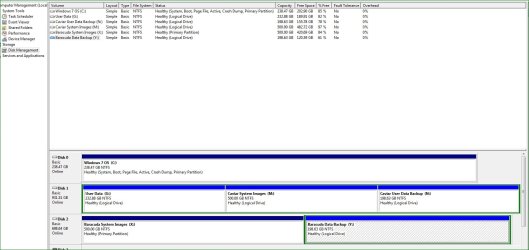
For now, though, I thought I would post a snip of my current set-up in hopes of obtaining any feedback that might make this better, or to point out any glaring errors that I may have made.


Any feedback is greatly appreciated.


Thank you
 

Attachments
  • compmgmt.jpg
    compmgmt.jpg
    115.5 KB · Views: 25

My Computer My Computer

At a glance

Windows 8.1 Pro with Media CenterIntel Core i7-860 processor, (8MB Cache, 2.80...8GB DDR3 SDRAM at 1333MHz-4x2GBnVidia GeForce GTS240, 1024MB GDDR3
Computer type
PC/Desktop
Computer Manufacturer/Model Number
Dell Studio XPS 8100
OS
Windows 8.1 Pro with Media Center
CPU
Intel Core i7-860 processor, (8MB Cache, 2.80GHz)
Motherboard
Dell (Chicony - DH57M01)
Memory
8GB DDR3 SDRAM at 1333MHz-4x2GB
Graphics Card(s)
nVidia GeForce GTS240, 1024MB GDDR3
Sound Card
OEM Integrated
Monitor(s) Displays
Dell ST2410, 24" Flat Panel Monitor
Hard Drives
256GB Samsung SSD 840 Pro, MZ-7PD256BW
Western Digital 1TB Caviar Blue, WD10EALX
Seagate Baracuda 750GB, ST3750528AS (OEM)
Western Digital 2TB Black, WD2003FZEX
PSU
OEM - Max Output Power 350W
Case
OEM
Cooling
OEM
The layout looks fine. I assume you image the OS to both M and X (maybe alternatively?).

The part I do not quite understand is how you backup your data. I image my data partitions too (although sync would be faster). Reason is because I like to keep the father, grandfather, etc. copies for a while.

I image about 2 or 3 times per week.
 

My Computer My Computer

At a glance

Vista, Windows7, Mint Mate, Zorin, Windows 8from 1.6GHz Duo to i7
Computer Manufacturer/Model Number
HP, Dell, Gateway, Toshiba - 4 laptops and 2 desktops
OS
Vista, Windows7, Mint Mate, Zorin, Windows 8
CPU
from 1.6GHz Duo to i7
Monitor(s) Displays
2x HP w2207
Hard Drives
5x HDD, 7x SSD, 12x Externals
Keyboard
with trackball - no mices
Mouse
Trackball mice
Internet Speed
DSL 6000
Just in case ...

... I image my data partitions too (although sync would be faster). Reason is because I like to keep the father, grandfather, etc. copies for a while.

I image about 2 or 3 times per week.

It's good to keep multiple copies, just in case something corrupts one of them.

Also, you may decide to delete a file and then 6 months later discover that you shouldn't have deleted it.
It has happened to me. :o
 

My Computer My Computer

At a glance

W7 Ultimate SP1, LM19.2 MATE, W10 Home 1703, ...AMD Phenom II x6 1100T, 3.3 GHz12GB DDR3 1333 G-Skill (4GB x 2), G-Skill (2G...NVIDIA GeForce GTX 660
Computer type
PC/Desktop
Computer Manufacturer/Model Number
n/a
OS
W7 Ultimate SP1, LM19.2 MATE, W10 Home 1703, W10 Pro 1703 VM, #All 64 bit
CPU
AMD Phenom II x6 1100T, 3.3 GHz
Motherboard
ASUS M4A88T-M/USB3 (AM3)
Memory
12GB DDR3 1333 G-Skill (4GB x 2), G-Skill (2GB x 2)
Graphics Card(s)
NVIDIA GeForce GTX 660
Sound Card
Realtek?
Monitor(s) Displays
Samsung S23B350
Screen Resolution
1920x1080
Hard Drives
WD Green 2TB (SATA), WD Green 3TB (SATA), WD Blue 4TB (SATA), WD Blue 6TB (SATA)
PSU
Cooler Master
Case
Antec GX300 Tower
Cooling
3x Antec TRICOOL 120mm Fans
Mouse
Wired Optical
Internet Speed
DSL
Antivirus
Avast
Browser
Pale Moon (64 bit)
Other Info
2018-12-27 Upgraded HDDs
2015-12-10 Upgraded case, graphics card, storage
2015-08-15 Upgraded motherboard & RAM
2015-07-15 Upgraded LM17.1 to LM17.2
The layout looks fine. I assume you image the OS to both M and X (maybe alternatively?).

The part I do not quite understand is how you backup your data. I image my data partitions too (although sync would be faster). Reason is because I like to keep the father, grandfather, etc. copies for a while.

I image about 2 or 3 times per week.


Yes, that's the plan: OS images to both M and X. I wasn't really thinking about the alternating approach, but it sounds good and I will try it. I plan to use N and Y in a similar fashion for user data backups.

The X and Y partitions (Disk #2 in the snip), are located on an external, enclosed drive. I'll keep that drive off-line except for when executing actual imaging and back-up operations.

Regarding how I'm backing up my user data, well so far in order to eliminate the major vunerability that I had, I've been using the Window's 7 Back-up & Restore utility and imaging data partitions with Macrium. I'll continue to use these until I figure out this part of my plan. I like Macrium a lot, and I'm considering an upgrade to their paid standard version to get access to their file and folder backup feature.
 

My Computer My Computer

At a glance

Windows 8.1 Pro with Media CenterIntel Core i7-860 processor, (8MB Cache, 2.80...8GB DDR3 SDRAM at 1333MHz-4x2GBnVidia GeForce GTS240, 1024MB GDDR3
Computer type
PC/Desktop
Computer Manufacturer/Model Number
Dell Studio XPS 8100
OS
Windows 8.1 Pro with Media Center
CPU
Intel Core i7-860 processor, (8MB Cache, 2.80GHz)
Motherboard
Dell (Chicony - DH57M01)
Memory
8GB DDR3 SDRAM at 1333MHz-4x2GB
Graphics Card(s)
nVidia GeForce GTS240, 1024MB GDDR3
Sound Card
OEM Integrated
Monitor(s) Displays
Dell ST2410, 24" Flat Panel Monitor
Hard Drives
256GB Samsung SSD 840 Pro, MZ-7PD256BW
Western Digital 1TB Caviar Blue, WD10EALX
Seagate Baracuda 750GB, ST3750528AS (OEM)
Western Digital 2TB Black, WD2003FZEX
PSU
OEM - Max Output Power 350W
Case
OEM
Cooling
OEM
... It's good to keep multiple copies, just in case something corrupts one of them.

Also, you may decide to delete a file and then 6 months later discover that you shouldn't have deleted it.
It has happened to me. :o


This makes sense to me! I'll keep that in mind as I go forward.
 

My Computer My Computer

At a glance

Windows 8.1 Pro with Media CenterIntel Core i7-860 processor, (8MB Cache, 2.80...8GB DDR3 SDRAM at 1333MHz-4x2GBnVidia GeForce GTS240, 1024MB GDDR3
Computer type
PC/Desktop
Computer Manufacturer/Model Number
Dell Studio XPS 8100
OS
Windows 8.1 Pro with Media Center
CPU
Intel Core i7-860 processor, (8MB Cache, 2.80GHz)
Motherboard
Dell (Chicony - DH57M01)
Memory
8GB DDR3 SDRAM at 1333MHz-4x2GB
Graphics Card(s)
nVidia GeForce GTS240, 1024MB GDDR3
Sound Card
OEM Integrated
Monitor(s) Displays
Dell ST2410, 24" Flat Panel Monitor
Hard Drives
256GB Samsung SSD 840 Pro, MZ-7PD256BW
Western Digital 1TB Caviar Blue, WD10EALX
Seagate Baracuda 750GB, ST3750528AS (OEM)
Western Digital 2TB Black, WD2003FZEX
PSU
OEM - Max Output Power 350W
Case
OEM
Cooling
OEM
whs,

In my first post, I mentioned that I have a couple of questions; let me throw out the first one now (I'll direct this to you first, since I picked this up from your "SSD - Install" tutorial, (which was great, btw)):

In that tutorial, you stated:

"Note: Before you activate the SSD, it is recommended to set the BIOS to AHCI. Best time to do that is just before you change the boot sequence. Once Windows7 is running, you make the corresponding settings in the OS. Here is a tutorial on how to do that. Many people claim that there is a significant performance gain with AHCI. I, however, did not see that. But it may be different from system to system."

I believe I followed all intrtructions fairly close. Everything went flawless for me up until the point of rebooting and attempting to change the BIOS to AHCI. I had previously changed the registry to "0" as directed by B.F. Kid in his tutorial, but when I got in to the BIOS, there was not an option for AHCI, but instead "RAID" or "ATA."

I was stuck, but using a different computer I searched online and learned (that possibly), my Dell's RAID setting is equivalient to a combo RAID/AHCI setting all in one... I decide to go ahead and boot up and everything seemed (and still seems) fine. I re-checked the 'msahci' registry entry, and it somehow reverted back to "3."

Should I be concerned about this, or just leave it alone?
 

My Computer My Computer

At a glance

Windows 8.1 Pro with Media CenterIntel Core i7-860 processor, (8MB Cache, 2.80...8GB DDR3 SDRAM at 1333MHz-4x2GBnVidia GeForce GTS240, 1024MB GDDR3
Computer type
PC/Desktop
Computer Manufacturer/Model Number
Dell Studio XPS 8100
OS
Windows 8.1 Pro with Media Center
CPU
Intel Core i7-860 processor, (8MB Cache, 2.80GHz)
Motherboard
Dell (Chicony - DH57M01)
Memory
8GB DDR3 SDRAM at 1333MHz-4x2GB
Graphics Card(s)
nVidia GeForce GTS240, 1024MB GDDR3
Sound Card
OEM Integrated
Monitor(s) Displays
Dell ST2410, 24" Flat Panel Monitor
Hard Drives
256GB Samsung SSD 840 Pro, MZ-7PD256BW
Western Digital 1TB Caviar Blue, WD10EALX
Seagate Baracuda 750GB, ST3750528AS (OEM)
Western Digital 2TB Black, WD2003FZEX
PSU
OEM - Max Output Power 350W
Case
OEM
Cooling
OEM
there was not an option for AHCI, but instead "RAID" or "ATA."
Raid is the right setting in your case. But AHCI or IDE, the performance difference in real life is very minor. It only shows up in some of those meaningless performance measurements which are for bragging purposes.

Leave it as is. No need for action or concern.

PS: I assume you know that you can run the imaging in the background (click the 'hide' button on the macrium screen) and do other things in the meantime. No need to be concerned about the time it takes to make an image.
 

My Computer My Computer

At a glance

Vista, Windows7, Mint Mate, Zorin, Windows 8from 1.6GHz Duo to i7
Computer Manufacturer/Model Number
HP, Dell, Gateway, Toshiba - 4 laptops and 2 desktops
OS
Vista, Windows7, Mint Mate, Zorin, Windows 8
CPU
from 1.6GHz Duo to i7
Monitor(s) Displays
2x HP w2207
Hard Drives
5x HDD, 7x SSD, 12x Externals
Keyboard
with trackball - no mices
Mouse
Trackball mice
Internet Speed
DSL 6000
Backup Storage

This makes sense to me! I'll keep that in mind as I go forward.

The quote got mangled. :)

Obviously you'll need a fair amount of storage to keep multiple images.

I'm using ~2TB of external storage for backup images of my files (documents & pictures) going back to 2009.
I'm also using ~2TB of external storage for my video and music files (not imaged).

Those backups are spread over 5 external HDDs.
 

My Computer My Computer

At a glance

W7 Ultimate SP1, LM19.2 MATE, W10 Home 1703, ...AMD Phenom II x6 1100T, 3.3 GHz12GB DDR3 1333 G-Skill (4GB x 2), G-Skill (2G...NVIDIA GeForce GTX 660
Computer type
PC/Desktop
Computer Manufacturer/Model Number
n/a
OS
W7 Ultimate SP1, LM19.2 MATE, W10 Home 1703, W10 Pro 1703 VM, #All 64 bit
CPU
AMD Phenom II x6 1100T, 3.3 GHz
Motherboard
ASUS M4A88T-M/USB3 (AM3)
Memory
12GB DDR3 1333 G-Skill (4GB x 2), G-Skill (2GB x 2)
Graphics Card(s)
NVIDIA GeForce GTX 660
Sound Card
Realtek?
Monitor(s) Displays
Samsung S23B350
Screen Resolution
1920x1080
Hard Drives
WD Green 2TB (SATA), WD Green 3TB (SATA), WD Blue 4TB (SATA), WD Blue 6TB (SATA)
PSU
Cooler Master
Case
Antec GX300 Tower
Cooling
3x Antec TRICOOL 120mm Fans
Mouse
Wired Optical
Internet Speed
DSL
Antivirus
Avast
Browser
Pale Moon (64 bit)
Other Info
2018-12-27 Upgraded HDDs
2015-12-10 Upgraded case, graphics card, storage
2015-08-15 Upgraded motherboard & RAM
2015-07-15 Upgraded LM17.1 to LM17.2
Thank you whs; I will not change the RAID setting, nor will I go back in to the registry to change the 'msahci' start value to "0". I will leave it on its current setting of "3."

Now, on to my next question: This one relates to file locations and user folders. Prior to the SSD install, back when I was still using the HDD as the OS disk, I followed your Data Partition video dated 20 March 2010 on how to move the location of the user data folders and files off of the C: drive. I created a new partition, "I" drive I believe it was, and moved all data in to folders with the same names as those listed under my old Library. Prior to the install, this partition (I Drive), was imaged with Macrium, and that image was later used to re-establish my new G user data partition.

This seemed to work well prior to the SSD install and I was able to clear much space from the C: drive before shrinking it down in size.

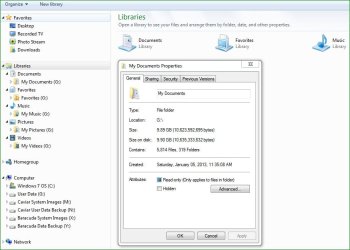
In the snip below, you can see that I now have all Library contents residing on the G drive, which I believe is correct, but I'm not 100% sure. I did this by linking the data folders (on my newly imaged G drive) to the various Libraries. I'm not sure if this is a problem, but when I right click on the individual folders (not the library icons), I do not see the "Location" option in the Properties tab. You can see this in the snip as well.

Does this sound right? I searched for the location tab by right-clicking directly on the various Library folders and also down below in the actual G drive and still could not come up with the location options.

Also post-image transfer, I have noticed that my iPhone "Photo Stream," HP Officejet printer (which I use wirelessly), and one of my Adobe programs is not linking up properly with their data folders. I suspect this has something to do with the AppData folders and files, but this is just a guess.

Any advice you can share would be appreciated.
 

Attachments

  • Properties.jpg
    Properties.jpg
    61.5 KB · Views: 6

My Computer My Computer

At a glance

Windows 8.1 Pro with Media CenterIntel Core i7-860 processor, (8MB Cache, 2.80...8GB DDR3 SDRAM at 1333MHz-4x2GBnVidia GeForce GTS240, 1024MB GDDR3
Computer type
PC/Desktop
Computer Manufacturer/Model Number
Dell Studio XPS 8100
OS
Windows 8.1 Pro with Media Center
CPU
Intel Core i7-860 processor, (8MB Cache, 2.80GHz)
Motherboard
Dell (Chicony - DH57M01)
Memory
8GB DDR3 SDRAM at 1333MHz-4x2GB
Graphics Card(s)
nVidia GeForce GTS240, 1024MB GDDR3
Sound Card
OEM Integrated
Monitor(s) Displays
Dell ST2410, 24" Flat Panel Monitor
Hard Drives
256GB Samsung SSD 840 Pro, MZ-7PD256BW
Western Digital 1TB Caviar Blue, WD10EALX
Seagate Baracuda 750GB, ST3750528AS (OEM)
Western Digital 2TB Black, WD2003FZEX
PSU
OEM - Max Output Power 350W
Case
OEM
Cooling
OEM
Disregard the HP Officejet printer issue mentioned above; for some reason the wireless connection stopped working (I don't know if it had any thing to do with my SSD install or the image transfer). I reset the connection to my router and it's working fine now...
 

My Computer My Computer

At a glance

Windows 8.1 Pro with Media CenterIntel Core i7-860 processor, (8MB Cache, 2.80...8GB DDR3 SDRAM at 1333MHz-4x2GBnVidia GeForce GTS240, 1024MB GDDR3
Computer type
PC/Desktop
Computer Manufacturer/Model Number
Dell Studio XPS 8100
OS
Windows 8.1 Pro with Media Center
CPU
Intel Core i7-860 processor, (8MB Cache, 2.80GHz)
Motherboard
Dell (Chicony - DH57M01)
Memory
8GB DDR3 SDRAM at 1333MHz-4x2GB
Graphics Card(s)
nVidia GeForce GTS240, 1024MB GDDR3
Sound Card
OEM Integrated
Monitor(s) Displays
Dell ST2410, 24" Flat Panel Monitor
Hard Drives
256GB Samsung SSD 840 Pro, MZ-7PD256BW
Western Digital 1TB Caviar Blue, WD10EALX
Seagate Baracuda 750GB, ST3750528AS (OEM)
Western Digital 2TB Black, WD2003FZEX
PSU
OEM - Max Output Power 350W
Case
OEM
Cooling
OEM
When you moved the folders to the I drive, they lost the location tab because you probably moved them to the root of the I drive and not to individual folders. But that is no problem if you now INCLUDED them into the libraries.

The link of some apps may be disturbed because the path to the folders has changed. You will probably have to reestablish the link to the new location manually.
 

My Computer My Computer

At a glance

Vista, Windows7, Mint Mate, Zorin, Windows 8from 1.6GHz Duo to i7
Computer Manufacturer/Model Number
HP, Dell, Gateway, Toshiba - 4 laptops and 2 desktops
OS
Vista, Windows7, Mint Mate, Zorin, Windows 8
CPU
from 1.6GHz Duo to i7
Monitor(s) Displays
2x HP w2207
Hard Drives
5x HDD, 7x SSD, 12x Externals
Keyboard
with trackball - no mices
Mouse
Trackball mice
Internet Speed
DSL 6000
Okay, user data is stored and accessible on G drive, far away from C:, and included in my Libraries tab.

HP Officejet problem resolved by re-establishing wireless connection to router. This may not have been related to the SSD/OS reimaging… I may have unplugged the printer causing this issue. It’s working fine now.

Apple iPhone PhotoStream re-established by uninstalling then reinstalling iCloud. Seems to be okay.

The very brief Adobe error (for Adobe Air, I believe), has not returned. The only app I have (that I know of), that uses Adobe Air is Pandora, and I’m listening to music on it right now… no problems at all. I suppose I’ll have to ‘wait and see’ on this one.

Other than that, I have accessed most of the programs and apps available on my computer and everything seems to be working okay except for the following two items:

1. Windows Media Player (which I never use), does not contain the right path to my G data folders and files. I played around with this for a while but have not yet been able to figure it out. I’ll do some additional research.

2. Internet Explorer “Favorites” are not showing up in the Favorites tab when I’m on line surfing the internet. I use these quite often and need to figure out how to redirect the Favorites internet shortcut files, which are contained in a “Favorites” folder that I established on my G drive. Should I simply copy these files (they add up only to 56.0 KB) from the G drive and paste them in to my C: Favorites folder?

I’m open for suggestions.

Thanks
 

My Computer My Computer

At a glance

Windows 8.1 Pro with Media CenterIntel Core i7-860 processor, (8MB Cache, 2.80...8GB DDR3 SDRAM at 1333MHz-4x2GBnVidia GeForce GTS240, 1024MB GDDR3
Computer type
PC/Desktop
Computer Manufacturer/Model Number
Dell Studio XPS 8100
OS
Windows 8.1 Pro with Media Center
CPU
Intel Core i7-860 processor, (8MB Cache, 2.80GHz)
Motherboard
Dell (Chicony - DH57M01)
Memory
8GB DDR3 SDRAM at 1333MHz-4x2GB
Graphics Card(s)
nVidia GeForce GTS240, 1024MB GDDR3
Sound Card
OEM Integrated
Monitor(s) Displays
Dell ST2410, 24" Flat Panel Monitor
Hard Drives
256GB Samsung SSD 840 Pro, MZ-7PD256BW
Western Digital 1TB Caviar Blue, WD10EALX
Seagate Baracuda 750GB, ST3750528AS (OEM)
Western Digital 2TB Black, WD2003FZEX
PSU
OEM - Max Output Power 350W
Case
OEM
Cooling
OEM
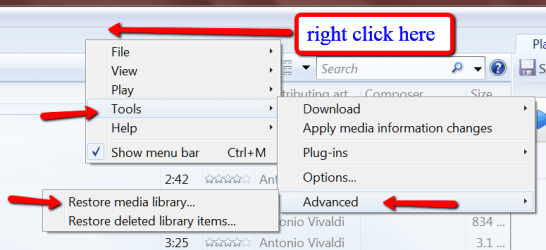
1. For the WMP try what is explaines in the picture. Maybe it let's you browse to the right folder.

2. I would try that. Else, if they show up at all, I would export them and then reimport them.
 

Attachments

  • 2013-01-09_1659.png
    2013-01-09_1659.png
    26.3 KB · Views: 3

My Computer My Computer

At a glance

Vista, Windows7, Mint Mate, Zorin, Windows 8from 1.6GHz Duo to i7
Computer Manufacturer/Model Number
HP, Dell, Gateway, Toshiba - 4 laptops and 2 desktops
OS
Vista, Windows7, Mint Mate, Zorin, Windows 8
CPU
from 1.6GHz Duo to i7
Monitor(s) Displays
2x HP w2207
Hard Drives
5x HDD, 7x SSD, 12x Externals
Keyboard
with trackball - no mices
Mouse
Trackball mice
Internet Speed
DSL 6000
"Favorites" issue solved! My registry entries were pointing to my previous data drive, "I".

I changed it to "G" and my Favorites have returned to the appropriate place in the Favorites pop-up window.
 

Attachments

  • registry.png
    registry.png
    29 KB · Views: 9

My Computer My Computer

At a glance

Windows 8.1 Pro with Media CenterIntel Core i7-860 processor, (8MB Cache, 2.80...8GB DDR3 SDRAM at 1333MHz-4x2GBnVidia GeForce GTS240, 1024MB GDDR3
Computer type
PC/Desktop
Computer Manufacturer/Model Number
Dell Studio XPS 8100
OS
Windows 8.1 Pro with Media Center
CPU
Intel Core i7-860 processor, (8MB Cache, 2.80GHz)
Motherboard
Dell (Chicony - DH57M01)
Memory
8GB DDR3 SDRAM at 1333MHz-4x2GB
Graphics Card(s)
nVidia GeForce GTS240, 1024MB GDDR3
Sound Card
OEM Integrated
Monitor(s) Displays
Dell ST2410, 24" Flat Panel Monitor
Hard Drives
256GB Samsung SSD 840 Pro, MZ-7PD256BW
Western Digital 1TB Caviar Blue, WD10EALX
Seagate Baracuda 750GB, ST3750528AS (OEM)
Western Digital 2TB Black, WD2003FZEX
PSU
OEM - Max Output Power 350W
Case
OEM
Cooling
OEM
I believe most of my problems occurred because I changed the original user data backup drive letter from "I" to "G." But, all of that was part of my initial tinkering to get everything set up in the first place.

Now that my system is tweaked to my liking and no new drive letters to create (for now at least), I'm going to re-image in Macrium (and Windows Backup for an additional safety net), and then do a live test by restoring the new Macrium image.

In order to do this, should I use the Macrium CD or USB Recovery Disk that I created to boot up and take it from there? or, should I open Macrium from my C: drive and restore from there?

Also, are there any other nuances that I should know about before moving forward with this test?

Thank you,
 

My Computer My Computer

At a glance

Windows 8.1 Pro with Media CenterIntel Core i7-860 processor, (8MB Cache, 2.80...8GB DDR3 SDRAM at 1333MHz-4x2GBnVidia GeForce GTS240, 1024MB GDDR3
Computer type
PC/Desktop
Computer Manufacturer/Model Number
Dell Studio XPS 8100
OS
Windows 8.1 Pro with Media Center
CPU
Intel Core i7-860 processor, (8MB Cache, 2.80GHz)
Motherboard
Dell (Chicony - DH57M01)
Memory
8GB DDR3 SDRAM at 1333MHz-4x2GB
Graphics Card(s)
nVidia GeForce GTS240, 1024MB GDDR3
Sound Card
OEM Integrated
Monitor(s) Displays
Dell ST2410, 24" Flat Panel Monitor
Hard Drives
256GB Samsung SSD 840 Pro, MZ-7PD256BW
Western Digital 1TB Caviar Blue, WD10EALX
Seagate Baracuda 750GB, ST3750528AS (OEM)
Western Digital 2TB Black, WD2003FZEX
PSU
OEM - Max Output Power 350W
Case
OEM
Cooling
OEM
You cannot restore from C. That's like pulling yourself out of the water by the hair, lol. Use the WinPE CD.

But if you only want to make a test, create a small 2GB partition, copy some data into it and image/restore that. This is a lot less risky and faster. You learn the whole process that way too. I always keep a little 2GB partition around - just for testing purposes.
 

My Computer My Computer

At a glance

Vista, Windows7, Mint Mate, Zorin, Windows 8from 1.6GHz Duo to i7
Computer Manufacturer/Model Number
HP, Dell, Gateway, Toshiba - 4 laptops and 2 desktops
OS
Vista, Windows7, Mint Mate, Zorin, Windows 8
CPU
from 1.6GHz Duo to i7
Monitor(s) Displays
2x HP w2207
Hard Drives
5x HDD, 7x SSD, 12x Externals
Keyboard
with trackball - no mices
Mouse
Trackball mice
Internet Speed
DSL 6000
I believe most of my problems occurred because I changed the original user data backup drive letter from "I" to "G." But, all of that was part of my initial tinkering to get everything set up in the first place.

Now that my system is tweaked to my liking and no new drive letters to create (for now at least), I'm going to re-image in Macrium (and Windows Backup for an additional safety net), and then do a live test by restoring the new Macrium image.

In order to do this, should I use the Macrium CD or USB Recovery Disk that I created to boot up and take it from there? or, should I open Macrium from my C: drive and restore from there?

Also, are there any other nuances that I should know about before moving forward with this test?

Thank you,

You can't boot from the C: drive and restore. I have always used the bootable Macrium CD to restore. It has never failed. Let us know if you have any questions.
 

My Computer My Computer

At a glance

Windows 7 Home Premium 32-Bit - Build 7600 SP1Intel Core i3-2120 3.30GhzKingston 4 GB DDR3 1333 mhzAMD Radeon HD6670
Computer type
PC/Desktop
Computer Manufacturer/Model Number
Custom Build
OS
Windows 7 Home Premium 32-Bit - Build 7600 SP1
CPU
Intel Core i3-2120 3.30Ghz
Motherboard
Asus P8Z68-V LX Intel Z68 Socket H2 ATX
Memory
Kingston 4 GB DDR3 1333 mhz
Graphics Card(s)
AMD Radeon HD6670
Sound Card
Sound Blaster Audigy SE 24-Bit
Monitor(s) Displays
Asus VE228
Screen Resolution
1440 X 900
Hard Drives
OCZ Vertex 3 120 GB Sata 3 SSD ==
Kingston SH103/S3 120 G Hyper X 120 GB SSD ==
Western Digital 500 GB Caviar Green 7200 RPM ==
PSU
Corsair CX600M == 600 Watt
Case
NZXT Apollo - Silver with Clear Side Panel
Cooling
Three 120 mm Fans
Keyboard
Microsoft Natural 4000
Mouse
Microsoft Custom Optical 3000
Internet Speed
AT&T Fiber Optic Wireless Network
Antivirus
Microsoft Security Essentials
Browser
Chrome
Other Info
120 mm Blue LED Fan -- Three Blue LED Lazer Light Sticks
Great, from the bootable usb it is then.

whs, regarding the test partition, I followed your same recommendation from an earlier post in this thread (or another one), and already feel comfortable restoring images in that fashion.

In order to really put this to rest, I'm going to have to do a real live test. I want to be 100% sure this is going to work in the future if I have another failure.

I'll be back shortly to let you know how the test goes...
 

My Computer My Computer

At a glance

Windows 8.1 Pro with Media CenterIntel Core i7-860 processor, (8MB Cache, 2.80...8GB DDR3 SDRAM at 1333MHz-4x2GBnVidia GeForce GTS240, 1024MB GDDR3
Computer type
PC/Desktop
Computer Manufacturer/Model Number
Dell Studio XPS 8100
OS
Windows 8.1 Pro with Media Center
CPU
Intel Core i7-860 processor, (8MB Cache, 2.80GHz)
Motherboard
Dell (Chicony - DH57M01)
Memory
8GB DDR3 SDRAM at 1333MHz-4x2GB
Graphics Card(s)
nVidia GeForce GTS240, 1024MB GDDR3
Sound Card
OEM Integrated
Monitor(s) Displays
Dell ST2410, 24" Flat Panel Monitor
Hard Drives
256GB Samsung SSD 840 Pro, MZ-7PD256BW
Western Digital 1TB Caviar Blue, WD10EALX
Seagate Baracuda 750GB, ST3750528AS (OEM)
Western Digital 2TB Black, WD2003FZEX
PSU
OEM - Max Output Power 350W
Case
OEM
Cooling
OEM
I did an image restore earlier this week using Macrium with no problems. You should be OK.
 

My Computer My Computer

At a glance

Microsoft Windows 7 Home Premium 64-bit Servi...Intel(R) Core(TM) i3 CPU M 330 @ 2.13GHz8 GB DDR3Intel(R) HD Graphics
Computer type
Laptop
Computer Manufacturer/Model Number
Hewlett-Packard/G62-107SA Notebook
OS
Microsoft Windows 7 Home Premium 64-bit Service Pack 1
CPU
Intel(R) Core(TM) i3 CPU M 330 @ 2.13GHz
Motherboard
Hewlett-Packard 1425
Memory
8 GB DDR3
Graphics Card(s)
Intel(R) HD Graphics
Sound Card
Realtek High Definition Audio
Monitor(s) Displays
Builtin
Screen Resolution
1366 x 768 x 32 bits (4294967296 colors) @ 60 Hz
Hard Drives
250 GB SATA Hard Disk Drive 7200 rpm
2TB Seagate GoFlex USB 2 Drive
1TB Iomega Prestige USB 2 Drive
1.5TB Iomega Prestige USB 2 Drive (Samsung)
2TB WD MyBook Live NAS.
Mouse
Logitech Anywhere MX
Internet Speed
152 Mbs download 10 Mbs upload
Antivirus
Norton 360
Browser
Chrome
In order to really put this to rest, I'm going to have to do a real live test. I want to be 100% sure this is going to work in the future if I have another failure.
Macrium hasn't let me down but forget 100% certainty for anything. The safest way to test a full system restore and also prove you can recover from a failed HDD is to do an image restore to a new HDD.
 

My Computer My Computer

At a glance

Windows 7x64 Home Premium SP1Intel i7 2600kG.Skill Ripjaws (DDR3-1600) 2x4GBNvidia GeForce GTS 450; Intel HD Graphics 300...
Computer type
PC/Desktop
Computer Manufacturer/Model Number
Own build
OS
Windows 7x64 Home Premium SP1
CPU
Intel i7 2600k
Motherboard
ASUS P8Z68 Deluxe
Memory
G.Skill Ripjaws (DDR3-1600) 2x4GB
Graphics Card(s)
Nvidia GeForce GTS 450; Intel HD Graphics 3000(GT2+)
Monitor(s) Displays
Dell Ultrasharp IPS panel U2311H, Samsung SyncMaster P2350
Screen Resolution
1920x1080
Hard Drives
Samsung 850 Pro SSD 256GB, Samsung SSD 840 120GB, Seagates 1TB Barracuda ST31000528AS x2
PSU
Seasonic M12II 520W
Case
Lian Li Lancool PC-K60
Cooling
Case: 1x120mm, 3x140mm CPU: Hyper 212+
Keyboard
Logitech MK520 (wireless)
Mouse
Logitech MK520
Internet Speed
6-7 Mbps
Antivirus
Norton Security Premium, Malwarebytes on 2 (MSE on 3rd PC)
Browser
FireFox
Other Info
Audio: Logitech Z523 2.1
Back
Top