Solved Image your system with free Macrium

... I'm back and the test went well. It took 11:59 (see snip).

Two issues only to report; I will include in the next post.
 

Attachments

  • Macrium complete.png
    Macrium complete.png
    414.9 KB · Views: 15
Last edited:

My Computer My Computer

At a glance

Windows 8.1 Pro with Media CenterIntel Core i7-860 processor, (8MB Cache, 2.80...8GB DDR3 SDRAM at 1333MHz-4x2GBnVidia GeForce GTS240, 1024MB GDDR3
Computer type
PC/Desktop
Computer Manufacturer/Model Number
Dell Studio XPS 8100
OS
Windows 8.1 Pro with Media Center
CPU
Intel Core i7-860 processor, (8MB Cache, 2.80GHz)
Motherboard
Dell (Chicony - DH57M01)
Memory
8GB DDR3 SDRAM at 1333MHz-4x2GB
Graphics Card(s)
nVidia GeForce GTS240, 1024MB GDDR3
Sound Card
OEM Integrated
Monitor(s) Displays
Dell ST2410, 24" Flat Panel Monitor
Hard Drives
256GB Samsung SSD 840 Pro, MZ-7PD256BW
Western Digital 1TB Caviar Blue, WD10EALX
Seagate Baracuda 750GB, ST3750528AS (OEM)
Western Digital 2TB Black, WD2003FZEX
PSU
OEM - Max Output Power 350W
Case
OEM
Cooling
OEM
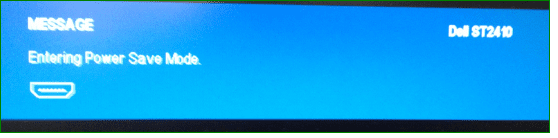
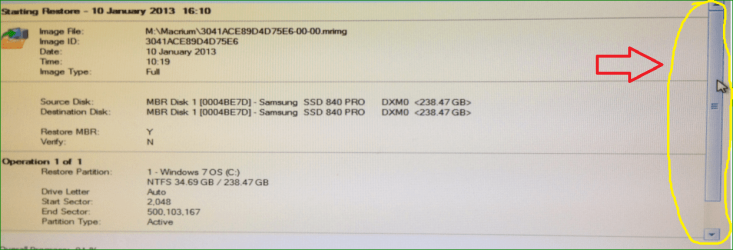
Issue #1 -- Power Save Mode: Approximately 7 minutes in to the first two attempts, I received a message that stated "Entering Power Saving Mode" (see snip). I do not understand why this occurred. I turned off hibernation and ensured my Power Options were set to "Never." I'm not really sure how I got through this: During the second try I kept moving my mouse around but that didn't help. On the third and successful attempt I turned on my external HDD at 5 minutes in and then instead of just moving the mouse around I actually slid the Macrium bar (circled in yellow in the snip), every 10-15 seconds.

There's probably a better way to deal with this, so if you know what it is, please advise.
 

Attachments

  • PowerSave.png
    PowerSave.png
    23.1 KB · Views: 14
  • SliderBar.png
    SliderBar.png
    220.4 KB · Views: 13

My Computer My Computer

At a glance

Windows 8.1 Pro with Media CenterIntel Core i7-860 processor, (8MB Cache, 2.80...8GB DDR3 SDRAM at 1333MHz-4x2GBnVidia GeForce GTS240, 1024MB GDDR3
Computer type
PC/Desktop
Computer Manufacturer/Model Number
Dell Studio XPS 8100
OS
Windows 8.1 Pro with Media Center
CPU
Intel Core i7-860 processor, (8MB Cache, 2.80GHz)
Motherboard
Dell (Chicony - DH57M01)
Memory
8GB DDR3 SDRAM at 1333MHz-4x2GB
Graphics Card(s)
nVidia GeForce GTS240, 1024MB GDDR3
Sound Card
OEM Integrated
Monitor(s) Displays
Dell ST2410, 24" Flat Panel Monitor
Hard Drives
256GB Samsung SSD 840 Pro, MZ-7PD256BW
Western Digital 1TB Caviar Blue, WD10EALX
Seagate Baracuda 750GB, ST3750528AS (OEM)
Western Digital 2TB Black, WD2003FZEX
PSU
OEM - Max Output Power 350W
Case
OEM
Cooling
OEM
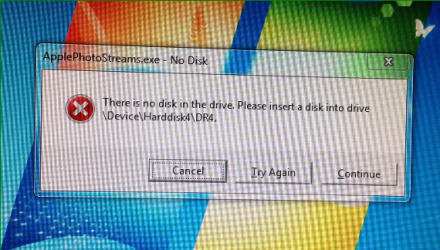
Final post about the test, regarding Issue #2 -- an ApplePhotoSreams.exe error. This showed up the first time I booted back in to the newly imaged C: drive, and again when I tried to access the iCloud control panel. I'm not sure what happened, but I rebooted one more time and it disappeared and has not returned. Should I be concerned?

If not, other than the Power Save issue, (which I'm still open for recommendations), I'm good, and ready to move on to my wife's laptop, a Dell XPS M1330.

Thanks for all of your help!
 

Attachments

  • ApplePhotoStreams.png
    ApplePhotoStreams.png
    504.5 KB · Views: 11

My Computer My Computer

At a glance

Windows 8.1 Pro with Media CenterIntel Core i7-860 processor, (8MB Cache, 2.80...8GB DDR3 SDRAM at 1333MHz-4x2GBnVidia GeForce GTS240, 1024MB GDDR3
Computer type
PC/Desktop
Computer Manufacturer/Model Number
Dell Studio XPS 8100
OS
Windows 8.1 Pro with Media Center
CPU
Intel Core i7-860 processor, (8MB Cache, 2.80GHz)
Motherboard
Dell (Chicony - DH57M01)
Memory
8GB DDR3 SDRAM at 1333MHz-4x2GB
Graphics Card(s)
nVidia GeForce GTS240, 1024MB GDDR3
Sound Card
OEM Integrated
Monitor(s) Displays
Dell ST2410, 24" Flat Panel Monitor
Hard Drives
256GB Samsung SSD 840 Pro, MZ-7PD256BW
Western Digital 1TB Caviar Blue, WD10EALX
Seagate Baracuda 750GB, ST3750528AS (OEM)
Western Digital 2TB Black, WD2003FZEX
PSU
OEM - Max Output Power 350W
Case
OEM
Cooling
OEM
The issue #1 I do not get. Was that whilst you were operating from the WinPE CD.

And regarding issue #2 I am completely lost. What is this rotten Apple stuff.
 

My Computer My Computer

At a glance

Vista, Windows7, Mint Mate, Zorin, Windows 8from 1.6GHz Duo to i7
Computer Manufacturer/Model Number
HP, Dell, Gateway, Toshiba - 4 laptops and 2 desktops
OS
Vista, Windows7, Mint Mate, Zorin, Windows 8
CPU
from 1.6GHz Duo to i7
Monitor(s) Displays
2x HP w2207
Hard Drives
5x HDD, 7x SSD, 12x Externals
Keyboard
with trackball - no mices
Mouse
Trackball mice
Internet Speed
DSL 6000
Yes, I used a WinPE USB... and the Power Save messages occurred approximately 7 minutes in to the 'restore image' process.

I should have mentioned that upon entering the power save mode, the monitor goes blank and the computer becomes un-responsive, necessitating a reboot.
 

My Computer My Computer

At a glance

Windows 8.1 Pro with Media CenterIntel Core i7-860 processor, (8MB Cache, 2.80...8GB DDR3 SDRAM at 1333MHz-4x2GBnVidia GeForce GTS240, 1024MB GDDR3
Computer type
PC/Desktop
Computer Manufacturer/Model Number
Dell Studio XPS 8100
OS
Windows 8.1 Pro with Media Center
CPU
Intel Core i7-860 processor, (8MB Cache, 2.80GHz)
Motherboard
Dell (Chicony - DH57M01)
Memory
8GB DDR3 SDRAM at 1333MHz-4x2GB
Graphics Card(s)
nVidia GeForce GTS240, 1024MB GDDR3
Sound Card
OEM Integrated
Monitor(s) Displays
Dell ST2410, 24" Flat Panel Monitor
Hard Drives
256GB Samsung SSD 840 Pro, MZ-7PD256BW
Western Digital 1TB Caviar Blue, WD10EALX
Seagate Baracuda 750GB, ST3750528AS (OEM)
Western Digital 2TB Black, WD2003FZEX
PSU
OEM - Max Output Power 350W
Case
OEM
Cooling
OEM
Regarding the rotten Apple stuff, I really don't know. I just recently started using the Photostream through Apple's iCloud when I upgraded my phone to an iPhone. That problem seemingly has gone away...
 

My Computer My Computer

At a glance

Windows 8.1 Pro with Media CenterIntel Core i7-860 processor, (8MB Cache, 2.80...8GB DDR3 SDRAM at 1333MHz-4x2GBnVidia GeForce GTS240, 1024MB GDDR3
Computer type
PC/Desktop
Computer Manufacturer/Model Number
Dell Studio XPS 8100
OS
Windows 8.1 Pro with Media Center
CPU
Intel Core i7-860 processor, (8MB Cache, 2.80GHz)
Motherboard
Dell (Chicony - DH57M01)
Memory
8GB DDR3 SDRAM at 1333MHz-4x2GB
Graphics Card(s)
nVidia GeForce GTS240, 1024MB GDDR3
Sound Card
OEM Integrated
Monitor(s) Displays
Dell ST2410, 24" Flat Panel Monitor
Hard Drives
256GB Samsung SSD 840 Pro, MZ-7PD256BW
Western Digital 1TB Caviar Blue, WD10EALX
Seagate Baracuda 750GB, ST3750528AS (OEM)
Western Digital 2TB Black, WD2003FZEX
PSU
OEM - Max Output Power 350W
Case
OEM
Cooling
OEM
That is a Dell message about power saving. I wonder if there is a setting in the BIOS.
 

My Computer My Computer

At a glance

Microsoft Windows 7 Home Premium 64-bit Servi...Intel(R) Core(TM) i3 CPU M 330 @ 2.13GHz8 GB DDR3Intel(R) HD Graphics
Computer type
Laptop
Computer Manufacturer/Model Number
Hewlett-Packard/G62-107SA Notebook
OS
Microsoft Windows 7 Home Premium 64-bit Service Pack 1
CPU
Intel(R) Core(TM) i3 CPU M 330 @ 2.13GHz
Motherboard
Hewlett-Packard 1425
Memory
8 GB DDR3
Graphics Card(s)
Intel(R) HD Graphics
Sound Card
Realtek High Definition Audio
Monitor(s) Displays
Builtin
Screen Resolution
1366 x 768 x 32 bits (4294967296 colors) @ 60 Hz
Hard Drives
250 GB SATA Hard Disk Drive 7200 rpm
2TB Seagate GoFlex USB 2 Drive
1TB Iomega Prestige USB 2 Drive
1.5TB Iomega Prestige USB 2 Drive (Samsung)
2TB WD MyBook Live NAS.
Mouse
Logitech Anywhere MX
Internet Speed
152 Mbs download 10 Mbs upload
Antivirus
Norton 360
Browser
Chrome
That was the first place I looked... I have two options under the ACPI Power Mgmt Setting in the BIOS: "S1" or "S3";

S3 is the default and from an online search, that appears to be correct setting for me. I will keep searching.
 

My Computer My Computer

At a glance

Windows 8.1 Pro with Media CenterIntel Core i7-860 processor, (8MB Cache, 2.80...8GB DDR3 SDRAM at 1333MHz-4x2GBnVidia GeForce GTS240, 1024MB GDDR3
Computer type
PC/Desktop
Computer Manufacturer/Model Number
Dell Studio XPS 8100
OS
Windows 8.1 Pro with Media Center
CPU
Intel Core i7-860 processor, (8MB Cache, 2.80GHz)
Motherboard
Dell (Chicony - DH57M01)
Memory
8GB DDR3 SDRAM at 1333MHz-4x2GB
Graphics Card(s)
nVidia GeForce GTS240, 1024MB GDDR3
Sound Card
OEM Integrated
Monitor(s) Displays
Dell ST2410, 24" Flat Panel Monitor
Hard Drives
256GB Samsung SSD 840 Pro, MZ-7PD256BW
Western Digital 1TB Caviar Blue, WD10EALX
Seagate Baracuda 750GB, ST3750528AS (OEM)
Western Digital 2TB Black, WD2003FZEX
PSU
OEM - Max Output Power 350W
Case
OEM
Cooling
OEM
Whatever settings you made in your Win7 does not count because the WinPE is running on it's own mini Win7. So it can only come from the BIOS.
 

My Computer My Computer

At a glance

Vista, Windows7, Mint Mate, Zorin, Windows 8from 1.6GHz Duo to i7
Computer Manufacturer/Model Number
HP, Dell, Gateway, Toshiba - 4 laptops and 2 desktops
OS
Vista, Windows7, Mint Mate, Zorin, Windows 8
CPU
from 1.6GHz Duo to i7
Monitor(s) Displays
2x HP w2207
Hard Drives
5x HDD, 7x SSD, 12x Externals
Keyboard
with trackball - no mices
Mouse
Trackball mice
Internet Speed
DSL 6000
Can we be absolutely certain that the Restore was conducted under the control of the WinPE Boot Rescue.

A RESTORE can be launched via Macrium running under Full Windows (placing code in RAM)
or via the built in "Recovery Boot Menu Option",
in addition to the WinPE Boot Rescue,
and the screen shows very little difference.

A few years ago I had some doubts,
and after extensive testing found that my chosen mechanism was not properly installed and it was falling back to one of the alternatives.
 

My Computer My Computer

At a glance

Windows 7 Ultimate 64 bit SP1 x64AMD Phenom X4 95008 GBATI Radeon HD 4600 Series
Computer Manufacturer/Model Number
ASUSTeK Computer INC. M3A32-MVP DELUXE (CPU 1)
OS
Windows 7 Ultimate 64 bit SP1 x64
CPU
AMD Phenom X4 9500
Motherboard
ASUSTeK M3A32-MVP Deluxe (CPU 1)
Memory
8 GB
Graphics Card(s)
ATI Radeon HD 4600 Series
Sound Card
AMD High Definition Audio Device
Monitor(s) Displays
SyncMaster (1680x1050@60Hz)
Hard Drives
59GB OCZ-VERTEX2 ATA Device
+
977GB SAMSUNG HD103SJ ATA Device
+
625GB WDC WD6401AALS-00L3B2 ATA Device
I'm not sure which version of Macrium is being used here but I think the Windows boot menu option is available only with the paid versions.
 

My Computer My Computer

At a glance

Microsoft Windows 7 Home Premium 64-bit Servi...Intel(R) Core(TM) i3 CPU M 330 @ 2.13GHz8 GB DDR3Intel(R) HD Graphics
Computer type
Laptop
Computer Manufacturer/Model Number
Hewlett-Packard/G62-107SA Notebook
OS
Microsoft Windows 7 Home Premium 64-bit Service Pack 1
CPU
Intel(R) Core(TM) i3 CPU M 330 @ 2.13GHz
Motherboard
Hewlett-Packard 1425
Memory
8 GB DDR3
Graphics Card(s)
Intel(R) HD Graphics
Sound Card
Realtek High Definition Audio
Monitor(s) Displays
Builtin
Screen Resolution
1366 x 768 x 32 bits (4294967296 colors) @ 60 Hz
Hard Drives
250 GB SATA Hard Disk Drive 7200 rpm
2TB Seagate GoFlex USB 2 Drive
1TB Iomega Prestige USB 2 Drive
1.5TB Iomega Prestige USB 2 Drive (Samsung)
2TB WD MyBook Live NAS.
Mouse
Logitech Anywhere MX
Internet Speed
152 Mbs download 10 Mbs upload
Antivirus
Norton 360
Browser
Chrome
I may have been wrong about S3 being the correct ACPI setting in my BIOS. Here's what I just learned from the Advanced Configuration and Power Interface Specification, Revision 4.0a of April 5, 2010:

S1 Sleeping State -- The S1 sleeping state is a low wake latency sleeping state. In this state, no system context is lost (CPU or chip set) and hardware maintains all system context.

S3 Sleeping State -- The S3 sleeping state is a low wake latency sleeping state where all system context is lost except system memory. CPU, cache, and chip set context are lost in this state. Hardware maintains memory context and restores some CPU and L2 configuration context. Control starts from the processor's reset vector after the wake event.

Does this sound like I might be on the right track? I'll try changing the BIOS to S1 later this afternoon and report back.
 

My Computer My Computer

At a glance

Windows 8.1 Pro with Media CenterIntel Core i7-860 processor, (8MB Cache, 2.80...8GB DDR3 SDRAM at 1333MHz-4x2GBnVidia GeForce GTS240, 1024MB GDDR3
Computer type
PC/Desktop
Computer Manufacturer/Model Number
Dell Studio XPS 8100
OS
Windows 8.1 Pro with Media Center
CPU
Intel Core i7-860 processor, (8MB Cache, 2.80GHz)
Motherboard
Dell (Chicony - DH57M01)
Memory
8GB DDR3 SDRAM at 1333MHz-4x2GB
Graphics Card(s)
nVidia GeForce GTS240, 1024MB GDDR3
Sound Card
OEM Integrated
Monitor(s) Displays
Dell ST2410, 24" Flat Panel Monitor
Hard Drives
256GB Samsung SSD 840 Pro, MZ-7PD256BW
Western Digital 1TB Caviar Blue, WD10EALX
Seagate Baracuda 750GB, ST3750528AS (OEM)
Western Digital 2TB Black, WD2003FZEX
PSU
OEM - Max Output Power 350W
Case
OEM
Cooling
OEM
Yeah, you should be on S1.
 

My Computer My Computer

At a glance

Vista, Windows7, Mint Mate, Zorin, Windows 8from 1.6GHz Duo to i7
Computer Manufacturer/Model Number
HP, Dell, Gateway, Toshiba - 4 laptops and 2 desktops
OS
Vista, Windows7, Mint Mate, Zorin, Windows 8
CPU
from 1.6GHz Duo to i7
Monitor(s) Displays
2x HP w2207
Hard Drives
5x HDD, 7x SSD, 12x Externals
Keyboard
with trackball - no mices
Mouse
Trackball mice
Internet Speed
DSL 6000
I'm not sure which version of Macrium is being used here but I think the Windows boot menu option is available only with the paid versions.
Guilty as charged :(

I do have that benefit.
Originally the Free version not only lacked that but it also lacked any incremental/differential backup and any form of WinPE recovery.

The free version has more recently been given some benefits that were reserved for the paid version and I am afraid I have lost track of the distinctions.

Regards
Alan
 

My Computer My Computer

At a glance

Windows 7 Ultimate 64 bit SP1 x64AMD Phenom X4 95008 GBATI Radeon HD 4600 Series
Computer Manufacturer/Model Number
ASUSTeK Computer INC. M3A32-MVP DELUXE (CPU 1)
OS
Windows 7 Ultimate 64 bit SP1 x64
CPU
AMD Phenom X4 9500
Motherboard
ASUSTeK M3A32-MVP Deluxe (CPU 1)
Memory
8 GB
Graphics Card(s)
ATI Radeon HD 4600 Series
Sound Card
AMD High Definition Audio Device
Monitor(s) Displays
SyncMaster (1680x1050@60Hz)
Hard Drives
59GB OCZ-VERTEX2 ATA Device
+
977GB SAMSUNG HD103SJ ATA Device
+
625GB WDC WD6401AALS-00L3B2 ATA Device
I think the only real benefit the free version has got recently is the ability to handle GPT disks.
 

My Computer My Computer

At a glance

Microsoft Windows 7 Home Premium 64-bit Servi...Intel(R) Core(TM) i3 CPU M 330 @ 2.13GHz8 GB DDR3Intel(R) HD Graphics
Computer type
Laptop
Computer Manufacturer/Model Number
Hewlett-Packard/G62-107SA Notebook
OS
Microsoft Windows 7 Home Premium 64-bit Service Pack 1
CPU
Intel(R) Core(TM) i3 CPU M 330 @ 2.13GHz
Motherboard
Hewlett-Packard 1425
Memory
8 GB DDR3
Graphics Card(s)
Intel(R) HD Graphics
Sound Card
Realtek High Definition Audio
Monitor(s) Displays
Builtin
Screen Resolution
1366 x 768 x 32 bits (4294967296 colors) @ 60 Hz
Hard Drives
250 GB SATA Hard Disk Drive 7200 rpm
2TB Seagate GoFlex USB 2 Drive
1TB Iomega Prestige USB 2 Drive
1.5TB Iomega Prestige USB 2 Drive (Samsung)
2TB WD MyBook Live NAS.
Mouse
Logitech Anywhere MX
Internet Speed
152 Mbs download 10 Mbs upload
Antivirus
Norton 360
Browser
Chrome
Long night and long morning (and long post, I apologize). I still have no solution regarding my computer going in to Power Save Mode (PSM) randomly when booted up with the Macrium WinPE Recovery Disk.

My system works fine when I do a normal startup using my Windows 7 OS. I experience absolutely no premature PSMs.

I'm pretty much at a loss; here's what I've tried so far, performing a system reboot before each test:

USING MACRIUM WINPE USB RECOVERY THUMB DRIVE:

1. Reconfirmed that PSM is invoked with ACPI setting in BIOS set to "S3."
Test 1: Booted up, PSM NOT invoked after 12 minutes; stopped test
Test 2: PSM invoked at 2:19 minutes.
Test 3: PSM invoked at 4:48 minutes.
Test 4: PSM invoked at 7:40 minutes.

2. Changed ACPI setting in BIOS to "S1"
Test 1: PSM invoked at 2:43 minutes
Test 2: PSM invoked at 6:29 minutes
Test 3: PSM invoked at 2:57 minutes
Test 4: PSM invoked at 1:37 minutes

3. Rebooted, after Macrium start-up moved mouse every 10-15 seconds
Test 1: PSM invoked at 1:46 minutes

4. Rebooted, after Macrium start-up moved menu slider bar up and down every 10-15 seconds
Test 1: PSM invoked at 6:27 minutes

5. Rebooted, changed BIOS ACPI back to "S3." After Macrium start-up turned on external HDD
Test 1: PSM invokded at 1:26 minutes

USING MACRIUM WINPE CD RECOVERY DISK:

6. Test 1: PSM invoked at 1:27 minutes
Test 2: PSM invoked at 1:47 minutes

At this point I hit the internet for additional research. I found many Dell customers with a wide variety of monitors having power save and sleep problems. I tried some of their recommendations as follows:

7. Disabled the "DDI/CI" setting on my monitor and Booted up using WINPE USB Thumb drive
Test 1: PSM NOT invoked after 15 minutes; stopped test
Test 2: PSM NOT invoked after 15 minutes; stopped test
Test 3: PSM invoked at 1:16 minutes
Test 4: PSM invoked at 3:58 minutes

8. Change from HDMI cable to DVI-D
Test 1: PSM NOT invoked after 15 minutes; stopped test
Test 2: PSM invoked at 4:42 minutes

9. Using DVI-D cable, turning off monitor after Macrium start-up
Test 1: PSM NOT invoked after 15 minutes; stopped test
Test 2: PSM invoked some time before 15 minutes (I had the monitor shut-off until 15 minutes passed)

10. Following Dell tech guidance in a thread at their user forum, disconnected all monitor and computer cables and power cords, pressed the power button on the monitor for 5 seconds; reconnect then reboot.
Test 1: PSM NOT invoked after 15 minutes; stopped test
Test 2: PSM invoked at 11:23 minutes

USING A SEPARATE WINDOWS RESCUE THUMB DRIVE CREATED FROM THE WINDOWS 7 "BACKUP AND RESTORE" UTILITY:

11. Test 1: PSM invoked at 3:59 minutes

Since I have no problems during a normal start-up (not using a recovery disk), I'm wondering if a solution might be found by loading some type of driver when prompted during the Macrium startup screen. So far, per previous guidance on these forums, I have always selected "No" at the Load Drivers prompt. Does this sound like a feasible solution to explore?

The saga continues...

 

My Computer My Computer

At a glance

Windows 8.1 Pro with Media CenterIntel Core i7-860 processor, (8MB Cache, 2.80...8GB DDR3 SDRAM at 1333MHz-4x2GBnVidia GeForce GTS240, 1024MB GDDR3
Computer type
PC/Desktop
Computer Manufacturer/Model Number
Dell Studio XPS 8100
OS
Windows 8.1 Pro with Media Center
CPU
Intel Core i7-860 processor, (8MB Cache, 2.80GHz)
Motherboard
Dell (Chicony - DH57M01)
Memory
8GB DDR3 SDRAM at 1333MHz-4x2GB
Graphics Card(s)
nVidia GeForce GTS240, 1024MB GDDR3
Sound Card
OEM Integrated
Monitor(s) Displays
Dell ST2410, 24" Flat Panel Monitor
Hard Drives
256GB Samsung SSD 840 Pro, MZ-7PD256BW
Western Digital 1TB Caviar Blue, WD10EALX
Seagate Baracuda 750GB, ST3750528AS (OEM)
Western Digital 2TB Black, WD2003FZEX
PSU
OEM - Max Output Power 350W
Case
OEM
Cooling
OEM
The driver route may be the solution. But I have never messed with that. So you'll have to experiment with that.
 

My Computer My Computer

At a glance

Vista, Windows7, Mint Mate, Zorin, Windows 8from 1.6GHz Duo to i7
Computer Manufacturer/Model Number
HP, Dell, Gateway, Toshiba - 4 laptops and 2 desktops
OS
Vista, Windows7, Mint Mate, Zorin, Windows 8
CPU
from 1.6GHz Duo to i7
Monitor(s) Displays
2x HP w2207
Hard Drives
5x HDD, 7x SSD, 12x Externals
Keyboard
with trackball - no mices
Mouse
Trackball mice
Internet Speed
DSL 6000
I'll continue to experiment. I suppose the key will be to figure out which driver is used by Windows 7 after normal startup to prevent the premature Power Save Mode...
 

My Computer My Computer

At a glance

Windows 8.1 Pro with Media CenterIntel Core i7-860 processor, (8MB Cache, 2.80...8GB DDR3 SDRAM at 1333MHz-4x2GBnVidia GeForce GTS240, 1024MB GDDR3
Computer type
PC/Desktop
Computer Manufacturer/Model Number
Dell Studio XPS 8100
OS
Windows 8.1 Pro with Media Center
CPU
Intel Core i7-860 processor, (8MB Cache, 2.80GHz)
Motherboard
Dell (Chicony - DH57M01)
Memory
8GB DDR3 SDRAM at 1333MHz-4x2GB
Graphics Card(s)
nVidia GeForce GTS240, 1024MB GDDR3
Sound Card
OEM Integrated
Monitor(s) Displays
Dell ST2410, 24" Flat Panel Monitor
Hard Drives
256GB Samsung SSD 840 Pro, MZ-7PD256BW
Western Digital 1TB Caviar Blue, WD10EALX
Seagate Baracuda 750GB, ST3750528AS (OEM)
Western Digital 2TB Black, WD2003FZEX
PSU
OEM - Max Output Power 350W
Case
OEM
Cooling
OEM
Also another area I'm digging in to is acpi registry entries; Any changes made there would not be applied during a Macrium Recovery Disk boot-up, correct?
 

My Computer My Computer

At a glance

Windows 8.1 Pro with Media CenterIntel Core i7-860 processor, (8MB Cache, 2.80...8GB DDR3 SDRAM at 1333MHz-4x2GBnVidia GeForce GTS240, 1024MB GDDR3
Computer type
PC/Desktop
Computer Manufacturer/Model Number
Dell Studio XPS 8100
OS
Windows 8.1 Pro with Media Center
CPU
Intel Core i7-860 processor, (8MB Cache, 2.80GHz)
Motherboard
Dell (Chicony - DH57M01)
Memory
8GB DDR3 SDRAM at 1333MHz-4x2GB
Graphics Card(s)
nVidia GeForce GTS240, 1024MB GDDR3
Sound Card
OEM Integrated
Monitor(s) Displays
Dell ST2410, 24" Flat Panel Monitor
Hard Drives
256GB Samsung SSD 840 Pro, MZ-7PD256BW
Western Digital 1TB Caviar Blue, WD10EALX
Seagate Baracuda 750GB, ST3750528AS (OEM)
Western Digital 2TB Black, WD2003FZEX
PSU
OEM - Max Output Power 350W
Case
OEM
Cooling
OEM
Also another area I'm digging in to is acpi registry entries; Any changes made there would not be applied during a Macrium Recovery Disk boot-up, correct?

The Macrium would restore the way it was when the Macrium Image was made. Any changes after that would not be on the Image.
 

My Computer My Computer

At a glance

Windows 7 Home Premium 32-Bit - Build 7600 SP1Intel Core i3-2120 3.30GhzKingston 4 GB DDR3 1333 mhzAMD Radeon HD6670
Computer type
PC/Desktop
Computer Manufacturer/Model Number
Custom Build
OS
Windows 7 Home Premium 32-Bit - Build 7600 SP1
CPU
Intel Core i3-2120 3.30Ghz
Motherboard
Asus P8Z68-V LX Intel Z68 Socket H2 ATX
Memory
Kingston 4 GB DDR3 1333 mhz
Graphics Card(s)
AMD Radeon HD6670
Sound Card
Sound Blaster Audigy SE 24-Bit
Monitor(s) Displays
Asus VE228
Screen Resolution
1440 X 900
Hard Drives
OCZ Vertex 3 120 GB Sata 3 SSD ==
Kingston SH103/S3 120 G Hyper X 120 GB SSD ==
Western Digital 500 GB Caviar Green 7200 RPM ==
PSU
Corsair CX600M == 600 Watt
Case
NZXT Apollo - Silver with Clear Side Panel
Cooling
Three 120 mm Fans
Keyboard
Microsoft Natural 4000
Mouse
Microsoft Custom Optical 3000
Internet Speed
AT&T Fiber Optic Wireless Network
Antivirus
Microsoft Security Essentials
Browser
Chrome
Other Info
120 mm Blue LED Fan -- Three Blue LED Lazer Light Sticks
Back
Top