Solved Image your system with free Macrium

The "smart" feature not smart at all, then .

Glad you fixed it. :)
 

My Computers My Computers

System One System Two

  • Computer type
    PC/Desktop
    OS
    7 X64
    CPU
    i5 8400
    Motherboard
    gigabyte b365m ds3h
    Memory
    2x8gb 3200mhz
    Hard Drives
    various
    PSU
    pure power 11 400w cm
    Case
    Coolermaster
    Cooling
    cryorig m9i
  • Computer type
    PC/Desktop
    OS
    7x64
    CPU
    g5400
    Motherboard
    ga b365m ds3h
    Memory
    8gb ddr4 2400
    PSU
    xfx pro 450w
I finally solved it. It was something to do with the XHCI setting in the BIOS. At the default of 'Smart Auto' or with it set to 'Enabled', there is no input with the rescue media. However, if I choose 'Disabled' or 'Auto', the USB mouse and keyboard work fine.

Thanks for all the help/suggestions.
Who would have thunk. Good job - but that would have been quasi impossible for us to figure out. Lesson learned.
 

My Computer My Computer

Computer Manufacturer/Model Number
HP, Dell, Gateway, Toshiba - 4 laptops and 2 desktops
OS
Vista, Windows7, Mint Mate, Zorin, Windows 8
CPU
from 1.6GHz Duo to i7
Monitor(s) Displays
2x HP w2207
Hard Drives
5x HDD, 7x SSD, 12x Externals
Keyboard
with trackball - no mices
Mouse
Trackball mice
Internet Speed
DSL 6000
I had a scary moment the other day whilst making a routine backup image of my data drive. I got the following message:

Backup aborted! Unable to read from disk - Error Code 23 - Data error (cyclic redundancy check)


According to Macrium's support page (v5: Imaging disks with bad sectors (Bad Sectors)), if a bad sector is encountered during image creation then you will receive that error in your backup log. This is considered a fatal condition because your data cannot be read and the image will abort.


As instructed by Macrium I ran a full checkdisk including repair option. However, chkdsk went off and a few hours later reported back, no bad sectors, no repairs needed...0 bad file records processed....Windows has checked the file system and found no problems. The only thing it did say was that there were 46 unused index entries cleaned up from file 0x9, whatever that means.


So is my disk failing and in need of urgent replacement (according to Macrium) or is it in perfect health (according to MS)? Kind of important given it's still under warrenty and I thnk I'd have a hard time presenting a normal healthy disk to the shop and asking for a replacement!

 

My Computer My Computer

OS
Win 7 Pro 64 bit
I had a scary moment the other day whilst making a routine backup image of my data drive. I got the following message:

Backup aborted! Unable to read from disk - Error Code 23 - Data error (cyclic redundancy check)


According to Macrium's support page (v5: Imaging disks with bad sectors (Bad Sectors)), if a bad sector is encountered during image creation then you will receive that error in your backup log. This is considered a fatal condition because your data cannot be read and the image will abort.


As instructed by Macrium I ran a full checkdisk including repair option. However, chkdsk went off and a few hours later reported back, no bad sectors, no repairs needed...0 bad file records processed....Windows has checked the file system and found no problems. The only thing it did say was that there were 46 unused index entries cleaned up from file 0x9, whatever that means.


So is my disk failing and in need of urgent replacement (according to Macrium) or is it in perfect health (according to MS)? Kind of important given it's still under warrenty and I thnk I'd have a hard time presenting a normal healthy disk to the shop and asking for a replacement!
Can be faulty memory stick as well. Please test your memory.
Macrium Reflect still reports disk errors?
 

My Computer My Computer

Computer type
Laptop
Computer Manufacturer/Model Number
ACER ASPIRE 5742G
OS
Microsoft Windows 7 Home Premium 64-bits 7601 Multiprocessor Free Service Pack 1
CPU
Intel(R) Core(TM) i3 CPU M 370 @ 2.40GHz
Motherboard
Acer Aspire 5742G
Memory
4,00 GB
Graphics Card(s)
ATI Mobility Radeon HD 5400 Series
Sound Card
(1) AMD High Definition Audio Device (2) Realtek High Defi
Screen Resolution
1366 x 768 x 32 bits (4294967296 colors) @ 60 Hz
Hard Drives
WDC WD5000BEVT-22ZAT0
I got an image failed error once. I ran it again and the image was created successfully. Apparently, sometime, stuff just happens. Btw, I strongly recommend always running verify after an image (MR can be set to do so automatically). I would much rather discover a faulty image while I can still make another one than to discover the image I'm depending on to restore my machine is mung since it's too late to make a new image by then. It takes almost twice as long to make an image when Verify is included but who sits around staring at the screen while MR is doing its thing (not this old lady, anyway)?
 

My Computer My Computer

Computer type
PC/Desktop
Computer Manufacturer/Model Number
Custom Build
OS
Win 7 Ultimate 64 bit
CPU
Intel i7-3930K
Motherboard
ASUS P9X79 WS
Memory
Kingston HyperX Genesis 32GB Kit (8x4GB Modules) 1600MHz DDR
Graphics Card(s)
MSI R7850 Twin Frozr 2GD5/OC Radeon HD 7850 2GB 256-bit GDDR
Sound Card
Asus Xonar Essence STX
Monitor(s) Displays
3x Asus VG248QE 24", Vizio 32" TV
Screen Resolution
1920 x 1080, ?
Hard Drives
Samsung 128GB 840 Pro SSD (1),
Samsung 4TB 850 EVO SSDs (4)
Samsung 4TB 850 EVO SSDs (16) external backup drives used in 2.5" hot swap bays in the computer.
PSU
Corsair HX750w
Case
Antec Two Hundred v2 (modified)
Cooling
Cooler Master GeminII S524 120mm (fan replaced with a 140mm)
Keyboard
Logitech G510s
Mouse
Logitech M525 (two in use)
Internet Speed
=< 32Mbps down, 8Mbps up
Antivirus
AVAST!, MBAM, SAS, Spybot S&D (all but MBAM free) Glary Util
Browser
IE11
Other Info
LSI 9211-8i HBA card (8 SATA III ports), 2.5" & 3.5" Hot Swap Bays, HooToo HT-CR001 PCI-E to USB 3.0 Internal Hub + 6 Slot Card Reader, and LG Model CH12LS28 BD-ROM Optical Drive. Also, ScanSnap S1500 ADF duplexing scanner, Canon 9000F flat bed scanner, Corsair SP2500 2.1 speakers, Samsung CLP 415nw laser color printer, Cyberpower PP2200SW UPS
Good point.
 

My Computer My Computer

Computer type
Laptop
Computer Manufacturer/Model Number
Hewlett-Packard/G62-107SA Notebook
OS
Microsoft Windows 7 Home Premium 64-bit Service Pack 1
CPU
Intel(R) Core(TM) i3 CPU M 330 @ 2.13GHz
Motherboard
Hewlett-Packard 1425
Memory
8 GB DDR3
Graphics Card(s)
Intel(R) HD Graphics
Sound Card
Realtek High Definition Audio
Monitor(s) Displays
Builtin
Screen Resolution
1366 x 768 x 32 bits (4294967296 colors) @ 60 Hz
Hard Drives
250 GB SATA Hard Disk Drive 7200 rpm
2TB Seagate GoFlex USB 2 Drive
1TB Iomega Prestige USB 2 Drive
1.5TB Iomega Prestige USB 2 Drive (Samsung)
2TB WD MyBook Live NAS.
Mouse
Logitech Anywhere MX
Internet Speed
152 Mbs download 10 Mbs upload
Antivirus
Norton 360
Browser
Chrome
Imaging programs can be over cautious. But it is worth checking. For your own peace of mind, you could run the manufacturers disk utility and see what it says. They are not foolproof either, of course, but give it a go.

Don't know what disk you have, but seagate for dos boot media seems to be able to work other drives, not just seagates. WD do one that you can run from within windows, but I don't think it has any fixing capability.


I had a scary moment the other day whilst making a routine backup image of my data drive. I got the following message:

Backup aborted! Unable to read from disk - Error Code 23 - Data error (cyclic redundancy check)


According to Macrium's support page (v5: Imaging disks with bad sectors (Bad Sectors)), if a bad sector is encountered during image creation then you will receive that error in your backup log. This is considered a fatal condition because your data cannot be read and the image will abort.


As instructed by Macrium I ran a full checkdisk including repair option. However, chkdsk went off and a few hours later reported back, no bad sectors, no repairs needed...0 bad file records processed....Windows has checked the file system and found no problems. The only thing it did say was that there were 46 unused index entries cleaned up from file 0x9, whatever that means.


So is my disk failing and in need of urgent replacement (according to Macrium) or is it in perfect health (according to MS)? Kind of important given it's still under warrenty and I thnk I'd have a hard time presenting a normal healthy disk to the shop and asking for a replacement!
 

My Computers My Computers

System One System Two

  • Computer type
    PC/Desktop
    OS
    7 X64
    CPU
    i5 8400
    Motherboard
    gigabyte b365m ds3h
    Memory
    2x8gb 3200mhz
    Hard Drives
    various
    PSU
    pure power 11 400w cm
    Case
    Coolermaster
    Cooling
    cryorig m9i
  • Computer type
    PC/Desktop
    OS
    7x64
    CPU
    g5400
    Motherboard
    ga b365m ds3h
    Memory
    8gb ddr4 2400
    PSU
    xfx pro 450w
Try again and see what happens. If it repeats itself, it may be prudent to RMA the disk. You don't want to live with a disk from which you cannot make images.
 

My Computer My Computer

Computer Manufacturer/Model Number
HP, Dell, Gateway, Toshiba - 4 laptops and 2 desktops
OS
Vista, Windows7, Mint Mate, Zorin, Windows 8
CPU
from 1.6GHz Duo to i7
Monitor(s) Displays
2x HP w2207
Hard Drives
5x HDD, 7x SSD, 12x Externals
Keyboard
with trackball - no mices
Mouse
Trackball mice
Internet Speed
DSL 6000
If I image my three SSDs using a standard (non-advanced format) hard drive (in a USB enclosure) as the target/storage device and then restore from that, will they still be aligned properly?
 

My Computer My Computer

OS
Windows 7 x64 Home Premium

My Computer My Computer

Computer Manufacturer/Model Number
HP, Dell, Gateway, Toshiba - 4 laptops and 2 desktops
OS
Vista, Windows7, Mint Mate, Zorin, Windows 8
CPU
from 1.6GHz Duo to i7
Monitor(s) Displays
2x HP w2207
Hard Drives
5x HDD, 7x SSD, 12x Externals
Keyboard
with trackball - no mices
Mouse
Trackball mice
Internet Speed
DSL 6000
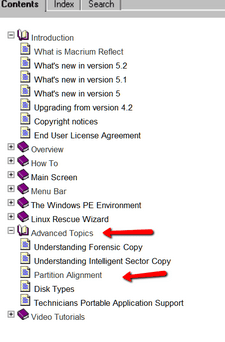
Yes, if you do it right. Read here - directions in the picture.

Reflect_v5


View attachment 302658

From that document it seems like I don't have to do anything to preserve alignment since I'm using Windows 7, am I reading it right?

I'm also assuming that 'Copy selected partitions' is now called 'Image this disk'
 

My Computer My Computer

OS
Windows 7 x64 Home Premium
I'm also assuming that 'Copy selected partitions' is now called 'Image this disk'
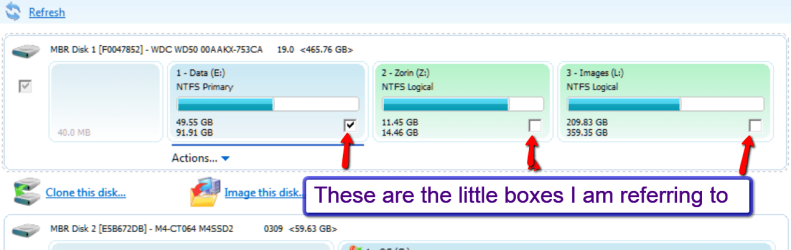
There you have to watch out. If you have several partitions on the image, make sure only those that you want to restore are checked in the little boxes under the partition.
 

Attachments

  • 2014-01-21_2325.png
    2014-01-21_2325.png
    35.4 KB · Views: 2

My Computer My Computer

Computer Manufacturer/Model Number
HP, Dell, Gateway, Toshiba - 4 laptops and 2 desktops
OS
Vista, Windows7, Mint Mate, Zorin, Windows 8
CPU
from 1.6GHz Duo to i7
Monitor(s) Displays
2x HP w2207
Hard Drives
5x HDD, 7x SSD, 12x Externals
Keyboard
with trackball - no mices
Mouse
Trackball mice
Internet Speed
DSL 6000
Hi, I have some questions. I've been using Win7 system imaging but I find it a bit cumbersome, esp. the un-ability to restore the image to a smaller drive (is that possible with Macrium Free?).

I'm thinking of going with Macrium Free. Is it really free (no adware etc.?), trustworthy and reliable? I like one ability of Win7's B&R and that is that I can mount the image VHD file and restore single files etc. and also restore the whole image from the boot (using the Win7 rescue disc). Are these functions possible with Macrium Free?

In the feature comparison chart of Macrium it says that the Free version can't do recovery from Windows boot menu, so I guess that's a no-go then? How would I have to restore it then, first install Windows, then Macrium and then full restore (overwrite the latest Win installation with the one from the image backup)?

Please help me understand. And if you recommend some other freeware imaging software, please do tell too. Thank you!


My Computer My Computer

OS
Windows 7 Ultimate x64 SP1
Yes, you can do all the things you asked about. You can recover from a bootable Linux DVD or a PE Rescue CD or USB drive. What it means by recovery from the boot menu means there is no recovery partition you can boot into when Windows starts. You can also mount, VHDs, recover files from the mounted VHD. It is very highly thought of my most here on Seven forums and widely used. This may help answer some of your questions. http://www.sevenforums.com/tutorials/73828-imaging-free-macrium.html
 

My Computers My Computers

System One System Two

  • Computer type
    PC/Desktop
    Computer Manufacturer/Model Number
    ALWAYS UNDER CONSTRUCTION
    OS
    Windows 11 Pro
    CPU
    Ryzen 9 5900X
    Motherboard
    Asus X570 Crosshair Viii Hero
    Memory
    32GB G Skill DDR4-3600
    Graphics Card(s)
    EVGA RTX 3080 FTW 3 Ultra
    Sound Card
    On Board/Sennheiser PC37X Headset
    Monitor(s) Displays
    3 X Asus 27"
    Screen Resolution
    2560x1440
    Hard Drives
    2 X 1 TB NVME drives
    PSU
    EVGA 850
    Case
    Phanteks Eclipse P400A
    Cooling
    EVGA 280 AIO
    Keyboard
    Logitech G510s/ Logitech G13
    Mouse
    Logitech G502
    Internet Speed
    24/1
    Antivirus
    ESET/MBAM Pro/SAS Pro
    Browser
    Chrome/ Firefox/ Edge
  • Computer type
    Laptop
    System Manufacturer/Model Number
    Dell 16 Plus
    OS
    Windows 11 Pro
    CPU
    Intel Ultra 9 288V
    Memory
    32 GB LPDDR5X 8533
    Monitor(s) Displays
    16" Mini-LED HDR600 Touch 90 Hz
    Screen Resolution
    2560X1600
    Hard Drives
    1 TB NVME
Are you sure that with Macrium Reflect Free I can:

- Restore to a smaller HDD (I have a 500 GB HDD with 3 partitons and I monthly make an image of all 3 partitions - so the whole HDD, but there's just about 250 GB of data on all 3 partitions of mine, so if my 500 GB HDD dies, can I buy a 320 GB HDD and restore the 3 partitions onto it without any problems)?

- Restore from the boot (just like using the Windows 7 rescue disc) without any problems (onto an empty/new HDD), even though it says on the Macrium site that in the free version that's not supported?

- VHD files can be mounted, explored, files copied etc. - just like in Windows 7 integrated tool?

I apologise for being a pain in the ass but backup and restore is an extremely important thing and I have to depend on it so that's why I'm double-asking.

Thank you! :)
 

My Computer My Computer

OS
Windows 7 Ultimate x64 SP1
Some imaging programs create a recovery partition which you can boot into when Windows boots. That's what they mean, that is not supported. What you do is create a recovery CD or USB drive and boot into that, just like the Windows Rescue disk. I'm sure about the VHD files being able to be mounted, explored. I am not sure about restoring to a smaller drive, but I believe it can. When it does the image, it only images the used portion of the partition. So, I see no reason it can't restore to a smaller drive as long as your partitions on the smaller drives are larger than the image (used portion it was created from) It can also clone a partition.
 

My Computers My Computers

System One System Two

  • Computer type
    PC/Desktop
    Computer Manufacturer/Model Number
    ALWAYS UNDER CONSTRUCTION
    OS
    Windows 11 Pro
    CPU
    Ryzen 9 5900X
    Motherboard
    Asus X570 Crosshair Viii Hero
    Memory
    32GB G Skill DDR4-3600
    Graphics Card(s)
    EVGA RTX 3080 FTW 3 Ultra
    Sound Card
    On Board/Sennheiser PC37X Headset
    Monitor(s) Displays
    3 X Asus 27"
    Screen Resolution
    2560x1440
    Hard Drives
    2 X 1 TB NVME drives
    PSU
    EVGA 850
    Case
    Phanteks Eclipse P400A
    Cooling
    EVGA 280 AIO
    Keyboard
    Logitech G510s/ Logitech G13
    Mouse
    Logitech G502
    Internet Speed
    24/1
    Antivirus
    ESET/MBAM Pro/SAS Pro
    Browser
    Chrome/ Firefox/ Edge
  • Computer type
    Laptop
    System Manufacturer/Model Number
    Dell 16 Plus
    OS
    Windows 11 Pro
    CPU
    Intel Ultra 9 288V
    Memory
    32 GB LPDDR5X 8533
    Monitor(s) Displays
    16" Mini-LED HDR600 Touch 90 Hz
    Screen Resolution
    2560X1600
    Hard Drives
    1 TB NVME
The macrium boot menu thing just means you can boot up the macrium winpe from a boot menu entry.

( Essenbe is right that a few imaging programs can make recovery partitions, Acronis and paragon for example, I can't see the point ).

The idea of the boot menu entry is you don't need to carry a flash drive with macrium winpe on it. The downsides are

a) It might not work, if windows boot process is damaged ( which is quite often the reason you want to restore)

b) You will always get a menu for few seconds on startup, which can be quite annoying. ( unless you are multibooting, where you will have a menu anyway)

There are several free imaging programs . They will all be able to restore to a smaller drive and let you get individual files out of an image.

They will all create boot media of some kind to be put on flash/dvd. Many of them do not create the boot menu thing, instead they can reboot themselves into what they often call pre -os mode. That also means you don't need to carry a flash with you ( but, like the boot menu entry, depend on Windows not being too damaged to fire them up ).

You will definitely need the external boot media they create, just in case.

Paragon do a free one. Paragon paid products are great, but the free versions are quite limited.
http://www.paragon-software.com/home/br-free/

Easeus do one. It has some nice features, e.g. you can see and copy out of the backup images with windows explorer- you don't need to mount anything. http://www.todo-backup.com/products/home/free-backup-software.htm

Macrium does a free one. It works well, I used it for a while myself.

Now there is an even better free one. FREE Backup software for Windows 7, 8 and Server 2008 R2, 2012
 

My Computers My Computers

System One System Two

  • Computer type
    PC/Desktop
    OS
    7 X64
    CPU
    i5 8400
    Motherboard
    gigabyte b365m ds3h
    Memory
    2x8gb 3200mhz
    Hard Drives
    various
    PSU
    pure power 11 400w cm
    Case
    Coolermaster
    Cooling
    cryorig m9i
  • Computer type
    PC/Desktop
    OS
    7x64
    CPU
    g5400
    Motherboard
    ga b365m ds3h
    Memory
    8gb ddr4 2400
    PSU
    xfx pro 450w
Why don't you just try it on a small 2GB partition. That will amswer all your questions. And yes, it is the best imaging program around - only AOEMI would be a good alternative.

Read and watch the tutorial and Keith an I have put together and you will get the hang of it - Steve linked it.
 

My Computer My Computer

Computer Manufacturer/Model Number
HP, Dell, Gateway, Toshiba - 4 laptops and 2 desktops
OS
Vista, Windows7, Mint Mate, Zorin, Windows 8
CPU
from 1.6GHz Duo to i7
Monitor(s) Displays
2x HP w2207
Hard Drives
5x HDD, 7x SSD, 12x Externals
Keyboard
with trackball - no mices
Mouse
Trackball mice
Internet Speed
DSL 6000
- Restore to a smaller HDD (I have a 500 GB HDD with 3 partitons and I monthly make an image of all 3 partitions - so the whole HDD, but there's just about 250 GB of data on all 3 partitions of mine, so if my 500 GB HDD dies, can I buy a 320 GB HDD and restore the 3 partitions onto it without any problems)?

Macrium Reflect can be used to restore an image to a smaller partition as long as the original data is less than the size of the partition it is going to. Even though you can restore your partitions to a smaller HDD, if you can afford it in any way, I would suggest buying another 500GB HDD so that, when your original HDD exceeds 320GB, you will be able to still backup your data on the second HDD.

- Restore from the boot (just like using the Windows 7 rescue disc) without any problems (onto an empty/new HDD), even though it says on the Macrium site that in the free version that's not supported?

The restore from boot you are referring to is an optional feature on the paid versions that will allow you to restore and image without having to use a recovery CD or USB flash drive. When you first boot up the computer, a screen will appear during boot, but before windows itself starts booting, that gives you the option to open up the program that is on your computer that will restore your image. If the drive has been damaged enough that the program can't be opened from the drive, a recovery disk or USB flash drive will be needed. I have the Pro version and use that feature myself because it's convenient (and I'm lazy).

On the free version, instead of a program that can be opened during boot, you have to use a recovery CD or USB flash drive you make ahead of time to restore an image to your HDD. It's not as convenient as having the option on the computer but is more reliable. Even though I use the built in version, I still need the have my recovery USB flash drive on hand just in case I manage to mess up my boot drive badly enough the built-in feature can't be used or I'm using the image to restore to a replacement drive.

If I've confused you thoroughly, just rest assured you will be able to use the free version to restore your data as long as you make a recovery disk or USB flash drive ahead of time.

- VHD files can be mounted, explored, files copied etc. - just like in Windows 7 integrated tool?

Yes.

I apologise for being a pain in the ass but backup and restore is an extremely important thing and I have to depend on it so that's why I'm double-asking.

No apology necessary. You are wise to want to make backups and to make sure you will be doing it correctly.
 

My Computer My Computer

Computer type
PC/Desktop
Computer Manufacturer/Model Number
Custom Build
OS
Win 7 Ultimate 64 bit
CPU
Intel i7-3930K
Motherboard
ASUS P9X79 WS
Memory
Kingston HyperX Genesis 32GB Kit (8x4GB Modules) 1600MHz DDR
Graphics Card(s)
MSI R7850 Twin Frozr 2GD5/OC Radeon HD 7850 2GB 256-bit GDDR
Sound Card
Asus Xonar Essence STX
Monitor(s) Displays
3x Asus VG248QE 24", Vizio 32" TV
Screen Resolution
1920 x 1080, ?
Hard Drives
Samsung 128GB 840 Pro SSD (1),
Samsung 4TB 850 EVO SSDs (4)
Samsung 4TB 850 EVO SSDs (16) external backup drives used in 2.5" hot swap bays in the computer.
PSU
Corsair HX750w
Case
Antec Two Hundred v2 (modified)
Cooling
Cooler Master GeminII S524 120mm (fan replaced with a 140mm)
Keyboard
Logitech G510s
Mouse
Logitech M525 (two in use)
Internet Speed
=< 32Mbps down, 8Mbps up
Antivirus
AVAST!, MBAM, SAS, Spybot S&D (all but MBAM free) Glary Util
Browser
IE11
Other Info
LSI 9211-8i HBA card (8 SATA III ports), 2.5" & 3.5" Hot Swap Bays, HooToo HT-CR001 PCI-E to USB 3.0 Internal Hub + 6 Slot Card Reader, and LG Model CH12LS28 BD-ROM Optical Drive. Also, ScanSnap S1500 ADF duplexing scanner, Canon 9000F flat bed scanner, Corsair SP2500 2.1 speakers, Samsung CLP 415nw laser color printer, Cyberpower PP2200SW UPS
Thank you all for sharing the knowledge! I will try Macrium Reflect Free and leave Windows 7 imaging tool. Have you all always had success in restoring a Macrium full image of a drive? Also, let me ask you a few questions about the Macrium program itself. Does it have any processes/services that run in the background all the time or is it a run-when-needed kind of application? Is there any adware or calling phone (since it's a freeware app)? I guess if supports USB 3.0 speeds and I saw that it comes in 32 and 64-bit flavours (I have Win7 x64). The freeware version is a bit hidden on tha Macrium site but I have found it - though it only has a small DL installer.

Anyway, I'm going to go and try it, thank you very much for help, much appreciated!
 

My Computer My Computer

OS
Windows 7 Ultimate x64 SP1
Back
Top