Imaging with free Macrium

   Information

This tutorial shows imaging with free Macrium Version 5.0. If you are still using Macrium Version 4.2, go to this Vimeo site where the tutorial of that version is stored.

The Video does not show the recovery part because I have no setup to screen capture it. But Keith (Kado) made this excellent recovery tutorial with text (but no sound) that he captured from a virtual partition.


   Warning


Note that the external disk to which you image must be formatted in NTFS. A disk that is formatted in Fat32 will accept an image, but the recovery programs cannot restore that image. You can, however, mount (open) a Fat32 image as VHD.


   Note
The production of the WinPE recovery CD (which is highly recommended) may take up to 3 hours because Macrium needs to download the 1.7GB WAIK (Windows Application Installation Kit). For your convenience I have uploaded a ready made .iso of the WinPE recovery disc. That can be downloaded in appr. 8 minutes which clearly beats the WAIK download. Once you downloaded and unzipped the folder, you can burn it directly to a CD with e.g. ImgBurn.

Here is the link to my Skydrive site.

Here is an alternate link from FileSwap (courtesy of Gary - Britton30)

I draw your attention to the fact that this WinPE CD can also be used to make images. That may be convenient in case you do not want to install Macrium on your PC.


This video tutorial explains the full cycle of the imaging process which is:

· Initial setups
· Image definition
· Image scheduling
· Image production

The imaging program that was used for this tutorial is free Macrium. But the basic principles are the same for other imaging programs although the user interface will be different.

This video runs for appr. 7 minutes.
There is a related thread on the Vista forum which gives a brief introduction to Macrium followed by a discussion.
You can download the free Macrium edition from here.

Note: If you have a problem with the loudness of the sound output of the video, check the "Loudness Equalization" box in your Playback device. It is under the 'Enhancements' tab.


Last edited by a moderator:
You are very welcome. I will be back in Florida soon.
 

My Computer My Computer

Computer Manufacturer/Model Number
HP, Dell, Gateway, Toshiba - 4 laptops and 2 desktops
OS
Vista, Windows7, Mint Mate, Zorin, Windows 8
CPU
from 1.6GHz Duo to i7
Monitor(s) Displays
2x HP w2207
Hard Drives
5x HDD, 7x SSD, 12x Externals
Keyboard
with trackball - no mices
Mouse
Trackball mice
Internet Speed
DSL 6000
WHS, just wanted to say thanks again for posting a really valuable download in that win pe. it has literally saved my butt a couple times now. what a great difference from the linux recovery for macrium. and i have renamed my drives and partitions in each so they are sooooo easy to pick out now...no mistakes makes for a happy computer.
 

My Computer My Computer

Computer type
PC/Desktop
Computer Manufacturer/Model Number
Cyberpower
OS
win 7 64 home premium
CPU
3.6 amd
Memory
8g
Hard Drives
AMD 500g ssd, 500hdd
Browser
Pale Moon
WHS, just wanted to say thanks again for posting a really valuable download in that win pe. it has literally saved my butt a couple times now. what a great difference from the linux recovery for macrium. and i have renamed my drives and partitions in each so they are sooooo easy to pick out now...no mistakes makes for a happy computer.
I am glad that you could make good use of the WinPE iso.
 

My Computer My Computer

Computer Manufacturer/Model Number
HP, Dell, Gateway, Toshiba - 4 laptops and 2 desktops
OS
Vista, Windows7, Mint Mate, Zorin, Windows 8
CPU
from 1.6GHz Duo to i7
Monitor(s) Displays
2x HP w2207
Hard Drives
5x HDD, 7x SSD, 12x Externals
Keyboard
with trackball - no mices
Mouse
Trackball mice
Internet Speed
DSL 6000
What if I have raid 0 and need to load specific drivers for windows to be installed? How do I make an image in that case?
 

My Computer My Computer

Computer Manufacturer/Model Number
Home Built
OS
7 ultimate 64
CPU
Core 2 Quad 9650
Motherboard
GA-EP-45-UD3P
Memory
16GB
Graphics Card(s)
GTX 580
Hard Drives
Raid 0
Best to integrate your raid drivers to the pe media.
 

My Computers My Computers

System One System Two

  • Computer type
    PC/Desktop
    OS
    7 X64
    CPU
    i5 8400
    Motherboard
    gigabyte b365m ds3h
    Memory
    2x8gb 3200mhz
    Hard Drives
    various
    PSU
    pure power 11 400w cm
    Case
    Coolermaster
    Cooling
    cryorig m9i
  • Computer type
    PC/Desktop
    OS
    7x64
    CPU
    g5400
    Motherboard
    ga b365m ds3h
    Memory
    8gb ddr4 2400
    PSU
    xfx pro 450w
can you please explain how to do that? i just learned of this software this morning
 

My Computer My Computer

Computer Manufacturer/Model Number
Home Built
OS
7 ultimate 64
CPU
Core 2 Quad 9650
Motherboard
GA-EP-45-UD3P
Memory
16GB
Graphics Card(s)
GTX 580
Hard Drives
Raid 0
It is easy.

You can use free version of PowerIso to make it even easier

Just click the Download Now button to get the free ( unregistered) version.

http://www.poweriso.com/


a) Pick up whs iso with poweriso - look in the souces folder, rt click boot.wim and copy (extract ) boot.wim onto your hard drive.

So you have c:\boot.wim

b) Use dism ( which you have built in to win7 ) to mount the boot.wim into any empty folder.

Make a folder on your drive called e.g. mount - so you have c:\mount

At command prompt, type this

DISM /MOUNT-WIM /WIMFILE:c:\boot.wim /INDEX:1 /MOUNTDIR:c:\mount

c) Use dism to integrate the raid drivers ( NOTE your drivers must be the same bit version as the wim - I think whs has done 64 bit? - and they must be in .inf format - you cannot integrate any kind of .exe . If they coma as .exe , you will have to extract it.)

Put the drivers in folder called e.g. c:\raiddrivers

Tell dism to integrate all the .inf files it finds in that folder like this:

DISM /IMAGE:c:\mount /ADD-DRIVER /DRIVER:c:\raiddrivers /RECURSE

d) Unmount the wim with /commit to save the changes

DISM /UNMOUNT-WIM /MOUNTDIR:c:\mount /COMMIT


e ) pick up whs iso with poweriso again , rt click the boot.wim in sources folder and DELETE. Click the add file button, browse to your updated c:\boot.wim - poweriso will pop that in the iso sources folder.

Click Save As and give it name. Anything you like - e.g. Mynew.iso

Might take you 10 mins the first time you try it.
 

My Computers My Computers

System One System Two

  • Computer type
    PC/Desktop
    OS
    7 X64
    CPU
    i5 8400
    Motherboard
    gigabyte b365m ds3h
    Memory
    2x8gb 3200mhz
    Hard Drives
    various
    PSU
    pure power 11 400w cm
    Case
    Coolermaster
    Cooling
    cryorig m9i
  • Computer type
    PC/Desktop
    OS
    7x64
    CPU
    g5400
    Motherboard
    ga b365m ds3h
    Memory
    8gb ddr4 2400
    PSU
    xfx pro 450w
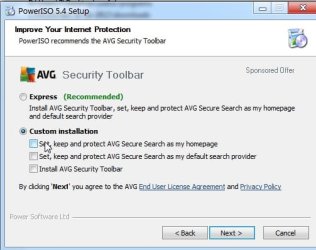
Tick custom when installing poweriso to avoid the toolbar

pisocustom.jpg

pisoextract.jpg

Pretty straightforward isn't it?
 

My Computers My Computers

System One System Two

  • Computer type
    PC/Desktop
    OS
    7 X64
    CPU
    i5 8400
    Motherboard
    gigabyte b365m ds3h
    Memory
    2x8gb 3200mhz
    Hard Drives
    various
    PSU
    pure power 11 400w cm
    Case
    Coolermaster
    Cooling
    cryorig m9i
  • Computer type
    PC/Desktop
    OS
    7x64
    CPU
    g5400
    Motherboard
    ga b365m ds3h
    Memory
    8gb ddr4 2400
    PSU
    xfx pro 450w
can i not complete any of this by simply using Macrium Reflect? I would rather not use any other 3rd party software as this is sounding very complex... can it not simply be done in the program im currently using?
 

My Computer My Computer

Computer Manufacturer/Model Number
Home Built
OS
7 ultimate 64
CPU
Core 2 Quad 9650
Motherboard
GA-EP-45-UD3P
Memory
16GB
Graphics Card(s)
GTX 580
Hard Drives
Raid 0
It is not complex - very very simple.

I think the paid version of reflect will do exactly the same thing for you. But you need to download a HUGE thing called WAIK from MS - it is free - but bloody enormous.

I don't know if the free macrium will do all that.

The advantage of doing it yourself is that you can put newer versions in - use the same wim - when mounted, just replace the files in c:\mount\program files\Macrium , with the new ones that you just installed.

No need to download the humungous WAIK from MS.
 

My Computers My Computers

System One System Two

  • Computer type
    PC/Desktop
    OS
    7 X64
    CPU
    i5 8400
    Motherboard
    gigabyte b365m ds3h
    Memory
    2x8gb 3200mhz
    Hard Drives
    various
    PSU
    pure power 11 400w cm
    Case
    Coolermaster
    Cooling
    cryorig m9i
  • Computer type
    PC/Desktop
    OS
    7x64
    CPU
    g5400
    Motherboard
    ga b365m ds3h
    Memory
    8gb ddr4 2400
    PSU
    xfx pro 450w
  • Like
Reactions: whs
I have already downloaded that file, and it was no problem doing so. I would much rather do this from within reflect. Can you please advise me on the steps? I'll buy the software if needed. I want to do it the reflect way.

I clicked on the redish silver cd thing and i chose the recommended WinPE file, not the complete one and I created a recover disc. thats all ive done so far.
 

My Computer My Computer

Computer Manufacturer/Model Number
Home Built
OS
7 ultimate 64
CPU
Core 2 Quad 9650
Motherboard
GA-EP-45-UD3P
Memory
16GB
Graphics Card(s)
GTX 580
Hard Drives
Raid 0
I am not sure with the free version .

I always make my own winpe media.

Maybe whs will tell you how.

If the free version does it - it will be pretty easy - there is probably something called create recovery media - select winpe - and off it goes.

I don't know if automatically hunts for drivers you have installed, or if you have to point at them .
It will tell you.
 

My Computers My Computers

System One System Two

  • Computer type
    PC/Desktop
    OS
    7 X64
    CPU
    i5 8400
    Motherboard
    gigabyte b365m ds3h
    Memory
    2x8gb 3200mhz
    Hard Drives
    various
    PSU
    pure power 11 400w cm
    Case
    Coolermaster
    Cooling
    cryorig m9i
  • Computer type
    PC/Desktop
    OS
    7x64
    CPU
    g5400
    Motherboard
    ga b365m ds3h
    Memory
    8gb ddr4 2400
    PSU
    xfx pro 450w
I am not sure with the free version .

I always make my own winpe media.

Maybe whs will tell you how.

If the free version does it - it will be pretty easy - there is probably something called create recovery media - select winpe - and off it goes.

I don't know if automatically hunts for drivers you have installed, or if you have to point at them .
It will tell you.

Ive done that and it warns me this:
warn1.jpg


I just need to know how to properly do this from using reflect.
 

My Computer My Computer

Computer Manufacturer/Model Number
Home Built
OS
7 ultimate 64
CPU
Core 2 Quad 9650
Motherboard
GA-EP-45-UD3P
Memory
16GB
Graphics Card(s)
GTX 580
Hard Drives
Raid 0
I'm pretty sure it does. It searches for drivers and presents a list of those found. If you want to there is a browse button to go looking for others. I have never had to do that so I'm not sure what to look for. I guess it would be the inf file.
 

My Computer My Computer

Computer type
Laptop
Computer Manufacturer/Model Number
Hewlett-Packard/G62-107SA Notebook
OS
Microsoft Windows 7 Home Premium 64-bit Service Pack 1
CPU
Intel(R) Core(TM) i3 CPU M 330 @ 2.13GHz
Motherboard
Hewlett-Packard 1425
Memory
8 GB DDR3
Graphics Card(s)
Intel(R) HD Graphics
Sound Card
Realtek High Definition Audio
Monitor(s) Displays
Builtin
Screen Resolution
1366 x 768 x 32 bits (4294967296 colors) @ 60 Hz
Hard Drives
250 GB SATA Hard Disk Drive 7200 rpm
2TB Seagate GoFlex USB 2 Drive
1TB Iomega Prestige USB 2 Drive
1.5TB Iomega Prestige USB 2 Drive (Samsung)
2TB WD MyBook Live NAS.
Mouse
Logitech Anywhere MX
Internet Speed
152 Mbs download 10 Mbs upload
Antivirus
Norton 360
Browser
Chrome
Here it is - rescue media wizard


v5: Understanding Rescue CDs and the Macrium rescue environment (Rescue CD, v5)

@Kado - what do you mean you guess? LOL - I posted it all just above.

@ mistachy -From that message it looks like you need the paid version to automatically hunt for your drivers - it is not terribly clear, though.

Looks like if you tick the unsupported drivers, it will ask you to point it to the .inf files - exactly the same as you do dism.

Why don't you ask Nick?
 

My Computers My Computers

System One System Two

  • Computer type
    PC/Desktop
    OS
    7 X64
    CPU
    i5 8400
    Motherboard
    gigabyte b365m ds3h
    Memory
    2x8gb 3200mhz
    Hard Drives
    various
    PSU
    pure power 11 400w cm
    Case
    Coolermaster
    Cooling
    cryorig m9i
  • Computer type
    PC/Desktop
    OS
    7x64
    CPU
    g5400
    Motherboard
    ga b365m ds3h
    Memory
    8gb ddr4 2400
    PSU
    xfx pro 450w
I am afraid that I am of no help here. I have never tried that myself. But the procedure that SIW2 lined out seems to be simple. I would go with that rather than venture on uncharted territory. What can you lose.
 

My Computer My Computer

Computer Manufacturer/Model Number
HP, Dell, Gateway, Toshiba - 4 laptops and 2 desktops
OS
Vista, Windows7, Mint Mate, Zorin, Windows 8
CPU
from 1.6GHz Duo to i7
Monitor(s) Displays
2x HP w2207
Hard Drives
5x HDD, 7x SSD, 12x Externals
Keyboard
with trackball - no mices
Mouse
Trackball mice
Internet Speed
DSL 6000
Okay I will go to macrium support and see if they can advise me how to properly use the software. thanks for your help everyone.
 

My Computer My Computer

Computer Manufacturer/Model Number
Home Built
OS
7 ultimate 64
CPU
Core 2 Quad 9650
Motherboard
GA-EP-45-UD3P
Memory
16GB
Graphics Card(s)
GTX 580
Hard Drives
Raid 0
Hmm, if you figure out how to do it with Macrium, let us know. Would be useful to know.

Btw: I think you need a Macrium Pro version if you want to talk to anybody in Macrium land - even their forum.
 

My Computer My Computer

Computer Manufacturer/Model Number
HP, Dell, Gateway, Toshiba - 4 laptops and 2 desktops
OS
Vista, Windows7, Mint Mate, Zorin, Windows 8
CPU
from 1.6GHz Duo to i7
Monitor(s) Displays
2x HP w2207
Hard Drives
5x HDD, 7x SSD, 12x Externals
Keyboard
with trackball - no mices
Mouse
Trackball mice
Internet Speed
DSL 6000
Thanks kindly for the help. Those are my intentions. Once I learn how to do it this way, and learn what it is im doing exactly, maybe i can learn 3rd party software too. Im not well versed in these processes. This is a bit complicated for me to understand.
 

My Computer My Computer

Computer Manufacturer/Model Number
Home Built
OS
7 ultimate 64
CPU
Core 2 Quad 9650
Motherboard
GA-EP-45-UD3P
Memory
16GB
Graphics Card(s)
GTX 580
Hard Drives
Raid 0
No offence - but are you sure it is a good idea to have a raid setup if you are new to this kind of thing?

If something goes wrong - which it will at some point - you have added some extra complexity.

I suppose as you have done it already - better to just leave it.
 

My Computers My Computers

System One System Two

  • Computer type
    PC/Desktop
    OS
    7 X64
    CPU
    i5 8400
    Motherboard
    gigabyte b365m ds3h
    Memory
    2x8gb 3200mhz
    Hard Drives
    various
    PSU
    pure power 11 400w cm
    Case
    Coolermaster
    Cooling
    cryorig m9i
  • Computer type
    PC/Desktop
    OS
    7x64
    CPU
    g5400
    Motherboard
    ga b365m ds3h
    Memory
    8gb ddr4 2400
    PSU
    xfx pro 450w
Back
Top