Imaging with free Macrium

   Information

This tutorial shows imaging with free Macrium Version 5.0. If you are still using Macrium Version 4.2, go to this Vimeo site where the tutorial of that version is stored.

The Video does not show the recovery part because I have no setup to screen capture it. But Keith (Kado) made this excellent recovery tutorial with text (but no sound) that he captured from a virtual partition.


   Warning


Note that the external disk to which you image must be formatted in NTFS. A disk that is formatted in Fat32 will accept an image, but the recovery programs cannot restore that image. You can, however, mount (open) a Fat32 image as VHD.


   Note
The production of the WinPE recovery CD (which is highly recommended) may take up to 3 hours because Macrium needs to download the 1.7GB WAIK (Windows Application Installation Kit). For your convenience I have uploaded a ready made .iso of the WinPE recovery disc. That can be downloaded in appr. 8 minutes which clearly beats the WAIK download. Once you downloaded and unzipped the folder, you can burn it directly to a CD with e.g. ImgBurn.

Here is the link to my Skydrive site.

Here is an alternate link from FileSwap (courtesy of Gary - Britton30)

I draw your attention to the fact that this WinPE CD can also be used to make images. That may be convenient in case you do not want to install Macrium on your PC.


This video tutorial explains the full cycle of the imaging process which is:

· Initial setups
· Image definition
· Image scheduling
· Image production

The imaging program that was used for this tutorial is free Macrium. But the basic principles are the same for other imaging programs although the user interface will be different.

This video runs for appr. 7 minutes.
There is a related thread on the Vista forum which gives a brief introduction to Macrium followed by a discussion.
You can download the free Macrium edition from here.

Note: If you have a problem with the loudness of the sound output of the video, check the "Loudness Equalization" box in your Playback device. It is under the 'Enhancements' tab.


Last edited by a moderator:
I've not done any dual booting but for windows you might as well include the 100MB partition in each image. That way you always have a recent version. The restore process can leave it out if you want.
 

My Computer My Computer

Computer type
Laptop
Computer Manufacturer/Model Number
Hewlett-Packard/G62-107SA Notebook
OS
Microsoft Windows 7 Home Premium 64-bit Service Pack 1
CPU
Intel(R) Core(TM) i3 CPU M 330 @ 2.13GHz
Motherboard
Hewlett-Packard 1425
Memory
8 GB DDR3
Graphics Card(s)
Intel(R) HD Graphics
Sound Card
Realtek High Definition Audio
Monitor(s) Displays
Builtin
Screen Resolution
1366 x 768 x 32 bits (4294967296 colors) @ 60 Hz
Hard Drives
250 GB SATA Hard Disk Drive 7200 rpm
2TB Seagate GoFlex USB 2 Drive
1TB Iomega Prestige USB 2 Drive
1.5TB Iomega Prestige USB 2 Drive (Samsung)
2TB WD MyBook Live NAS.
Mouse
Logitech Anywhere MX
Internet Speed
152 Mbs download 10 Mbs upload
Antivirus
Norton 360
Browser
Chrome
KADO,

Do we need to make a Rescue CD every time we create a new partition or the internal hard drive status changes or is it a one time thing that looks up all drivers and don't need to unless the new drives/hardware are installed ??

SAM
 

My Computer My Computer

Computer type
Laptop
Computer Manufacturer/Model Number
DELL
OS
WINDOWS 7 Ultimate x64
CPU
Intel (R) Core(TM) i5-2410M CPU @ 2.30GHZ
Motherboard
DELL INC, Model ONJT03
Memory
DDR3 8GIGs
Graphics Card(s)
INTEL R HD GRAPHICS 3000 _NVIDIA
Antivirus
BIT DEFENDER
Browser
CHROME
You only need to make a new rescue CD when the release notes for a program update suggest it.
 

My Computer My Computer

Computer type
Laptop
Computer Manufacturer/Model Number
Hewlett-Packard/G62-107SA Notebook
OS
Microsoft Windows 7 Home Premium 64-bit Service Pack 1
CPU
Intel(R) Core(TM) i3 CPU M 330 @ 2.13GHz
Motherboard
Hewlett-Packard 1425
Memory
8 GB DDR3
Graphics Card(s)
Intel(R) HD Graphics
Sound Card
Realtek High Definition Audio
Monitor(s) Displays
Builtin
Screen Resolution
1366 x 768 x 32 bits (4294967296 colors) @ 60 Hz
Hard Drives
250 GB SATA Hard Disk Drive 7200 rpm
2TB Seagate GoFlex USB 2 Drive
1TB Iomega Prestige USB 2 Drive
1.5TB Iomega Prestige USB 2 Drive (Samsung)
2TB WD MyBook Live NAS.
Mouse
Logitech Anywhere MX
Internet Speed
152 Mbs download 10 Mbs upload
Antivirus
Norton 360
Browser
Chrome
I recommend you have a look at this excellent tutorial that Keith made. It explains the recovery portion of Macrium and shows you how the WinPE CD (WinRE CD - same thing) is used.
 

My Computer My Computer

Computer Manufacturer/Model Number
HP, Dell, Gateway, Toshiba - 4 laptops and 2 desktops
OS
Vista, Windows7, Mint Mate, Zorin, Windows 8
CPU
from 1.6GHz Duo to i7
Monitor(s) Displays
2x HP w2207
Hard Drives
5x HDD, 7x SSD, 12x Externals
Keyboard
with trackball - no mices
Mouse
Trackball mice
Internet Speed
DSL 6000
Thanks Wolfgang. I already posted earlier.
 

My Computer My Computer

Computer type
Laptop
Computer Manufacturer/Model Number
Hewlett-Packard/G62-107SA Notebook
OS
Microsoft Windows 7 Home Premium 64-bit Service Pack 1
CPU
Intel(R) Core(TM) i3 CPU M 330 @ 2.13GHz
Motherboard
Hewlett-Packard 1425
Memory
8 GB DDR3
Graphics Card(s)
Intel(R) HD Graphics
Sound Card
Realtek High Definition Audio
Monitor(s) Displays
Builtin
Screen Resolution
1366 x 768 x 32 bits (4294967296 colors) @ 60 Hz
Hard Drives
250 GB SATA Hard Disk Drive 7200 rpm
2TB Seagate GoFlex USB 2 Drive
1TB Iomega Prestige USB 2 Drive
1.5TB Iomega Prestige USB 2 Drive (Samsung)
2TB WD MyBook Live NAS.
Mouse
Logitech Anywhere MX
Internet Speed
152 Mbs download 10 Mbs upload
Antivirus
Norton 360
Browser
Chrome
Dear KADO and WHS,

I have done a test drive as was suggested by KADO in the few easy steps.

1. Transferred 1.2GB in a 2GB logical partition.
2. Made a backup image using Macrium, was a breeze
3. As the External hard drive was online so I peeked into it and looked at that drives image and Mounted it and it was readily available to view and copy but no DELETE function worked which was great since it was the image that was backed-up.
4. On the actual TEST drive erased 85% of the files and brought it down to 200MB file.
5. Rebooted using MACRIUM Rescue CD and i gotta tell you it is a whole different world for all it does for you (small hick-up will discuss below) = GOODBYE WINDOWS RECOVERY CD and HELLO LOVELY MACRIUM
6. Recovered the whole partition with ease and one interesting thing is before i rebooted through rescue CD i had renamed the partition from TEST VOLUME to TEST DISK. This is the partition that I had made an image of and erased data from
7. As the recovery finished I booted windows normally and found my data in that partition back to normal (restored) as it was before I had erased 85% of the contents.
8. Found the partition named back to TEST VOLUME as the name of the partition was recovered along with its contents.

Now the small HICK-UP
Took me less than 3 minutes to create an image
Took 12-15 minutes for MACRIUM reflect Rescue CD to load drivers with the following message:

(you may need to load drivers for following devices in order to Backup and restore)

USB Controller
Ethernet Controller
Network Controller


It took 5-8 minutes to load drivers for all than it showed message Driver Load Failed
After 15 minutes it displayed the following message

Drivers were found and Loaded for the Following devices:

INTEL(R) Centrino(R) Wireless N1000
RENESAS Electronics USB 3.0 Host Controller
Realtek PCIe GBE Family Controller


I am guessing the drivers are there but is it normal for it to take 15 minutes to look for drivers seems like it ran the entire contents of C: drive to look for these 3 drivers three times over.

I also created a .docx file from the .XML file that it generated.

Please advise what i should do to prevent this lengthy scan for drivers when running MACRIUM's Rescue CD
C: drive is 80 Gigs and the drivers are allover the place not consolidated in one folder.

Should I check for updates from DELL for drivers and Microsoft for any Service Pack 1 updates

View attachment drivers list that failed to load.docx


Thanks
SAM
 
Last edited:

My Computer My Computer

Computer type
Laptop
Computer Manufacturer/Model Number
DELL
OS
WINDOWS 7 Ultimate x64
CPU
Intel (R) Core(TM) i5-2410M CPU @ 2.30GHZ
Motherboard
DELL INC, Model ONJT03
Memory
DDR3 8GIGs
Graphics Card(s)
INTEL R HD GRAPHICS 3000 _NVIDIA
Antivirus
BIT DEFENDER
Browser
CHROME
I've not had any missing driver problems. Was the PE one that you created yourself or was it the one WHS supplied?
 

My Computer My Computer

Computer type
Laptop
Computer Manufacturer/Model Number
Hewlett-Packard/G62-107SA Notebook
OS
Microsoft Windows 7 Home Premium 64-bit Service Pack 1
CPU
Intel(R) Core(TM) i3 CPU M 330 @ 2.13GHz
Motherboard
Hewlett-Packard 1425
Memory
8 GB DDR3
Graphics Card(s)
Intel(R) HD Graphics
Sound Card
Realtek High Definition Audio
Monitor(s) Displays
Builtin
Screen Resolution
1366 x 768 x 32 bits (4294967296 colors) @ 60 Hz
Hard Drives
250 GB SATA Hard Disk Drive 7200 rpm
2TB Seagate GoFlex USB 2 Drive
1TB Iomega Prestige USB 2 Drive
1.5TB Iomega Prestige USB 2 Drive (Samsung)
2TB WD MyBook Live NAS.
Mouse
Logitech Anywhere MX
Internet Speed
152 Mbs download 10 Mbs upload
Antivirus
Norton 360
Browser
Chrome
Quick question

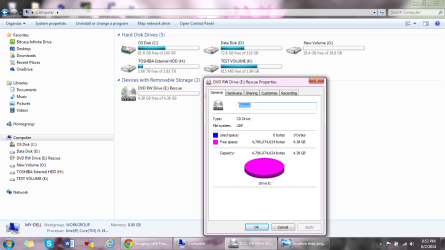
Please explain to me why the rescue DVD RW that I made using MACRIUM REFLECT works like a charm but it doesn't show any data on it, under properties shows 0 bytes used and all bytes under FREE and Available
Please see this image RESCUE DVD 0 bytes used.png


for your Question above KADO
I had downloaded the PE that WHS had supplied but when the WIN PE started downloading i just didn't care and waited as it took no more than 3.5 minutes and was all done. I must have a fast connection I guess.
do you think perhaps the one that WHS supplied in the link will work better and remove this hick-up ???
 

My Computer My Computer

Computer type
Laptop
Computer Manufacturer/Model Number
DELL
OS
WINDOWS 7 Ultimate x64
CPU
Intel (R) Core(TM) i5-2410M CPU @ 2.30GHZ
Motherboard
DELL INC, Model ONJT03
Memory
DDR3 8GIGs
Graphics Card(s)
INTEL R HD GRAPHICS 3000 _NVIDIA
Antivirus
BIT DEFENDER
Browser
CHROME
I don't know why it appears empty but the iso is less than 200MB.


I was thinking the reverse. When you created the PE did it scan for and load drivers? It should pick up all the drivers you need at that time so you don't need to go find them when you boot the PE.

Maybe WHS has some ideas.
 

My Computer My Computer

Computer type
Laptop
Computer Manufacturer/Model Number
Hewlett-Packard/G62-107SA Notebook
OS
Microsoft Windows 7 Home Premium 64-bit Service Pack 1
CPU
Intel(R) Core(TM) i3 CPU M 330 @ 2.13GHz
Motherboard
Hewlett-Packard 1425
Memory
8 GB DDR3
Graphics Card(s)
Intel(R) HD Graphics
Sound Card
Realtek High Definition Audio
Monitor(s) Displays
Builtin
Screen Resolution
1366 x 768 x 32 bits (4294967296 colors) @ 60 Hz
Hard Drives
250 GB SATA Hard Disk Drive 7200 rpm
2TB Seagate GoFlex USB 2 Drive
1TB Iomega Prestige USB 2 Drive
1.5TB Iomega Prestige USB 2 Drive (Samsung)
2TB WD MyBook Live NAS.
Mouse
Logitech Anywhere MX
Internet Speed
152 Mbs download 10 Mbs upload
Antivirus
Norton 360
Browser
Chrome
DEAR WHS,

Please shed some light on it

I just looked up DELL's site for driver updates and seems like there are several, should that make any changes to the way MACRIUM behaves after the drivers update install ??

Thanks KADO
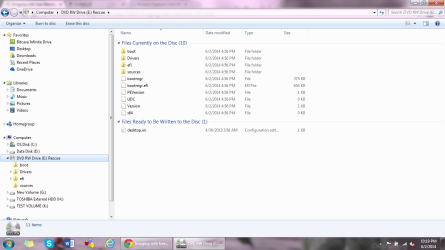
BTW here is the folder image i just looked at and you are right it has folders and files in it, don't understand why it shows as empty int he previous image

MACRIUM RESCUE DVD Folder shows DATA.png

SAM
 

My Computer My Computer

Computer type
Laptop
Computer Manufacturer/Model Number
DELL
OS
WINDOWS 7 Ultimate x64
CPU
Intel (R) Core(TM) i5-2410M CPU @ 2.30GHZ
Motherboard
DELL INC, Model ONJT03
Memory
DDR3 8GIGs
Graphics Card(s)
INTEL R HD GRAPHICS 3000 _NVIDIA
Antivirus
BIT DEFENDER
Browser
CHROME
That looks like it should Sam.
 

My Computer My Computer

Computer type
Laptop
Computer Manufacturer/Model Number
Hewlett-Packard/G62-107SA Notebook
OS
Microsoft Windows 7 Home Premium 64-bit Service Pack 1
CPU
Intel(R) Core(TM) i3 CPU M 330 @ 2.13GHz
Motherboard
Hewlett-Packard 1425
Memory
8 GB DDR3
Graphics Card(s)
Intel(R) HD Graphics
Sound Card
Realtek High Definition Audio
Monitor(s) Displays
Builtin
Screen Resolution
1366 x 768 x 32 bits (4294967296 colors) @ 60 Hz
Hard Drives
250 GB SATA Hard Disk Drive 7200 rpm
2TB Seagate GoFlex USB 2 Drive
1TB Iomega Prestige USB 2 Drive
1.5TB Iomega Prestige USB 2 Drive (Samsung)
2TB WD MyBook Live NAS.
Mouse
Logitech Anywhere MX
Internet Speed
152 Mbs download 10 Mbs upload
Antivirus
Norton 360
Browser
Chrome
I regularily get this driver message and have always ingnored it without any consequences. Try that next time.
 

My Computer My Computer

Computer Manufacturer/Model Number
HP, Dell, Gateway, Toshiba - 4 laptops and 2 desktops
OS
Vista, Windows7, Mint Mate, Zorin, Windows 8
CPU
from 1.6GHz Duo to i7
Monitor(s) Displays
2x HP w2207
Hard Drives
5x HDD, 7x SSD, 12x Externals
Keyboard
with trackball - no mices
Mouse
Trackball mice
Internet Speed
DSL 6000
Dear KADO and WHS,


Many thanks to your awesome cooperation and total support to get me up and running in no time with something i never used before knowing full well that i just came out of a disaster and unwilling to try anything new that could provoke irreversible circumstances.

Came out like a shining star with an excellent and free Total backup solution.


KADO,

My Next stop is Free_File_SYNC and I will hit you guys for it. That will be like an icing on the cake.

After that i will look around to get assistance to Dual-Boot safely with UBUNTU, avoiding BOOTING issue that became the very reason for our introduction, and progress towards setting up networking labs at home .

Best Regards
SAM
 

My Computer My Computer

Computer type
Laptop
Computer Manufacturer/Model Number
DELL
OS
WINDOWS 7 Ultimate x64
CPU
Intel (R) Core(TM) i5-2410M CPU @ 2.30GHZ
Motherboard
DELL INC, Model ONJT03
Memory
DDR3 8GIGs
Graphics Card(s)
INTEL R HD GRAPHICS 3000 _NVIDIA
Antivirus
BIT DEFENDER
Browser
CHROME
If you want my 5 cents worth, do not dual boot with Ubuntu - that's nothing but headaches. Run Ubuntu in a virtual system. That has a lot of advantages and is completely trouble free. I run 5 Linux systems like that and performance is excellent - even running them from external disks. To get you started, have a look at this tutorial I made for the purpose. I use Mint, but Ubuntu is the exact same installation process. Only the Mint system setup portion would not apply.

Another neat option is to run from a USB flash drive. Here again I have a tutorial which you may want to consider. I use again Mint Mate as the example because I think it is far better than Ubuntu (but that is personal taste). Watch my demo video then you will understand.
 

My Computer My Computer

Computer Manufacturer/Model Number
HP, Dell, Gateway, Toshiba - 4 laptops and 2 desktops
OS
Vista, Windows7, Mint Mate, Zorin, Windows 8
CPU
from 1.6GHz Duo to i7
Monitor(s) Displays
2x HP w2207
Hard Drives
5x HDD, 7x SSD, 12x Externals
Keyboard
with trackball - no mices
Mouse
Trackball mice
Internet Speed
DSL 6000
I agree with WHS on the dual boot. I also run Linux Mint and Ubuntu in virtual machines and Puppy Linux from a USB stick. Much less hassle.
 

My Computer My Computer

Computer type
Laptop
Computer Manufacturer/Model Number
Hewlett-Packard/G62-107SA Notebook
OS
Microsoft Windows 7 Home Premium 64-bit Service Pack 1
CPU
Intel(R) Core(TM) i3 CPU M 330 @ 2.13GHz
Motherboard
Hewlett-Packard 1425
Memory
8 GB DDR3
Graphics Card(s)
Intel(R) HD Graphics
Sound Card
Realtek High Definition Audio
Monitor(s) Displays
Builtin
Screen Resolution
1366 x 768 x 32 bits (4294967296 colors) @ 60 Hz
Hard Drives
250 GB SATA Hard Disk Drive 7200 rpm
2TB Seagate GoFlex USB 2 Drive
1TB Iomega Prestige USB 2 Drive
1.5TB Iomega Prestige USB 2 Drive (Samsung)
2TB WD MyBook Live NAS.
Mouse
Logitech Anywhere MX
Internet Speed
152 Mbs download 10 Mbs upload
Antivirus
Norton 360
Browser
Chrome
The Ethernet and Network drivers are not needed for a restore. It just sees that equipment and asks for the drivers. The USB 3 driver can be handy if you are using a USB 3 external disk on a USB 3 port. Other wise you have to use a USB 2 port.

Jim:cool:
 

My Computer My Computer

Computer type
PC/Desktop
Computer Manufacturer/Model Number
Home Built
OS
Windows 8.1 Pro w/Media Center 64bit, Windows 7 HP 64bit
CPU
Phenom II X6 1100T
Motherboard
ASUS M5A99X EVO
Memory
Crucial Balistic 8gb DDR3-1866 CL9
Graphics Card(s)
MSI R6850 Cyclone IGD5 PE
Sound Card
On Board
Monitor(s) Displays
ASUS VE258Q 25" LED with DVI-HDMI-DisplayPort
Screen Resolution
1920 x 1080
Hard Drives
Two WD Cavier Black 2TB Sata III, WD My Book Essential 2TB USB 3.0
PSU
Seasonic X650 80 Plus GOLD Modular
Case
Corsair 400R
Cooling
Antec Kuhler H2O 620, Two 120mm and four 140mm
Keyboard
Logitech K120
Mouse
Logitech Marble Mouse USB, Logitech Precision Game Pad
Internet Speed
15MB
Antivirus
Norton IS 2013, Malwarebytes Pro Beta 2
Browser
IE-11, FF-27
Other Info
APC UPS ES 750, Netgear WNR3500L Gigabit & Wireless N Router with SamKnows Test Program, Motorola SB6120 Gigabit Cable Modem. Brother HL-2170W Laser Printer, Epson V300 Scanner
Dear WHS and KADO,

I must have UBUNTU installed since i am using it to make Networking LABS at home and UBUNTU OS has far better understanding than WIN7 of few major important utilities that i need to make the Virtual LAB interact with LIVE GEAR at home. It has been done successfully as I am on the GNS3 Forum and so have been there Instructions. There steps are pretty simple but the mistakes to watch out for are not mentioned there at least as of yet. Therefore I have been reaching out to you guys for support ever since i made the awful blunder of making my laptop unbootable.
Will just have to be careful

WHS /KADO ,

Could you please Elaborate what kind of headaches i could run into since i will only boot UBUNTU when working with the lab equipment and WIN7 will be the one that i will normally use ?? would like to know before hand from users like yourselves and KADO that have ran into issues with DUAL BOOT to watch out for the GAPS and avoid them if and when possible.

With Regards
SAM :D
 

My Computer My Computer

Computer type
Laptop
Computer Manufacturer/Model Number
DELL
OS
WINDOWS 7 Ultimate x64
CPU
Intel (R) Core(TM) i5-2410M CPU @ 2.30GHZ
Motherboard
DELL INC, Model ONJT03
Memory
DDR3 8GIGs
Graphics Card(s)
INTEL R HD GRAPHICS 3000 _NVIDIA
Antivirus
BIT DEFENDER
Browser
CHROME
I'll leave this to Wolfgang ans others to answer since my knowledge of dual boot is second hand.
 

My Computer My Computer

Computer type
Laptop
Computer Manufacturer/Model Number
Hewlett-Packard/G62-107SA Notebook
OS
Microsoft Windows 7 Home Premium 64-bit Service Pack 1
CPU
Intel(R) Core(TM) i3 CPU M 330 @ 2.13GHz
Motherboard
Hewlett-Packard 1425
Memory
8 GB DDR3
Graphics Card(s)
Intel(R) HD Graphics
Sound Card
Realtek High Definition Audio
Monitor(s) Displays
Builtin
Screen Resolution
1366 x 768 x 32 bits (4294967296 colors) @ 60 Hz
Hard Drives
250 GB SATA Hard Disk Drive 7200 rpm
2TB Seagate GoFlex USB 2 Drive
1TB Iomega Prestige USB 2 Drive
1.5TB Iomega Prestige USB 2 Drive (Samsung)
2TB WD MyBook Live NAS.
Mouse
Logitech Anywhere MX
Internet Speed
152 Mbs download 10 Mbs upload
Antivirus
Norton 360
Browser
Chrome
Over to you WHS,

Will wait for your assistance as it is always appreciated.


Thanks to all

SAM
 

My Computer My Computer

Computer type
Laptop
Computer Manufacturer/Model Number
DELL
OS
WINDOWS 7 Ultimate x64
CPU
Intel (R) Core(TM) i5-2410M CPU @ 2.30GHZ
Motherboard
DELL INC, Model ONJT03
Memory
DDR3 8GIGs
Graphics Card(s)
INTEL R HD GRAPHICS 3000 _NVIDIA
Antivirus
BIT DEFENDER
Browser
CHROME
No issues here

I haven't had any issues dual booting W7 Ultimate SP1 (64 bit) with:

  • Ubuntu 10.04 (64 bit)
  • Linux Mint 14 MATE (64 bit) to Linux Mint MATE 17 (64 bit)

Note:


  1. My motherboards have all been BIOS based (not EFI)
  2. I pre-partitioned my OS HDD, so I do not have the W7 System Reserved partition.
 

My Computer My Computer

Computer type
PC/Desktop
Computer Manufacturer/Model Number
n/a
OS
W7 Ultimate SP1, LM19.2 MATE, W10 Home 1703, W10 Pro 1703 VM, #All 64 bit
CPU
AMD Phenom II x6 1100T, 3.3 GHz
Motherboard
ASUS M4A88T-M/USB3 (AM3)
Memory
12GB DDR3 1333 G-Skill (4GB x 2), G-Skill (2GB x 2)
Graphics Card(s)
NVIDIA GeForce GTX 660
Sound Card
Realtek?
Monitor(s) Displays
Samsung S23B350
Screen Resolution
1920x1080
Hard Drives
WD Green 2TB (SATA), WD Green 3TB (SATA), WD Blue 4TB (SATA), WD Blue 6TB (SATA)
PSU
Cooler Master
Case
Antec GX300 Tower
Cooling
3x Antec TRICOOL 120mm Fans
Mouse
Wired Optical
Internet Speed
DSL
Antivirus
Avast
Browser
Pale Moon (64 bit)
Other Info
2018-12-27 Upgraded HDDs
2015-12-10 Upgraded case, graphics card, storage
2015-08-15 Upgraded motherboard & RAM
2015-07-15 Upgraded LM17.1 to LM17.2
Back
Top