Imaging with free Macrium

   Information

This tutorial shows imaging with free Macrium Version 5.0. If you are still using Macrium Version 4.2, go to this Vimeo site where the tutorial of that version is stored.

The Video does not show the recovery part because I have no setup to screen capture it. But Keith (Kado) made this excellent recovery tutorial with text (but no sound) that he captured from a virtual partition.


   Warning


Note that the external disk to which you image must be formatted in NTFS. A disk that is formatted in Fat32 will accept an image, but the recovery programs cannot restore that image. You can, however, mount (open) a Fat32 image as VHD.


   Note
The production of the WinPE recovery CD (which is highly recommended) may take up to 3 hours because Macrium needs to download the 1.7GB WAIK (Windows Application Installation Kit). For your convenience I have uploaded a ready made .iso of the WinPE recovery disc. That can be downloaded in appr. 8 minutes which clearly beats the WAIK download. Once you downloaded and unzipped the folder, you can burn it directly to a CD with e.g. ImgBurn.

Here is the link to my Skydrive site.

Here is an alternate link from FileSwap (courtesy of Gary - Britton30)

I draw your attention to the fact that this WinPE CD can also be used to make images. That may be convenient in case you do not want to install Macrium on your PC.


This video tutorial explains the full cycle of the imaging process which is:

· Initial setups
· Image definition
· Image scheduling
· Image production

The imaging program that was used for this tutorial is free Macrium. But the basic principles are the same for other imaging programs although the user interface will be different.

This video runs for appr. 7 minutes.
There is a related thread on the Vista forum which gives a brief introduction to Macrium followed by a discussion.
You can download the free Macrium edition from here.

Note: If you have a problem with the loudness of the sound output of the video, check the "Loudness Equalization" box in your Playback device. It is under the 'Enhancements' tab.


Last edited by a moderator:
@ Laurie

Yes because the MBR relates to the physical drive not the specific logical drive
Correct

The MBR holds the information on how the logical partitions, containing file systems, are organized on that medium. Besides that, the MBR also contains executable code to function as a loader for the installed operating system—usually by passing control over to the loader's second stage, or in conjunction with each partition's volume boot record (VBR). This MBR code is usually referred to as a boot loader.

Source
 

My Computer

Computer Manufacturer/Model Number
HP, Dell, Gateway, Toshiba - 4 laptops and 2 desktops
OS
Vista, Windows7, Mint Mate, Zorin, Windows 8
CPU
from 1.6GHz Duo to i7
Monitor(s) Displays
2x HP w2207
Hard Drives
5x HDD, 7x SSD, 12x Externals
Keyboard
with trackball - no mices
Mouse
Trackball mice
Internet Speed
DSL 6000
That's the piece I was missing - I just didn't see that tiny link at the bottom of the Window.
This tallies up nicely with my earlier post . :)
This is one of the reasons why I preferred the Reflect v4 GUI.
The Restore Wizard exposed these various options, instead of relying on the user to discover the settings hidden behind tiny links.
 

My Computer

Computer type
PC/Desktop
Computer Manufacturer/Model Number
n/a
OS
W7 Ultimate SP1, LM19.2 MATE, W10 Home 1703, W10 Pro 1703 VM, #All 64 bit
CPU
AMD Phenom II x6 1100T, 3.3 GHz
Motherboard
ASUS M4A88T-M/USB3 (AM3)
Memory
12GB DDR3 1333 G-Skill (4GB x 2), G-Skill (2GB x 2)
Graphics Card(s)
NVIDIA GeForce GTX 660
Sound Card
Realtek?
Monitor(s) Displays
Samsung S23B350
Screen Resolution
1920x1080
Hard Drives
WD Green 2TB (SATA), WD Green 3TB (SATA), WD Blue 4TB (SATA), WD Blue 6TB (SATA)
PSU
Cooler Master
Case
Antec GX300 Tower
Cooling
3x Antec TRICOOL 120mm Fans
Mouse
Wired Optical
Internet Speed
DSL
Antivirus
Avast
Browser
Pale Moon (64 bit)
Other Info
2018-12-27 Upgraded HDDs
2015-12-10 Upgraded case, graphics card, storage
2015-08-15 Upgraded motherboard & RAM
2015-07-15 Upgraded LM17.1 to LM17.2
I once took Macrium to task for confusing MBR and VBR in their documentation. I wonder if they have corrected it yet.
 

My Computer

Computer type
Laptop
Computer Manufacturer/Model Number
Hewlett-Packard/G62-107SA Notebook
OS
Microsoft Windows 7 Home Premium 64-bit Service Pack 1
CPU
Intel(R) Core(TM) i3 CPU M 330 @ 2.13GHz
Motherboard
Hewlett-Packard 1425
Memory
8 GB DDR3
Graphics Card(s)
Intel(R) HD Graphics
Sound Card
Realtek High Definition Audio
Monitor(s) Displays
Builtin
Screen Resolution
1366 x 768 x 32 bits (4294967296 colors) @ 60 Hz
Hard Drives
250 GB SATA Hard Disk Drive 7200 rpm
2TB Seagate GoFlex USB 2 Drive
1TB Iomega Prestige USB 2 Drive
1.5TB Iomega Prestige USB 2 Drive (Samsung)
2TB WD MyBook Live NAS.
Mouse
Logitech Anywhere MX
Internet Speed
152 Mbs download 10 Mbs upload
Antivirus
Norton 360
Browser
Chrome
@ Laurie

Yes because the MBR relates to the physical drive not the specific logical drive
Correct

The MBR holds the information on how the logical partitions, containing file systems, are organized on that medium. Besides that, the MBR also contains executable code to function as a loader for the installed operating system—usually by passing control over to the loader's second stage, or in conjunction with each partition's volume boot record (VBR). This MBR code is usually referred to as a boot loader.

Source


To steal from Professor Higgins, "I think [I've] got it!"


And if that reference isn't familiar, let me know


Thanks again :)
 

My Computer

Computer type
Laptop
Computer Manufacturer/Model Number
ProStar Model P157SM-A
OS
Windows 7 Professional 64 bit SP 1
CPU
Intel Core i7-4710 MQ
Motherboard
No info
Memory
16 GB
Graphics Card(s)
NVIDIA GeForce GTX 870M
Hard Drives
256 GB Samsung SSD
1TB 7200 RPM Hard Drive
Antivirus
Norton Internet Security
Browser
Internet Explorer and Mozilla Firefox
The option is there in case you have changed it. You may a custom mbr, which is now different , so you may not want to overwrite from a backup.
 

My Computers

System One System Two

  • Computer type
    PC/Desktop
    OS
    7 X64
    CPU
    i5 8400
    Motherboard
    gigabyte b365m ds3h
    Memory
    2x8gb 3200mhz
    Hard Drives
    various
    PSU
    pure power 11 400w cm
    Case
    Coolermaster
    Cooling
    cryorig m9i
  • Computer type
    PC/Desktop
    OS
    7x64
    CPU
    g5400
    Motherboard
    ga b365m ds3h
    Memory
    8gb ddr4 2400
    PSU
    xfx pro 450w
The option is there in case you have changed it. You may a custom mbr, which is now different , so you may not want to overwrite from a backup.
A specific example of this would be if you made some partition changes since the system image was made. The new MBR will contain the new partition table and you don't want to restore an MBR with an old partition table.
 
Last edited:

My Computer

Computer type
PC/Desktop
Computer Manufacturer/Model Number
Own build
OS
Windows 7x64 Home Premium SP1
CPU
Intel i7 2600k
Motherboard
ASUS P8Z68 Deluxe
Memory
G.Skill Ripjaws (DDR3-1600) 2x4GB
Graphics Card(s)
Nvidia GeForce GTS 450; Intel HD Graphics 3000(GT2+)
Monitor(s) Displays
Dell Ultrasharp IPS panel U2311H, Samsung SyncMaster P2350
Screen Resolution
1920x1080
Hard Drives
Samsung 850 Pro SSD 256GB, Samsung SSD 840 120GB, Seagates 1TB Barracuda ST31000528AS x2
PSU
Seasonic M12II 520W
Case
Lian Li Lancool PC-K60
Cooling
Case: 1x120mm, 3x140mm CPU: Hyper 212+
Keyboard
Logitech MK520 (wireless)
Mouse
Logitech MK520
Internet Speed
6-7 Mbps
Antivirus
Norton Security Premium, Malwarebytes on 2 (MSE on 3rd PC)
Browser
FireFox
Other Info
Audio: Logitech Z523 2.1
It shouldn't affect the partition table.
 

My Computers

System One System Two

  • Computer type
    PC/Desktop
    OS
    7 X64
    CPU
    i5 8400
    Motherboard
    gigabyte b365m ds3h
    Memory
    2x8gb 3200mhz
    Hard Drives
    various
    PSU
    pure power 11 400w cm
    Case
    Coolermaster
    Cooling
    cryorig m9i
  • Computer type
    PC/Desktop
    OS
    7x64
    CPU
    g5400
    Motherboard
    ga b365m ds3h
    Memory
    8gb ddr4 2400
    PSU
    xfx pro 450w
It shouldn't affect the partition table.
Yes it will. The partition table is towards the end of the 512 byte MBR. If you change the partition structure after your last Macrium image then you can do a Macrium image restore but don't not change the MBR using the old one. If you do change the MBR then you will not be able to access any new or altered partition size and location. The MBR contains 2 main key components:
- Boot code
- Partition table information including size, location, active status etc.

Windows system imaging will definitely not allow you to do this but Macrium should. Mind you - I have not actually tried it.
 

My Computer

Computer type
PC/Desktop
Computer Manufacturer/Model Number
Own build
OS
Windows 7x64 Home Premium SP1
CPU
Intel i7 2600k
Motherboard
ASUS P8Z68 Deluxe
Memory
G.Skill Ripjaws (DDR3-1600) 2x4GB
Graphics Card(s)
Nvidia GeForce GTS 450; Intel HD Graphics 3000(GT2+)
Monitor(s) Displays
Dell Ultrasharp IPS panel U2311H, Samsung SyncMaster P2350
Screen Resolution
1920x1080
Hard Drives
Samsung 850 Pro SSD 256GB, Samsung SSD 840 120GB, Seagates 1TB Barracuda ST31000528AS x2
PSU
Seasonic M12II 520W
Case
Lian Li Lancool PC-K60
Cooling
Case: 1x120mm, 3x140mm CPU: Hyper 212+
Keyboard
Logitech MK520 (wireless)
Mouse
Logitech MK520
Internet Speed
6-7 Mbps
Antivirus
Norton Security Premium, Malwarebytes on 2 (MSE on 3rd PC)
Browser
FireFox
Other Info
Audio: Logitech Z523 2.1
It shouldn't affect the partition table.
Yes it will. The partition table is towards the end of the 512 byte MBR. If you change the partition structure after your last Macrium image then you can do a Macrium image restore but don't not change the MBR using the old one. If you do change the MBR then you will not be able to access any new or altered partition size and location. The MBR contains 2 main key components:
- Boot code
- Partition table information including size, location, active status etc.

Windows system imaging will definitely not allow you to do this but Macrium should. Mind you - I have not actually tried it.

If I think I might need to rebuild a damaged partition table on an external HD where a "resize partition" operation somehow got interrupted, am I right in assuming that Partition Wizard rather than Macrium is the right tool to consider?

(The HDD partition is not part of any image, and my assumption is that the only thing I could do with Macrium would be restore an MBR that has been saved as part of an image. I'm still trying to learn all these tools) :p
 

My Computer

Computer type
Laptop
Computer Manufacturer/Model Number
ProStar Model P157SM-A
OS
Windows 7 Professional 64 bit SP 1
CPU
Intel Core i7-4710 MQ
Motherboard
No info
Memory
16 GB
Graphics Card(s)
NVIDIA GeForce GTX 870M
Hard Drives
256 GB Samsung SSD
1TB 7200 RPM Hard Drive
Antivirus
Norton Internet Security
Browser
Internet Explorer and Mozilla Firefox
Partition Wizard can recover lost and damaged partitions.
 

My Computer

Computer type
Laptop
Computer Manufacturer/Model Number
Hewlett-Packard/G62-107SA Notebook
OS
Microsoft Windows 7 Home Premium 64-bit Service Pack 1
CPU
Intel(R) Core(TM) i3 CPU M 330 @ 2.13GHz
Motherboard
Hewlett-Packard 1425
Memory
8 GB DDR3
Graphics Card(s)
Intel(R) HD Graphics
Sound Card
Realtek High Definition Audio
Monitor(s) Displays
Builtin
Screen Resolution
1366 x 768 x 32 bits (4294967296 colors) @ 60 Hz
Hard Drives
250 GB SATA Hard Disk Drive 7200 rpm
2TB Seagate GoFlex USB 2 Drive
1TB Iomega Prestige USB 2 Drive
1.5TB Iomega Prestige USB 2 Drive (Samsung)
2TB WD MyBook Live NAS.
Mouse
Logitech Anywhere MX
Internet Speed
152 Mbs download 10 Mbs upload
Antivirus
Norton 360
Browser
Chrome
(The HDD partition is not part of any image, and my assumption is that the only thing I could do with Macrium would be restore an MBR that has been saved as part of an image. I'm still trying to learn all these tools) :p
I would also opt for Partition Wizard in this case.
I would keep learning how to use Macrium since system imaging is your best security.
 

My Computer

Computer type
PC/Desktop
Computer Manufacturer/Model Number
Own build
OS
Windows 7x64 Home Premium SP1
CPU
Intel i7 2600k
Motherboard
ASUS P8Z68 Deluxe
Memory
G.Skill Ripjaws (DDR3-1600) 2x4GB
Graphics Card(s)
Nvidia GeForce GTS 450; Intel HD Graphics 3000(GT2+)
Monitor(s) Displays
Dell Ultrasharp IPS panel U2311H, Samsung SyncMaster P2350
Screen Resolution
1920x1080
Hard Drives
Samsung 850 Pro SSD 256GB, Samsung SSD 840 120GB, Seagates 1TB Barracuda ST31000528AS x2
PSU
Seasonic M12II 520W
Case
Lian Li Lancool PC-K60
Cooling
Case: 1x120mm, 3x140mm CPU: Hyper 212+
Keyboard
Logitech MK520 (wireless)
Mouse
Logitech MK520
Internet Speed
6-7 Mbps
Antivirus
Norton Security Premium, Malwarebytes on 2 (MSE on 3rd PC)
Browser
FireFox
Other Info
Audio: Logitech Z523 2.1
I would keep learning how to use Macrium since system imaging is your best security.

Yep, I have a Macrium image of my new laptop, stored safely on a spare external HDD.

Now I have to repair my primary external HDD so I can use it to store all my backups going forward. It has some old backups (my old laptop plus a bunch of old files) that I want to preserve if I can while I do the fix.

I do not want to appear to be hijacking this thread, so I will let it go at that. I started a separate thread to address my partition failure/restoral problem, will work the details there. Thanks!
 

My Computer

Computer type
Laptop
Computer Manufacturer/Model Number
ProStar Model P157SM-A
OS
Windows 7 Professional 64 bit SP 1
CPU
Intel Core i7-4710 MQ
Motherboard
No info
Memory
16 GB
Graphics Card(s)
NVIDIA GeForce GTX 870M
Hard Drives
256 GB Samsung SSD
1TB 7200 RPM Hard Drive
Antivirus
Norton Internet Security
Browser
Internet Explorer and Mozilla Firefox
Your PE Image

It didn't work for me, but I created a new one from Macrium and it did work.
 

My Computer

OS
Windows 7 Professional x64

My Computer

Computer Manufacturer/Model Number
HP, Dell, Gateway, Toshiba - 4 laptops and 2 desktops
OS
Vista, Windows7, Mint Mate, Zorin, Windows 8
CPU
from 1.6GHz Duo to i7
Monitor(s) Displays
2x HP w2207
Hard Drives
5x HDD, 7x SSD, 12x Externals
Keyboard
with trackball - no mices
Mouse
Trackball mice
Internet Speed
DSL 6000
whs, thanks for your service. I've been updating the Macrium versions throughout the years using your ISO files. Unfortunately, I have to report the first time I've encounter an issue with your latest Rescue 5.3.7299..iso file. I think it may be corrupted because this error appears whenever I attempt to load the Macrium WinPE:

"A winpeshl.ini file is present, but no commands were successfully launched. This could be caused by incorrect formatting or an invalid executable name. Please consult the documentation for more information."

I re-downloaded the file to be sure and also tried to create bootable images on USB using two different version of Rufus portable, so I narrowed out that those weren't the culprit. I had to revert back to your previous 5.3.7220 ISO file to make it work. The first hint seemed to be too good to be true based on the file sizes: 140,480 KB vs 160,320 KB. It's not often I see new versions result in a small size compared to previous versions as software usually becomes bloated over time (unless of course the developer happen to rewrite code to be more efficient).
 

My Computer

Computer type
Laptop
Computer Manufacturer/Model Number
ASUS K52F-A1
OS
Windows 7 Home Premium 64-bit SP1
CPU
Intel Core i3-350M @ 2.27GHz
Motherboard
ASUS K52F
Memory
8GB DDR3
Graphics Card(s)
Intel HD Graphics
Sound Card
Conexant SmartAudio HD
Monitor(s) Displays
Notebook display (disabled) and BenQ EW2420 24" (active)
Screen Resolution
1920 x 1080
Hard Drives
Samsung 840 EVO SSD 120GB
Keyboard
Logitech K120
Mouse
Dell Laser MOCZUL
Antivirus
none
Browser
Opera portable
Other Info
not yet revealed
Thanks for letting me know. I created a new one that I will upload. It is 137MBs.
 

My Computer

Computer Manufacturer/Model Number
HP, Dell, Gateway, Toshiba - 4 laptops and 2 desktops
OS
Vista, Windows7, Mint Mate, Zorin, Windows 8
CPU
from 1.6GHz Duo to i7
Monitor(s) Displays
2x HP w2207
Hard Drives
5x HDD, 7x SSD, 12x Externals
Keyboard
with trackball - no mices
Mouse
Trackball mice
Internet Speed
DSL 6000
WHS:

Is this newest upload that you are doing today known to be fully compatible and non-problematic with UEFI and GPT?

I'm going to be switching to UEFI by year-end and am looking for any pitfalls, particularly concerning Macrium. I have only the free version.
 

My Computer

Computer type
PC/Desktop
Computer Manufacturer/Model Number
Ignatz Special; 4 speed manual gearbox; factory air conditioning; one of one
OS
Windows 7 Home Premium SP1, 64-bit
CPU
Intel Skylake i5-6600K, not overclocked
Motherboard
AsRock Z170M Extreme 4, micro ATX
Memory
8 GB HyperX DDR4-2666 (2 x 4 GB)
Graphics Card(s)
none; graphics are integrated on CPU
Sound Card
onboard: Realtek ALC1150; external: USB Behringer UF0-202
Monitor(s) Displays
Dell S2340M 23 inch IPS
Screen Resolution
1600 x 900
Hard Drives
System: Crucial MX100 series SSD, 128 GB;
Data: Samsung Spinpoint 103SJ, 1 TB;
Backup: WD Caviar Green WD30EZRX-00D8PB0, 3 TB
PSU
Rosewill SilentNight 500 watt fanless, semi-modular
Case
Antec Solo II
Cooling
Noctua NH-U12S; Noctua F12 intake, Noctua S12A exhaust
Keyboard
Microsoft 200 6JH-00001 USB
Mouse
Dell or Microsoft optical wired; USB
Antivirus
Microsoft Security Essentials and Malwarebytes Premium
Browser
Pale Moon
Other Info
All fans PWM; speeds at idle: CPU circa 500 rpm; intake circa 600 rpm; exhaust circa 600 rpm; CPU temps 27 idle and 47 C load in a warm room (27 C/81 F) when running Intel Extreme Tuning Utility stress test.
WHS:

Is this newest upload that you are doing today known to be fully compatible and non-problematic with UEFI and GPT?

I'm going to be switching to UEFI by year-end and am looking for any pitfalls, particularly concerning Macrium. I have only the free version.

It is from the latest Macrium release (5.3.7299)and as far as I know it can handle UEFI. But by year end there will probably a later release.
 

My Computer

Computer Manufacturer/Model Number
HP, Dell, Gateway, Toshiba - 4 laptops and 2 desktops
OS
Vista, Windows7, Mint Mate, Zorin, Windows 8
CPU
from 1.6GHz Duo to i7
Monitor(s) Displays
2x HP w2207
Hard Drives
5x HDD, 7x SSD, 12x Externals
Keyboard
with trackball - no mices
Mouse
Trackball mice
Internet Speed
DSL 6000
as far as I know it can handle UEFI.

Can I take that to mean that you don't know from personal experience?

I see that there is a version 6 plus, at least for the paid version.

Is it a guess, an assumption, or a known fact that the currently uploaded version (5 plus) would NOT restore images made with the future free version 6 as normally installed on a C partition?

I'm just trying to get a better understanding of exactly when I should expect your uploads to NOT bail me out in a critical situation. I very rarely have to restore, but I want to be fully prepared when I move on to UEFI and the dreaded Windows 10---possibly at the same time.
 

My Computer

Computer type
PC/Desktop
Computer Manufacturer/Model Number
Ignatz Special; 4 speed manual gearbox; factory air conditioning; one of one
OS
Windows 7 Home Premium SP1, 64-bit
CPU
Intel Skylake i5-6600K, not overclocked
Motherboard
AsRock Z170M Extreme 4, micro ATX
Memory
8 GB HyperX DDR4-2666 (2 x 4 GB)
Graphics Card(s)
none; graphics are integrated on CPU
Sound Card
onboard: Realtek ALC1150; external: USB Behringer UF0-202
Monitor(s) Displays
Dell S2340M 23 inch IPS
Screen Resolution
1600 x 900
Hard Drives
System: Crucial MX100 series SSD, 128 GB;
Data: Samsung Spinpoint 103SJ, 1 TB;
Backup: WD Caviar Green WD30EZRX-00D8PB0, 3 TB
PSU
Rosewill SilentNight 500 watt fanless, semi-modular
Case
Antec Solo II
Cooling
Noctua NH-U12S; Noctua F12 intake, Noctua S12A exhaust
Keyboard
Microsoft 200 6JH-00001 USB
Mouse
Dell or Microsoft optical wired; USB
Antivirus
Microsoft Security Essentials and Malwarebytes Premium
Browser
Pale Moon
Other Info
All fans PWM; speeds at idle: CPU circa 500 rpm; intake circa 600 rpm; exhaust circa 600 rpm; CPU temps 27 idle and 47 C load in a warm room (27 C/81 F) when running Intel Extreme Tuning Utility stress test.
I have made UEFI images with three W8.1 systems and they look OK. But I had no need yet to restore them.

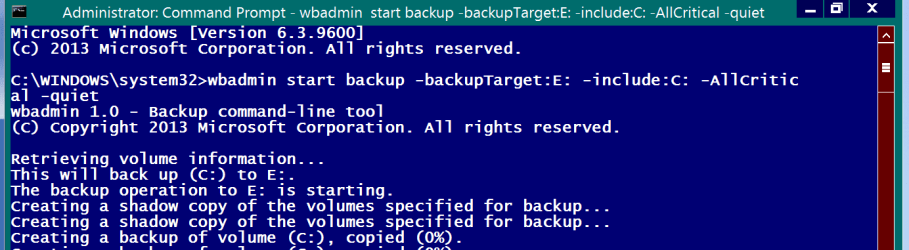
An even easier way is to make an image with Wbadmin. That is also easy for the recovery either via the System Recovery Option of your recovery still works or the installation/repair disc if the system is completely kaput.

All you need to do is run this command:

wbadmin start backup -backupTarget:X: -include:C: -AllCritical -quiet

Where 'X' is the letter of the drive where you want to place the image. All partitions that are needed for a proper operation will be imaged along with C (that's what the -AllCritical does).

I am just now running one in my W8.1. This is a virtual system where I have only C (no Efi partition).
 

Attachments

  • 2015-04-27_1930.png
    2015-04-27_1930.png
    22 KB · Views: 177

My Computer

Computer Manufacturer/Model Number
HP, Dell, Gateway, Toshiba - 4 laptops and 2 desktops
OS
Vista, Windows7, Mint Mate, Zorin, Windows 8
CPU
from 1.6GHz Duo to i7
Monitor(s) Displays
2x HP w2207
Hard Drives
5x HDD, 7x SSD, 12x Externals
Keyboard
with trackball - no mices
Mouse
Trackball mice
Internet Speed
DSL 6000
Back
Top