Because that is actually what people want/ web-based emails stored on their computer,
It was very difficult before and the feature is long overdue,
Lets not forget you can delete them at your convenience,
Cheers.
True enough, I guess...and
if you delete the local copy (on your hard drive), then the copy on the server is still there. 
Okay, well, that's good enough for me.
In fact that is not true.
The main difference between
IMAP and
Exchange mail protocols compared to
POP3 protocol is that both IMAP and Exchange sync the server and local storage. You delete an email on server, next time your client is online it will be synced and the message is also deleted from local computer, or vice versa delete locally, go online and message will be deleted from the server. Only POP3 allows you to choose if deleting a message locally also deletes it from a server, and keeps messages locally even when they are deleted on server.
Here the
Advanced tab of
POP3 mail account settings on Outlook 2013, easy to select what happens to deleted messages and if the server should keep or delete messages already read and stored locally:

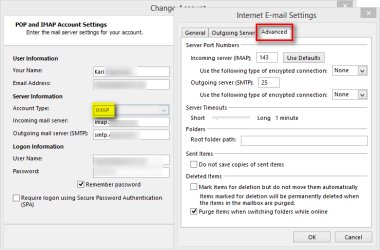
The same option does not even exist on
IMAP account settings:
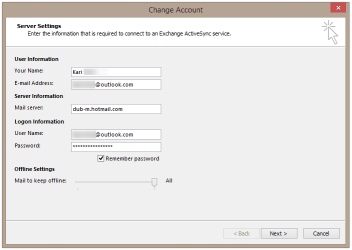
has no other options for user to decide than the time period messages are read from the server (stored offline, locally). Default is
All, all messages since the creation of the account will be downloaded locally. As the full name of the protocol
Exchange ActiveSync reveals everything is always synced:
Conclusion: For Outlook.com mail accounts on a local mail client, you can select IMAP, Exchange or POP3 protocol. If you need to preserve messages locally even when they are deleted on server, or delete locally but keep on server use POP3 protocol. If you would like to keep local mail storage and server synced, select IMAP or Exchange. If you let Outlook 2010 or 2013 to set up an Outlook.com email account automatically, it uses Exchange protocol.
Manual
POP3 settings for
Outlook.com email accounts:
- Incoming Server:
- pop3.live.com
- Port: 995
- Encrypted Connection: SSL
- Outgoing Server:
- smtp.live.com
- Port: 25 or 587
- Authentication: Yes
- Encrypted Connection: TLS
Kari



