Solved IMAP? Why?

robertwnielsen

New member
Power User
VIP
Local time
1:00 PM
Messages
79
I apologize if this has been asked before, but with the announcement of IMAP protocols available for Outlook.com, I have a question. Why do many people like the IMAP mail protocol, since using that protocol causes messages to be stored locally, eating up computer hard drive space?
 

My Computer

OS
Windows 7 Ultimate
CPU
AMD Sempron LE-1150 2.0 Ghz
Motherboard
Gigabyte GA-M61PME-S2
Graphics Card(s)
ATi Radeon HD 3650
Sound Card
Realtek HD Onboard Audio
Monitor(s) Displays
HP 1702
Screen Resolution
1280x1024
Keyboard
Logitech Wireless
Mouse
Logitech Wireless
Internet Speed
7 MB DSL
Because that is actually what people want/ web-based emails stored on their computer,
It was very difficult before and the feature is long overdue,
Lets not forget you can delete them at your convenience,
Cheers.
 

My Computer

Computer type
PC/Desktop
Computer Manufacturer/Model Number
Custom assembled by me :}
OS
Win-7-Pro64bit 7-H-Prem-64bit
CPU
i7-5930K 2nd i9-9940x both water blocked VRM's too
Motherboard
ASUS SABERTOOTH X99 2nd ASUS x299 Apex
Memory
Trident-z 3200C14 2nd Trident-z 3600C16
Graphics Card(s)
EVGA 1080ti ftw3 2nd Titan Xp both water blocked
Sound Card
Built-in Realtek
Monitor(s) Displays
1-AOC G2460PG 24"G-Sync 144Hz/ 2nd 1-ASUS VG248QE 24" 144Hz
Screen Resolution
1920 x 1080 144Hz
Hard Drives
2-Samsung M.2 Evo & Evo Plus
2-Samsung 850 EVO 500GB SSD's/ 3-2.5 W.D. Black 1tb-&3-1tb/3-3.5 WD Black 1tb hdd's
PSU
EVGA SuperNOVA 1000-P2 2nd 1200-P2
Case
2-Corsair Obsidian Series 450D Black ATX Mid Tower
Cooling
Custom water loops
Keyboard
Logitech G710+/ 2nd Logitech G910
Mouse
2-RedDragon M901 Perdition 16400 dpi Gaming mouse = wired
Internet Speed
Comcast Ping 19ms 89.31mbps download speed 6.12mbps upload
Antivirus
Malwarebytes Pro/ Superantispyware Pro
Browser
FireFox & Pale moon
Other Info
2nd ASUS X299 Apex/Intel i9-9940x with Custom water loop/7H-Prem-x64/Corsair 450D case/Ram Trident-z 3600C16 4x8gb / Samsung970Evo plus 500gb SSD/Dual ssd EZ swap evo/PSU EVGA SuperNova 1200w-P2 80+Platinum/GPU Titan Xp /8-ML-140 on push-pull on 2-280GTX rads
Because that is actually what people want/ web-based emails stored on their computer,
It was very difficult before and the feature is long overdue,
Lets not forget you can delete them at your convenience,
Cheers.

True enough, I guess...and if you delete the local copy (on your hard drive), then the copy on the server is still there. :) Okay, well, that's good enough for me. :)
 

My Computer

OS
Windows 7 Ultimate
CPU
AMD Sempron LE-1150 2.0 Ghz
Motherboard
Gigabyte GA-M61PME-S2
Graphics Card(s)
ATi Radeon HD 3650
Sound Card
Realtek HD Onboard Audio
Monitor(s) Displays
HP 1702
Screen Resolution
1280x1024
Keyboard
Logitech Wireless
Mouse
Logitech Wireless
Internet Speed
7 MB DSL

My Computer

OS
Windows 7 Ultimate
CPU
AMD Sempron LE-1150 2.0 Ghz
Motherboard
Gigabyte GA-M61PME-S2
Graphics Card(s)
ATi Radeon HD 3650
Sound Card
Realtek HD Onboard Audio
Monitor(s) Displays
HP 1702
Screen Resolution
1280x1024
Keyboard
Logitech Wireless
Mouse
Logitech Wireless
Internet Speed
7 MB DSL
Because that is actually what people want/ web-based emails stored on their computer,
It was very difficult before and the feature is long overdue,
Lets not forget you can delete them at your convenience,
Cheers.

True enough, I guess...and if you delete the local copy (on your hard drive), then the copy on the server is still there. :) Okay, well, that's good enough for me. :)

In fact that is not true.

The main difference between IMAP and Exchange mail protocols compared to POP3 protocol is that both IMAP and Exchange sync the server and local storage. You delete an email on server, next time your client is online it will be synced and the message is also deleted from local computer, or vice versa delete locally, go online and message will be deleted from the server. Only POP3 allows you to choose if deleting a message locally also deletes it from a server, and keeps messages locally even when they are deleted on server.

Here the Advanced tab of POP3 mail account settings on Outlook 2013, easy to select what happens to deleted messages and if the server should keep or delete messages already read and stored locally:

POP3.png

The same option does not even exist on IMAP account settings:
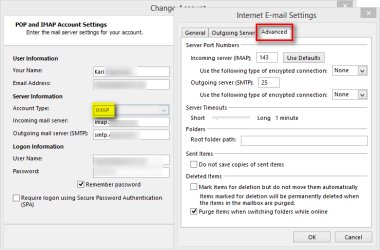
IMAP.png

Exchange has no other options for user to decide than the time period messages are read from the server (stored offline, locally). Default is All, all messages since the creation of the account will be downloaded locally. As the full name of the protocol Exchange ActiveSync reveals everything is always synced:
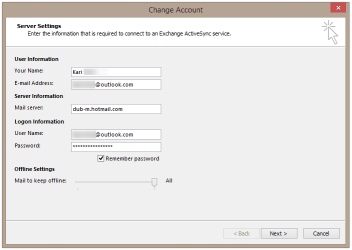
Exchange.png

Conclusion: For Outlook.com mail accounts on a local mail client, you can select IMAP, Exchange or POP3 protocol. If you need to preserve messages locally even when they are deleted on server, or delete locally but keep on server use POP3 protocol. If you would like to keep local mail storage and server synced, select IMAP or Exchange. If you let Outlook 2010 or 2013 to set up an Outlook.com email account automatically, it uses Exchange protocol.

Manual POP3 settings for Outlook.com email accounts:
  • Incoming Server:
    • pop3.live.com
    • Port: 995
    • Encrypted Connection: SSL
  • Outgoing Server:
    • smtp.live.com
    • Port: 25 or 587
    • Authentication: Yes
    • Encrypted Connection: TLS

Kari
 
Last edited:

My Computer

Computer type
Laptop
Computer Manufacturer/Model Number
HP ENVY 17-1150eg
OS
Windows 10 Pro x64 EN-GB
CPU
1.6 GHz Intel Core i7-720QM Processor
Memory
6 GB
Graphics Card(s)
ATI Mobility Radeon HD 5850 Graphics
Sound Card
Beats sound system with integrated subwoofer
Monitor(s) Displays
17" laptop display, 22" LED and 32" Full HD TV through HDMI
Screen Resolution
1600*900 (1), 1920*1080 (2&3)
Hard Drives
Internal: 2 x 500 GB SATA Hard Disk Drive 7200 rpm
External: 2TB for backups, 3TB USB3 network drive for media
Cooling
As Envy runs a bit warm, I have it on a Cooler Master pad
Keyboard
Logitech diNovo Media Desktop Laser (bluetooth)
Mouse
Logitech Performance Mouse MX
Internet Speed
50/10 Mbps VDSL
Antivirus
Windows Defender 4.3.9431.0
Browser
Maxthon 3.5.2., IE11
Back
Top
