
Immediate restart w/ dump files but no BSOD

benbrockn

New member
Member
Local time
7:09 PM
Messages
51
Hello,

I started noticing that my newly built computer suddenly restarts without warning and offers no BSOD. I built it about 3 weeks ago, and originally it did not have this problem. I Googled a solution for no BSOD, and they suggested to do this:
Right Click My Computer -> Properties -> Advanced System Settings -> Advanced Tab -> Under Startup and Recovery click Settings -> untick the box for automatic restart
I haven't turned my computer on in fear of something really breaking, but I was able to get all of the dump files per this post: http://www.sevenforums.com/tutorials/179397-dump-files-upload-sevenforums.html
(I tried to download WinDdg, but the installer from Microsoft kept failing out on my good computer).

I was going to run the dm log collector as it says in the BSOD rules on posting, but I'd rather not take a chance with my newly built computer. I can do that, but I want to minimze the risk (I really can't afford a new build). Attached are the dump files in .zip format.

Specs:
Code:
--Custom Build
--Windows 7 Professional 64-bit
--AMD FX-6300 3.5GHz 6-Core Processor
--Gigabyte GA-78LMT-USB3 Micro ATX AM3+ Motherboard
--Kingston 8GB (2 x 4GB) DDR3-1333 Memory
--Asus Radeon R7 260X 2GB Video Card
--Old (but Healthy according to SMART data) Samsung 250 GB Drive
--Corsair CSM 650W 80+ Gold Certified Semi-Modular ATX
--NZXT Sentry Mix 2 Fan Controller
--Gear Head USB 2.0 4-Port Hub with Energy Saving Switch
--Avast! Free Antivirus
 

Attachments

My Computer My Computer

At a glance

Windows 7 Professional 64-bitAMD FX-6300 3.5GHz 6-Core ProcessorKingston 8GB (2 x 4GB) DDR3-1333 MemoryAsus Radeon R7 260X 2GB Video Card
Computer type
PC/Desktop
Computer Manufacturer/Model Number
Custom Build
OS
Windows 7 Professional 64-bit
CPU
AMD FX-6300 3.5GHz 6-Core Processor
Motherboard
Gigabyte GA-78LMT-USB3 Micro ATX AM3+ Motherboard
Memory
Kingston 8GB (2 x 4GB) DDR3-1333 Memory
Graphics Card(s)
Asus Radeon R7 260X 2GB Video Card
Hard Drives
Old (but Healthy according to SMART data) SeaGate 250 GB Drive
PSU
Corsair CSM 650W 80+ Gold Certified Semi-Modular ATX
Case
Corsair 350D MicroATX Mid Tower
Antivirus
Avast! Free Antivirus
Browser
Firefox
Other Info
--NZXT Sentry Mix 2 Fan Controller
--Gear Head USB 2.0 4-Port Hub with Energy Saving Switch
Update

I had to use my computer last night, no problems for awhile. I start playing some n64 games on it for a few hours hours, seems good, then it randomly restarts again with no blue screen. The checkbox to "automatically restart after errors" was unchecked as I did that earlier, so I'm surprised why there wasn't a blue screen. I have another dump file from it as well.

Can anyone read these dump files for me please??
 

My Computer My Computer

At a glance

Windows 7 Professional 64-bitAMD FX-6300 3.5GHz 6-Core ProcessorKingston 8GB (2 x 4GB) DDR3-1333 MemoryAsus Radeon R7 260X 2GB Video Card
Computer type
PC/Desktop
Computer Manufacturer/Model Number
Custom Build
OS
Windows 7 Professional 64-bit
CPU
AMD FX-6300 3.5GHz 6-Core Processor
Motherboard
Gigabyte GA-78LMT-USB3 Micro ATX AM3+ Motherboard
Memory
Kingston 8GB (2 x 4GB) DDR3-1333 Memory
Graphics Card(s)
Asus Radeon R7 260X 2GB Video Card
Hard Drives
Old (but Healthy according to SMART data) SeaGate 250 GB Drive
PSU
Corsair CSM 650W 80+ Gold Certified Semi-Modular ATX
Case
Corsair 350D MicroATX Mid Tower
Antivirus
Avast! Free Antivirus
Browser
Firefox
Other Info
--NZXT Sentry Mix 2 Fan Controller
--Gear Head USB 2.0 4-Port Hub with Energy Saving Switch

I'm going to request this thread is moved to the BSOD section, in the meantime please run the DM Log Collector as described in the instructions linked at the top of the BSOD forum and post the resulting .zip in your next reply.
 

My Computer My Computer

At a glance

W7 Pro x64 SP1 | W10 Pro IP x64 | W8.1 Pro x6...i7-4790k @ 4GHz (4.4GHz Boost)16GB DDR3 Kingston HyperX Fury @ 1600MHz CL 9...EVGA GTX 980 Classified
Computer type
PC/Desktop
Computer Manufacturer/Model Number
Custom Build
OS
W7 Pro x64 SP1 | W10 Pro IP x64 | W8.1 Pro x64 VM | Linux Mint VM
CPU
i7-4790k @ 4GHz (4.4GHz Boost)
Motherboard
ASUS Sabertooth Z87 (BIOS Rev 2004)
Memory
16GB DDR3 Kingston HyperX Fury @ 1600MHz CL 9-9-9-27
Graphics Card(s)
EVGA GTX 980 Classified
Sound Card
Realtek Onboard
Monitor(s) Displays
Samsung S27D390
Screen Resolution
1920 x 1080
Hard Drives
240GB Intel 520 Series SSD |
Samsung 850 EVO 120GB SSD |
2TB WD Caviar Black |
2TB WD Caviar Green
PSU
Corsair HX850-80 Gold Modular
Case
Cooler Master Silencio 650
Cooling
Corsair H80i w/2 x Corsair SP120 | 2 x 120mm Noctua NF-S12B
Keyboard
Microsoft Sidewinder X4
Mouse
Gigabyte M6900 optical
Internet Speed
152mb
Antivirus
F-Secure
Browser
Firefox 38.0
Other Info
Backup Rig: Win 7 Pro 64-bit | AMD A10-5800k | ASUS F2A85-V Pro | 8GB Samsung DDR3 @1600MHz | 120GB Toshiba SDD | 2TB Seagate HDD | Cooler Master Silencio 550
Update 2

Boozad,

Originally this post was in the BSOD section, someone moved it to General Discussion.

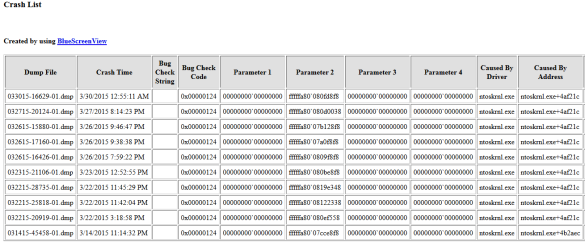
Attached are the results of the DM Log Collector (zip) as well as what I saw in BlueScreenViewer (report.png)

- Ben
 

Attachments

My Computer My Computer

At a glance

Windows 7 Professional 64-bitAMD FX-6300 3.5GHz 6-Core ProcessorKingston 8GB (2 x 4GB) DDR3-1333 MemoryAsus Radeon R7 260X 2GB Video Card
Computer type
PC/Desktop
Computer Manufacturer/Model Number
Custom Build
OS
Windows 7 Professional 64-bit
CPU
AMD FX-6300 3.5GHz 6-Core Processor
Motherboard
Gigabyte GA-78LMT-USB3 Micro ATX AM3+ Motherboard
Memory
Kingston 8GB (2 x 4GB) DDR3-1333 Memory
Graphics Card(s)
Asus Radeon R7 260X 2GB Video Card
Hard Drives
Old (but Healthy according to SMART data) SeaGate 250 GB Drive
PSU
Corsair CSM 650W 80+ Gold Certified Semi-Modular ATX
Case
Corsair 350D MicroATX Mid Tower
Antivirus
Avast! Free Antivirus
Browser
Firefox
Other Info
--NZXT Sentry Mix 2 Fan Controller
--Gear Head USB 2.0 4-Port Hub with Energy Saving Switch
Originally this post was in the BSOD section, someone moved it to General Discussion.

OK, no problem. Your dumps are all 0x124s which indicate a hardware error, but as with most 0x124s they're giving away no clues. Do your crashes happen at any particular time or under any particular circumstances? How long from the PC booting to the crash usually?
 

My Computer My Computer

At a glance

W7 Pro x64 SP1 | W10 Pro IP x64 | W8.1 Pro x6...i7-4790k @ 4GHz (4.4GHz Boost)16GB DDR3 Kingston HyperX Fury @ 1600MHz CL 9...EVGA GTX 980 Classified
Computer type
PC/Desktop
Computer Manufacturer/Model Number
Custom Build
OS
W7 Pro x64 SP1 | W10 Pro IP x64 | W8.1 Pro x64 VM | Linux Mint VM
CPU
i7-4790k @ 4GHz (4.4GHz Boost)
Motherboard
ASUS Sabertooth Z87 (BIOS Rev 2004)
Memory
16GB DDR3 Kingston HyperX Fury @ 1600MHz CL 9-9-9-27
Graphics Card(s)
EVGA GTX 980 Classified
Sound Card
Realtek Onboard
Monitor(s) Displays
Samsung S27D390
Screen Resolution
1920 x 1080
Hard Drives
240GB Intel 520 Series SSD |
Samsung 850 EVO 120GB SSD |
2TB WD Caviar Black |
2TB WD Caviar Green
PSU
Corsair HX850-80 Gold Modular
Case
Cooler Master Silencio 650
Cooling
Corsair H80i w/2 x Corsair SP120 | 2 x 120mm Noctua NF-S12B
Keyboard
Microsoft Sidewinder X4
Mouse
Gigabyte M6900 optical
Internet Speed
152mb
Antivirus
F-Secure
Browser
Firefox 38.0
Other Info
Backup Rig: Win 7 Pro 64-bit | AMD A10-5800k | ASUS F2A85-V Pro | 8GB Samsung DDR3 @1600MHz | 120GB Toshiba SDD | 2TB Seagate HDD | Cooler Master Silencio 550
Firstly let's rule out the Gigabyte crapware, uninstall the programs below which are proven to cause BSODs. They may not be the cause but let's rule them out sooner rather than later.
Capture.JPG
 

My Computer My Computer

At a glance

W7 Pro x64 SP1 | W10 Pro IP x64 | W8.1 Pro x6...i7-4790k @ 4GHz (4.4GHz Boost)16GB DDR3 Kingston HyperX Fury @ 1600MHz CL 9...EVGA GTX 980 Classified
Computer type
PC/Desktop
Computer Manufacturer/Model Number
Custom Build
OS
W7 Pro x64 SP1 | W10 Pro IP x64 | W8.1 Pro x64 VM | Linux Mint VM
CPU
i7-4790k @ 4GHz (4.4GHz Boost)
Motherboard
ASUS Sabertooth Z87 (BIOS Rev 2004)
Memory
16GB DDR3 Kingston HyperX Fury @ 1600MHz CL 9-9-9-27
Graphics Card(s)
EVGA GTX 980 Classified
Sound Card
Realtek Onboard
Monitor(s) Displays
Samsung S27D390
Screen Resolution
1920 x 1080
Hard Drives
240GB Intel 520 Series SSD |
Samsung 850 EVO 120GB SSD |
2TB WD Caviar Black |
2TB WD Caviar Green
PSU
Corsair HX850-80 Gold Modular
Case
Cooler Master Silencio 650
Cooling
Corsair H80i w/2 x Corsair SP120 | 2 x 120mm Noctua NF-S12B
Keyboard
Microsoft Sidewinder X4
Mouse
Gigabyte M6900 optical
Internet Speed
152mb
Antivirus
F-Secure
Browser
Firefox 38.0
Other Info
Backup Rig: Win 7 Pro 64-bit | AMD A10-5800k | ASUS F2A85-V Pro | 8GB Samsung DDR3 @1600MHz | 120GB Toshiba SDD | 2TB Seagate HDD | Cooler Master Silencio 550
Boozad,

I'm really sure to be honest. My CPU temp idle is about 45oF and the max I've seen under load is about 76oF (I haven't run stress tests, these are just from me seeing CoreTemp. I've done a lot of Google'ing for the 0124 error, some guy on Tom's Hardware said it might be bad RAM or incorrect memory timing.

I guess I would have to say that maybe under stress it restarts? But it happened twice when my wife played a movie through XBMC, twice when I was playing Descent II through Steam (on the main menu, if you select things too fast it just restarted), once when I was playing Perfect Dark through Steam. The others I can't remember but basically playing games or watching movies it happens - but just sometimes. I've played other games and watched other movies for hours with no restart.

As for the Gigabyte programs, don't I need those? I have a GB motherboard, and that 3+ TB unlock sounds like I need it since I have a 3 TB backup drive (not connected ATM). I looked under control panel, but there were not listed. Also, in the start menu as well as under Program Files, there were no uninstall exe's. The only Uninstall application I could find was the Update manager uninstall app.

The only strange thing I've noticed is that my USB 3.0 slots don't work, and that was just another thing I haven't got to yet.
 

My Computer My Computer

At a glance

Windows 7 Professional 64-bitAMD FX-6300 3.5GHz 6-Core ProcessorKingston 8GB (2 x 4GB) DDR3-1333 MemoryAsus Radeon R7 260X 2GB Video Card
Computer type
PC/Desktop
Computer Manufacturer/Model Number
Custom Build
OS
Windows 7 Professional 64-bit
CPU
AMD FX-6300 3.5GHz 6-Core Processor
Motherboard
Gigabyte GA-78LMT-USB3 Micro ATX AM3+ Motherboard
Memory
Kingston 8GB (2 x 4GB) DDR3-1333 Memory
Graphics Card(s)
Asus Radeon R7 260X 2GB Video Card
Hard Drives
Old (but Healthy according to SMART data) SeaGate 250 GB Drive
PSU
Corsair CSM 650W 80+ Gold Certified Semi-Modular ATX
Case
Corsair 350D MicroATX Mid Tower
Antivirus
Avast! Free Antivirus
Browser
Firefox
Other Info
--NZXT Sentry Mix 2 Fan Controller
--Gear Head USB 2.0 4-Port Hub with Energy Saving Switch
My Computer My Computer

At a glance

W7 Pro x64 SP1 | W10 Pro IP x64 | W8.1 Pro x6...i7-4790k @ 4GHz (4.4GHz Boost)16GB DDR3 Kingston HyperX Fury @ 1600MHz CL 9...EVGA GTX 980 Classified
Computer type
PC/Desktop
Computer Manufacturer/Model Number
Custom Build
OS
W7 Pro x64 SP1 | W10 Pro IP x64 | W8.1 Pro x64 VM | Linux Mint VM
CPU
i7-4790k @ 4GHz (4.4GHz Boost)
Motherboard
ASUS Sabertooth Z87 (BIOS Rev 2004)
Memory
16GB DDR3 Kingston HyperX Fury @ 1600MHz CL 9-9-9-27
Graphics Card(s)
EVGA GTX 980 Classified
Sound Card
Realtek Onboard
Monitor(s) Displays
Samsung S27D390
Screen Resolution
1920 x 1080
Hard Drives
240GB Intel 520 Series SSD |
Samsung 850 EVO 120GB SSD |
2TB WD Caviar Black |
2TB WD Caviar Green
PSU
Corsair HX850-80 Gold Modular
Case
Cooler Master Silencio 650
Cooling
Corsair H80i w/2 x Corsair SP120 | 2 x 120mm Noctua NF-S12B
Keyboard
Microsoft Sidewinder X4
Mouse
Gigabyte M6900 optical
Internet Speed
152mb
Antivirus
F-Secure
Browser
Firefox 38.0
Other Info
Backup Rig: Win 7 Pro 64-bit | AMD A10-5800k | ASUS F2A85-V Pro | 8GB Samsung DDR3 @1600MHz | 120GB Toshiba SDD | 2TB Seagate HDD | Cooler Master Silencio 550
My CPU temp idle is about 45oF and the max I've seen under load is about 76oF

I take it here you mean °C not °F?

Not according to Core Temp. It's in Fahrenheit, I know it doesn't make sense to be under room temp, our house is actually 65F right now. I read a different Tom's hardware post that AMD chips don't always display the right temperature. The exhaust fan feels like it's room temperature.

I only air cool btw.
 

My Computer My Computer

At a glance

Windows 7 Professional 64-bitAMD FX-6300 3.5GHz 6-Core ProcessorKingston 8GB (2 x 4GB) DDR3-1333 MemoryAsus Radeon R7 260X 2GB Video Card
Computer type
PC/Desktop
Computer Manufacturer/Model Number
Custom Build
OS
Windows 7 Professional 64-bit
CPU
AMD FX-6300 3.5GHz 6-Core Processor
Motherboard
Gigabyte GA-78LMT-USB3 Micro ATX AM3+ Motherboard
Memory
Kingston 8GB (2 x 4GB) DDR3-1333 Memory
Graphics Card(s)
Asus Radeon R7 260X 2GB Video Card
Hard Drives
Old (but Healthy according to SMART data) SeaGate 250 GB Drive
PSU
Corsair CSM 650W 80+ Gold Certified Semi-Modular ATX
Case
Corsair 350D MicroATX Mid Tower
Antivirus
Avast! Free Antivirus
Browser
Firefox
Other Info
--NZXT Sentry Mix 2 Fan Controller
--Gear Head USB 2.0 4-Port Hub with Energy Saving Switch
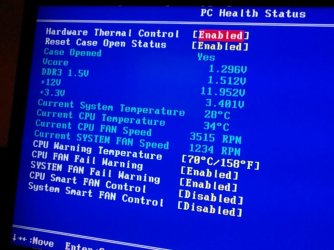
You CPU isn't going to be 45°F, that's 7°C. We need to get some realistic readings for your CPU temperature before we go any further really. Can you boot into BIOS and check the temperature in there please.
 

My Computer My Computer

At a glance

W7 Pro x64 SP1 | W10 Pro IP x64 | W8.1 Pro x6...i7-4790k @ 4GHz (4.4GHz Boost)16GB DDR3 Kingston HyperX Fury @ 1600MHz CL 9...EVGA GTX 980 Classified
Computer type
PC/Desktop
Computer Manufacturer/Model Number
Custom Build
OS
W7 Pro x64 SP1 | W10 Pro IP x64 | W8.1 Pro x64 VM | Linux Mint VM
CPU
i7-4790k @ 4GHz (4.4GHz Boost)
Motherboard
ASUS Sabertooth Z87 (BIOS Rev 2004)
Memory
16GB DDR3 Kingston HyperX Fury @ 1600MHz CL 9-9-9-27
Graphics Card(s)
EVGA GTX 980 Classified
Sound Card
Realtek Onboard
Monitor(s) Displays
Samsung S27D390
Screen Resolution
1920 x 1080
Hard Drives
240GB Intel 520 Series SSD |
Samsung 850 EVO 120GB SSD |
2TB WD Caviar Black |
2TB WD Caviar Green
PSU
Corsair HX850-80 Gold Modular
Case
Cooler Master Silencio 650
Cooling
Corsair H80i w/2 x Corsair SP120 | 2 x 120mm Noctua NF-S12B
Keyboard
Microsoft Sidewinder X4
Mouse
Gigabyte M6900 optical
Internet Speed
152mb
Antivirus
F-Secure
Browser
Firefox 38.0
Other Info
Backup Rig: Win 7 Pro 64-bit | AMD A10-5800k | ASUS F2A85-V Pro | 8GB Samsung DDR3 @1600MHz | 120GB Toshiba SDD | 2TB Seagate HDD | Cooler Master Silencio 550
You CPU isn't going to be 45°F, that's 7°C. We need to get some realistic readings for your CPU temperature before we go any further really. Can you boot into BIOS and check the temperature in there please.

See attached
 

Attachments

  • IMG_20150330_111509.jpg
    IMG_20150330_111509.jpg
    101.4 KB · Views: 16

My Computer My Computer

At a glance

Windows 7 Professional 64-bitAMD FX-6300 3.5GHz 6-Core ProcessorKingston 8GB (2 x 4GB) DDR3-1333 MemoryAsus Radeon R7 260X 2GB Video Card
Computer type
PC/Desktop
Computer Manufacturer/Model Number
Custom Build
OS
Windows 7 Professional 64-bit
CPU
AMD FX-6300 3.5GHz 6-Core Processor
Motherboard
Gigabyte GA-78LMT-USB3 Micro ATX AM3+ Motherboard
Memory
Kingston 8GB (2 x 4GB) DDR3-1333 Memory
Graphics Card(s)
Asus Radeon R7 260X 2GB Video Card
Hard Drives
Old (but Healthy according to SMART data) SeaGate 250 GB Drive
PSU
Corsair CSM 650W 80+ Gold Certified Semi-Modular ATX
Case
Corsair 350D MicroATX Mid Tower
Antivirus
Avast! Free Antivirus
Browser
Firefox
Other Info
--NZXT Sentry Mix 2 Fan Controller
--Gear Head USB 2.0 4-Port Hub with Energy Saving Switch
That's more like it. You're going to need a reliable reading for the stress tests I'm going to recommend. Try HWMonitor and see what that reads out. I'm going to get someone to take a look at your voltages as well as I'm not entirely happy with you 12v rail.
 

My Computer My Computer

At a glance

W7 Pro x64 SP1 | W10 Pro IP x64 | W8.1 Pro x6...i7-4790k @ 4GHz (4.4GHz Boost)16GB DDR3 Kingston HyperX Fury @ 1600MHz CL 9...EVGA GTX 980 Classified
Computer type
PC/Desktop
Computer Manufacturer/Model Number
Custom Build
OS
W7 Pro x64 SP1 | W10 Pro IP x64 | W8.1 Pro x64 VM | Linux Mint VM
CPU
i7-4790k @ 4GHz (4.4GHz Boost)
Motherboard
ASUS Sabertooth Z87 (BIOS Rev 2004)
Memory
16GB DDR3 Kingston HyperX Fury @ 1600MHz CL 9-9-9-27
Graphics Card(s)
EVGA GTX 980 Classified
Sound Card
Realtek Onboard
Monitor(s) Displays
Samsung S27D390
Screen Resolution
1920 x 1080
Hard Drives
240GB Intel 520 Series SSD |
Samsung 850 EVO 120GB SSD |
2TB WD Caviar Black |
2TB WD Caviar Green
PSU
Corsair HX850-80 Gold Modular
Case
Cooler Master Silencio 650
Cooling
Corsair H80i w/2 x Corsair SP120 | 2 x 120mm Noctua NF-S12B
Keyboard
Microsoft Sidewinder X4
Mouse
Gigabyte M6900 optical
Internet Speed
152mb
Antivirus
F-Secure
Browser
Firefox 38.0
Other Info
Backup Rig: Win 7 Pro 64-bit | AMD A10-5800k | ASUS F2A85-V Pro | 8GB Samsung DDR3 @1600MHz | 120GB Toshiba SDD | 2TB Seagate HDD | Cooler Master Silencio 550
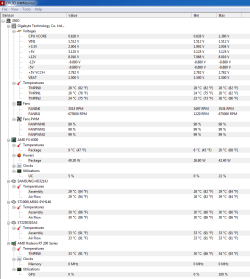
I'm running HWMonitor now, but the temps are wrong just like in CoreTemp. AMD has some weird formula for temperatures where you might need an offset in order to understand it (AMD doesn't use C or F, they use a scale from 0-255 for the temperature and translate that into C, but some report that it might not be a linear scale). I didn't have a problem with my laptop that has an AMD A6-3400M APU - I didn't need an offset for CoreTemp, and it reads correctly.

Here is the data from HWMonitor:
 

Attachments

  • HWMonitor.PNG
    HWMonitor.PNG
    28.3 KB · Views: 1

My Computer My Computer

At a glance

Windows 7 Professional 64-bitAMD FX-6300 3.5GHz 6-Core ProcessorKingston 8GB (2 x 4GB) DDR3-1333 MemoryAsus Radeon R7 260X 2GB Video Card
Computer type
PC/Desktop
Computer Manufacturer/Model Number
Custom Build
OS
Windows 7 Professional 64-bit
CPU
AMD FX-6300 3.5GHz 6-Core Processor
Motherboard
Gigabyte GA-78LMT-USB3 Micro ATX AM3+ Motherboard
Memory
Kingston 8GB (2 x 4GB) DDR3-1333 Memory
Graphics Card(s)
Asus Radeon R7 260X 2GB Video Card
Hard Drives
Old (but Healthy according to SMART data) SeaGate 250 GB Drive
PSU
Corsair CSM 650W 80+ Gold Certified Semi-Modular ATX
Case
Corsair 350D MicroATX Mid Tower
Antivirus
Avast! Free Antivirus
Browser
Firefox
Other Info
--NZXT Sentry Mix 2 Fan Controller
--Gear Head USB 2.0 4-Port Hub with Energy Saving Switch
OK, we know your CPU temperature is OK at idle so if you're happy knowing your top limit with the readings it's giving I'll recommend some stress tests. I'll just get someone to drop by and look at your voltages first.

That's a messed up way of reporting temperatures on that CPU though.
 

My Computer My Computer

At a glance

W7 Pro x64 SP1 | W10 Pro IP x64 | W8.1 Pro x6...i7-4790k @ 4GHz (4.4GHz Boost)16GB DDR3 Kingston HyperX Fury @ 1600MHz CL 9...EVGA GTX 980 Classified
Computer type
PC/Desktop
Computer Manufacturer/Model Number
Custom Build
OS
W7 Pro x64 SP1 | W10 Pro IP x64 | W8.1 Pro x64 VM | Linux Mint VM
CPU
i7-4790k @ 4GHz (4.4GHz Boost)
Motherboard
ASUS Sabertooth Z87 (BIOS Rev 2004)
Memory
16GB DDR3 Kingston HyperX Fury @ 1600MHz CL 9-9-9-27
Graphics Card(s)
EVGA GTX 980 Classified
Sound Card
Realtek Onboard
Monitor(s) Displays
Samsung S27D390
Screen Resolution
1920 x 1080
Hard Drives
240GB Intel 520 Series SSD |
Samsung 850 EVO 120GB SSD |
2TB WD Caviar Black |
2TB WD Caviar Green
PSU
Corsair HX850-80 Gold Modular
Case
Cooler Master Silencio 650
Cooling
Corsair H80i w/2 x Corsair SP120 | 2 x 120mm Noctua NF-S12B
Keyboard
Microsoft Sidewinder X4
Mouse
Gigabyte M6900 optical
Internet Speed
152mb
Antivirus
F-Secure
Browser
Firefox 38.0
Other Info
Backup Rig: Win 7 Pro 64-bit | AMD A10-5800k | ASUS F2A85-V Pro | 8GB Samsung DDR3 @1600MHz | 120GB Toshiba SDD | 2TB Seagate HDD | Cooler Master Silencio 550
OK, we know your CPU temperature is OK at idle so if you're happy knowing your top limit with the readings it's giving I'll recommend some stress tests. I'll just get someone to drop by and look at your voltages first.

That's a messed up way of reporting temperatures on that CPU though.

Yeah those voltages I don't like. 8v instead of 12v, 3v instead of 5v.

I'm trying to stress test on my own (sort of), I'm running n64 roms with all cheats enabled (basically bad code that causes memory leaks) and video recording the cpu temps, usage, ram used, voltages across motherboard, etc. Hoping to get a controlled restart, but to no avail.
 

My Computer My Computer

At a glance

Windows 7 Professional 64-bitAMD FX-6300 3.5GHz 6-Core ProcessorKingston 8GB (2 x 4GB) DDR3-1333 MemoryAsus Radeon R7 260X 2GB Video Card
Computer type
PC/Desktop
Computer Manufacturer/Model Number
Custom Build
OS
Windows 7 Professional 64-bit
CPU
AMD FX-6300 3.5GHz 6-Core Processor
Motherboard
Gigabyte GA-78LMT-USB3 Micro ATX AM3+ Motherboard
Memory
Kingston 8GB (2 x 4GB) DDR3-1333 Memory
Graphics Card(s)
Asus Radeon R7 260X 2GB Video Card
Hard Drives
Old (but Healthy according to SMART data) SeaGate 250 GB Drive
PSU
Corsair CSM 650W 80+ Gold Certified Semi-Modular ATX
Case
Corsair 350D MicroATX Mid Tower
Antivirus
Avast! Free Antivirus
Browser
Firefox
Other Info
--NZXT Sentry Mix 2 Fan Controller
--Gear Head USB 2.0 4-Port Hub with Energy Saving Switch
OK, we know your CPU temperature is OK at idle so if you're happy knowing your top limit with the readings it's giving I'll recommend some stress tests. I'll just get someone to drop by and look at your voltages first.

That's a messed up way of reporting temperatures on that CPU though.

Yeah those voltages I don't like. 8v instead of 12v, 3v instead of 5v.

Those readings in HWMonitor don't match up with what's in your BIOS, the BIOS ones are what you should concentrate on.

The stress tests we recommend are designed to stress and test individual components and will be much more thorough and definitive.
 

My Computer My Computer

At a glance

W7 Pro x64 SP1 | W10 Pro IP x64 | W8.1 Pro x6...i7-4790k @ 4GHz (4.4GHz Boost)16GB DDR3 Kingston HyperX Fury @ 1600MHz CL 9...EVGA GTX 980 Classified
Computer type
PC/Desktop
Computer Manufacturer/Model Number
Custom Build
OS
W7 Pro x64 SP1 | W10 Pro IP x64 | W8.1 Pro x64 VM | Linux Mint VM
CPU
i7-4790k @ 4GHz (4.4GHz Boost)
Motherboard
ASUS Sabertooth Z87 (BIOS Rev 2004)
Memory
16GB DDR3 Kingston HyperX Fury @ 1600MHz CL 9-9-9-27
Graphics Card(s)
EVGA GTX 980 Classified
Sound Card
Realtek Onboard
Monitor(s) Displays
Samsung S27D390
Screen Resolution
1920 x 1080
Hard Drives
240GB Intel 520 Series SSD |
Samsung 850 EVO 120GB SSD |
2TB WD Caviar Black |
2TB WD Caviar Green
PSU
Corsair HX850-80 Gold Modular
Case
Cooler Master Silencio 650
Cooling
Corsair H80i w/2 x Corsair SP120 | 2 x 120mm Noctua NF-S12B
Keyboard
Microsoft Sidewinder X4
Mouse
Gigabyte M6900 optical
Internet Speed
152mb
Antivirus
F-Secure
Browser
Firefox 38.0
Other Info
Backup Rig: Win 7 Pro 64-bit | AMD A10-5800k | ASUS F2A85-V Pro | 8GB Samsung DDR3 @1600MHz | 120GB Toshiba SDD | 2TB Seagate HDD | Cooler Master Silencio 550
Those readings in HWMonitor don't match up with what's in your BIOS, the BIOS ones are what you should concentrate on.

The stress tests we recommend are designed to stress and test individual components and will be much more thorough and definitive.

So.... all or most of the data from HWMonitor might be wrong/useless?
 

My Computer My Computer

At a glance

Windows 7 Professional 64-bitAMD FX-6300 3.5GHz 6-Core ProcessorKingston 8GB (2 x 4GB) DDR3-1333 MemoryAsus Radeon R7 260X 2GB Video Card
Computer type
PC/Desktop
Computer Manufacturer/Model Number
Custom Build
OS
Windows 7 Professional 64-bit
CPU
AMD FX-6300 3.5GHz 6-Core Processor
Motherboard
Gigabyte GA-78LMT-USB3 Micro ATX AM3+ Motherboard
Memory
Kingston 8GB (2 x 4GB) DDR3-1333 Memory
Graphics Card(s)
Asus Radeon R7 260X 2GB Video Card
Hard Drives
Old (but Healthy according to SMART data) SeaGate 250 GB Drive
PSU
Corsair CSM 650W 80+ Gold Certified Semi-Modular ATX
Case
Corsair 350D MicroATX Mid Tower
Antivirus
Avast! Free Antivirus
Browser
Firefox
Other Info
--NZXT Sentry Mix 2 Fan Controller
--Gear Head USB 2.0 4-Port Hub with Energy Saving Switch
In a nutshell, yes. Try Speccy (linked in my sig below) and see what that reports.
 

My Computer My Computer

At a glance

W7 Pro x64 SP1 | W10 Pro IP x64 | W8.1 Pro x6...i7-4790k @ 4GHz (4.4GHz Boost)16GB DDR3 Kingston HyperX Fury @ 1600MHz CL 9...EVGA GTX 980 Classified
Computer type
PC/Desktop
Computer Manufacturer/Model Number
Custom Build
OS
W7 Pro x64 SP1 | W10 Pro IP x64 | W8.1 Pro x64 VM | Linux Mint VM
CPU
i7-4790k @ 4GHz (4.4GHz Boost)
Motherboard
ASUS Sabertooth Z87 (BIOS Rev 2004)
Memory
16GB DDR3 Kingston HyperX Fury @ 1600MHz CL 9-9-9-27
Graphics Card(s)
EVGA GTX 980 Classified
Sound Card
Realtek Onboard
Monitor(s) Displays
Samsung S27D390
Screen Resolution
1920 x 1080
Hard Drives
240GB Intel 520 Series SSD |
Samsung 850 EVO 120GB SSD |
2TB WD Caviar Black |
2TB WD Caviar Green
PSU
Corsair HX850-80 Gold Modular
Case
Cooler Master Silencio 650
Cooling
Corsair H80i w/2 x Corsair SP120 | 2 x 120mm Noctua NF-S12B
Keyboard
Microsoft Sidewinder X4
Mouse
Gigabyte M6900 optical
Internet Speed
152mb
Antivirus
F-Secure
Browser
Firefox 38.0
Other Info
Backup Rig: Win 7 Pro 64-bit | AMD A10-5800k | ASUS F2A85-V Pro | 8GB Samsung DDR3 @1600MHz | 120GB Toshiba SDD | 2TB Seagate HDD | Cooler Master Silencio 550
Speccy reads CPU temp is 50F, house is 66F. Mobo system temp says 85F.

Voltages read exactly the same as hwmonitor read.
 

My Computer My Computer

At a glance

Windows 7 Professional 64-bitAMD FX-6300 3.5GHz 6-Core ProcessorKingston 8GB (2 x 4GB) DDR3-1333 MemoryAsus Radeon R7 260X 2GB Video Card
Computer type
PC/Desktop
Computer Manufacturer/Model Number
Custom Build
OS
Windows 7 Professional 64-bit
CPU
AMD FX-6300 3.5GHz 6-Core Processor
Motherboard
Gigabyte GA-78LMT-USB3 Micro ATX AM3+ Motherboard
Memory
Kingston 8GB (2 x 4GB) DDR3-1333 Memory
Graphics Card(s)
Asus Radeon R7 260X 2GB Video Card
Hard Drives
Old (but Healthy according to SMART data) SeaGate 250 GB Drive
PSU
Corsair CSM 650W 80+ Gold Certified Semi-Modular ATX
Case
Corsair 350D MicroATX Mid Tower
Antivirus
Avast! Free Antivirus
Browser
Firefox
Other Info
--NZXT Sentry Mix 2 Fan Controller
--Gear Head USB 2.0 4-Port Hub with Energy Saving Switch
That's really strange. My voltages are absolutely perfect in both Speccy and HWMonitor.

Capture.JPG

It could just be an inaccuracy with the sensors on that model motherboard, monitoring software is known to be good for some and bad for others. It's your temperatures I'm more concerned about going through the stress tests, are you happy to run some stress and diagnostics tests?
 

My Computer My Computer

At a glance

W7 Pro x64 SP1 | W10 Pro IP x64 | W8.1 Pro x6...i7-4790k @ 4GHz (4.4GHz Boost)16GB DDR3 Kingston HyperX Fury @ 1600MHz CL 9...EVGA GTX 980 Classified
Computer type
PC/Desktop
Computer Manufacturer/Model Number
Custom Build
OS
W7 Pro x64 SP1 | W10 Pro IP x64 | W8.1 Pro x64 VM | Linux Mint VM
CPU
i7-4790k @ 4GHz (4.4GHz Boost)
Motherboard
ASUS Sabertooth Z87 (BIOS Rev 2004)
Memory
16GB DDR3 Kingston HyperX Fury @ 1600MHz CL 9-9-9-27
Graphics Card(s)
EVGA GTX 980 Classified
Sound Card
Realtek Onboard
Monitor(s) Displays
Samsung S27D390
Screen Resolution
1920 x 1080
Hard Drives
240GB Intel 520 Series SSD |
Samsung 850 EVO 120GB SSD |
2TB WD Caviar Black |
2TB WD Caviar Green
PSU
Corsair HX850-80 Gold Modular
Case
Cooler Master Silencio 650
Cooling
Corsair H80i w/2 x Corsair SP120 | 2 x 120mm Noctua NF-S12B
Keyboard
Microsoft Sidewinder X4
Mouse
Gigabyte M6900 optical
Internet Speed
152mb
Antivirus
F-Secure
Browser
Firefox 38.0
Other Info
Backup Rig: Win 7 Pro 64-bit | AMD A10-5800k | ASUS F2A85-V Pro | 8GB Samsung DDR3 @1600MHz | 120GB Toshiba SDD | 2TB Seagate HDD | Cooler Master Silencio 550
Back
Top