
Import Pictures and Video Error

lguapo

New member
Local time
6:40 PM
Messages
7
Hi everyone. I am getting this error multiple times (as much as 50 times while importing 500 pictures) as I try to import pictures and video from a memory card using my PC's built in card reader. I am given the option of trying again and it will work, but I have to manually click on "Try again". Quite the pain. I remember not having this issue at all some time ago but I don't know why it has changed. I am running Windows 7 Home Premium 64 bit.
 

Attachments
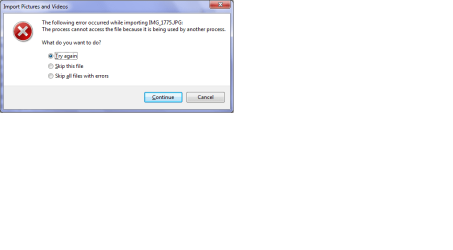
  • Import Pictures Error.png
    Import Pictures Error.png
    11.5 KB · Views: 25

My Computer My Computer

At a glance

Windows 7 Home Premium 64 bit
OS
Windows 7 Home Premium 64 bit
Anyone?
 

My Computer My Computer

At a glance

Windows 7 Home Premium 64 bit
OS
Windows 7 Home Premium 64 bit
many things can affect a memory card and the data con get corrupted.
that said--try opening an explorer window--see if the card is listed (possible name 'data disk', 'storage device' or similar)--right click--select OPEN--if a window opens--search thru folder structure to pictures and try to drag them to a 'new folder' on your desktop
 

My Computer My Computer

At a glance

win7 ultimate 32bitcore2 Extreme QX6850-OCd to 3.15 GHz4 GBNVidia 8600 GT
Computer Manufacturer/Model Number
SALEON model 2.2b
OS
win7 ultimate 32bit
CPU
core2 Extreme QX6850-OCd to 3.15 GHz
Motherboard
ASUS P5G41-M LE
Memory
4 GB
Graphics Card(s)
NVidia 8600 GT
Monitor(s) Displays
23" acer
Hard Drives
one SATA 250GB partitioned equally in half
one SATA 160GB-internal storage
PSU
500W Thermaltake
Case
mini tower
Just tried a brand new memory card and the same thing is happening. Very frustrated.
 

My Computer My Computer

At a glance

Windows 7 Home Premium 64 bit
OS
Windows 7 Home Premium 64 bit
maybe the card reader is bad.
do you have a USB cable for your camera? can you connect it directly to a USB port and access the photos that way?
 

My Computer My Computer

At a glance

win7 ultimate 32bitcore2 Extreme QX6850-OCd to 3.15 GHz4 GBNVidia 8600 GT
Computer Manufacturer/Model Number
SALEON model 2.2b
OS
win7 ultimate 32bit
CPU
core2 Extreme QX6850-OCd to 3.15 GHz
Motherboard
ASUS P5G41-M LE
Memory
4 GB
Graphics Card(s)
NVidia 8600 GT
Monitor(s) Displays
23" acer
Hard Drives
one SATA 250GB partitioned equally in half
one SATA 160GB-internal storage
PSU
500W Thermaltake
Case
mini tower
I checked the drive in Device Manger. It says it's working properly. I checked for an updated driver but it is already using the most up-to-date one. Argh!
 

My Computer My Computer

At a glance

Windows 7 Home Premium 64 bit
OS
Windows 7 Home Premium 64 bit
try connecting camera directly to computer (as mentioned in my previous post)--then post results please
 

My Computer My Computer

At a glance

win7 ultimate 32bitcore2 Extreme QX6850-OCd to 3.15 GHz4 GBNVidia 8600 GT
Computer Manufacturer/Model Number
SALEON model 2.2b
OS
win7 ultimate 32bit
CPU
core2 Extreme QX6850-OCd to 3.15 GHz
Motherboard
ASUS P5G41-M LE
Memory
4 GB
Graphics Card(s)
NVidia 8600 GT
Monitor(s) Displays
23" acer
Hard Drives
one SATA 250GB partitioned equally in half
one SATA 160GB-internal storage
PSU
500W Thermaltake
Case
mini tower
Ok, connected camera to computer via USB. I had 50 photos on memory card. It was going great until picture #49. Same error. It happened to picture #50 also.
 

My Computer My Computer

At a glance

Windows 7 Home Premium 64 bit
OS
Windows 7 Home Premium 64 bit
were you 'importing' photos--or did you open an explorer window and try dragging them to a folder?
 

My Computer My Computer

At a glance

win7 ultimate 32bitcore2 Extreme QX6850-OCd to 3.15 GHz4 GBNVidia 8600 GT
Computer Manufacturer/Model Number
SALEON model 2.2b
OS
win7 ultimate 32bit
CPU
core2 Extreme QX6850-OCd to 3.15 GHz
Motherboard
ASUS P5G41-M LE
Memory
4 GB
Graphics Card(s)
NVidia 8600 GT
Monitor(s) Displays
23" acer
Hard Drives
one SATA 250GB partitioned equally in half
one SATA 160GB-internal storage
PSU
500W Thermaltake
Case
mini tower
I was importing the pictures.
 

My Computer My Computer

At a glance

Windows 7 Home Premium 64 bit
OS
Windows 7 Home Premium 64 bit
try this: plug USB cable into camera (with camera turned OFF) plug other end of USB cable into computer USB port--then turn ON camera--if you get an 'autorun' window--select 'take no action'.
open an explorer window--you should see if the camera (possible name 'data disk', 'removeable storage device' or even camera name)--right click--select OPEN--a window should open--click through the folder structure to a folder named DCIM--this folder should contain your photos-- select them all and drag them to a 'new folder' on your desktop (or whatever folder you use to store your photos).
 

My Computer My Computer

At a glance

win7 ultimate 32bitcore2 Extreme QX6850-OCd to 3.15 GHz4 GBNVidia 8600 GT
Computer Manufacturer/Model Number
SALEON model 2.2b
OS
win7 ultimate 32bit
CPU
core2 Extreme QX6850-OCd to 3.15 GHz
Motherboard
ASUS P5G41-M LE
Memory
4 GB
Graphics Card(s)
NVidia 8600 GT
Monitor(s) Displays
23" acer
Hard Drives
one SATA 250GB partitioned equally in half
one SATA 160GB-internal storage
PSU
500W Thermaltake
Case
mini tower
tmaN69, that method worked just fine (50 photos). However, it is too much work for what used to be a simple task - stick a memory card into computer, click import, and walk away. What I want to know is why Windows is saying the files are being used by another process. I don't get that part.
 

My Computer My Computer

At a glance

Windows 7 Home Premium 64 bit
OS
Windows 7 Home Premium 64 bit
that is the method that I have always used--don't have or like card readers.

as far as windows thinking that another process is using files--could be write caching or indexing the disk in your card reader--or--even though device manager shows device is working properly--it may not be.

glad you were able to get your photos.

am out
 

My Computer My Computer

At a glance

win7 ultimate 32bitcore2 Extreme QX6850-OCd to 3.15 GHz4 GBNVidia 8600 GT
Computer Manufacturer/Model Number
SALEON model 2.2b
OS
win7 ultimate 32bit
CPU
core2 Extreme QX6850-OCd to 3.15 GHz
Motherboard
ASUS P5G41-M LE
Memory
4 GB
Graphics Card(s)
NVidia 8600 GT
Monitor(s) Displays
23" acer
Hard Drives
one SATA 250GB partitioned equally in half
one SATA 160GB-internal storage
PSU
500W Thermaltake
Case
mini tower
Back
Top