
Hello all,
Could not find a solution to this.
I use the windows pic/video importer and for years it always imported with the file name and date taken. Never had a duplicate and easy to organize pics.
recently i upgraded to 10 (what a mess) and then reverted back to 7. I also have a new sony A7iii that may be the cause.
Anyway, When using the imported, "name + Date Taken" is no longer an option under advance settings. My only choices are "tag" or "original file name"
Attached is a pic of the missing option via this web post.
Add Date Time stamp to Photos when importing them in Windows 10
Any ideas? My Sony repeats numbers with every new SD card. I just dumped a thousand pics and it is a total mess of repeated file numbers. We shoot with burst so sometimes so it generates a lot of pics. Load another SD for a different shoot and the numbering starts over again at 001.
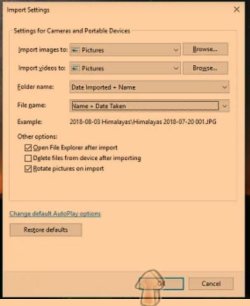
Could not find a solution to this.
I use the windows pic/video importer and for years it always imported with the file name and date taken. Never had a duplicate and easy to organize pics.
recently i upgraded to 10 (what a mess) and then reverted back to 7. I also have a new sony A7iii that may be the cause.
Anyway, When using the imported, "name + Date Taken" is no longer an option under advance settings. My only choices are "tag" or "original file name"
Attached is a pic of the missing option via this web post.
Add Date Time stamp to Photos when importing them in Windows 10
Any ideas? My Sony repeats numbers with every new SD card. I just dumped a thousand pics and it is a total mess of repeated file numbers. We shoot with burst so sometimes so it generates a lot of pics. Load another SD for a different shoot and the numbering starts over again at 001.
My Computer
- Computer type
- PC/Desktop
- Computer Manufacturer/Model Number
- HP elite desk
- OS
- Microsoft Windows 7 Home Premium 64-bit 7601 Multiprocessor Free Service Pack 1
- CPU
- Intel(R) Core(TM) i7-4770 CPU @ 3.40GHz
- Motherboard
- Hewlett-Packard 1998
- Memory
- 16.00 GB
- Graphics Card(s)
- (1) AMD Radeon HD 7000 series (2) Intel(R) HD Graphics 460
- Sound Card
- (1) High Definition Audio Device (2) Realtek High Definiti
- Monitor(s) Displays
- NEC EA224 NEC EA193
- Screen Resolution
- (1) 1600 x 900 x 32 bits (4294967296 colors) @ 60 Hz (2) 1
- Hard Drives
- (1) SanDisk Ultra II 480GB ATA Device
(2) ST500DM002-1BD142 ATA Device
